Xamarin-macios: xcode storyboard: No assistant results
Steps to Reproduce
- Open a storyboard from visual studio mac (stable and preview), using open with xcode (11.3).
- In xcode 11.3, use the new toolbar button to show the "assistant"
- Select a control in the storyboard.
Expected Behavior
The assistant should open the fake objective-c code, where you can drag controls to create bindings.
Actual Behavior
The assistant displays the "automatic" empty (no assistant results) view instead.
Environment
Tested on VSmac stable and preview.
=== Visual Studio Community 2019 for Mac ===

Version 8.3.11 (build 1)
Installation UUID: 97bac647-f8c6-4121-b05f-03c98fa9f4b7
    GTK+ 2.24.23 (Raleigh theme)
    Xamarin.Mac 5.16.1.24 (d16-3 / 08809f5b)

    Package version: 604000208

=== Mono Framework MDK ===

Runtime:
    Mono 6.4.0.208 (2019-06/07c23f2ca43) (64-bit)
    Package version: 604000208

=== NuGet ===

Version: 5.3.0.6192

=== .NET Core SDK ===

SDK: /usr/local/share/dotnet/sdk/3.1.100/Sdks
SDK Versions:
    3.1.100
    3.0.101
    3.0.100
    2.1.701
    2.1.700
    2.1.505
MSBuild SDKs: /Library/Frameworks/Mono.framework/Versions/6.4.0/lib/mono/msbuild/Current/bin/Sdks

=== .NET Core Runtime ===

Runtime: /usr/local/share/dotnet/dotnet
Runtime Versions:
    3.1.0
    3.0.1
    3.0.0
    2.1.14
    2.1.13
    2.1.12
    2.1.11
    2.1.9

=== Xamarin.Profiler ===

Version: 1.6.12.26
Location: /Applications/Xamarin Profiler.app/Contents/MacOS/Xamarin Profiler

=== Updater ===

Version: 11

=== Apple Developer Tools ===

Xcode 11.3 (15712)
Build 11C29

=== Xamarin.Android ===

Version: 10.0.6.2 (Visual Studio Community)
Commit: xamarin-android/d16-3/c407838
Android SDK: /Volumes/Ursa/Users/minimac2/Library/Developer/Xamarin/android-sdk-macosx
    Supported Android versions:
        5.0 (API level 21)
        5.1 (API level 22)
        6.0 (API level 23)
        7.0 (API level 24)
        7.1 (API level 25)
        8.0 (API level 26)
        8.1 (API level 27)

SDK Tools Version: 26.1.1
SDK Platform Tools Version: 28.0.2
SDK Build Tools Version: 28.0.0

Build Information:
Mono: mono/mono/2019-06@476d72b9e32
Java.Interop: xamarin/java.interop/d16-3@5836f58
LibZipSharp: grendello/LibZipSharp/d16-3@71f4a94
LibZip: nih-at/libzip/rel-1-5-1@b95cf3fd
ProGuard: xamarin/proguard/master@905836d
SQLite: xamarin/sqlite/3.27.1@8212a2d
Xamarin.Android Tools: xamarin/xamarin-android-tools/d16-3@cb41333

=== Microsoft Mobile OpenJDK ===

Java SDK: /Volumes/Ursa/Users/minimac2/Library/Developer/Xamarin/jdk/microsoft_dist_openjdk_8.0.25
1.8.0-25
Android Designer EPL code available here:
https://github.com/xamarin/AndroidDesigner.EPL

=== Android SDK Manager ===

Version: 1.4.0.65
Hash: c33b107
Branch: remotes/origin/d16-3
Build date: 2019-11-19 20:33:22 UTC

=== Android Device Manager ===

Version: 1.2.0.116
Hash: d2b2af0
Branch: remotes/origin/d16-3
Build date: 2019-11-19 20:33:42 UTC

=== Xamarin Inspector ===

Version: 1.4.3
Hash: db27525
Branch: 1.4-release
Build date: Mon, 09 Jul 2018 21:20:18 GMT
Client compatibility: 1

=== Xamarin Designer ===

Version: 16.3.0.256
Hash: 8a223bfd7
Branch: remotes/origin/d16-3
Build date: 2019-11-01 21:02:02 UTC

=== Xamarin.Mac ===

Version: 6.6.0.12 (Visual Studio Community)
Hash: e3c2b406d
Branch: xcode11.2
Build date: 2019-11-01 00:12:07-0400

=== Xamarin.iOS ===

Version: 13.6.0.12 (Visual Studio Community)
Hash: e3c2b406d
Branch: xcode11.2
Build date: 2019-11-01 00:12:08-0400

=== Build Information ===

Release ID: 803110001
Git revision: 6ee6ad2ec46ae5a08a1999ee4c815ac656a35b91
Build date: 2019-12-05 16:09:27+00
Build branch: release-8.3
Xamarin extensions: 56bd70ef2e327f71c615cfc29a47fd50685fadcb

=== Operating System ===

Mac OS X 10.14.6
Darwin 18.7.0 Darwin Kernel Version 18.7.0
    Tue Aug 20 16:57:14 PDT 2019
    root:xnu-4903.271.2~2/RELEASE_X86_64 x86_64
=== Visual Studio Community 2019 for Mac (Preview) ===

Version 8.4 Preview (8.4 build 2653)
Installation UUID: 97bac647-f8c6-4121-b05f-03c98fa9f4b7
    GTK+ 2.24.23 (Raleigh theme)
    Xamarin.Mac 5.16.1.25 (issue-7441-d16-3-vsmac / 881172e73)

    Package version: 606000155

=== Mono Framework MDK ===

Runtime:
    Mono 6.6.0.155 (2019-08/296a9afdb24) (64-bit)
    Package version: 606000155

=== Roslyn (Language Service) ===

3.4.0-beta4-19562-05+ff930dec4565e2bc424ad3bf3e22ecb20542c87d

=== NuGet ===

Version: 5.3.0.6192

=== .NET Core SDK ===

SDK: /usr/local/share/dotnet/sdk/3.1.100/Sdks
SDK Versions:
    3.1.100
    3.0.101
    3.0.100
    2.1.701
    2.1.700
    2.1.505
MSBuild SDKs: /Library/Frameworks/Mono.framework/Versions/6.6.0/lib/mono/msbuild/Current/bin/Sdks

=== .NET Core Runtime ===

Runtime: /usr/local/share/dotnet/dotnet
Runtime Versions:
    3.1.0
    3.0.1
    3.0.0
    2.1.14
    2.1.13
    2.1.12
    2.1.11
    2.1.9

=== Xamarin.Profiler ===

Version: 1.6.12.26
Location: /Applications/Xamarin Profiler.app/Contents/MacOS/Xamarin Profiler

=== Updater ===

Version: 11

=== Xamarin.Android ===

Version: 10.1.1.0 (Visual Studio Community)
Commit: xamarin-android/d16-4/f2c9364
Android SDK: /Volumes/Ursa/Users/minimac2/Library/Developer/Xamarin/android-sdk-macosx
    Supported Android versions:
        5.0 (API level 21)
        5.1 (API level 22)
        6.0 (API level 23)
        7.0 (API level 24)
        7.1 (API level 25)
        8.0 (API level 26)
        8.1 (API level 27)

SDK Tools Version: 26.1.1
SDK Platform Tools Version: 28.0.2
SDK Build Tools Version: 28.0.0

Build Information:
Mono: bef1e63
Java.Interop: xamarin/java.interop/d16-4@c4e569f
ProGuard: xamarin/proguard/master@905836d
SQLite: xamarin/sqlite/3.28.0@46204c4
Xamarin.Android Tools: xamarin/xamarin-android-tools/master@9f4ed4b

=== Microsoft Mobile OpenJDK ===

Java SDK: /Volumes/Ursa/Users/minimac2/Library/Developer/Xamarin/jdk/microsoft_dist_openjdk_8.0.25
1.8.0-25
Android Designer EPL code available here:
https://github.com/xamarin/AndroidDesigner.EPL

=== Android SDK Manager ===

Version: 16.4.0.9
Hash: 3f7256f
Branch: remotes/origin/d16-4
Build date: 2019-12-12 15:07:02 UTC

=== Android Device Manager ===

Version: 16.4.0.28
Hash: 68e9956
Branch: remotes/origin/d16-4
Build date: 2019-12-12 15:07:24 UTC

=== Xamarin Inspector ===

Version: 1.4.3
Hash: db27525
Branch: 1.4-release
Build date: Mon, 09 Jul 2018 21:20:18 GMT
Client compatibility: 1

=== Apple Developer Tools ===

Xcode 11.3 (15712)
Build 11C29

=== Xamarin.Mac ===

Version: 6.8.3.0 (Visual Studio Community)
Hash: 0d8fe219c
Branch: d16-4
Build date: 2019-12-04 13:06:40-0500

=== Xamarin.iOS ===

Version: 13.8.3.0 (Visual Studio Community)
Hash: 0d8fe219c
Branch: d16-4
Build date: 2019-12-04 13:06:41-0500

=== Xamarin Designer ===

Version: 16.4.0.468
Hash: 519082ea8
Branch: remotes/origin/d16-4
Build date: 2019-12-04 16:21:00 UTC

=== Build Information ===

Release ID: 804002653
Git revision: 2e3df1802f0ec01d1e99efe8b653863e0046539e
Build date: 2019-12-16 17:11:18+00
Build branch: release-8.4
Xamarin extensions: e247cffe0cdd90921b109f80f847db19b34f3936

=== Operating System ===

Mac OS X 10.14.6
Darwin 18.7.0 Darwin Kernel Version 18.7.0
    Tue Aug 20 16:57:14 PDT 2019
    root:xnu-4903.271.2~2/RELEASE_X86_64 x86_64
Build Logs
VS bug #1046469
 softlion
All 8 comments
I can confirm, somehow Xcode isn't populating the automatic with the files we create in the generated project.
It is a reasonable enhancement request to improve the generated project.
 chamons
on 27 Dec 2019
chamons
on 27 Dec 2019
@chamons it is not an enhancement, it is a feature which was working. Thus it is a regression.
softlion
on 27 Dec 2019
I did not realize that, fixing tags.
chamons
on 27 Dec 2019
Is there a work around for this? Seems like a major issue.
EDIT: Workaround, for xib files - first comment from AdamKemp here: https://forums.xamarin.com/discussion/52867/assistant-editor-in-xcode-not-showing-my-classes
Essentially, switch to the other xcode window that opens and drill down to the xib file from there. Assistant will show correct file.
 MichaelBourkeCF
on 10 Jan 2020
MichaelBourkeCF
on 10 Jan 2020
I just lost 4 hours to this bug, any update on fixing this?
EDIT: @MichaelBourkeCF's workaround works for me, thanks! (This should still get fixed...)
 justintoth
on 15 Jan 2020
justintoth
on 15 Jan 2020
@sofokli1,
Could you provide more details about how exactly do you open the assistant editor? Is the editor broken for native projects as well?
It's important to mention that assistant editor behavior was significantly modified in Xcode 11. Based on the information provided in this WWDC session, the new behavior can be reverted in Xcode Preferences:

To open a view controller code file in Xcode I first press "Adjust Editor Options" and then "Assistant ":
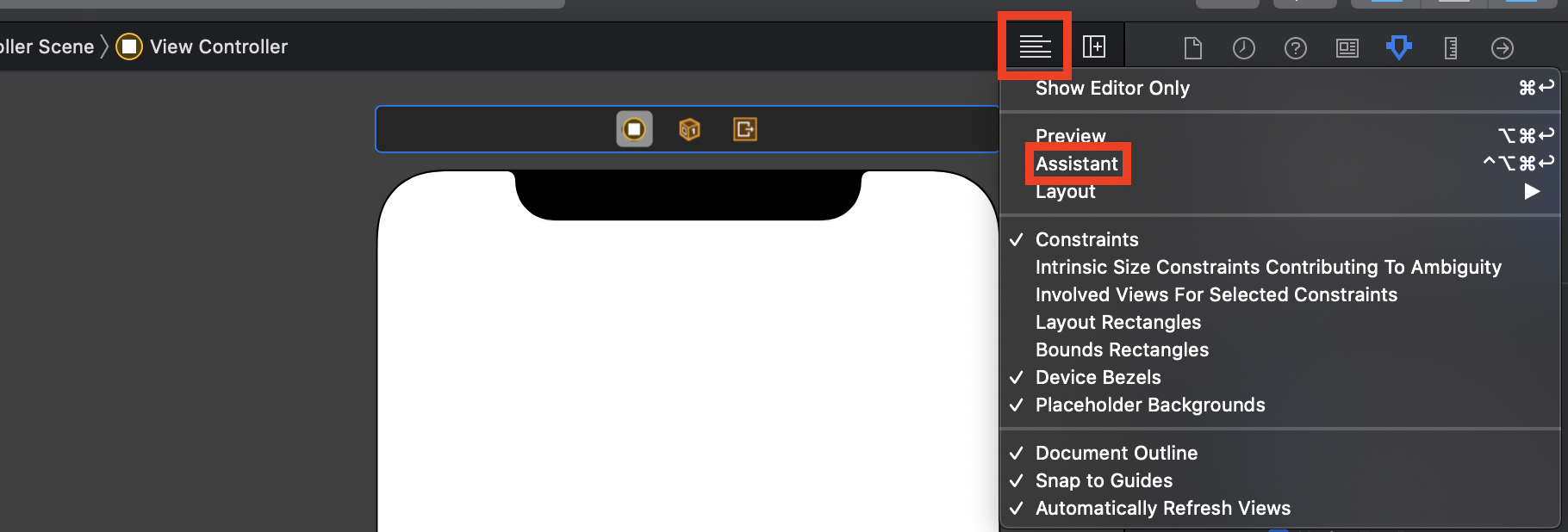
Also, you can use hotkeys to jump to the editor.
Let us know if that helped.
cc: @justintoth, @MichaelBourkeCF
 olegoid
on 22 Jan 2020
olegoid
on 22 Jan 2020
I managed to get it work once using your solution. After that,, the "Assistant" stays grayed out in the main window. VS opens a second xcode window with an the assistant result, and this windows displays "no assistant result" whatever item i select. I tryed to clean the solution. Same behavior.
So i found a workaround.
1) start with xcode closed. Open resource from VS in xcode.
2) after the second xcode window have opened, choose Assistant. If there is no assistant result, close this secondary window, then reopen it by right clicking the resource name in xcode (in the left navigator pane) and choosing open in new window. Again tap Assistant to open the assistant and this time it appears correctly.
softlion
on 27 Jan 2020
The workaround isn't working for me. I've been reduced to doing my interface editing in Xcode, then switching to Visual Studio's built-in editor to do my outlets. Giving the UI components names there seems to automatically create outlets. Thought that info my help someone else.
 StefAnglr
on 17 Jul 2020
StefAnglr
on 17 Jul 2020
Related issues
 wjk
·
37Comments
wjk
·
37Comments
 hansmbakker
·
39Comments
hansmbakker
·
39Comments
 SOFSPEEL
·
51Comments
SOFSPEEL
·
51Comments
 lilleydnSub
·
45Comments
lilleydnSub
·
45Comments
 simeon052
·
114Comments
simeon052
·
114Comments
Most helpful comment
Is there a work around for this? Seems like a major issue.
EDIT: Workaround, for xib files - first comment from AdamKemp here: https://forums.xamarin.com/discussion/52867/assistant-editor-in-xcode-not-showing-my-classes
Essentially, switch to the other xcode window that opens and drill down to the xib file from there. Assistant will show correct file.