Xamarin-macios: MonoMacGameView not rendering on Mojave
Steps to Reproduce
- Download Mac sample app MonoMacGameView
- Compile and run the sample
Expected Behavior
See the cube and the pyramid rendering correctly
Prior to updating to Xamarin.Mac 5, this was working on Mojave. We have an app that is having an identical problem to the sample.
Actual Behavior
The screen has no rendered content

Environment
=== Visual Studio Community 2017 for Mac ===

Version 7.6.9 (build 22)
Installation UUID: ecaddbe9-a78e-4787-b689-cbc3dfa7ace9
Runtime:
    Mono 5.12.0.309 (2018-02/39d89a335c8) (64-bit)
    GTK+ 2.24.23 (Raleigh theme)
    Xamarin.Mac 4.4.1.178 (master / eeaeb7e6)

    Package version: 512000309

=== NuGet ===

Version: 4.3.1.4445

=== .NET Core ===

Runtime: /usr/local/share/dotnet/dotnet
Runtime Versions:
    2.1.3
    2.1.2
    2.1.1
    2.0.5
SDK: /usr/local/share/dotnet/sdk/2.1.401/Sdks
SDK Versions:
    2.1.401
    2.1.302
    2.1.301
    2.1.4
MSBuild SDKs: /Library/Frameworks/Mono.framework/Versions/5.12.0/lib/mono/msbuild/15.0/bin/Sdks

=== Xamarin.Profiler ===

Version: 1.6.3
Location: /Applications/Xamarin Profiler.app/Contents/MacOS/Xamarin Profiler

=== Apple Developer Tools ===

Xcode 10.0 (14320.25)
Build 10A255

=== Xamarin.Mac ===

Version: 5.0.0.0 (Visual Studio Community)
Hash: b40230c0
Branch:
Build date: 2018-09-27 11:41:37-0400

=== Xamarin.iOS ===

Xamarin.iOS not installed.
Can't find mtouch or the Version file at /Library/Frameworks/Xamarin.iOS.framework/Versions/Current.

=== Xamarin.Android ===

Not Installed

=== Xamarin Inspector ===

Version: 1.4.3
Hash: db27525
Branch: 1.4-release
Build date: Mon, 09 Jul 2018 21:20:18 GMT
Client compatibility: 1

=== Build Information ===

Release ID: 706090022
Git revision: 0a0ba3c4593e9adb1c6ff6324e641036146af376
Build date: 2018-10-05 16:38:51+00
Build branch: release-7.6
Xamarin extensions: f7856b13f2c03a58e08381d3a5970bba18f5c7d7

=== Operating System ===

Mac OS X 10.14.0
Darwin 18.0.0 Darwin Kernel Version 18.0.0
    Wed Aug 22 20:13:40 PDT 2018
    root:xnu-4903.201.2~1/RELEASE_X86_64 x86_64
Example Project (If Possible)
https://developer.xamarin.com/samples/mac/MonoMacGameWindow/
 larsbrubaker
All 19 comments
I could reproduce the issue with the following environment: https://gist.github.com/VincentDondain/9c6f036286022c4bf507cda9bd5c4aa6 (XM 5.0.0.0).
However this does not look like a regression in Xamarin.Mac but something introduced in Xcode 10 that broke us.
The sample app works fine with Xcode 9.4 and XM 5.0 (no need for XM 4.8...)
 VincentDondain
on 10 Oct 2018
VincentDondain
on 10 Oct 2018
Oh it looks this is already fixed in a latest Xamarin.Mac build. See comment: https://github.com/xamarin/xamarin-macios/issues/4848#issuecomment-427405971 (you can get a build from there or you'll have to wait until we refresh the alpha channel).
VincentDondain
on 10 Oct 2018
Fantastic, thanks for investigating and supplying the workaround
 jlewin
on 10 Oct 2018
jlewin
on 10 Oct 2018
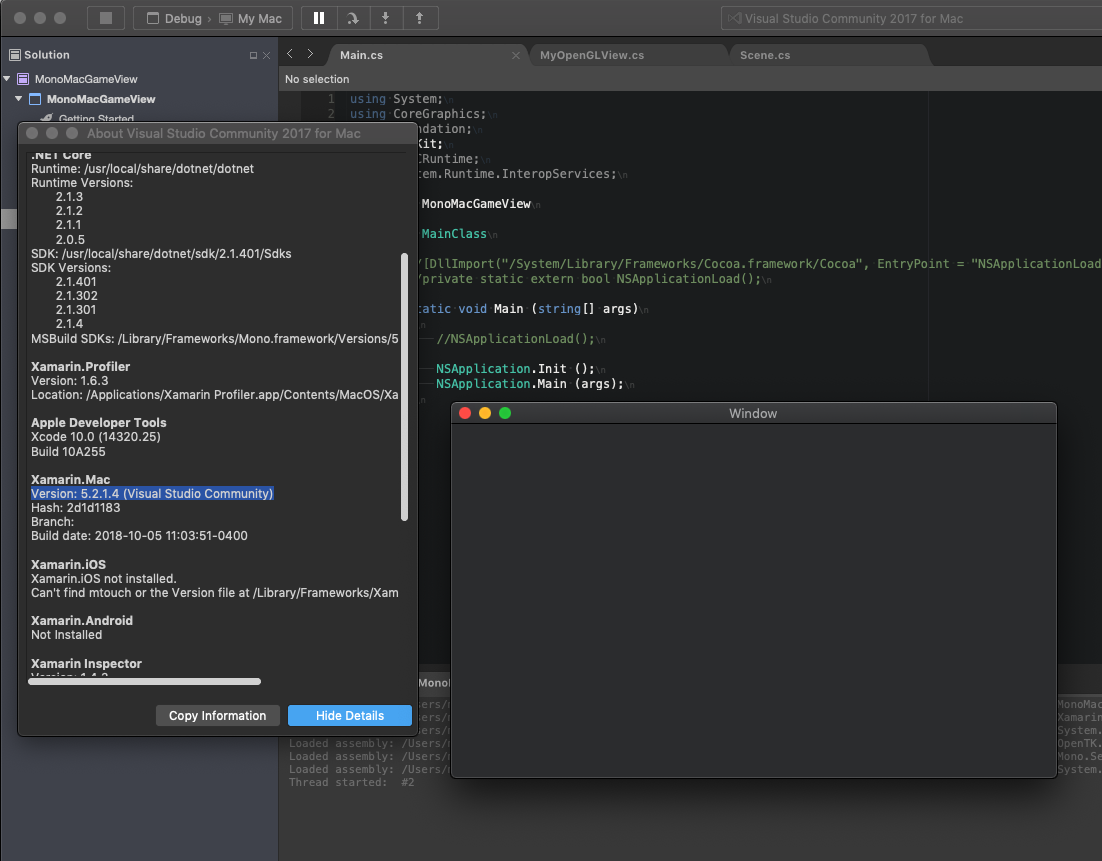
- Upgraded to the 5.2.1.4 build in the link below and still seeing the same problem, MonoMacGameView loads to blank screen
- Tried the
NSApplicationLoadinvoke in main and problem persists
Here is an official build: https://bosstoragemirror.blob.core.windows.net/wrench/jenkins/d15-9/2d1d118302f3c131a6fc91eca113877a6ae1111c/38/package/xamarin.mac-5.2.1.4.pkg
jlewin
on 11 Oct 2018
Mmh I can't get it to work anymore with the build I tried yesterday (but I change environment all the time so maybe I messed up). I'm reopening the bug and will confirm for sure what's happening. Sorry for the confusion (:
VincentDondain
on 11 Oct 2018
@VincentDondain - this bug continues to block our ability to develop and build on Mojave on modern hardware that was bought specifically for this purpose. Essentially we've lost OpenTK support on OSX Mojave and we're closely guarding the only machine we have which can still build our project. Hopefully by avoiding OS and/or Visual Studio updates we can remain on High Sierra/VS 7.6.6 (build 17) and continue to make builds until this problem is addressed.
Any chance this issue can be reviewed and confirmed, or at this time, are you aware of any workarounds that would get the sample OpenTK project working again?
If for any reason our old High Sierra machine stops working, we're going to lose our last remaining option for building our product on OSX.
jlewin
on 27 Feb 2019
Hi, @jlewin have you tried building with Xcode 9.4 as I briefly suggested here
https://github.com/xamarin/xamarin-macios/issues/4959#issuecomment-428731167? I tried again today and I was able to build and run successfully on Mojave. See my version info.
I can also provide a bit more info when the failure is happening, here's the console output.
In particular Unable to load Info.plist exceptions (eGPUOverrides) is intriguing... and this seems to either be an issue in Xcode 10's build system (forcing us to use Xcode 9 build system to get this sample working) or it's a Mojave issue...
Sorry for the trouble this issue has caused you, I'll make sure to move that issue forward and bring the conversation to our  (you're free to join).
However I cannot promise when we'll have a fix for it...
VincentDondain
on 5 Mar 2019
Note: I also tried on a different Mac hardware (initially tried on an iMac), same issue on Mac mini though the Info.plist exception did not show up, so I guess it can be discarded.
VincentDondain
on 5 Mar 2019
@VincentDondain - thanks so much for the followup. I originally saw the note about Xcode 9.4 but was unaware we could downgrade our Mojave Mac mini to the older version. After downgrading Xcode to 9.4 as recommended, we can build and run the OpenTK sample, as well as our application, on the latest stable VS builds. This workaround is enough to get us up and running again on our faster build machine. Really appreciate your time and attention on this issue.
jlewin
on 6 Mar 2019
This is issue is still happening, I've added a little more info in the referenced ticket above. Thanks for the XCode downgrade info, that may be helpful in the short term.
I think this issue needs to be prioritised - it has existed for almost a year and still has not been fixed in spite of it being rather fundamental issue.
 sungiant
on 6 Sep 2019
sungiant
on 6 Sep 2019
I just tested downgrading to both XCode 9.4 and XCode 9.4.1 using macOS Mojave10.14.6 - it does not consistently resolve this issue...
Steps taken:
- Download the XCode.app for an older version, give it a suitable filename.
- Used
xcode-select -sto set the version of XCode the system should use. - Update
Visual Studio > Preferences > Projects > SDK Locations > Appleto point to the correct version. - Restart
Doing this resolved the issue on:
- The
MonoMacGameWindowsample
Doing this did not resolve the issue on:
- The
GLFullScreensample - My personal project
sungiant
on 7 Sep 2019
I think this issue needs to be prioritised - it has existed for almost a year and still has not been fixed in spite of it being rather fundamental issue.
I understand the frustration. Many of our issues are prioritized based upon number customers impacted, how core the functionality in question is, and how much work supporting new Xcodes entail. Some issues in our tracker are significantly older than one year.
As you may have heard, Xcode11 is a large release, and much of the summer has been devoted to maintaining existing functionality and adding support to the new APIs.
I understand that does not fix your specific issue, but I want you to understand that the team is hard at work on Xamarin.Mac and Xamarin.iOS.
 chamons
on 9 Sep 2019
chamons
on 9 Sep 2019
Hi Chris, thanks for the update; any movement/plans around tackling this issue?
sungiant
on 8 Oct 2019
If there was any movement, you'd see it noted on this issue. Xcode 11.1 just released and Xcode 11.2 is already in preview, so as you can imagine most of our effort is focused in that area right now.
We look at issues in an order based on impact and number of customers affected.
I've added help-wanted as it may be awhile until someone from our team can look at this specific issue. If you or someone else is interested, feel free to stop by our community channel.
chamons
on 8 Oct 2019
This is affecting many of our Mac products right now. Any updates??
 IronMeister
on 4 Feb 2020
IronMeister
on 4 Feb 2020
As this hasn't been updated since October of 2019, no there aren't any updates. MonoMacGameView is not a high traffic component, and as I noted:
We look at issues in an order based on impact and number of customers affected.
As this issues has help-wanted attached, if you are personally interested we are happy to point you in the right direction if you want to investigate personally.
Also, if you have a support contact, you can consider raising an issue there.
chamons
on 4 Feb 2020
It's always hard to judge speech when it is written out as opposed to spoken, but it seems like there is a lot of unnecessary passive-aggressiveness in this thread. I understand that y'all are incredibly busy and that Apple, from my impression, is absolutely useless when it comes to notifying Xamarin of breaking changes, but @IronMeister was asking a harmless question and in his defense, a lot of tickets get overlooked here.
It's frustrating to get started with this development when all of the documentation is 2+ years out of date. Microsoft is not providing adequate resources to the Xamarin team, and after all the debugging I have done to try and unbreak my builds, I am pretty sure I will have better luck just writing a native app with a message bus to talk to .NET Core applications.
 ssimontis
on 6 Apr 2020
ssimontis
on 6 Apr 2020
@ssimontis agreed, I struggled with this thread. In my case I actually resorted to ditching MonoMac to get my 3D application working again (after having used MonoMac for years). Instead I
embedded a Mono VM directly into a C++ application and then wrote C bindings to allow me to access the parts of OpenGL I needed... It worked, but certainly took some time.
sungiant
on 7 Apr 2020
This works for me in Macos 10.14.6, Xcode 10.2.1. Set the OpenglContexts View property to your view.
For example in MonoMacGameView
RenderFrame += delegate(object src, FrameEventArgs fea) {
    if (this.OpenGLContext.View == null)  // Set the View
        this.OpenGLContext.View = this;
    scene.DrawGLScene();
};
or in MacOpenTK
Game.RenderFrame += (sender, e) => {
     if (Game.OpenGLContext.View == null) //Set the View
         Game.OpenGLContext.View = Game;

   ...
}
 prash-wghats
on 30 Apr 2020
prash-wghats
on 30 Apr 2020
Related issues
 nejdu
·
44Comments
nejdu
·
44Comments
 lilleydnSub
·
45Comments
lilleydnSub
·
45Comments
 ThumbGen
·
43Comments
ThumbGen
·
43Comments
 GribovAlexander
·
35Comments
GribovAlexander
·
35Comments
 kodejack
·
170Comments
kodejack
·
170Comments
Most helpful comment
This works for me in Macos 10.14.6, Xcode 10.2.1. Set the
OpenglContexts View property to your view.For example in MonoMacGameView
or in MacOpenTK