Xamarin.forms.googlemaps: Direct assign 'MyLocationButtonEnabled' value / result = no show
BUG / PROBREM REPORT
SUMMARY
Directly assign value, result map itself never show the my location button.
VERSIONS
Xamarin.Forms.GoogleMaps = 2.2.0
PLATFORMS
- [x] iOS
HOW TO REPRODUCE
Your sample solution / on BasicMapPage.xsml.cs / comment out all code
(from the comment marker '// MyLocationButtonEnabled' about line#65 until the end.)
        // MyLocationButtonEnabled
        switchMyLocationButtonEnabled.Toggled += (sender, e) =>
        {
            map.UiSettings.MyLocationButtonEnabled = e.Value;
        };
        switchMyLocationButtonEnabled.IsToggled = map.UiSettings.MyLocationButtonEnabled;
Put on below line of code instead
map.UiSettings.MyLocationButtonEnabled = true;My result the my location button never show.
 maniti
All 13 comments
Thank you for reporting.
It seems same as #371 .
I will fix it soon. 👍
 amay077
on 29 Oct 2017
amay077
on 29 Oct 2017
I fixed this issue in v2.2.1-beta1 .
Could you try?
amay077
on 29 Oct 2017
Fixed on Android? I just tested, and it's still not shown.
 kingnguyen93
on 29 Oct 2017
kingnguyen93
on 29 Oct 2017
I can confirm also and even my position is not displayed.
 ghost
on 29 Oct 2017
ghost
on 29 Oct 2017
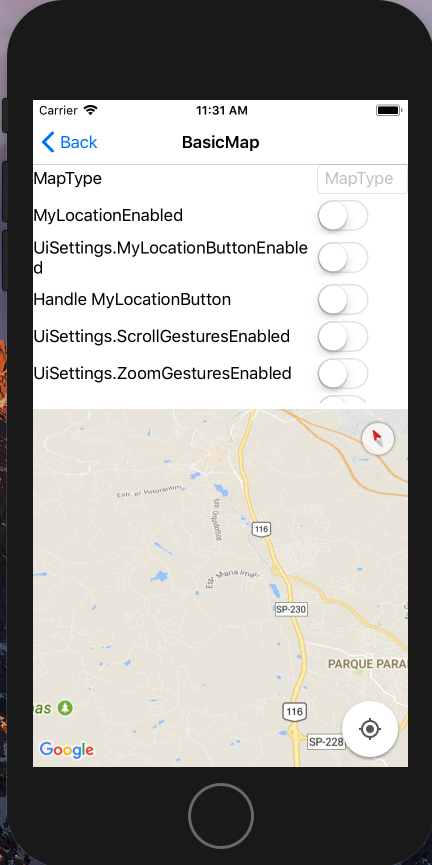
I can see location button on iOS by below code with v2.2.1-beta1 and XFGoogleMapsSample.
    public partial class BasicMapPage : ContentPage
    {
        public BasicMapPage()
        {
            InitializeComponent();

            map.UiSettings.MyLocationButtonEnabled = true;
        }
    }
amay077
on 30 Oct 2017
A was testing on android emulator and it is not showing with the same code
ghost
on 30 Oct 2017
Thanks. I reproduced it. (I didn't run on Android because this issue is about iOS side)
A was testing on android emulator and it is not showing with the same code
This issue has 2 reasons.
- Design of GoogleMaps Android API - We should set
Map.MyLocationEnabled = trueandUiSettings.MyLocationButtonEnabled = truefor display location button. - Bug -
Map.MyLocationEnabled = truein page constructor is not worked. This is my bug.
Conclusion
Add map.MyLocationEnabled = true in your page constructor.
And wait for next version(v2.2.1-beta2).
public partial class BasicMapPage : ContentPage
{
    public BasicMapPage()
    {
        InitializeComponent();

        map.MyLocationEnabled = true;  // <-- added
        map.UiSettings.MyLocationButtonEnabled = true;
    }
}
Dear @amay077
thanks for your afford, v2.2.1-beta2 works fine.
maniti
on 30 Oct 2017
I released v2.2.1-beta2.
Could you try this?
amay077
on 30 Oct 2017
@amay077 v2.2.1-beta2 = working fine
maniti
on 2 Nov 2017
Is this bug closed?
 JamestsaiTW
on 8 Nov 2017
JamestsaiTW
on 8 Nov 2017
Yes, it's closed.
amay077
on 8 Nov 2017
@amay077 last version (2.2.1) MyLocationEabled works in Android but not in iOS (no blue dot, and no certer if you tap in MyLocationButton)
 rayita
on 21 Nov 2017
rayita
on 21 Nov 2017
Related issues
 galadril
·
3Comments
galadril
·
3Comments
 mammadkoma
·
6Comments
mammadkoma
·
6Comments
 non335
·
7Comments
non335
·
7Comments
 mtsrdr
·
6Comments
mtsrdr
·
6Comments
 Gavrielo
·
3Comments
Gavrielo
·
3Comments