Xamarin.forms.googlemaps: Voting: Map Marker Clustering
If you want to this feature then post 👍 to below.
Suggestion
Implement google maps clustering utility for Android & iOS.
Android:
https://developers.google.com/maps/documentation/android-api/utility/marker-clustering
iOS:
https://developers.google.com/maps/documentation/ios-sdk/utility/marker-clustering
 declandowling
All 97 comments
Goog idea!
Is there someone who can port to C#?
 amay077
on 3 Dec 2016
amay077
on 3 Dec 2016
this is a good place to start http://silverlightfoundry.blogspot.co.uk/2009/07/bing-maps-silverlight-control-part-5.html
 jaykannan
on 6 Dec 2016
jaykannan
on 6 Dec 2016
I stabled upon that repo, maybe that can help a bit with te Android side
https://github.com/oystehei/MapsUtilityDemo/tree/master/MapsUtilityDemo
 claudiocleberson
on 13 Mar 2017
claudiocleberson
on 13 Mar 2017
Someone found a way to integrate it? I can't find a way to translate Pin into POIItem.
 YahavGB
on 25 Mar 2017
YahavGB
on 25 Mar 2017
Okay, I'm working on a port to the clustering feature. I'll post it soon :).
YahavGB
on 28 Mar 2017
I found some repos.
- https://github.com/alexsorokoletov/Xamarin.Android.Maps.Utils
- https://github.com/sushihangover/XamarinGoogleMapClustering
But these are "Binding" projects.
I hope "PORT" from java to C# because core logic is same as Android and iOS.
amay077
on 29 Mar 2017
@amay077 yes, I mean a complete port to the clustering feature from Xamarin iOS and Xamarin Android to Xamarin Forms. This port is based on a fork of this project and its API, obviously.
YahavGB
on 29 Mar 2017
The original sources are here:
- https://github.com/googlemaps/android-maps-utils
- https://github.com/googlemaps/google-maps-ios-utils
Thanks @YahavGB,
I am waiting expectantly.
amay077
on 29 Mar 2017
@amay077 as promised, I've implemented a unified API for clustering (a basic one, though).
The API supports marker clustering, custom markers, custom clusters and buckets. It currently works on iOS and Android.
Please check my forked repository and check it so I can submit a pull request - https://github.com/YahavGB/Xamarin.Forms.GoogleMaps.
Sample code:
        for (var i = 0; i <= ClusterItemsCount; i++)
        {
            var lat = this._currentPosition.Latitude + Extent * GetRandomNumber(-1.0, 1.0);
            var lng = this._currentPosition.Longitude + Extent * GetRandomNumber(-1.0, 1.0);

            this.Map.ClusteredPins.Add(new Pin()
            {
                Position = new Position(lat, lng),
                Label = $"Item {i}",
                Icon = BitmapDescriptorFactory.FromBundle("pin_red.png")
            });
        }
Note the usage of ClusteredPins instead of Pins. Using that approach one can mix between standard pins (which won't be clustered) and clustered pins. For advance options, see ClusterOptions.cs.
Hope it'll help 👍 !
YahavGB
on 21 Apr 2017
Why don't incorporate that resource on the Xamarin.Forms.GoogleMaps package?
 mpghelli
on 28 Apr 2017
mpghelli
on 28 Apr 2017
@mpghelli The clustering feature has been implemented as a fork of this repository. When it'll get general approval I'll submit it as a pull request.
Meanwhile you can use my forked repository.
YahavGB
on 28 Apr 2017
I have a plan to contains Marker clustering in Xamarin.Forms.GoogleMaps.
But sorry I can not try @YahavGB 's implementation yet.
amay077
on 28 Apr 2017
Is there anyway to get forked repository by nuget? Im getting problems to compile Android project. Lacks Xamarin.Forms.GoogleMaps.Android.Utils reference.
mpghelli
on 28 Apr 2017
No, but I can upload the compiled dlls in case you'd like :)
ב-28 באפר׳ 2017, בשעה 14:09, mpghelli notifications@github.com כתב/ה:
Is there anyway to get forked repository by nuget? Im getting problems to compile Android and IOS project
—
You are receiving this because you were mentioned.
Reply to this email directly, view it on GitHub, or mute the thread.
YahavGB
on 28 Apr 2017
Yes. I Would like. I will be thankfull if you can do that. :)
mpghelli
on 28 Apr 2017
I did it compile and generated the Dlls. I've Added Xamarin.Forms.GoogleMaps dll reference on portable class library and Xamarin.Forms.GoogleMaps.Android too on Android project, but when i compile my project it throw some exceptions. Seems it lacks some packages of Android SDK itself:
Severity Code Description Project File Line Suppression State
Error error: package com.google.maps.android.clustering.ClusterManager does not exist
com.google.maps.android.clustering.ClusterManager.OnClusterClickListener MRV.Terrenos.Mobile.Droid C:\Projetos\MRV TERRENOS\src\v1\dev\MRVTerrenos\MRV.Terrenos.Mobile\MRV.Terrenos.Mobile.Droid\obj\Debug\android\src\mono\com\google\maps\android\clustering\ClusterManager_OnClusterClickListenerImplementor.java
Seems im using the same android librarys that example project.
Do I have to add any other references?
mpghelli
on 28 Apr 2017
@mpghelli I've uploaded the libraries to my Drive, you can grab them here: https://drive.google.com/drive/folders/0B02ufEMX6wJ7WmxFMHh2bHFXdUE?usp=sharing
How to integrate the libraries:
The shared project
_Instead of adding Xamarin.Forms.GoogleMaps from nuget_, add a reference to the local assembly you've downloaded from Drive.

Android
_Instead of adding the nuget package_, add a reference to these DLLs:
- Xamarin.Forms.GoogleMaps.dll
- Xamarin.Forms.GoogleMaps.Android.dll
- GoogleMapsUtility.dll
In addition, you do need to add a reference to Google Play Maps package, so you can do it using NuGet (simply install Xamarin.GooglePlayServices.Maps).

iOS
_Instead of adding the nuget package_, add a reference to these DLLs:
- Xamarin.Forms.GoogleMaps.dll
- Xamarin.Forms.GoogleMaps.iOS.dll
- GoogleMapsUtility.dll
In addition, you do need to add a reference to Google Play Maps package, so you can do it using NuGet (simply install Xamarin.Google.iOS.Maps).

YahavGB
on 28 Apr 2017
@mpghelli It seems like it doesn't appear on the iOS image, but just to clarify, in the iOS project you should reference GoogleMapsUtils.iOS.dll.
YahavGB
on 28 Apr 2017
Thank you very much. I will try that and keep you informed. :)
mpghelli
on 28 Apr 2017
It Works!!!
But i don't understand some behaviors. Some times it has just 5 pins, but group in a circle wrote with 10+. Is that the correct behavior?
Another question is if is possible to group the Pins with the same Icone first?
Thanks Again.
mpghelli
on 28 Apr 2017
Hi!
I'm glad that it works :).
Regarding the first question, it sounds incorrect. I did used buckets, so
it should group pins into groups (I don't remember the groups, you can find
them, and change them, in ClusterOptions.cs in the shared project), however
the described behavior sounds wrong.
Can you give me more details? Can you show me the code and tell in which
platform it occurs?
Regarding the second question, to the best of my knowledge the default
implementation doesn't do that and therefore we don't have that feature.
However, I wonder, maybe we can implement that manually by using multiple
cluster managers.
You welcome :).
On Fri, Apr 28, 2017 at 7:28 PM, mpghelli notifications@github.com wrote:
It Works!!!
But i don't understand some behaviors. Some times it has just 5 pins, but
group in a circle wrote with 10+. Is that the correct behavior?Another question is if is possible to group the Pins with the same Icone
first?Thanks Again.
—
You are receiving this because you were mentioned.
Reply to this email directly, view it on GitHub
https://github.com/amay077/Xamarin.Forms.GoogleMaps/issues/123#issuecomment-298044436,
or mute the thread
https://github.com/notifications/unsubscribe-auth/ABTa3xz69wUvaCcjROQc9wJYWsbWNa8kks5r0hPFgaJpZM4K73Fk
.
YahavGB
on 28 Apr 2017
I have a collection that i
loop through and create a clustered Pin for each one. I've tested only in android 5.0 until now.
`
foreach (var terreno in terrenos)
{
var pinCoord = GetPositionByCoordinate(terreno.Coordenadas.Split('|').First());
var pin = CreateLandPin(
Terreno,
terreno.Id,
terreno.Nome,
terreno.Logradouro,
pinCoord,
terreno.Cor);
var customPin = new TerrenosPin(terreno, pin);
this.mapTerrenos.ClusteredPins.Add(new Pin()
{
Position = customPin.MapPinPosition,
Label = customPin.MapPinLabel,
Icon = customPin.MapPin.Icon
});
}
`
Like i said, it groups less then 10 itens in a 10+ grouped pin, but when i clicked in that grouped pin it show the correct number of pins grouped inside.
Thank You
mpghelli
on 28 Apr 2017
The CameraChanged event stoped worked using this dll version too.
Maybe it was overriden inside the dll to make the grouping?
Thanks
mpghelli
on 28 Apr 2017
The icon shows grouped 10+, when I click on it, it shows 5 items in cluster, ... any ideas?

 poseydonfba
on 5 May 2017
poseydonfba
on 5 May 2017
👍
 leaguefun
on 21 May 2017
leaguefun
on 21 May 2017
👍
mpghelli
on 23 May 2017
@YahavGB Just wanted to know if you made your pull request yet ?
I would really appreciate this feature. If you don't plan on making a pull request, maybe i will try doing it like @mpghelli did
 SimonTod
on 7 Jun 2017
SimonTod
on 7 Jun 2017
Hi @YahavGB, @bitbeans ,
Could you make marker clustering as other extension library (like a Xamarin.Forms.GoogleMaps.Bindings) ?
I hope keep simple this "core" Xamarin.Forms.GoogleMaps library.
But if you needed, I can make "internal visible" interface for extension library.
amay077
on 21 Jun 2017
Yes it always shows 10+, even if I only have 5 pins... Is there a fix for this ?
 gviddy
on 5 Jul 2017
gviddy
on 5 Jul 2017
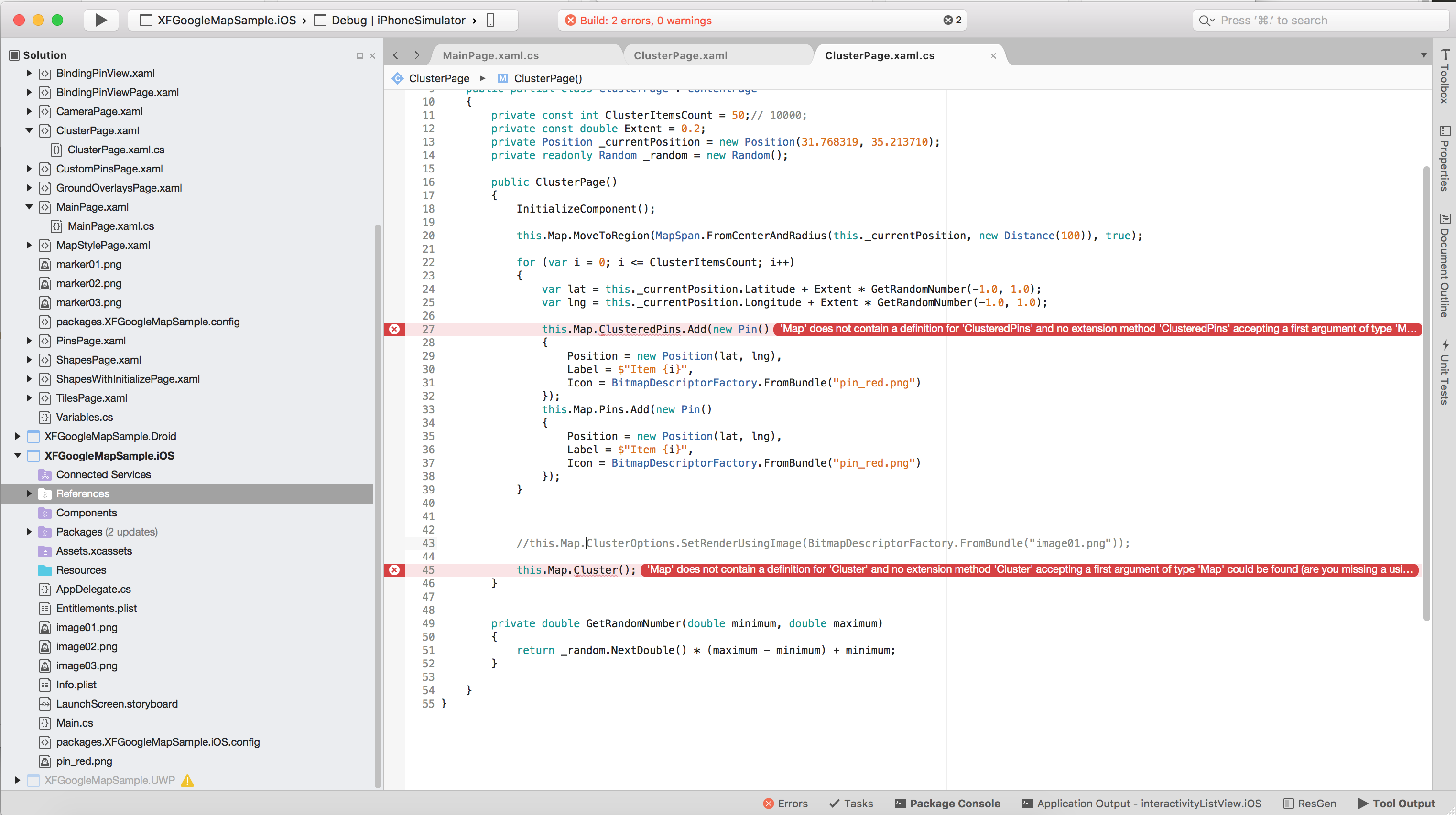
https://github.com/bitbeans/Xamarin.Forms.GoogleMaps/commit/4d27526c2847c84f19c948f2629adb3c7bcda7f5
I pull this branch and added back the missed ClusterPage, but the map object seems not adapted with this solution, please help, many thanks.
leaguefun
on 1 Aug 2017
@gviddy @poseydonfba If you're still experiencing the problem with 10+ markers showing up, even if you have less than that, I think I've found a fix for that. Try to change GetBucket method implementation in XamarinClusterRenderer class:
protected override int GetBucket(ICluster cluster)
{
int size = cluster.Size;
if (size <= this._map.ClusterOptions.Buckets[0])
return size;
return this._map.ClusterOptions.Buckets[this.BucketIndexForSize(cluster.Size)];
}
Alternatively, you can add ClusterOptions.RendererImage or ClusterOptions.RendererCallback
 mierzynskim
on 14 Aug 2017
mierzynskim
on 14 Aug 2017
can not find Com.Google.Maps.Android.Clustering in release mode !!!!!!!!!!!!!!!!!!!!!!
 mortezabarzkar
on 13 Sep 2017
mortezabarzkar
on 13 Sep 2017
👍
 ssotir
on 27 Sep 2017
ssotir
on 27 Sep 2017
@mierzynskim where is required to implement "GetBucket" for "the problem with 10+"
 andreslon
on 29 Sep 2017
andreslon
on 29 Sep 2017
@andreslon GetBucket method is in XamarinClusterRenderer class. You can find it in @YahavGB fork here https://github.com/YahavGB/Xamarin.Forms.GoogleMaps
mierzynskim
on 29 Sep 2017
@mierzynskim I have overriden the GetBucket method but when I build the android project I get an aapt.exe strange error. The portable project builds just fine as well as the Xamarin.Forms.GoogleMaps.Android.Utils project.
 xerx
on 24 Apr 2018
xerx
on 24 Apr 2018
@amay077 Clustering has become a core google maps feature. I understand that you want to keep this core library simple but isn't it a core feature to be added?
 vatsalyagoel
on 9 May 2018
vatsalyagoel
on 9 May 2018
@amay077 It will be nice if it cane integrated with new updates....
 vishaljani23
on 27 May 2018
vishaljani23
on 27 May 2018
Can you include it in release version? I'm having a hard time referencing @YahavGB's solution.
 stavroaudi
on 24 Jul 2018
stavroaudi
on 24 Jul 2018
The build for release version had been moved ahead for long time, can @YahavGB's solution merge with the current release version ?
leaguefun
on 24 Jul 2018
@amay077 @YahavGB This is a great feature, we need it ASAP, can it be integrated soon please?
 KevinAble
on 24 Jul 2018
KevinAble
on 24 Jul 2018
https://github.com/amay077/Xamarin.Forms.GoogleMaps/issues/123#issuecomment-310110724
I hope someone makes "Marker Clustering" as extension library for Xamarin.Forms.GoogleMaps.
Of course I will help you if you needed.
amay077
on 26 Jul 2018
Same here, I'm trying to use YahavGB's library to get cluster..
 espritm
on 26 Jul 2018
espritm
on 26 Jul 2018
@amay077 I would be interested in your thoughts on making it an extension and how to do that architecturally,
I was able to pull the latest version of the package and integrate what @YahavGB had previously done for IOS (what I am only worried about for the moment). I just have the projects in my solution and are referencing them directly.
There where a few things that came out
- Rather than just dropping the GoogleMapsUtils.IOS DLL in I used the nuget package Xamarin.iOS.Maps.Utils
- The GMUClusterDelegateHandler setting to the ClusterManager was taking over all the events (like camera idled), I commented it out since it didn't do much, clustering still works and all the eventshandlers seem to firing fine. (Took me a little bit to figure this one out)
-With the addition of the ClusterMarker type, the PIN lookup function in clusterlogic had to be modified to cast the Marker correctly for the LINQ to work, the original ClusterMarker is stored in the userdata object on the event marker. (I dont think the TappedMarker functionality code worked properly in YahavGB's code) - There were also some casting checks that needed to be made in the UpdateSelectedPin methods in both PinLogic and ClusterLogic. (Fairly obvious)
Hope this helps someone
KevinAble
on 28 Jul 2018
Hi @KevinAble ,
Do you have open repo?
I want to try your code.
amay077
on 29 Jul 2018
Sure, give me a few days I can make a branch for you.
KevinAble
on 30 Jul 2018
If you want to integrate @YahavGB 's code to enable Clustering, please use ObservableRangeCollection from MVVM.Helper package nuget instead of ObservableCollection or IList to store Clustered Pins.
It allows you to add as many pins as you want to the cluster, and once they are all added it calculates the cluster once :
myMap.ClusteredPins.AddRange(lsMarkers); //calc and display cluster
Using an ObservableCollection force you to add pins one by one, and it calculates the cluster each time... more pins you have, more you app will freeze :/
foreach (var m in lsMarkers)
myMap.ClusteredPins.Add(m); //calc and display cluster
It happens in the class _Xamarin.Forms.GoogleMaps.Map_ when you will add a variable to store ClusteredPins
(to illustrate : https://github.com/YahavGB/Xamarin.Forms.GoogleMaps/blob/master/Xamarin.Forms.GoogleMaps/Xamarin.Forms.GoogleMaps/Map.cs line 165)
espritm
on 30 Jul 2018
My problem with using @YahavGB's solution is that in my XAML I have 'InitialCameraUpdate' and now when I run my app I get MethodAccessException: Xamarin.Forms.GoogleMaps.Internals.CameraUpdateConverter..ctor() is inaccessible from method
stavroaudi
on 31 Jul 2018
My question is, how do I pull the latest package (3.1.0) and have @YahavGB's solution at the same time?
stavroaudi
on 31 Jul 2018
I have the following:
` public void AddPinsTest(double latitude, double longitude, string companyName, string streetname, string cityName, string zipCode, string build)
{
var pinTest = new Pin
{
Position = new Position(latitude, longitude),
Label = companyName,
Address = streetname + " " + cityName + " " + zipCode + build,
};
pinTest.Clicked += Pin_Clicked;
PSMap.ClusteredPins.Add(pinTest);
}`
But since I changed from PSMap.Pins.Add(pinTest) to ClusteredPins, when I tap on a pin, the pin dialog does not appear, and the pinTest.Clicked+=Pin_Clicked doesn't even get called.
This is my Pin_Clicked method:
private async void Pin_Clicked(object sender, EventArgs eventArgs)
{
selectedPin = sender as Pin;
var result = await DisplayAlert(selectedPin?.Label, selectedPin?.Address, AppResources.Navigate, "OK");
if (result == true)
{
await CrossExternalMaps.Current.NavigateTo(
selectedPin.Label,
selectedPin.Position.Latitude,
selectedPin.Position.Longitude,
NavigationType.Driving);
}
}
stavroaudi
on 31 Jul 2018
@stavroaudi until Yahavs changes get implemented into this package or someone steps up and makes an extension package the only real option I found, was to pull down the code for both packages, compare/integrate/debug then reference the project directly in my solution, the problem you are seeing with the pin click, I solved by modifying the LookUpPIN in the clusterlogic.cs to
Pin LookupPin(Marker marker)
{
return GetItems(Map).FirstOrDefault(outerItem => ReferenceEquals(outerItem.NativeObject, marker.UserData as ClusteredMarker));
}
KevinAble
on 31 Jul 2018
Tried pulling @YahavGB's changes onto the latest Xamarin.Forms.GoogleMaps update, didn't work for me. If anyone can implement @YahavGB's changes into the package it would be great. I have dependency issues and cannot use @YahavGB's solution anymore, unless it is added to the latest package. I will happily donate to whoever does so!
stavroaudi
on 1 Aug 2018
@stavroaudi you need to install the Xamarin.iOS.Maps.Utils Nuget package to your Xamarin.forms.IOS.GoogleMaps.IOS project that should clear up most of your reference issues. I should have sometime this weekend to make a branch with my changes
KevinAble
on 1 Aug 2018
@KevinAble I did, my issues were with ClusterLogic.cs on Android. If you could make DLLs like @YahavGB did for the shared library, android and iOS but for 3.0.1, I would be grateful!
stavroaudi
on 2 Aug 2018
Can anyone please help with pin clicked!? I can't access ClusterLogic.cs on Android/iOS.
stavroaudi
on 6 Aug 2018
Hey all!
Here's how I integrated most recent code with @YahavGB implementation https://github.com/mierzynskim/Xamarin.Forms.GoogleMaps/tree/clustering. Obviously there's a lot to improve and test, but it's a good starting point. I changed sample project to work with clustering. I'd like to compare it with @KevinAble implementation and we can probably try to implement the extension together.
mierzynskim
on 6 Aug 2018
@mierzynskim Happy to hear you got it working! Would it be possible to send me the precompiled DLLs for your solution for iOS/Android/Shared? Similar to what @YahavGB did but you seem to have version 3.0+ so it would work for me. Thank you!
stavroaudi
on 6 Aug 2018
@stavroaudi Here's a folder with precompiled dlls https://drive.google.com/open?id=1WamukWgSSR4NKdev2Wz-o2OuDePADsNy.
mierzynskim
on 6 Aug 2018
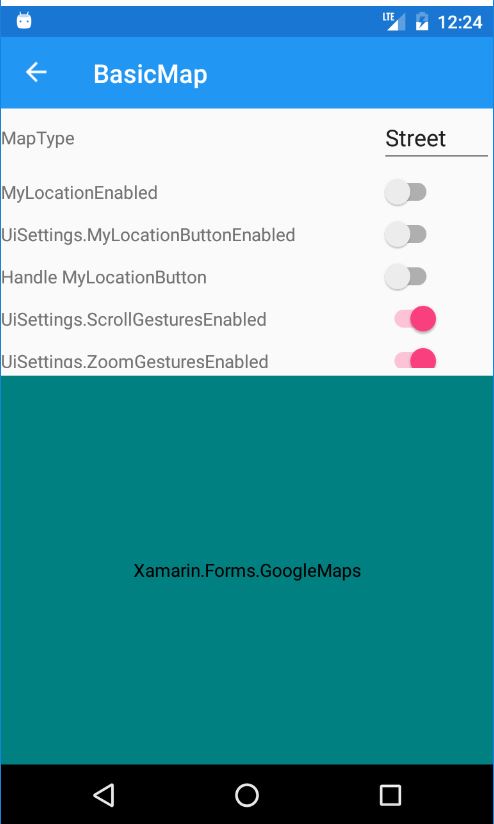
I am not able to render map... Can anybody suggest...
vishaljani23
on 7 Aug 2018
@mierzynskim It works! Thanks a lot!
@vishaljani23 Make sure you have Xamarin.FormsGoogleMaps.Init(this, bundle); in your MainActivity.cs and you include your API key in your manifest
stavroaudi
on 7 Aug 2018
Does anyone know how to change pin color when it is on focus? i.e. when a pin is clicked, change the color from red to blue, and when another pin is clicked, change the former pin back to red and the new pin to blue etc.
stavroaudi
on 7 Aug 2018
@mierzynskim Thanks for your work.
Do you know why the cluster need a lot of time to display icons when there is more than 1000 pins in the cluster ?
For instance, if I show the map with 200 pins in the cluster, the map needs 1 or 2 seconds to display. But if I show the map with 1000 pins in the cluster, the map needs 15 or 20sec to display :'(
I have same problem with @YahavGB 's solution
espritm
on 13 Aug 2018
@espritm It works fine for me on both iOS and Android. Can you share a code sample?
mierzynskim
on 14 Aug 2018
@mierzynskim @espritm I too am seeing very slow performance on anything above 1000 pins or so. So far only tested on Android, ill try iOS later today and report back.
 leemarthers
on 14 Aug 2018
leemarthers
on 14 Aug 2018
It's very slow on Android. I have 1500+ pins. It's fine on iOS
stavroaudi
on 15 Aug 2018
@stavroaudi I am seeing the same thing. everything works great on iOS but has very bad performance on android.
leemarthers
on 17 Aug 2018
can we use https://github.com/streinhard/Xamarin.Google.iOS.Maps.Utility, so that project is also supported? we dont replicate effort at both places.
 rohitvipin
on 18 Aug 2018
rohitvipin
on 18 Aug 2018
Will it merge into the main repository? this is a great function of the library.
leaguefun
on 18 Aug 2018
@espritm @leemarthers @stavroaudi I did a couple more tests and I agree it's too slow on Android 😞. Available algorithms use all markers to calculate clusters. That may cause bad performance. I updated android maps utils library and added VisibleNonHierarchicalDistanceBasedAlgorithm (more info here) that operates only on a visible region. It slightly improved clustering speed for me. Please pull the latest changes from my fork and let me know if it helped.
mierzynskim
on 20 Aug 2018
@mierzynskim thanks for looking into this. I will test today.
leemarthers
on 20 Aug 2018
@mierzynskim The performance seems better with items under 10000 however it seems to be much worse (unusable) for somewhere around the 20k+ mark. There seems to be an exponential slowdown as you increase the number. 30k never completed loading in my trials and crashed the emulator. The slowdown occurs in the AddItems method. It never completes with the 30k and as mentioned it slows to a crawl around the 20k mark. Putting my simple code below:
var rando = new Random();
Map.ClusterOptions.Algorithm = ClusterAlgorithm.VisibleNonHierarchicalDistanceBased;
for (int i = 1; i <= 30000; i++)
{
var latitude = rando.NextDouble() * 180;
var longitude = rando.NextDouble() * 180;
var pin = new Pin() { Label = "test", Type = PinType.Place, Position = new Position(latitude, longitude) };
Map.ClusteredPins.Add(pin);
}
leemarthers
on 20 Aug 2018
@mierzynskim, looks like we are running into a gref limit in android.
leemarthers
on 21 Aug 2018
@mierzynskim Sorry I'm quite new to this. If I fork from your solution on visual studio, how can I create DLL files for Android and iOS? I know for the shared project I can make the solution as a nuget package. Otherwise if you can send me the precompiled DLLs that would be great. I can then test and let you know if there is a significant performance upgrade
stavroaudi
on 22 Aug 2018
why dll when u have nuget https://www.nuget.org/packages/Xamarin.Forms.GoogleMaps/
 chrisgate
on 22 Aug 2018
chrisgate
on 22 Aug 2018
@leemarthers Yeah, I think there's nothing more we can do with it 😞. For those of you who struggles with huge amount of markers here's a possible solution.. I haven't got time to test it myself but limiting amount of markers to a visible region seems to be good idea.
@amay077 I'd love to hear your thoughts about implementing the extension. I'm not sure what structure you expect but I offer my help to implement it.
mierzynskim
on 22 Aug 2018
@chrisgate The nuget doesn't include clustering.
stavroaudi
on 23 Aug 2018
@mierzynskim can you pls share latest compiled dlls for both Android and iOS as Android Utils is not building in my system... Thanks..
vishaljani23
on 28 Aug 2018
Hey @mierzynskim ! I've been trying to check your clustering example but I'm not able to. There is an error in Xamarin.Forms.GoogleMaps.Android\Logics\ClusterLogic.cs. In this line:
this.NativeMap.SetOnCameraIdleListener(this._clusterManager);
I get the error:
Argument 1: cannot convert from 'Com.Google.Maps.Android.Clustering.ClusterManager' to 'Android.Gms.Maps.GoogleMap.IOnCameraIdleListener' Xamarin.Forms.GoogleMaps.Android
Any idea about what could be happening? Thanks!!
 carlosmacmar
on 29 Aug 2018
carlosmacmar
on 29 Aug 2018
@mierzynskim I just noticed another issue in testing in android. Each pin is being counted as two or three when clustered. I have 37 pins but I am getting a bucket of 50+ and a bucket of 10+. When I zoom in I can see a bucket of 6 break into 2 pins.
Any thoughts?
leemarthers
on 30 Aug 2018
Latest Xamarin.Forms.GoogleMaps package not providing clustering feature in Xamarin forms.
Is there any alternative way to implement clustering in Xamarin form maps?
Thanks in Advance
 Ajin001
on 2 Nov 2018
Ajin001
on 2 Nov 2018
I'm not update data pin marker when use ClursterPin. How to fix it?
 NamCkiku
on 29 Nov 2018
NamCkiku
on 29 Nov 2018
How to cluster less then 5 pins? If I change ClusterItemsCount to 3 in ClusterPage.xaml.cs (in XFGoogleMapSample) it does not cluster at all. Can you cluster less then 5 pins?
edit:
I should ask this question 12h before, since I found solution 5sec after posting comment :(
answer is: set MinClusterSize in XamarinClusterRenderer.cs (Xamarin.Forms.GoogleMaps.Android.Logics.Cluster.XamarinClusterRenderer)
for example in ctor add:
this.MinClusterSize = 2;
 darkovuj
on 3 Jan 2019
darkovuj
on 3 Jan 2019
Bonjour , je souhaite faire sur ma map en c# en UWP regrouper mes icons lorsqu'ils sont tous au même en droit, cependant je n'ai trouver aucun code en c# qui me permet de m'aider a realiser cette tache
pouvez vous m'aider svp après de nombreuses recherche cela ne me mène a rien
je vous remercie
 bryan2306
on 16 Jan 2019
bryan2306
on 16 Jan 2019
hi @mierzynskim I'm trying the clustering fork you made, thanks for the work! I see the issue with the rendering time with a large amount of map object 10k+, but I think it will still be very useful in a lot of cases. I'm looking through the code now, it might take a while to understand, but if you want any assistance let me know.
 philipogorman
on 29 Jan 2019
philipogorman
on 29 Jan 2019
Any more work being done on this? I think it's evident it'd be quite useful.
 gabrielbunselmeyer
on 31 Jan 2019
gabrielbunselmeyer
on 31 Jan 2019
Hey! I finally had some time and created extension library for Xamarin.Forms.GoogleMaps https://github.com/mierzynskim/Xamarin.Forms.GoogleMaps.Clustering. It currently depends on my custom fork but I'm planning to create PR that introduces my changes to the core library and create a nuget package. So stayed tuned and I'd appreciate any feedback 😄
mierzynskim
on 31 Jan 2019
That is some great work! Thanks so much.
gabrielbunselmeyer
on 31 Jan 2019
and until there isn't official nuget package, you can find precompiled dlls here https://drive.google.com/open?id=1WamukWgSSR4NKdev2Wz-o2OuDePADsNy
mierzynskim
on 31 Jan 2019
@mierzynskim Clustering is working fine, though now clicking on a pin shows the default InfoWindow again. The approach of setting "e.Pin.Label" and "e.Pin.Address" to null on the method treating the PinClicked event doesn't seem to work anymore. Any thoughts?
gabrielbunselmeyer
on 1 Feb 2019
@gabrielbunselmeyer I'm not sure if I got what you mean by that. Would you mind submitting an issue with more detailed explanation? Code samples would also be useful.
mierzynskim
on 6 Feb 2019
@amay077 Are there any plans to integrate clustering to the GoogleMaps NuGet Package?
 gnout
on 7 Feb 2019
gnout
on 7 Feb 2019
@mierzynskim @gabrielbunselmeyer encountered the problem like I did today. If we do not set "Label" property of Pin.
Map.PinClicked event always returns the First Clustered pin as PinClickedEventArgs. It will not return the one that was clicked.
 NirmalSubedi17
on 8 Feb 2019
NirmalSubedi17
on 8 Feb 2019
@mierzynskim Amazing, Thanks a lot!
Some time default pin icons displayed instead of one had been set, easy to reproduce:
https://github.com/mierzynskim/Xamarin.Forms.GoogleMaps.Clustering/issues/7
 zs-dima
on 9 Feb 2019
zs-dima
on 9 Feb 2019
@mierzynskim I faced Icon Changing issue. Icon is not changing when we assign new icon when somebody clicks on pin.
Here is the snippet:
map.PinClicked += (object sender, PinClickedEventArgs e) =>
{
if (e.Pin != null && e.Pin.Tag != null)
{
if (activePin != null)
activePin.Icon = BitmapDescriptorFactory.FromBundle("mapRedPin");
var clickedPin = map.ClusteredPins.FirstOrDefault(f => f.Tag.Equals(e.Pin.Tag));
clickedPin.Icon= BitmapDescriptorFactory.FromBundle("mapBluePin");
activePin = clickedPin;
}
};
I tried same with E.Pin as well with no luck then I tried to Find the Pin from ClusteredPins.
Thank you,
Nirmal Subedi
NirmalSubedi17
on 12 Feb 2019
@NirmalSubedi17 Thanks for pointing it out. Since Clustering became standalone repo, please create an issue on https://github.com/mierzynskim/Xamarin.Forms.GoogleMaps.Clustering. Please also note that I'm not going to answer questions regarding issues in this thread anymore.
mierzynskim
on 12 Feb 2019
I support @NirmalSubedi17 's Xamarin.Forms.GoogleMaps.Clustering. (https://github.com/amay077/Xamarin.Forms.GoogleMaps/issues/123#issuecomment-462867320)
I don't add marker clustering in Xamarin.Forms.GoogleMaps.
If you want marker clustering, please use Xamarin.Forms.GoogleMaps.Clustering or you implement it.
amay077
on 30 Mar 2019
@amay077 as promised, I've implemented a unified API for clustering (a basic one, though).
The API supports marker clustering, custom markers, custom clusters and buckets. It currently works on iOS and Android.Please check my forked repository and check it so I can submit a pull request - https://github.com/YahavGB/Xamarin.Forms.GoogleMaps.
Sample code:
        for (var i = 0; i <= ClusterItemsCount; i++)
        {
            var lat = this._currentPosition.Latitude + Extent * GetRandomNumber(-1.0, 1.0);
            var lng = this._currentPosition.Longitude + Extent * GetRandomNumber(-1.0, 1.0);

            this.Map.ClusteredPins.Add(new Pin()
            {
                Position = new Position(lat, lng),
                Label = $"Item {i}",
                Icon = BitmapDescriptorFactory.FromBundle("pin_red.png")
            });
        }
Note the usage of ClusteredPins instead of Pins. Using that approach one can mix between standard pins (which won't be clustered) and clustered pins. For advance options, see ClusterOptions.cs.
Hope it'll help 👍 !
@YahavGB is there a way to distinguish between binding to the clustered itemsource and the regular pins itemsource without overriding the Xamarin.Forms.GoogleMaps source code?
 AlonRom
on 1 Dec 2020
AlonRom
on 1 Dec 2020
Related issues
 LukasThijs
·
7Comments
LukasThijs
·
7Comments
 talhaa91
·
4Comments
talhaa91
·
4Comments
 non335
·
7Comments
non335
·
7Comments
 prajithmp
·
6Comments
amay077
·
7Comments
prajithmp
·
6Comments
amay077
·
7Comments
Most helpful comment
@amay077 as promised, I've implemented a unified API for clustering (a basic one, though).
The API supports marker clustering, custom markers, custom clusters and buckets. It currently works on iOS and Android.
Please check my forked repository and check it so I can submit a pull request - https://github.com/YahavGB/Xamarin.Forms.GoogleMaps.
Sample code:
Note the usage of ClusteredPins instead of Pins. Using that approach one can mix between standard pins (which won't be clustered) and clustered pins. For advance options, see ClusterOptions.cs.
Hope it'll help 👍 !