Xamarin.forms.googlemaps: Add Map.InitialCameraUpdate property
FEATURE REQUEST / SUGGESTION
SUMMARY
Set maps initial location easily.
DETAILS
Now, initial location is Rome when page shown.
If change to other location then should call MoveToRegion in page constructor.
My suggestion is make Map.InitialCameraPosition as CameraPosition what is bindable property provides set initial location easily.
In code
class MyPage : Page {
  MyPage() {
    InitializeComponents();

    map.InitialCameraUpdate = CameraUpdateFactory.NewCameraPosition(new CameraPosition(
      new Position(34, 135),  // latlng
      14d, // zoom
      30d, // rotation
      60d)); // tilt
  }
}
In XAML
<maps:Map
    InitialCameraUpdate="34, 135, 14, 30, 60"   <-- direct setting by TypeConverter
    VerticalOptions="FillAndExpand" />
OR
<maps:Map
    InitialCameraUpdate="{Binding FirstCameraUpdate}"  <-- binding to ViewModel
    VerticalOptions="FillAndExpand" />
RELATED ISSUES
- #101
PLATFORMS
which platform do you want?
- [x] Android
- [x] iOS
- [x] UWP
 amay077
All 7 comments
I released 1.8.0-beta5 what contains it.
Also added sample.
amay077
on 4 Feb 2017
@amay077
i have this error
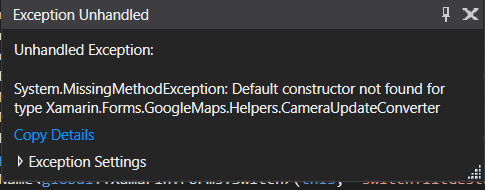
when i tried your plugin links
https://github.com/amay077/Xamarin.Forms.GoogleMaps/blob/master/XFGoogleMapSample/XFGoogleMapSample/BasicMapPage.xaml#L124
https://github.com/amay077/Xamarin.Forms.GoogleMaps/blob/master/XFGoogleMapSample/XFGoogleMapSample/BindingPinViewPage.xaml.cs#L13
it has problem with this line in xaml file
InitialCameraUpdate="34, 135, 14, 30, 60"
any help
 AbdelrahmanAA
on 2 Aug 2017
AbdelrahmanAA
on 2 Aug 2017
@amay077
I am seeing the same error and I just updated to 2.1.0, if I remove the InitialCameraUpdate in Xaml the view no longer crashes.
 kevincraig
on 15 Aug 2017
kevincraig
on 15 Aug 2017
yes the same is here
when i remove the camera from xaml it works
AbdelrahmanAA
on 7 Sep 2017
Thanks @kevincraig , @abdoelzamalkawy ,
Maybe I should change CameraUpdateConverter accessibility to public.
amay077
on 18 Sep 2017
What about this problem ? Any solution ? I am getting Rome as the initial place and I need to initiate my map in my position, and not move from Rome to it... Everytime I start a new map, it shows Rome and after that, moves to my position.
 olivertech
on 16 Jun 2018
olivertech
on 16 Jun 2018
Sorry guys, I still can't understand how this is possible.
It is exactly what I need too:
<maps:Map
    InitialCameraUpdate="{Binding FirstCameraUpdate}"  <-- binding to ViewModel
    VerticalOptions="FillAndExpand" />
 stesvis
on 27 Oct 2018
stesvis
on 27 Oct 2018
Related issues
 soile1991
·
5Comments
soile1991
·
5Comments
 PeterRT
·
7Comments
PeterRT
·
7Comments
 ViktorBylbas
·
4Comments
ViktorBylbas
·
4Comments
 talhaa91
·
4Comments
talhaa91
·
4Comments
 idan-rubin
·
6Comments
idan-rubin
·
6Comments