Xamarin-android: Can not install NDK
Steps to Reproduce
- Run "Visual Studio 2017 Professional edition"
- Open menu "Tools->Android->Android SDK Manager..."
- Select tab "Tools", check box named "NDK", press "Apply" button
Expected Behavior
Android NDK should be downloaded, installed and functional
Actual Behavior
Always (regardless of NDK version selection or repo choice, MS or Google) I always get "Downloading NDK v17.1.4828580 failed"
Version Information
Microsoft Visual Studio Professional 2017
Version 15.8.7
VisualStudio.15.Release/15.8.7+28010.2046
Microsoft .NET Framework
Version 4.7.03056
Installed Version: Professional
Visual C++ 2017 00369-60000-00001-AA263
Microsoft Visual C++ 2017
ADL Tools Service Provider 1.0
This package contains services used by Data Lake tools
Application Insights Tools for Visual Studio Package 8.13.10627.1
Application Insights Tools for Visual Studio
ASP.NET and Web Tools 2017 15.8.05085.0
ASP.NET and Web Tools 2017
ASP.NET Core Razor Language Services 15.8.31590
Provides languages services for ASP.NET Core Razor.
ASP.NET Web Frameworks and Tools 2012 4.0.30625.0
For additional information, visit https://www.asp.net/
ASP.NET Web Frameworks and Tools 2017 5.2.60618.0
For additional information, visit https://www.asp.net/
Azure App Service Tools v3.0.0 15.8.05023.0
Azure App Service Tools v3.0.0
Azure Data Lake Node 1.0
This package contains the Data Lake integration nodes for Server Explorer.
Azure Data Lake Tools for Visual Studio 2.3.5001.4
Microsoft Azure Data Lake Tools for Visual Studio
Azure Functions and Web Jobs Tools 15.9.02046.0
Azure Functions and Web Jobs Tools
Azure Stream Analytics Tools for Visual Studio 2.3.5001.4
Microsoft Azure Stream Analytics Tools for Visual Studio
C# Tools 2.9.0-beta8-63208-01
C# components used in the IDE. Depending on your project type and settings, a different version of the compiler may be used.
Common Azure Tools 1.10
Provides common services for use by Azure Mobile Services and Microsoft Azure Tools.
Cookiecutter 15.8.18241.1
Provides tools for finding, instantiating and customizing templates in cookiecutter format.
Extensibility Message Bus 1.1.49 (remotes/origin/d15-8@ee674f3)
Provides common messaging-based MEF services for loosely coupled Visual Studio extension components communication and integration.
Fabric.DiagnosticEvents 1.0
Fabric Diagnostic Events
JavaScript Language Service 2.0
JavaScript Language Service
JavaScript Project System 2.0
JavaScript Project System
Microsoft Azure HDInsight Azure Node 2.3.5001.4
HDInsight Node under Azure Node
Microsoft Azure Hive Query Language Service 2.3.5001.4
Language service for Hive query
Microsoft Azure Service Fabric Tools for Visual Studio 2.3
Microsoft Azure Service Fabric Tools for Visual Studio
Microsoft Azure Stream Analytics Language Service 2.3.5001.4
Language service for Azure Stream Analytics
Microsoft Azure Stream Analytics Node 1.0
Azure Stream Analytics Node under Azure Node
Microsoft Azure Tools 2.9
Microsoft Azure Tools for Microsoft Visual Studio 2017 - v2.9.10730.2
Microsoft Continuous Delivery Tools for Visual Studio 0.4
Simplifying the configuration of Azure DevOps pipelines from within the Visual Studio IDE.
Microsoft JVM Debugger 1.0
Provides support for connecting the Visual Studio debugger to JDWP compatible Java Virtual Machines
Microsoft Library Manager 1.0
Install client-side libraries easily to any web project
Microsoft MI-Based Debugger 1.0
Provides support for connecting Visual Studio to MI compatible debuggers
Microsoft Visual C++ Wizards 1.0
Microsoft Visual C++ Wizards
Microsoft Visual Studio Tools for Containers 1.1
Develop, run, validate your ASP.NET Core applications in the target environment. F5 your application directly into a container with debugging, or CTRL + F5 to edit & refresh your app without having to rebuild the container.
Microsoft Visual Studio VC Package 1.0
Microsoft Visual Studio VC Package
MLGen Package Extension 1.0
MLGen Package Visual Studio Extension Detailed Info
Mono Debugging for Visual Studio 4.11.11-pre (8fb558f)
Support for debugging Mono processes with Visual Studio.
Node.js Tools 1.4.20907.4 Commit Hash:f048d52e417a8902dea9e42828b7fdab92d4aaaa
Adds support for developing and debugging Node.js apps in Visual Studio
NuGet Package Manager 4.6.0
NuGet Package Manager in Visual Studio. For more information about NuGet, visit http://docs.nuget.org/.
NuGet PackageReference Upgrader 1.0
A VS2017 Extension that helps legacy apps migrate off of packages.config.
NuGetReferenceSwitcher 1.0
Information about my package
PowerShell Pro Tools for Visual Studio 1.0
A set of tools for developing and debugging PowerShell scripts and modules in Visual Studio.
ProjectServicesPackage Extension 1.0
ProjectServicesPackage Visual Studio Extension Detailed Info
Python 15.8.18241.1
Provides IntelliSense, projects, templates, debugging, interactive windows, and other support for Python developers.
Python - Django support 15.8.18241.1
Provides templates and integration for the Django web framework.
Python - IronPython support 15.8.18241.1
Provides templates and integration for IronPython-based projects.
Python - Profiling support 15.8.18241.1
Profiling support for Python projects.
Python - UWP support 15.8.18241.1
Provides templates and integration for the UWP framework.
Python - VC Project Support 15.8.18116.3
Provides support for launching C++ projects with Python debugging enabled.
R Tools for Visual Studio 1.3.40517.1016
Provides project system, R Interactive window, plotting, and more for the R programming language.
ResourcePackage Extension 1.0
ResourcePackage Visual Studio Extension Detailed Info
ResourcePackage Extension 1.0
ResourcePackage Visual Studio Extension Detailed Info
SQL Server Data Tools 15.1.61808.07020
Microsoft SQL Server Data Tools
Test Adapter for Boost.Test 1.0
Enables Visual Studio's testing tools with unit tests written for Boost.Test. The use terms and Third Party Notices are available in the extension installation directory.
Test Adapter for Google Test 1.0
Enables Visual Studio's testing tools with unit tests written for Google Test. The use terms and Third Party Notices are available in the extension installation directory.
ToolWindowHostedEditor 1.0
Hosting json editor into a tool window
TypeScript Tools 15.8.20822.2001
TypeScript Tools for Microsoft Visual Studio
Visual Basic Tools 2.9.0-beta8-63208-01
Visual Basic components used in the IDE. Depending on your project type and settings, a different version of the compiler may be used.
Visual C++ for Cross Platform Mobile Development (Android) 15.0.27924.00
Visual C++ for Cross Platform Mobile Development (Android)
Visual C++ for Cross Platform Mobile Development (iOS) 15.0.27825.00
Visual C++ for Cross Platform Mobile Development (iOS)
Visual C++ for Linux Development 1.0.9.27924
Visual C++ for Linux Development
Visual F# Tools 10.2 for F# 4.5 15.8.0.0. Commit Hash: 55a3dc3231c95c77f81ee53f7d29152029da7408.
Microsoft Visual F# Tools 10.2 for F# 4.5
Visual Studio Code Debug Adapter Host Package 1.0
Interop layer for hosting Visual Studio Code debug adapters in Visual Studio
Visual Studio Spell Check Everywhere VSSpellCheckEverywhere
An extension that enables spell checking within any Visual Studio file editor or tool window that uses WPF text boxes.
https://GitHub.com/EWSoftware/VSSpellChecker
Visual Studio Spell Checker VSSpellChecker
An editor extension that checks the spelling of comments, strings, and plain text as you type or interactively with tool windows.
https://GitHub.com/EWSoftware/VSSpellChecker
Visual Studio Tools for Apache Cordova 15.123.7408.1
Visual Studio Tools for Apache Cordova
Visual Studio Tools for CMake 1.0
Visual Studio Tools for CMake
Visual Studio Tools for Containers 1.0
Visual Studio Tools for Containers
Visual Studio Tools for Universal Windows Apps 15.0.28010.2046
The Visual Studio Tools for Universal Windows apps allow you to build a single universal app experience that can reach every device running Windows 10: phone, tablet, PC, and more. It includes the Microsoft Windows 10 Software Development Kit.
VisualStudio.Mac 1.0
Mac Extension for Visual Studio
Xamarin 4.11.0.776 (d15-8@1ae9b59d7)
Visual Studio extension to enable development for Xamarin.iOS and Xamarin.Android.
Xamarin Designer 4.15.9 (d000f568b)
Visual Studio extension to enable Xamarin Designer tools in Visual Studio.
Xamarin Templates 1.1.116 (9619170)
Templates for building iOS, Android, and Windows apps with Xamarin and Xamarin.Forms.
Xamarin.Android SDK 9.0.0.19 (HEAD/a8a3b0ec7)
Xamarin.Android Reference Assemblies and MSBuild support.
Xamarin.iOS and Xamarin.Mac SDK 12.0.0.15 (84552a4)
Xamarin.iOS and Xamarin.Mac Reference Assemblies and MSBuild support.
 sensboston
All 26 comments
This is a Xamarin SDK Manager issue, I created a VSTS report for this issue.
 grendello
on 19 Nov 2018
grendello
on 19 Nov 2018
/cc @joj and @sgmunn - SDK Manager should be updated once fix for this issue is available
grendello
on 19 Nov 2018
@sensboston , could you attach the Android SDK Manager logs from C:\Users\<user.name>\AppData\Local\Xamarin\Logs\15.0?
You can also open the logs from Help->Xamarin->Open logs.
 DmitriyKirakosyan
on 19 Nov 2018
DmitriyKirakosyan
on 19 Nov 2018
I've got issue resolved by re-opening SDK Manager with "Administrator" privileges. So, it looks like Xamarin plugin runs it with insufficient privileges. BTW, it's a reproducible issue, not only one PC specific.
sensboston
on 20 Nov 2018
@sensboston Could you please check if the issue is reproducing if you restart the VS?
Also, could you still share the logs?
DmitriyKirakosyan
on 20 Nov 2018
@sensboston we automatically detect where the SDK is and open the SDK manager with privileges if needed. Where is your NDK being installed? And is that the path you have in SDK manager when you open it?
 joj
on 20 Nov 2018
joj
on 20 Nov 2018
@garuma maybe we should consider having the SDK manager have that logic instead of VS? (from my comment above)
joj
on 20 Nov 2018
@DmitriyKirakosyan, current logs are useless, no information about error.
logs.zip

@joj, on this PC (see logs and screenshots) NDK is not installed, patch (in VS settings) is empty but marked by green checkmark.
sensboston
on 20 Nov 2018
I have what appears to be same issue. VS was new install 15.8.7 and it installed in C:\Program Files (x86)\Microsoft Visual Studio\2017\Professional
- All the above items listed above I have tried. Logs have no details.
- Updated to VS to 15.9.2 yesterday same problem NDK fails to install.
Attached Image vsfailed.png
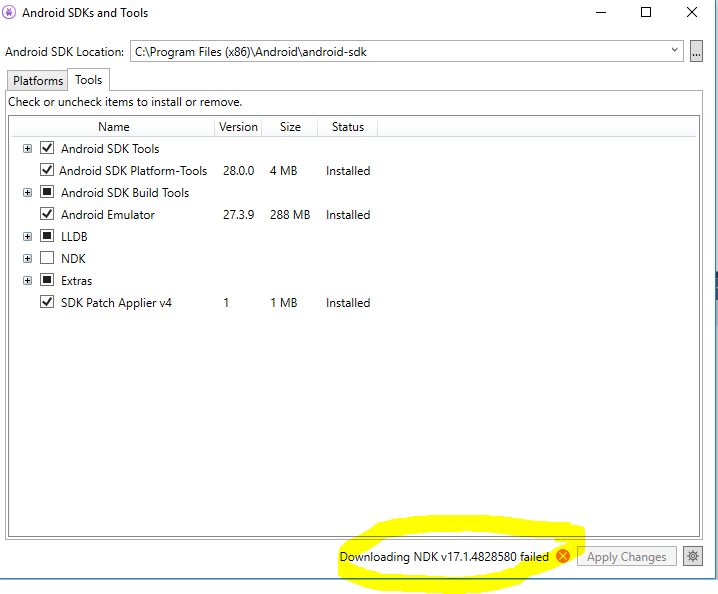
- Installed Android studio 3.1.2 to see if NDK loads via android studio sdk manager and it loads to Users\nameappdata\localandroid\sdk
Attached image

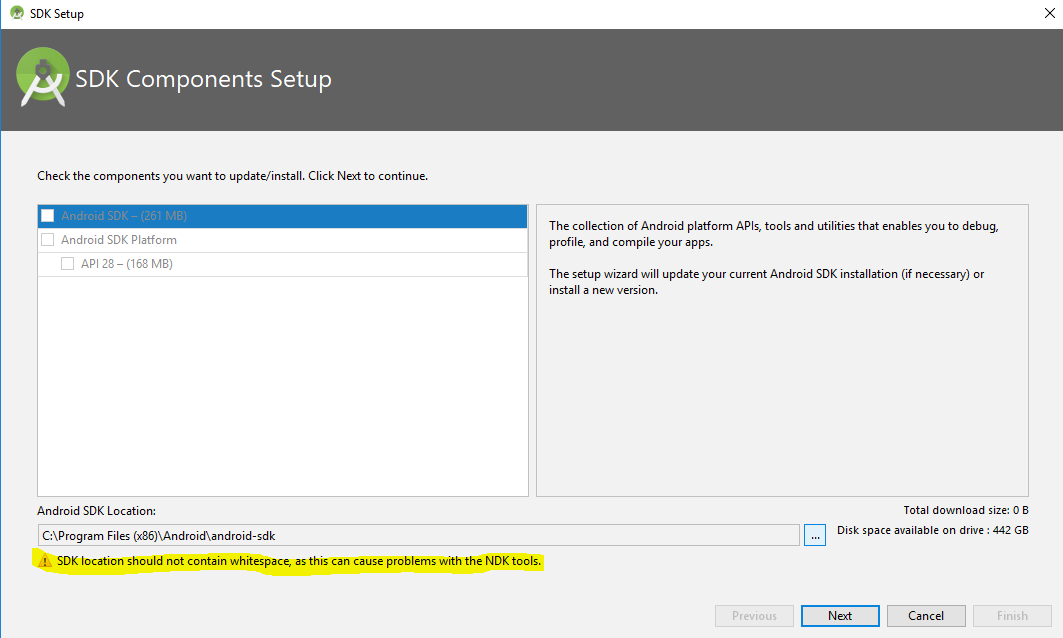
I notice that if I try to alter the path of the SDK folder in Android studio to point to visual studio version of the SDK in C:\Program Files (x86)Androidandroid-sdk then Android studio message objects to "whitespace" Is it just the whitespace causing error ??
Attached Image. changepath.png
 wsgraham
on 20 Nov 2018
wsgraham
on 20 Nov 2018
Additional information to my comment. If I point to the android studio version of the SDK which happily installed the NDK within VS Options-Xamarin-android settings then VS is happy.
I also could manually install the NDK into the program files (x86) where VS defaulted to on its install and this also seems to work (as far as I can tell).
The only issue is that I would only like to run updates via VS android sdk manager not have to try and worry about incompatibilities that might occur VS versus Android

wsgraham
on 20 Nov 2018
@wsgraham, @sensboston: did you ever find a workaround aside from manually installing an NDK yourself?
I'm seeing the same exact problem on a fairly clean install of Windows 10 and VS 2017. No clues as to what's going wrong in either logs or procmon.
 mfeingol
on 22 Dec 2018
mfeingol
on 22 Dec 2018
@mfeingol, I've got NDK installed by running VS2017 as "Administrator".
sensboston
on 22 Dec 2018
I tried that, made no difference. The SDK Manager already elevates when I run it from VS, so not surprising.
mfeingol
on 22 Dec 2018
Hmm, it's strange - running VS elevated ("Run as Administrator") helped me on all three PCs.
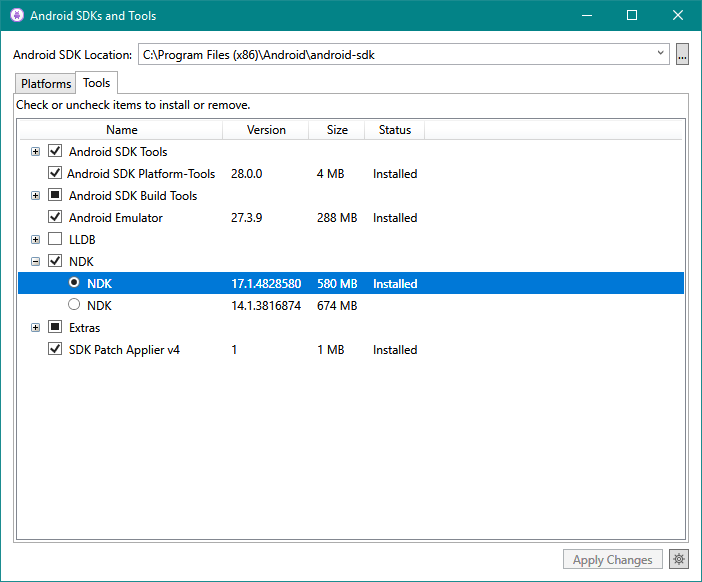
sensboston
on 22 Dec 2018
I believe you. :-) So you weren't being prompted to elevate when launching the SDK Manager?
What I see is the NDKs download, the zip files are there under appdata… but then the install process fails quickly for no apparent reason.
I've worked around the problem by manually unzipping the official 17c, but I'd like to play this by the book...
mfeingol
on 22 Dec 2018
Of course, if VS is running under administrative privileges, all spawning sub-processes are also having these privileges and rights. And as I said above, I did it 3 times in a row, and always got success. What's why I confused what this workaround didn't worked for you.
sensboston
on 22 Dec 2018
Go a head to C:\Users{user name}\AppData\Local\Temp
there you fill find folder called -> xamarin-android-sdk
copy ziped folder called android-ndk-r17b-windows-x86/ or 64 as yours
move and zip it , in setting below android sdk location , there is ndk location
 mosababdo
on 31 Dec 2018
mosababdo
on 31 Dec 2018
@mosababdo: thanks for the manual workaround. But I think we all hope this can be fixed in the SDK Manager itself.
mfeingol
on 2 Jan 2019
Having the same issue.
@mosababdo can confirm this workaround works.
 mclillill
on 11 Jan 2019
mclillill
on 11 Jan 2019
Solution: go to tools/options/Android configuration and check automatic install Android SDK.
After this only doble click in the error and will insstall automaticly.
 varitono
on 21 Jan 2019
varitono
on 21 Jan 2019
@varitono: that doesn't seem to help.
Where exactly should we double-click to trigger an NDK install?
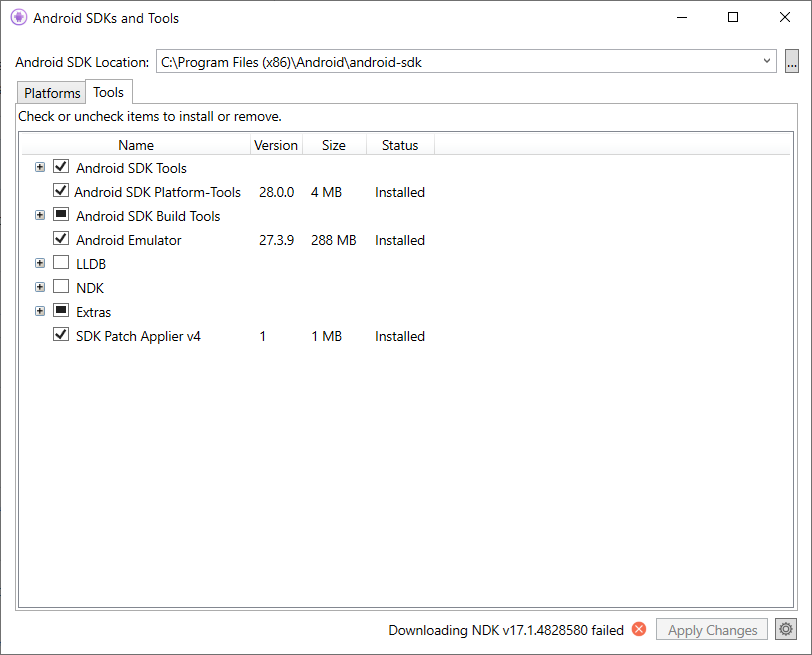
mfeingol
on 22 Jan 2019
Same error here. Can't install NDK, even with Administrator privileges.
Also trying to run directly SDK Manager, doesn't open.

 jbryanx
on 28 Jan 2019
jbryanx
on 28 Jan 2019
Any updates on this issue?
mfeingol
on 18 Feb 2019
Changing the SDK location to path inside my user directory helps me.
 Footmau
on 1 Apr 2019
Footmau
on 1 Apr 2019
A fresh install of VS 2019 appears to have fixed this for me.
mfeingol
on 8 Apr 2019
I believe this should be resolved in the latest VS 2019 release. Please reopen the issue if you're still running into this!
 pjcollins
on 20 Jun 2019
pjcollins
on 20 Jun 2019
Related issues
 dehghani-mehdi
·
42Comments
dehghani-mehdi
·
42Comments
 darkblackcorner
·
49Comments
darkblackcorner
·
49Comments
 rihadavid
·
46Comments
rihadavid
·
46Comments
 gmck
·
54Comments
gmck
·
54Comments
 hesamdarbandi
·
59Comments
hesamdarbandi
·
59Comments