Xamarin-android: Error: "java.exe" exited with code 1 in Release mode
Steps to Reproduce
- Open up any Xamarin.Android project
- Change Solution Configuration to Release mode
- Try to build the solution
Expected Behavior
Successful build.
Actual Behavior
I got this error
"java.exe" exited with code 1.
Version Information
I'm using VS 2017, v 15.6
Xamarin 4.9.0.749
Xamarin Designer 4.10.58
Xamarin.Android SDK 8.2.0.15
I tired following:
- Updating Proguard to latest version
- Updating JDK (jdk1.8.0_162), but downgraded to 161 again
- Set 1G as Java max heap size
- And all other solutions that you can find here: https://forums.xamarin.com/discussion/9305/java-exe-exited-with-code-1-xamarin-android-common-targets
I'm using Support library v4 and v7, Picaso, CallygraphyXamarin and JSON.net
In Debug mode I can build and archive the solution without any problem.
__Update__:
If I disable Proguard , I can get successful build/archive.
 dehghani-mehdi
All 42 comments
Please provide diagnostic build log output.
What OS+platform are you on? Is it 32-bit or 64-bit?
 jonpryor
on 6 Mar 2018
jonpryor
on 6 Mar 2018
@jonpryor Windows 10 x64
The diagnostic build log output:
diagnostic build log output.txt
dehghani-mehdi
on 7 Mar 2018
@dehghani-mehdi: Thank you.
This appears to be the culprit:
1>  C:\Program-Files-(x86)\Java\jdk1.8.0_161\\bin\java.exe -jar "C:\Program Files (x86)\Microsoft Visual Studio\2017\Enterprise\MSBuild\Xamarin\Android\proguard\lib\proguard.jar" -include "'C:\Program-Files-(x86)\Android\android-sdk\\tools\proguard\proguard-android.txt'" -include "'obj\Release\proguard\proguard_xamarin.cfg'" -include "'obj\Release\proguard\proguard_project_references.cfg'" -include "'obj\Release\proguard\proguard_project_primary.cfg'" -include "'proguard.cfg'" -include "'IT_IS_JUST_PATH_TO_SOLUTION\packages\Xamarin.Android.Arch.Lifecycle.Runtime.1.0.0\build\MonoAndroid80\..\..\proguard\proguard.txt'" -include "'IT_IS_JUST_PATH_TO_SOLUTION\packages\Xamarin.Android.Support.Core.UI.26.1.0.1\build\MonoAndroid80\..\..\proguard\proguard.txt'" -include "'IT_IS_JUST_PATH_TO_SOLUTION\packages\Xamarin.Android.Support.Media.Compat.26.1.0.1\build\MonoAndroid80\..\..\proguard\proguard.txt'" -include "'IT_IS_JUST_PATH_TO_SOLUTION\packages\Xamarin.Android.Support.v7.RecyclerView.26.1.0.1\build\MonoAndroid80\..\..\proguard\proguard.txt'" -include "'IT_IS_JUST_PATH_TO_SOLUTION\packages\Xamarin.Android.Support.Animated.Vector.Drawable.26.1.0.1\build\MonoAndroid80\..\..\proguard\proguard.txt'" -include "'IT_IS_JUST_PATH_TO_SOLUTION\packages\Xamarin.Android.Support.Design.26.1.0.1\build\MonoAndroid80\..\..\proguard\proguard.txt'" -injars "'obj\Release\android\bin\classes\..\classes.zip'(!META-INF/MANIFEST.MF);'C:\Program Files (x86)\Microsoft Visual Studio\2017\Enterprise\Common7\IDE\ReferenceAssemblies\Microsoft\Framework\MonoAndroid\v8.1\mono.android.jar'(!META-INF/MANIFEST.MF);'obj\Release\lp\0\jl\bin\classes.jar'(!META-INF/MANIFEST.MF);'obj\Release\lp\11\jl\bin\classes.jar'(!META-INF/MANIFEST.MF);'obj\Release\lp\12\jl\bin\classes.jar'(!META-INF/MANIFEST.MF);'obj\Release\lp\13\jl\bin\classes.jar'(!META-INF/MANIFEST.MF);'obj\Release\lp\14\jl\bin\classes.jar'(!META-INF/MANIFEST.MF);'obj\Release\lp\15\jl\bin\classes.jar'(!META-INF/MANIFEST.MF);'obj\Release\lp\16\jl\bin\classes.jar'(!META-INF/MANIFEST.MF);'obj\Release\lp\17\jl\bin\classes.jar'(!META-INF/MANIFEST.MF);'obj\Release\lp\18\jl\bin\classes.jar'(!META-INF/MANIFEST.MF);'obj\Release\lp\19\jl\bin\classes.jar'(!META-INF/MANIFEST.MF);'obj\Release\lp\2\jl\okhttp.jar'(!META-INF/MANIFEST.MF);'obj\Release\lp\20\jl\bin\classes.jar'(!META-INF/MANIFEST.MF);'obj\Release\lp\21\jl\bin\classes.jar'(!META-INF/MANIFEST.MF);'obj\Release\lp\22\jl\bin\classes.jar'(!META-INF/MANIFEST.MF);'obj\Release\lp\3\jl\okio.jar'(!META-INF/MANIFEST.MF);'obj\Release\lp\4\jl\picasso-2.5.2.jar'(!META-INF/MANIFEST.MF);'obj\Release\lp\6\jl\arch-core-common.jar'(!META-INF/MANIFEST.MF);'obj\Release\lp\7\jl\arch-lifecycle-common.jar'(!META-INF/MANIFEST.MF);'obj\Release\lp\8\jl\bin\classes.jar'(!META-INF/MANIFEST.MF);'obj\Release\lp\9\jl\bin\classes.jar'(!META-INF/MANIFEST.MF)" -libraryjars "'C:\Program-Files-(x86)\Android\android-sdk\platforms\android-27\android.jar'" -outjars obj\Release\proguard\__proguard_output__.jar -optimizations !code/allocation/variable  (TaskId:396)
1>  proguard.ParseException: Unknown option '-dontwarn' in line 1 of file 'proguard.cfg', (TaskId:396)
1>    included from argument number 10 (TaskId:396)
1>      at proguard.ConfigurationParser.parse(Unknown Source) (TaskId:396)
1>      at proguard.ProGuard.main(Unknown Source) (TaskId:396)
1>  Picked up JAVA_TOOL_OPTIONS: -Dfile.encoding=UTF8 (TaskId:396)
1>C:\Program Files (x86)\Microsoft Visual Studio\2017\Enterprise\MSBuild\Xamarin\Android\Xamarin.Android.Common.targets(2132,3): error MSB6006: "java.exe" exited with code 1.
In particular that second line:
proguard.ParseException: Unknown option '-dontwarn' in line 1 of file 'proguard.cfg',
This appears to be an issue regarding file encoding.
Unfortunately I don't know what the current-working-directory for that java.exe, and thus I don't know where proguard.cfg is coming from. Is it in your project directory?
For that matter, I don't know why proguard.cfg is being mentioned at all. Presumably it's via @(ProguardConfiguration), but I don't see it listed in other mentions of @(ProguardConfiguration) in that log file, so this is a tad confusing.
jonpryor
on 8 Mar 2018
Would you be able to provide your project? I really don't understand where proguard.cfg is coming from.
jonpryor
on 8 Mar 2018
@jonpryor You're welcome, I added proguard.cfg to the root of the project and set as ProguardConfiguration (in build action section). it's one of solutions that I found in that post on Xamarin's forum.
I got the error without that too.
Should I send log without proguard.cfg?
dehghani-mehdi
on 8 Mar 2018
@dehghani-mehdi: Yes, or you can read the log and provide the next bit of output around error MSB6006: "java.exe" exited with code 1.
jonpryor
on 9 Mar 2018
Here you go
xamarin log.txt
dehghani-mehdi
on 10 Mar 2018
Error point to line 2132, col 3 of:
"C:\Program Files (x86)\Microsoft Visual Studio\2017\Enterprise\MSBuild\Xamarin\Android\Xamarin.Android.Common.targets" Which is:
  <Proguard
    Condition="'$(AndroidEnableProguard)' == 'True' and '$(_ProguardProjectConfiguration)' != ''"
    ProguardJarPath="$(ProguardJarPath)"
    AndroidSdkDirectory="$(_AndroidSdkDirectory)"
    JavaToolPath="$(JavaToolPath)"
    ProguardToolPath="$(ProguardToolPath)"
    ToolExe="$(ProguardToolExe)"
    UseProguard="$(UseProguard)"
    JavaPlatformJarPath="$(JavaPlatformJarPath)"
    ClassesOutputDirectory="$(IntermediateOutputPath)android\bin\classes"
    AcwMapFile="$(_AcwMapFile)"
    ProguardCommonXamarinConfiguration="$(IntermediateOutputPath)proguard\proguard_xamarin.cfg"
    ProguardGeneratedReferenceConfiguration="$(_ProguardProjectConfiguration)"
    ProguardGeneratedApplicationConfiguration="$(IntermediateOutputPath)proguard\proguard_project_primary.cfg"
    ProguardConfigurationFiles="$(ProguardConfigFiles)"
    JavaLibrariesToEmbed="@(_JarsToProguard);@(_InstantRunJavaReference)"
    ExternalJavaLibraries="@(AndroidExternalJavaLibrary)"
    DoNotPackageJavaLibraries="@(_ResolvedDoNotPackageAttributes)"
    ProguardJarOutput="$(IntermediateOutputPath)proguard\__proguard_output__.jar"
    EnableLogging="$(ProguardEnableLogging)"
    DumpOutput="$(IntermediateOutputPath)proguard\dump.txt"
    PrintSeedsOutput="$(IntermediateOutputPath)proguard\seeds.txt"
    PrintUsageOutput="$(IntermediateOutputPath)proguard\usage.txt"
    PrintMappingOutput="$(IntermediateOutputPath)proguard\mapping.txt"
    ProguardInputJarFilter="$(_AndroidProguardInputJarFilter)"
     />
I'm getting this same issue. Only occurs in Release mode. I tried playing around with the configuration manager (ignoring certain projects, etc.) but no luck
Xamarin.Forms.Core runtime is v4.0.30319, Android is up to date, etc.
 omarhimada
on 27 Apr 2018
omarhimada
on 27 Apr 2018
@omarhimada if you use third-party libraries, maybe you need to use custom ProGuard config. for example see: https://github.com/square/okio#proguard
dehghani-mehdi
on 27 Apr 2018
I'm also getting this, seems to be identical. Any help would be appreciated, we're supposed to go live in a couple weeks, and this was building fine up until now.
So far the only change that I can see possibly doing this is I recently added Firebase for my android project. Removing Firebase and all relevant code for it does stop the error.
I'm thinking maybe it has something to do with the required GooglePlay package for Firebase?
 Nixon-Joseph
on 27 Apr 2018
Nixon-Joseph
on 27 Apr 2018
Can't figure it out. Have tried updating my proguard (because my build target is 8.1), creating a custom proguard config, and every other suggestion that the internet has.
I've decided not to enable Proguard for this particular project, because Xamarin.Android doesn't obfuscate anyway, and without it. my apk is only 1MB bigger. So the difference is negligible. Hopefully it gets fixed in the future, but where obfuscation isn't even an option (I thought it was before this), I'll just live without it for now.
Hopefully you have the same option, if no other fixes come up.
Nixon-Joseph
on 30 Apr 2018
Question: does disabling proguard have any performance implications besides
just increased file size?
On Mon, Apr 30, 2018, 3:41 PM Joseph Nixon, notifications@github.com
wrote:
Can't figure it out. Have tried updating my proguard (because my build
target is 8.1), creating a custom proguard config, and every other
suggestion that the internet has.
I've decided not to enable Proguard for this particular project, because
Xamarin.Android doesn't obfuscate anyway, and without it. my apk is only
1MB bigger. So the difference is negligible. Hopefully it gets fixed in the
future, but where obfuscation isn't even an option (I thought it was before
this), I'll just live without it for now.Hopefully you have the same option, if no other fixes come up.
—
You are receiving this because you were mentioned.
Reply to this email directly, view it on GitHub
https://github.com/xamarin/xamarin-android/issues/1369#issuecomment-385506632,
or mute the thread
https://github.com/notifications/unsubscribe-auth/ACZr50TbPffkeLqBUH082qyfRDslqyPVks5tt2jpgaJpZM4SejfI
.
omarhimada
on 30 Apr 2018
I haven't seen any, but I imagine it would depend on the size of your project. My compiled application without Proguardends up only being about 17MB (for now).
https://docs.microsoft.com/en-us/xamarin/android/deploy-test/release-prep/proguard?tabs=vswin
This document shows what proguard does in Xamarin.Android - "ProGuard Step
After the linker step completes successfully, Proguard is run to remove unused Java bytecode. This is the step that optimizes the APK."
In summary, my limited understanding, is after linking (the part that really trims down your file size), all Proguard does is run through your leftover code, and removes all references to unused parameters, variables, methods, etc...
I would imagine that if you had a very large project, it would be far more useful. But for mine, I doubt there will be any notable difference.
Nixon-Joseph
on 30 Apr 2018
I mean, I agree that it sounds like it probably doesn't make a HUGE
difference, but it's bound to have atleast SOME difference
I just hope there is some solution that doesn't involve disabling a
nice-to-have feature
On Mon, Apr 30, 2018, 3:54 PM Joseph Nixon, notifications@github.com
wrote:
I haven't seen any, but I imagine it would depend on the size of your
project. My compiled application without Proguardends up only being about
17MB (for now).https://docs.microsoft.com/en-us/xamarin/android/deploy-test/release-prep/proguard?tabs=vswin
This document shows what proguard does in Xamarin.Android - "ProGuard Step
After the linker step completes successfully, Proguard is run to remove
unused Java bytecode. This is the step that optimizes the APK."In summary, my limited understanding, is after linking (the part that
really trims down your file size), all Proguard does is run through your
leftover code, and removes all references to unused parameters, variables,
methods, etc...I would imagine that if you had a very large project, it would be far more
useful. But for mine, I doubt there will be any notable difference.—
You are receiving this because you were mentioned.
Reply to this email directly, view it on GitHub
https://github.com/xamarin/xamarin-android/issues/1369#issuecomment-385509856,
or mute the thread
https://github.com/notifications/unsubscribe-auth/ACZr5y2GtaULd-EQy_B5flEYkLCEy5FAks5tt2vkgaJpZM4SejfI
.
omarhimada
on 30 Apr 2018
Agreed. It would certainly be nice to use. I will definitely keep looking for an actual fix, but for now I'll have to go this route.
Nixon-Joseph
on 30 Apr 2018
I believe the fix is to ensure you save the proguard.cfg file as Encode in UTF-8 Without BOM as Visual Studio adds the byte order mark if you create a file via the Visual Studio wizard. You can use Notepad++ to do this easily.
See https://docs.microsoft.com/en-us/xamarin/android/deploy-test/release-prep/proguard?tabs=vswin#file-issues for more details.
@omarhimada and @Nixon-Joseph To answer your question, Proguard is really a first class citizen for large apps given how significant the size it can shave off your final APK.
My blog goes over this a little bit: https://www.jon-douglas.com/2016/11/22/xamarin-android-proguard/ (I believe it's now part of the documentation I linked above as well)
 JonDouglas
on 1 May 2018
JonDouglas
on 1 May 2018
I could fix the issue in my app, @JonDouglas already mentioned the solution.
2 notes:
- Only use custom ProGuard config if you use 3rd-party libraries (_no need for support libraries_)
- For me, saving
proguard.cfgasUTF-8doesn't work, I had to save asASCII, maybe you should try that too.
I think this issue should be closed. but I keep it open for now.
dehghani-mehdi
on 1 May 2018
@dehghani-mehdi How did you save as ASCII? I seem to have all other formatting options, other than that. UTF-8 doesn't seem to be working for me either.
Nixon-Joseph
on 3 May 2018
Looks like I found what works for me... Super weird... I was having issues playing with my build tools in the sdk manager (and then all of the sudden, I couldn't even open the SDK manager from VS any more). I happen to have an install of Android Studio, which uses it's own SDK folder, so I pointed VS at that SDK folder instead, and now it builds fine.
Nixon-Joseph
on 3 May 2018
Getting another issue now, I think it's related.
It builds now fine, but when I run the app, I get System.InvalidCastException: Unable to convert instance of type 'Android.Widget.LinearLayout' to type 'Android.Support.V7.Widget.Toolbar'. exception in my MainActivity onCreate method.
Any ideas?
Only happens when using Proguard.
Nixon-Joseph
on 3 May 2018
@Nixon-Joseph Can you try to clear your obj/bin folders to see if it's related to this issue?
JonDouglas
on 3 May 2018
@JonDouglas no dice
Nixon-Joseph
on 3 May 2018
@Nixon-Joseph If possible, please report a new GitHub issue with a respective project demonstrating this. Double check your respective FindViewById and layout resources to ensure you aren't accidentally calling the wrong view.
JonDouglas
on 3 May 2018
@JonDouglas I'll try, but I don't have a lot of time to create a repro.
Also, perhaps this isn't the right place, because I'm actually using Xamarin.Forms, and have almost zero android specific code (minus renderers and dependency classes).
Nixon-Joseph
on 3 May 2018
@Nixon-Joseph This would be the right place. Xamarin.Forms is built on-top of Xamarin.Android and that cast issue seems related to Xamarin.Android if it's not a coding error. If you do find any time, feel free to open up a new issue!
JonDouglas
on 3 May 2018
@JonDouglas
https://github.com/xamarin/xamarin-android/issues/1641
Thanks!
Nixon-Joseph
on 4 May 2018
So, as this issue is gone, I close it.
dehghani-mehdi
on 4 May 2018
I am still getting this error could you please help me figure out this issue
please check error :
Build FAILED.
3>
3>"C:\Users\jdj1\Source\Repos\SatelliteLogisticsGroup\kegid-x\KegID\KegID.Android\KegID.Android.csproj" (Rebuild;BuiltProjectOutputGroup;BuiltProjectOutputGroupDependencies;DebugSymbolsProjectOutputGroup;DebugSymbolsProjectOutputGroupDependencies;DocumentationProjectOutputGroup;DocumentationProjectOutputGroupDependencies;SatelliteDllsProjectOutputGroup;SatelliteDllsProjectOutputGroupDependencies;SGenFilesOutputGroup;SGenFilesOutputGroupDependencies target) (1) ->
3>(_CheckForContent target) ->
3>  C:\Users\jdj1\Source\Repos\SatelliteLogisticsGroup\kegid-x\KegID\KegID.Android\FodyWeavers.xml : warning XA0101: @(Content) build action is not supported
3>
3>
3>"C:\Users\jdj1\Source\Repos\SatelliteLogisticsGroup\kegid-x\KegID\KegID.Android\KegID.Android.csproj" (Rebuild;BuiltProjectOutputGroup;BuiltProjectOutputGroupDependencies;DebugSymbolsProjectOutputGroup;DebugSymbolsProjectOutputGroupDependencies;DocumentationProjectOutputGroup;DocumentationProjectOutputGroupDependencies;SatelliteDllsProjectOutputGroup;SatelliteDllsProjectOutputGroupDependencies;SGenFilesOutputGroup;SGenFilesOutputGroupDependencies target) (1) ->
3>(ResolveAssemblyReferences target) ->
3>  C:\Program Files (x86)\Microsoft Visual Studio\2019\Professional\MSBuild\Current\Bin\Microsoft.Common.CurrentVersion.targets(2106,5): warning MSB3277: Found conflicts between different versions of "Microsoft.CSharp" that could not be resolved.  These reference conflicts are listed in the build log when log verbosity is set to detailed.
3>
3>
3>"C:\Users\jdj1\Source\Repos\SatelliteLogisticsGroup\kegid-x\KegID\KegID.Android\KegID.Android.csproj" (Rebuild;BuiltProjectOutputGroup;BuiltProjectOutputGroupDependencies;DebugSymbolsProjectOutputGroup;DebugSymbolsProjectOutputGroupDependencies;DocumentationProjectOutputGroup;DocumentationProjectOutputGroupDependencies;SatelliteDllsProjectOutputGroup;SatelliteDllsProjectOutputGroupDependencies;SGenFilesOutputGroup;SGenFilesOutputGroupDependencies target) (1) ->
3>(_CompileToDalvikWithD8 target) ->
3>  C:\Program Files (x86)\Microsoft Visual Studio\2019\Professional\MSBuild\Xamarin\Android\Xamarin.Android.D8.targets(81,5): error MSB6006: "java.exe" exited with code 1.
3>
3>    2 Warning(s)
3>    1 Error(s)
3>
3>Time Elapsed 00:01:40.05
 jitendrajadav
on 10 Dec 2019
jitendrajadav
on 10 Dec 2019
@jitendrajadav did you try all mentioned solutions here? I didn't get this error since I closed the issue.
dehghani-mehdi
on 10 Dec 2019
@dehghani-mehdi I have tried all the stuff but couldn't get any luck I am attaching diagnostic build log output: please check
jitendrajadav
on 11 Dec 2019
@jitendrajadav Do you really need to use D8?
dehghani-mehdi
on 11 Dec 2019
Thank you @dehghani-mehdi for you reply I was earlier using Proguard but now while changing all the stuff automatically it will set I have tried with Proguard and R8 but it won't work I don't know what to do now?
jitendrajadav
on 12 Dec 2019
NP, are you able to build the hello world app with same settings as this app? I think the problem is related to R8/D8. but I think you should try to see if you can build hello world app. with them to narrow down the problem area.
dehghani-mehdi
on 12 Dec 2019
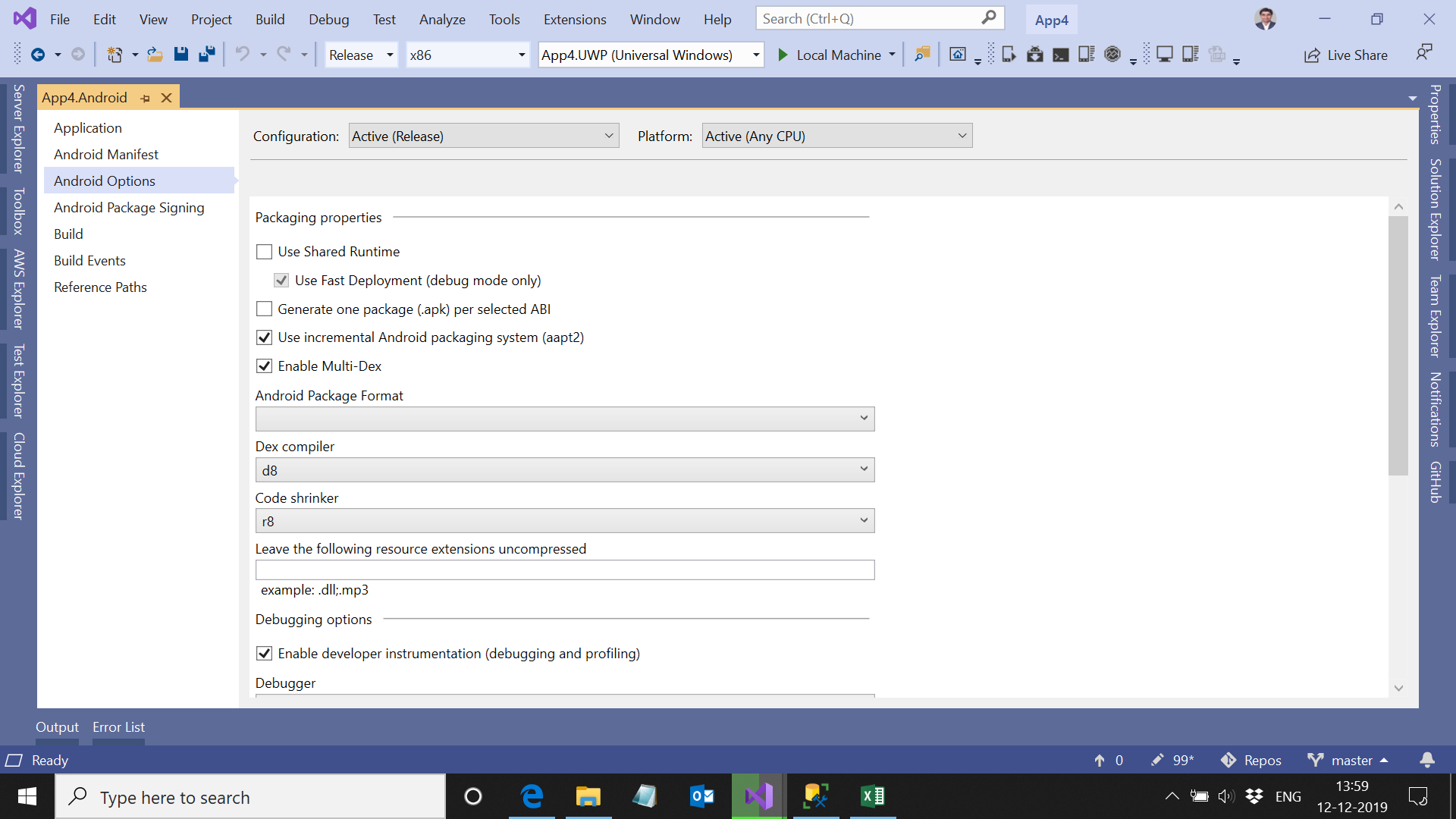
Yes Hello World Application working fine, what I have did it I have created new application and try to build in Release mode and it is working fine!
This what my setting please check
jitendrajadav
on 12 Dec 2019
Hi @dehghani-mehdi any update on it?
jitendrajadav
on 17 Dec 2019
@jitendrajadav Hi bro, did you try my prev suggestion?
I googled about this problem but I found nothing, the hello world app works for me too, so I think this problem is related to one or more of nuget packages that you used in your app. follow my prev suggestion, so you can find the target package(s).
dehghani-mehdi
on 17 Dec 2019
Hi @dehghani-mehdi I have tried with ASCII, UTF-8 without BOM but couldn't get much of help, I am not sure I how would I solved this problem my work is blocked
jitendrajadav
on 18 Dec 2019
Hi, @jitendrajadav
Do following:
- If you don't use Git or other version control systems, create a backup of your project
- Remove all nuget packages and related codes
- Try to build, build should be successful at this point
- Start adding nuget packages __one by one__ and try to build each time you add a nuget package
- Do #3 as long as you can build the project
The build should failed at some point, let me know the name of the package which cause the failed build.
_after adding each package I think you need to use the package, e.g call at least one method of the api of it_
dehghani-mehdi
on 18 Dec 2019
Hi @dehghani-mehdi I found only 1 package is creating problem and the package is
"LinkOS_Xamarin_SDK"
Please help me to figure out this problem
jitendrajadav
on 20 Dec 2019
Hi man, I didn't use this package before, but on its nuget page they mentioned
All new Xamarin development for Zebra printers should use the newer Zebra.Printer.SDK
Did you try the new package?
dehghani-mehdi
on 20 Dec 2019
sorry for long delay new suggested SDK works well! thank you for you support
jitendrajadav
on 14 Dec 2020
Related issues
 Cheesebaron
·
60Comments
Cheesebaron
·
60Comments
 xufeipyxis
·
40Comments
xufeipyxis
·
40Comments
 gmck
·
54Comments
gmck
·
54Comments
 johnthiriet
·
61Comments
johnthiriet
·
61Comments
 hesamdarbandi
·
59Comments
hesamdarbandi
·
59Comments
Most helpful comment
I believe the fix is to ensure you save the
proguard.cfgfile asEncode in UTF-8 Without BOMas Visual Studio adds the byte order mark if you create a file via the Visual Studio wizard. You can use Notepad++ to do this easily.See https://docs.microsoft.com/en-us/xamarin/android/deploy-test/release-prep/proguard?tabs=vswin#file-issues for more details.
@omarhimada and @Nixon-Joseph To answer your question, Proguard is really a first class citizen for large apps given how significant the size it can shave off your final APK.
My blog goes over this a little bit: https://www.jon-douglas.com/2016/11/22/xamarin-android-proguard/ (I believe it's now part of the documentation I linked above as well)