Wysiwyg-editor: Can't apply a stylesheet to fr-view in iframe
Expected behavior.
There is an option to apply a style on the same level as the fr-view body (particularly when in an iframe).
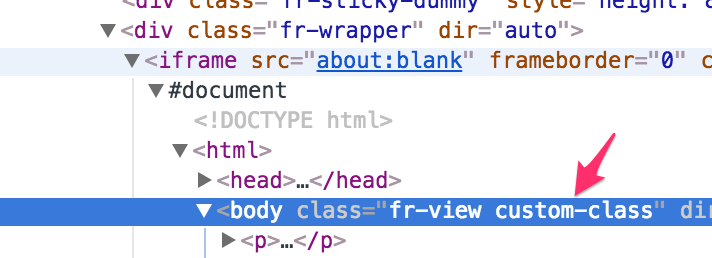
Actual behavior.
In our use case, we have multiple editors with different CSS requirements. These will be used to output to PDF, which requires isolated/normalized CSS. In order for the editor to match the desired output, we need to apply a custom class to the body of the iframe editor.
There's an iframeStyle option, but that doesn't solve the problem because we'd have to dump the entire (large) style sheet into there, and the sheets are different depending on the use case. Using .fr-view to select the styles won't work for the same reason, we need different classes.
What we need is an option that puts a class on the same level as fr-view in the wrapper as shown in the screenshot.
OS.
MacOS 10.12.6
Browser.
Google Chrome | 61.0.3163.100 (Official Build) (64-bit)
(We're a business plan customer.)
 bbugh
bbugh
All 3 comments
@bbugh is there any reason why you don't use the .fr-view class for that? Anyway, you could do it like this in the initialized event: editor.$el.addClass('custom-class').
 stefanneculai
on 19 Oct 2017
stefanneculai
on 19 Oct 2017
Yes, I detailed that in the original post.
There's an iframeStyle option, but that doesn't solve the problem because we'd have to dump the entire (large) style sheet into there, and the sheets are different depending on the use case. Using .fr-view to select the styles won't work for the same reason, we need different classes.
Having one main class (fr-view) doesn't allow us to have multiple different styles sheets that match the editor and the output, because we have different sets of sheets that we need.
Thanks for the suggestion, we'll give that a shot.
bbugh
on 19 Oct 2017
I made this work with the initialized event. Thanks for the help!
$('#editorContent').on('froalaEditor.initialized', function (e, editor) {
  editor.$el.addClass('special_class');
});
PS It would be helpful if your events page mentioned that events needed to be set up before the froalaEditor function is called!
bbugh
on 19 Oct 2017
Related issues
 george-norris-salesforce
·
4Comments
george-norris-salesforce
·
4Comments
 bnjmnfnk
·
4Comments
bnjmnfnk
·
4Comments
 cristianst
·
4Comments
cristianst
·
4Comments
 kikeso77
·
3Comments
kikeso77
·
3Comments
 Fandangi
·
3Comments
Fandangi
·
3Comments
Most helpful comment
I made this work with the initialized event. Thanks for the help!
PS It would be helpful if your events page mentioned that events needed to be set up before the
froalaEditorfunction is called!