Wysiwyg-editor: Adding Different Buttons to the QuickInsert Plugin Popup
I have the following in configuring my editor:
quickInsertButtons: ['image', 'table', 'insertLink', 'insertVideo', 'insertFile']
But only the buttons for image and table show up, not the ones that are already used in the Toolbar. I'm about to go and make my own buttons using the usual method, but I just thought it was odd that the pre-made buttons weren't working with the quickInsert plugin.
Thanks!
 Zetal911
All 18 comments
The buttons from the quick insert plugin are different than the ones from the toolbar. They are designed to make quick actions and they have a totally different behaviour than the ones which are available in the toolbar. The current available list for quick insert is: ['image', 'table', 'ul', 'ol', 'hr', 'paragraph'].
 stefanneculai
on 11 Feb 2016
stefanneculai
on 11 Feb 2016
I thought it was something like that. Do you have any advice to point me in the direction of adding new buttons to the Quick Insert plugin?
Thanks!
Zetal911
on 11 Feb 2016
We'll add some docs on our website for it shortly.
stefanneculai
on 11 Feb 2016
Is it possible to create a custom button that can be used in quickInsertButtons?
 nicooprat
on 6 Jul 2016
nicooprat
on 6 Jul 2016
Any news on this? Documentation on how to add custom buttons to the QuickInsert menu would be fantastic.
 mverstraete
on 1 Aug 2016
mverstraete
on 1 Aug 2016
Unfortunately, it's not possible yet and I don't have an ETA to share with you guys.
stefanneculai
on 1 Aug 2016
waiting for this feature !
 prakash-chokalingam
on 26 Nov 2016
prakash-chokalingam
on 26 Nov 2016
Any update on this?
 mpatelj
on 4 Jan 2017
mpatelj
on 4 Jan 2017
@stefanneculai would love to be able to at least add toolbar btns to the quickinsert. Any update on this?
 ianflorentino
on 3 Feb 2017
ianflorentino
on 3 Feb 2017
+1
It would be soooo awesome if you could register a new button with some HTML for it to insert.
 msisto
on 20 May 2017
msisto
on 20 May 2017
+1
Our team would love to have additional options for the quick insert buttons. Specifically "insert video" and "insert file".
 raerae13
on 22 May 2017
raerae13
on 22 May 2017
Agreed. This is a big one on our list too. Want to use Quick Insert to add frequent snipped for Headers / Subheaders as we are using the editor for a wiki page.
 clechner77
on 12 Jun 2017
clechner77
on 12 Jun 2017
Any update on this?
 bencallis1
on 8 Aug 2017
bencallis1
on 8 Aug 2017
@bencallis1 not yet. Sorry to keep you guys waiting so long.
stefanneculai
on 10 Aug 2017
I'd like to add my vote for this functionality. I would like to be able to add custom buttons the same way you can in the toolbar. Thanks!
 SeanDKendle
on 16 Aug 2017
SeanDKendle
on 16 Aug 2017
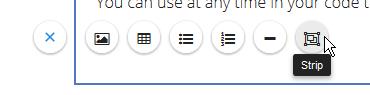
I've actually worked up a solution to this. I'd love your thoughts on this.
Altered the end of quick_insert.min.js:
    function add(newButton) {
        var iconModule = a.FE.MODULES.icon();

        b.opts.quickInsertButtons.push(newButton.name);
        a.FE.DefineIcon(newButton.name, newButton.icon);
        a.FE.QUICK_INSERT_BUTTONS[newButton.name] = newButton.button;  //abusing a constant, but not losing sleep over it.  Could add a public method to add elements

        iconModule.create(newButton.name);
    }
    var k,
    l;
    return {
        _init: j,
        hide: f,
        add: add
    }
Then, in my custom plugin, I did this:
    /*
     * newButton: {
     *  name: String,
     *  icon: {
     *      NAME: String //FontAwesome icon class
     *  },
     *  button: {
     *      icon: String, //internal icon name, should match name field above
            callback: function () {}, //function to call on button click
            requiredPlugin: String, //'nameOfPlugin', - optional
            title: String //'Tooltip Text Here'
     *  }
     */
    var newButton = "";

    newButton = {
        name: "strip",
        icon: {
            NAME: "object-group"
        },
        button: {
            icon: 'strip',
            callback: function () {
                this.quickInsert.hide(),
                console.log("strip button clicked!!!  This is where button logic goes.")
                , this.undo.saveStep()
            },
            requiredPlugin: 'strip', // name of your plugin, omit this line if you aren't making a plugin per se
            title: 'Strip'
        }
    };
    editor.quickInsert.add(newButton);
SeanDKendle
on 16 Aug 2017
@Zetal911 @nicooprat @bencallis1 @clechner77 @ianflorentino @raerae13 @msisto @mpatelj @prakash-chokalingam Here is the official way of doing this starting with version 2.7.0: https://www.froala.com/wysiwyg-editor/examples/custom-quick-insert-button.
stefanneculai
on 19 Sep 2017
Woah!

msisto
on 19 Sep 2017
Related issues
 bbugh
·
3Comments
bbugh
·
3Comments
 DerekJDev
·
3Comments
DerekJDev
·
3Comments
 bnjmnfnk
·
4Comments
bnjmnfnk
·
4Comments
 cksachdev
·
4Comments
cksachdev
·
4Comments
 Fandangi
·
3Comments
Fandangi
·
3Comments
Most helpful comment
waiting for this feature !