Wrangler: Wrangler is unable to publish w/ authentication failure, using env vars
$ CF_EMAIL="[email protected]" CF_API_KEY="xxxxx" ~/.cargo/bin/wrangler publish
⬇️ Installing wranglerjs...
⬇️ Installing wasm-pack...
✨   Built successfully, built project size is 517 bytes. ✨
Error: Something went wrong! Status: 400 Bad Request, Details {"success":false,"errors":[{"code":10000,"message":"Authentication error"}]}
Trying to publish a project (w/ no changes, directly from wrangler generate) using env vars, Wrangler is unable to authenticate. Similar error to #367, but w/ env vars
 signalnerve
All 8 comments
could not repro with current master. closing. please reopen if you still have trouble... your problem might be the quotes
 ashleygwilliams
on 30 Jul 2019
ashleygwilliams
on 30 Jul 2019
I'm having a similar issue. I installed wrangler using cargo install wrangler on a MacBook Pro running macOS Mojave 10.14.6
For reference, here are the toml files I used:
~/.wrangler/config/default.toml:
email = "[email protected]"
api_key = "api-key-went-here-with-quotes"
my-project/wrangler.toml:
account_id = "account-id-went-here-with-quotes"
name = "my-project"
type = "webpack"
# route = ""
workers_dev = true
# zone_id = ""
I tested the API key from the cloudflare workers dashboard:
curl -X GET "https://api.cloudflare.com/client/v4/user/tokens/verify" \
     -H "Authorization: Bearer api-key-went-here" \
     -H "Content-Type:application/json"
Result:
{"result":{"id":"id-went-here","status":"active"},"success":true,"errors":[],"messages":[{"code":10000,"message":"This API Token is valid and active","type":null}]}
I used an example template:
wrangler generate my-project https://github.com/cloudflare/worker-template
I ran preview, before I modified the account_id from account_id = ''
wrangler preview
⬇️ Installing wranglerjs...
⬇️ Installing wasm-pack...
✨  Built successfully, built project size is 517 bytes.
⚠️  Your wrangler.toml is missing the following fields: ["account_id"]
⚠️  Falling back to unauthenticated preview.
👷  GET https://00000000000000000000000000000000.cloudflareworkers.com
👷  Your worker responded with: Hello worker!
Then I modified account_id and set it to the account id on the cloudflare worker dashboard. I expected this might have resulted in an error:
wrangler preview
⬇️ Installing wranglerjs...
⬇️ Installing wasm-pack...
✨  Built successfully, built project size is 517 bytes.
Error: https://api.cloudflare.com/client/v4/accounts/8ebb8d81a9b45eb8b6d4a42008072281/workers/scripts/my-project/preview: Client Error: 400 Bad Request
Then I tried publish and it resulted in a 400 Bad Request. The account_id was populated was still set to the account id on the cloudflare worker dashboard:
wrangler publish
⬇️ Installing wranglerjs...
⬇️ Installing wasm-pack...
✨  Built successfully, built project size is 517 bytes.
Error: Something went wrong! Status: 400 Bad Request, Details {"success":false,"errors":[{"code":10000,"message":"Authentication error"}]}
Happy to help with further debugging
 alexmcroberts
on 19 Sep 2019
alexmcroberts
on 19 Sep 2019
hey @alexmcroberts, thanks for the thorough repro!
so this is an interesting thing! Cloudflare's API actually supports two types of authentication: one using email + _global api key_, and one using an _api token_. based on the curl command you ran to check yours, you are actually trying to use an _api token_ in place of the global api key.
Currently Wrangler only supports using email + global api key for authentication. Support for api tokens is on our radar (you can follow #471 for progress), but not yet implemented.
In the meantime, I found my global API key on this page https://dash.cloudflare.com/profile/api-tokens UNDER the API tokens section.
Hope this helps!
 ashleymichal
on 19 Sep 2019
ashleymichal
on 19 Sep 2019
Thanks @ashleymichal !
If wranger ony works with a global API key right now, can we have wrangler config throw an error when you try to use it with a non-global key?
 phayes
on 19 Sep 2019
phayes
on 19 Sep 2019
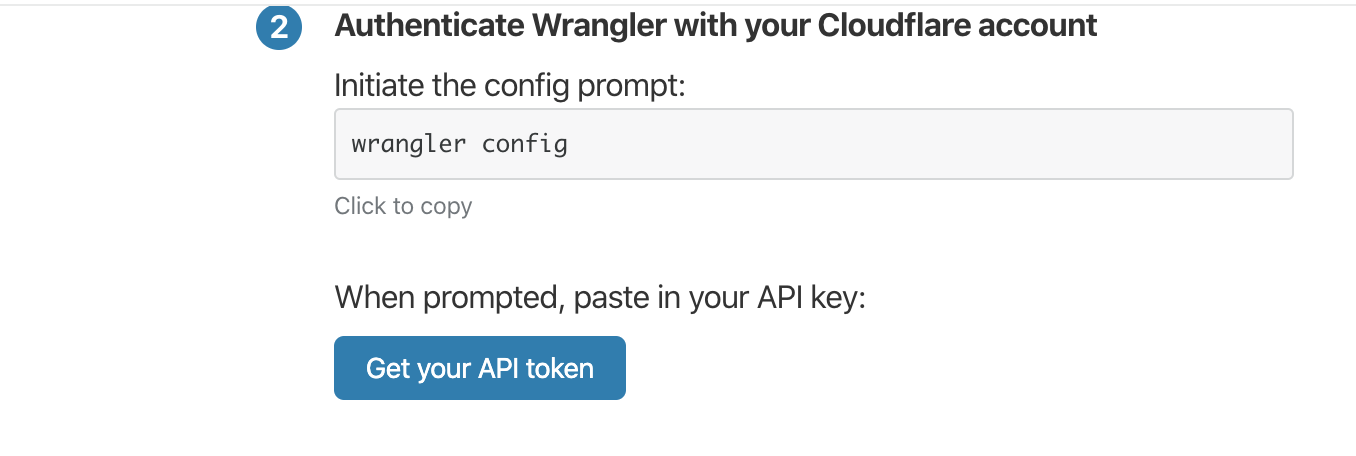
CLI Quick Start https://github.com/cloudflare/wrangler/issues/cli has a button called "Get your API token" , not "Global API Key" . So this is confusing.
 oleksandrborniak
on 9 Oct 2019
oleksandrborniak
on 9 Oct 2019
@oleksandrborniak you are 100% right! sorry about that and we'll get it fixed right away
ashleygwilliams
on 9 Oct 2019
Just run into this.
Also you could change Enter api key: for Enter Global API Key and even print the https://dash.cloudflare.com/profile/api-tokens link
 gonzaloserrano
on 17 Nov 2019
gonzaloserrano
on 17 Nov 2019
I'm still getting this error, despite using my global API key. Unable to preview, dev, or publish.
 spsaucier-bakkt
on 7 May 2020
spsaucier-bakkt
on 7 May 2020
Related issues
 autarc
·
4Comments
autarc
·
4Comments
 shyim
·
5Comments
shyim
·
5Comments
 EverlastingBugstopper
·
6Comments
EverlastingBugstopper
·
6Comments
 mxdpeep
·
6Comments
mxdpeep
·
6Comments
 tibotiber
·
6Comments
tibotiber
·
6Comments
Most helpful comment
hey @alexmcroberts, thanks for the thorough repro!
so this is an interesting thing! Cloudflare's API actually supports two types of authentication: one using email + _global api key_, and one using an _api token_. based on the curl command you ran to check yours, you are actually trying to use an _api token_ in place of the global api key.
Currently Wrangler only supports using email + global api key for authentication. Support for api tokens is on our radar (you can follow #471 for progress), but not yet implemented.
In the meantime, I found my global API key on this page https://dash.cloudflare.com/profile/api-tokens UNDER the API tokens section.
Hope this helps!