Wpscan: Cannot run wpscan after updating Kali
Subject of the issue
I cannot run wpscan after updating Kali last night. I get a gem dependency error with the activesupport gem.
Your environment
- Version of WPScan: Cannot determine, wpscan wont run
- Version of Ruby: Ruby 2.5.1p57 (2018-03-29 revision 63029) [i386-linux-gnu]
- Operating System (OS): Kali 4.18.0-kali2-686 Debian 4.18.10-2kali1
Steps to reproduce
sudo apt-get update && sudo apt-get upgrade && sudo apt-get dist-upgrade
try to run wpscan
Expected behavior
wpscan runs.
Actual behavior
Any attempts to run wpscan threw the following error:
Traceback (most recent call last):
    16: from /usr/local/bin/wpscan:23:in '<main>'
    15: from /usr/lib/ruby/2.5.0/rubygems.rb:309:in 'activate_bin_path'
    14: from /usr/lib/ruby/2.5.0/rubygems.rb:309:in 'synchronize'
    13: from /usr/lib/ruby/2.5.0/rubygems.rb:310:in 'block in activate_bin_path'
    12: from /usr/lib/ruby/2.5.0/rubygems/specification.rb:1440:in 'activate'
    11: from /usr/lib/ruby/2.5.0/rubygems/specification.rb:1458:in 'activate_dependencies'
    10: from /usr/lib/ruby/2.5.0/rubygems/specification.rb:1458:in 'each'
     9: from /usr/lib/ruby/2.5.0/rubygems/specification.rb:1472:in 'block in activate_dependencies'
     8: from /usr/lib/ruby/2.5.0/rubygems/specification.rb:1440:in 'activate'
     7: from /usr/lib/ruby/2.5.0/rubygems/specification.rb:1458:in 'activate_dependencies'
     6: from /usr/lib/ruby/2.5.0/rubygems/specification.rb:1458:in 'each'
     5: from /usr/lib/ruby/2.5.0/rubygems/specification.rb:1472:in 'block in activate_dependencies'
     4: from /usr/lib/ruby/2.5.0/rubygems/specification.rb:1440:in 'activate'
     3: from /usr/lib/ruby/2.5.0/rubygems/specification.rb:1458:in 'activate_dependencies'
     2: from /usr/lib/ruby/2.5.0/rubygems/specification.rb:1458:in 'each'
     1: from /usr/lib/ruby/2.5.0/rubygems/specification.rb:1469:in 'block in activate_dependencies'
/usr/lib/ruby/2.5.0/rubygems/dependency.rb:312:in 'to_specs': Could not find 'activesupport' (~> 4.2.1) - did find: [activesupport-5.2.1] (Gem::MissingSpecVersionError)
Checked in 'GEM_PATH=/root/.gem/ruby/2.5.0:/var/lib/gems/2.5.0:/usr/lib/i386-linux-gnu/rubygems-integration/2.5.0:/usr/share/rubygems-integration/2.5.0:/usr/share/rubygems-integration/all', execute 'gem env' for more information
So I installed activesupport 4.2.1 with gem install activesupport -v 4.2.1
and now when I try to run wpscan I get the following error:
Traceback (most recent call last):
    11: from /usr/local/bin/wpscan:23:in '<main>'
    10: from /usr/lib/ruby/2.5.0/rubygems.rb:309:in 'activate_bin_path'
     9: from /usr/lib/ruby/2.5.0/rubygems.rb:309:in 'synchronize'
     8: from /usr/lib/ruby/2.5.0/rubygems.rb:310:in 'block in activate_bin_path'
     7: from /usr/lib/ruby/2.5.0/rubygems/specification.rb:1440:in 'activate'
     6: from /usr/lib/ruby/2.5.0/rubygems/specification.rb:1458:in 'activate_dependencies'
     5: from /usr/lib/ruby/2.5.0/rubygems/specification.rb:1458:in 'each'
     4: from /usr/lib/ruby/2.5.0/rubygems/specification.rb:1472:in 'block in activate_dependencies'
     3: from /usr/lib/ruby/2.5.0/rubygems/specification.rb:1440:in 'activate'
     2: from /usr/lib/ruby/2.5.0/rubygems/specification.rb:1458:in 'activate_dependencies'
     1: from /usr/lib/ruby/2.5.0/rubygems/specification.rb:1458:in 'each'
/usr/lib/ruby/2.5.0/rubygems/specification.rb:1466:in 'block in activate_dependencies': can't satisfy 'activesupport (~> 5.2)', already activated 'activesupport-4.2.1' (Gem::LoadError)
What have you already tried
Tried updating Ruby through apt-get
gem update
gem install wpscan
downloading the git repo and running bundle install && rake install
gem install activesupport -v 4.2.1
Things you have tried (where relevant):
- Update WPScan to the latest version [X ]
- Update Ruby to the latest version [X ]
- Ensure you can reach the target site using cURL [X ]
- Proxied WPScan through a HTTP proxy to view the raw traffic [ ]
- Ensure you are using a supported Operating System (Linux and macOS) [X]
 J4C0814N
All 48 comments
@erwanlr aside from the actual issue, what do you think about catching the Gem::LoadError and displaying a message that people should NOT install gems manually if they are on kali linux?
 FireFart
on 7 Nov 2018
FireFart
on 7 Nov 2018
Assuming you're running wpscan with just wpscan in the terminal?
 ethicalhack3r
on 7 Nov 2018
ethicalhack3r
on 7 Nov 2018
@FireFart I don't like such specific things, we did it in the v2 but people still tried to install whatever rather than open a bug issue on the Kali tracker.
Here I don't get the error, it says require activesupport 4.2.1 even though the ~> 5.2 is in the gemspec, and then when the 4.2.1 is installed, it says that the 4.2.1 is already loaded and can't load the 5.2.x. Something went clearly wrong after updating Kali it seems
 erwanlr
on 7 Nov 2018
erwanlr
on 7 Nov 2018
@erwanlr jeah but people tend to make it worse by installing the gems manually :/
FireFart
on 7 Nov 2018
@ethicalhack3r Yes this happens when trying to run wpscan directly from the terminal, with any or no flags.
@FireFart and @erwanlr Should I uninstall and re-install Ruby, then re-install wpscan?
I am not a Ruby developer, but I would not have thought installing the version of a gem it was complaining about missing would break it. (not at wpscan, I mean Ruby). I install, remove and update python modules all the time and it does not affect the python environment this heavily.
This could be a well known quirk of Ruby, but if you didn't know better, the messaging , to me at least, indicated a simple fix of "Just install version 4.2.1 of activesupport". That is why I performed those steps.
J4C0814N
on 7 Nov 2018
normally this messes things up in kali if you try to install gems as everything is bundled in kali together. So you can try reinstalling wpscan via apt again and see if this fixes the error
FireFart
on 7 Nov 2018
Ah ok, I ran apt-get remove --purge wpscan, apt autoremove and then apt-get install wpscan. But I get the same error as above:
/usr/lib/ruby/2.5.0/rubygems/specification.rb:1466:in 'block in activate_dependencies': can't satisfy 'activesupport (~> 5.2)', already activated 'activesupport-4.2.1' (Gem::LoadError)
can anyone solve the problem ?
 Excoroxus
on 15 Nov 2018
Excoroxus
on 15 Nov 2018
I would open an issue on the Kali bug tracker (https://bugs.kali.org/view_all_bug_page.php) or forum (https://forums.kali.org/forum.php)
erwanlr
on 15 Nov 2018
Subject of the issue:
I cannot run wpscan after updating Kali last night. I get a gem dependency error with the activesupport gem.
My Kali environment:
Version of WPScan: Cannot determine, wpscan wont run
Version of Ruby: ruby 2.5.1p57 (2018-03-29 revision 63029) [x86_64-linux-gnu]
Operating System (OS): Linux kali 4.18.0-kali2-amd64 #1 SMP Debian 4.18.10-2kali1 (2018-10-09) x86_64 GNU/Linux
Expected behavior:
wpscan runs.
Actual behavior:
Any attempts to run wpscan threw the following error:
Traceback (most recent call last):
11: from /usr/local/bin/wpscan:23:in <main>'
10: from /usr/lib/ruby/2.5.0/rubygems.rb:309:inactivate_bin_path'
9: from /usr/lib/ruby/2.5.0/rubygems.rb:309:in synchronize'
8: from /usr/lib/ruby/2.5.0/rubygems.rb:310:inblock in activate_bin_path'
7: from /usr/lib/ruby/2.5.0/rubygems/specification.rb:1440:in activate'
6: from /usr/lib/ruby/2.5.0/rubygems/specification.rb:1458:inactivate_dependencies'
5: from /usr/lib/ruby/2.5.0/rubygems/specification.rb:1458:in each'
4: from /usr/lib/ruby/2.5.0/rubygems/specification.rb:1472:inblock in activate_dependencies'
3: from /usr/lib/ruby/2.5.0/rubygems/specification.rb:1440:in activate'
2: from /usr/lib/ruby/2.5.0/rubygems/specification.rb:1458:inactivate_dependencies'
1: from /usr/lib/ruby/2.5.0/rubygems/specification.rb:1458:in each'
/usr/lib/ruby/2.5.0/rubygems/specification.rb:1466:inblock in activate_dependencies': can't satisfy 'activesupport (~> 5.2)', already activated 'activesupport-4.2.10' (Gem::LoadError)
anyone can help me out with this issue?
 parteeksingh005
on 17 Nov 2018
parteeksingh005
on 17 Nov 2018
I have the same issue
 WouterVanVegchel
on 25 Nov 2018
WouterVanVegchel
on 25 Nov 2018
Can someone who has the problem open an issue on the Kali bug tracker (https://bugs.kali.org/view_all_bug_page.php) or forum (https://forums.kali.org/forum.php) and link to it from here, please?
ethicalhack3r
on 26 Nov 2018
Following...
Getting the same error on Kali, when triggering the command wpscan.
 sumgr0
on 26 Nov 2018
sumgr0
on 26 Nov 2018
@sumgro as @ethicalhack3r said it's an kali issue, not a wpscan issue. Can you please open a bug on the kali bug tracker and link it here? https://bugs.kali.org/main_page.php
FireFart
on 26 Nov 2018
@FireFart created a ticket on kali bug tracker - https://bugs.kali.org/view.php?id=5120
sumgr0
on 26 Nov 2018
this seems to have been caused by clash of 2 processes of installing via gem and through kali repositories...
https://bugs.kali.org/view.php?id=5120#
Can anyone confirm this?
sumgr0
on 26 Nov 2018
TLDR; If using Kali do not install wpscan from any other source (such as gem install wpscan), use Kali's (apt-get update I assume)
ethicalhack3r
on 26 Nov 2018
Here is what I did to resolve this (based on the suggestion)
Remove wpscan installed manually through gem - gem uninstall wpscan
Install wpscan via Kali repository - apt get wpscan
wpscan now works.
sumgr0
on 26 Nov 2018
TLDR; If using Kali do not install wpscan from any other source (such as
gem install wpscan), use Kali's (apt-get updateI assume)
True that...
sumgr0
on 26 Nov 2018
I also have this issue so im following this thread.
 Rzqu
on 27 Nov 2018
Rzqu
on 27 Nov 2018
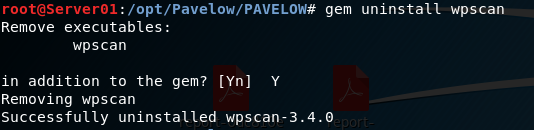
Here is what I did to resolve this (based on the suggestion)
Remove wpscan installed manually through gem - gem uninstall wpscan
Install wpscan via Kali repository - apt get wpscanwpscan now works.
This does not work for me.

Rzqu
on 27 Nov 2018
@rzqu this seems like a different error... maybe @ethicalhack3r can confirm
sumgr0
on 27 Nov 2018
@sumgro After re-installing wpscan through gem i get this

Installing it through apt-get install does nothing for me, the install goes through but when running wpscan i end up with this
Rzqu
on 27 Nov 2018
@rzqu could try removing wpscan through both gem and apt, use:
gem uninstall wpscan
apt remove wpscan
Then, install it via apt using: apt install wpscan
sumgr0
on 27 Nov 2018
@sumgro Ive tried what you suggested and im now faced with this error

Rzqu
on 27 Nov 2018
I solved the same problem with this sequence
- gem uninstall wpscan
- apt remove wpscan
- apt-get autoremove
- apt-get autoclean
- apt install wpscan
 cohernandez
on 1 Dec 2018
cohernandez
on 1 Dec 2018
I solved the same problem with this sequence
- gem uninstall wpscan
- apt remove wpscan
- apt-get autoremove
- apt-get autoclean
- apt install wpscan
Unfortunately this didnt fix my problem, same error as above

Whats interesting is that in /usr/bin/ wpscan doesnt exist, even after apt-get install wpscan
Rzqu
on 3 Dec 2018
I did this sequence:
gem uninstall wpscan
apt remove wpscan
apt-get autoremove
apt-get autoclean
apt install wpscan
And still having the same error:
/usr/lib/ruby/2.5.0/rubygems/specification.rb:1466:in `block in activate_dependencies': can't satisfy 'activesupport (~> 5.2)', already activated 'activesupport-4.2.10' (Gem::LoadError)
 dhd0004
on 3 Dec 2018
dhd0004
on 3 Dec 2018
@dhd0004 have a look at this https://bugs.kali.org/view.php?id=5134
Apparently mine was leaving little gems behind (excuse the pun)
i renamed /var/lib/gems/2.5.0/gems to /var/lib/gems/2.5.0/gems.old and my WPScan started working.
Maybe try that?
Rzqu
on 4 Dec 2018
that did not word for me:
ls -lsrt /var/lib/gems/2.5.0/gems.old/
total 36
4 drwxr-xr-x 4 root root 4096 Nov 15 16:59 concurrent-ruby-1.1.3
4 drwxr-xr-x 3 root root 4096 Nov 15 16:59 activesupport-5.1.6
4 drwxr-xr-x 3 root root 4096 Nov 15 16:59 opt_parse_validator-0.0.15.2
4 drwxr-xr-x 5 root root 4096 Nov 15 16:59 cms_scanner-0.0.39.0
4 drwxr-xr-x 3 root root 4096 Nov 15 17:00 activesupport-5.2.1
4 drwxr-xr-x 3 root root 4096 Nov 15 17:00 ruby-progressbar-1.10.0
4 drwxr-xr-x 9 root root 4096 Nov 15 17:00 yajl-ruby-1.4.1
4 drwxr-xr-x 4 root root 4096 Nov 15 17:00 cms_scanner-0.0.41.0
4 drwxr-xr-x 4 root root 4096 Nov 15 17:01 cms_scanner-0.0.40.3Y renamed from this:
ls -lsrt /var/lib/gems/2.5.0/gems
ls: cannot access '/var/lib/gems/2.5.0/gems': No such file or directory
Error still persists:
wpscan
Traceback (most recent call last):
11: from /usr/local/bin/wpscan:23:in<main>' 10: from /usr/lib/ruby/2.5.0/rubygems.rb:309:inactivate_bin_path'
9: from /usr/lib/ruby/2.5.0/rubygems.rb:309:insynchronize' 8: from /usr/lib/ruby/2.5.0/rubygems.rb:310:inblock in activate_bin_path'
7: from /usr/lib/ruby/2.5.0/rubygems/specification.rb:1440:inactivate' 6: from /usr/lib/ruby/2.5.0/rubygems/specification.rb:1458:inactivate_dependencies'
5: from /usr/lib/ruby/2.5.0/rubygems/specification.rb:1458:ineach' 4: from /usr/lib/ruby/2.5.0/rubygems/specification.rb:1472:inblock in activate_dependencies'
3: from /usr/lib/ruby/2.5.0/rubygems/specification.rb:1440:inactivate' 2: from /usr/lib/ruby/2.5.0/rubygems/specification.rb:1458:inactivate_dependencies'
1: from /usr/lib/ruby/2.5.0/rubygems/specification.rb:1458:ineach' /usr/lib/ruby/2.5.0/rubygems/specification.rb:1466:inblock in activate_dependencies': can't satisfy 'activesupport (~> 5.2)', already activated 'activesupport-4.2.10' (Gem::LoadError)
dhd0004
on 4 Dec 2018
@dhd0004
Im assuming that youve already done gem uninstall wpscan before renaming that folder?
Rzqu
on 4 Dec 2018
yes, i executed these commands:
gem uninstall wpscan
sudo apt-get autoremove wpscan
sudo mv /var/lib/gems/2.5.0/gems /var/lib/gems/2.5.0/gems.old
sudo apt-get install wpscan
wpscan
Traceback (most recent call last):
11: from /usr/local/bin/wpscan:23:in<main>' 10: from /usr/lib/ruby/2.5.0/rubygems.rb:309:inactivate_bin_path'
9: from /usr/lib/ruby/2.5.0/rubygems.rb:309:insynchronize' 8: from /usr/lib/ruby/2.5.0/rubygems.rb:310:inblock in activate_bin_path'
7: from /usr/lib/ruby/2.5.0/rubygems/specification.rb:1440:inactivate' 6: from /usr/lib/ruby/2.5.0/rubygems/specification.rb:1458:inactivate_dependencies'
5: from /usr/lib/ruby/2.5.0/rubygems/specification.rb:1458:ineach' 4: from /usr/lib/ruby/2.5.0/rubygems/specification.rb:1472:inblock in activate_dependencies'
3: from /usr/lib/ruby/2.5.0/rubygems/specification.rb:1440:inactivate' 2: from /usr/lib/ruby/2.5.0/rubygems/specification.rb:1458:inactivate_dependencies'
1: from /usr/lib/ruby/2.5.0/rubygems/specification.rb:1458:ineach' /usr/lib/ruby/2.5.0/rubygems/specification.rb:1466:inblock in activate_dependencies': can't satisfy 'activesupport (~> 5.2)', already activated 'activesupport-4.2.10' (Gem::LoadError)
dhd0004
on 5 Dec 2018
i typed "gem install wpscan" in terminal and i open wpscan and it works
 Milimas
on 8 Feb 2019
Milimas
on 8 Feb 2019
I followed this serial, but not working
- gem uninstall wpscan
apt remove wpscan
apt-get autoremove
apt-get autoclean
apt install wpscan
Traceback (most recent call last):
25: from /usr/bin/wpscan:23:in <main>'
24: from /usr/bin/wpscan:23:inload'
23: from /usr/share/rubygems-integration/all/gems/wpscan-3.4.4/bin/wpscan:3:in <top (required)>'
22: from /usr/lib/ruby/2.5.0/rubygems/core_ext/kernel_require.rb:59:inrequire'
21: from /usr/lib/ruby/2.5.0/rubygems/core_ext/kernel_require.rb:59:in require'
20: from /usr/share/rubygems-integration/all/gems/wpscan-3.4.4/lib/wpscan.rb:5:inrequire'
18: from /usr/lib/ruby/2.5.0/rubygems/core_ext/kernel_require.rb:59:inrequire'
17: from /usr/lib/ruby/vendor_ruby/active_support/all.rb:5:in <top (required)>'
16: from /usr/lib/ruby/2.5.0/rubygems/core_ext/kernel_require.rb:59:inrequire'
15: from /usr/lib/ruby/2.5.0/rubygems/core_ext/kernel_require.rb:59:in require'
14: from /usr/lib/ruby/vendor_ruby/active_support/core_ext.rb:3:ineach'
12: from /usr/lib/ruby/vendor_ruby/active_support/core_ext.rb:4:inblock in require'
10: from /usr/lib/ruby/2.5.0/rubygems/core_ext/kernel_require.rb:59:inrequire'
9: from /usr/lib/ruby/vendor_ruby/active_support/core_ext/big_decimal.rb:3:in <top (required)>'
8: from /usr/lib/ruby/2.5.0/rubygems/core_ext/kernel_require.rb:59:inrequire'
7: from /usr/lib/ruby/2.5.0/rubygems/core_ext/kernel_require.rb:59:in require'
6: from /usr/lib/ruby/vendor_ruby/active_support/core_ext/big_decimal/conversions.rb:4:inrequire'
4: from /usr/lib/ruby/2.5.0/rubygems/core_ext/kernel_require.rb:59:inrequire'
3: from /var/lib/gems/2.5.0/gems/bigdecimal-1.4.3/lib/bigdecimal/util.rb:9:in <top (required)>'
2: from /usr/lib/ruby/2.5.0/rubygems/core_ext/kernel_require.rb:39:inrequire'
1: from /usr/lib/ruby/2.5.0/rubygems/core_ext/kernel_require.rb:135:in rescue in require'
/usr/lib/ruby/2.5.0/rubygems/core_ext/kernel_require.rb:135:inrequire': /var/lib/gems/2.5.0/gems/bigdecimal-1.4.3/lib/bigdecimal/util.so: undefined symbol: rmpd_util_str_to_d - /var/lib/gems/2.5.0/gems/bigdecimal-1.4.3/lib/bigdecimal/util.so (LoadError)
 faudbispa
on 13 Feb 2019
faudbispa
on 13 Feb 2019
@dhd0004 and @faudbispa
Have you tried installing these 2 gems
gem install activesupport
gem install public_suffix
and then running wpscan ?
 afewcc
on 21 Feb 2019
afewcc
on 21 Feb 2019
same issue with me
Traceback (most recent call last):
28: from /usr/bin/wpscan:23:in<main>' 27: from /usr/bin/wpscan:23:inload'
26: from /usr/share/rubygems-integration/all/gems/wpscan-3.4.4/bin/wpscan:3:in<top (required)>' 25: from /usr/lib/ruby/2.5.0/rubygems/core_ext/kernel_require.rb:59:inrequire'
24: from /usr/lib/ruby/2.5.0/rubygems/core_ext/kernel_require.rb:59:inrequire' 23: from /usr/share/rubygems-integration/all/gems/wpscan-3.4.4/lib/wpscan.rb:5:in22: from /usr/lib/ruby/2.5.0/rubygems/core_ext/kernel_require.rb:59:in require' 21: from /usr/lib/ruby/2.5.0/rubygems/core_ext/kernel_require.rb:59:inrequire'
20: from /var/lib/gems/2.5.0/gems/activesupport-5.2.2/lib/active_support/all.rb:5:in<top (required)>' 19: from /usr/lib/ruby/2.5.0/rubygems/core_ext/kernel_require.rb:59:inrequire'
18: from /usr/lib/ruby/2.5.0/rubygems/core_ext/kernel_require.rb:59:inrequire' 17: from /var/lib/gems/2.5.0/gems/activesupport-5.2.2/lib/active_support/core_ext.rb:3:in16: from /var/lib/gems/2.5.0/gems/activesupport-5.2.2/lib/active_support/core_ext.rb:3:in each' 15: from /var/lib/gems/2.5.0/gems/activesupport-5.2.2/lib/active_support/core_ext.rb:4:inblock in14: from /usr/lib/ruby/2.5.0/rubygems/core_ext/kernel_require.rb:59:in require' 13: from /usr/lib/ruby/2.5.0/rubygems/core_ext/kernel_require.rb:59:inrequire'
12: from /var/lib/gems/2.5.0/gems/activesupport-5.2.2/lib/active_support/core_ext/object.rb:13:in<top (required)>' 11: from /usr/lib/ruby/2.5.0/rubygems/core_ext/kernel_require.rb:59:inrequire'
10: from /usr/lib/ruby/2.5.0/rubygems/core_ext/kernel_require.rb:59:inrequire' 9: from /var/lib/gems/2.5.0/gems/activesupport-5.2.2/lib/active_support/core_ext/object/json.rb:8:in8: from /usr/lib/ruby/2.5.0/rubygems/core_ext/kernel_require.rb:59:in require' 7: from /usr/lib/ruby/2.5.0/rubygems/core_ext/kernel_require.rb:59:inrequire'
6: from /var/lib/gems/2.5.0/gems/activesupport-5.2.2/lib/active_support/core_ext/big_decimal/conversions.rb:4:in<top (required)>' 5: from /usr/lib/ruby/2.5.0/rubygems/core_ext/kernel_require.rb:59:inrequire'
4: from /usr/lib/ruby/2.5.0/rubygems/core_ext/kernel_require.rb:59:inrequire' 3: from /var/lib/gems/2.5.0/gems/bigdecimal-1.4.3/lib/bigdecimal/util.rb:9:in2: from /usr/lib/ruby/2.5.0/rubygems/core_ext/kernel_require.rb:39:in require' 1: from /usr/lib/ruby/2.5.0/rubygems/core_ext/kernel_require.rb:135:inrescue in require'
/usr/lib/ruby/2.5.0/rubygems/core_ext/kernel_require.rb:135:in `require': /var/lib/gems/2.5.0/gems/bigdecimal-1.4.3/lib/bigdecimal/util.so: undefined symbol: rmpd_util_str_to_d - /var/lib/gems/2.5.0/gems/bigdecimal-1.4.3/lib/bigdecimal/util.so (LoadError)
 muaz-alhilal
on 23 Feb 2019
muaz-alhilal
on 23 Feb 2019
@muaz-alhilal, @faudbispa see https://github.com/wpscanteam/wpscan/issues/1283
Closing this issue as reports are no longer related to the main post.
Furthermore, before posting a new issue, please check the Readme, do some research either in the issues here or tracker of Kali, and google.
erwanlr
on 24 Feb 2019
Sir,
My prob was solved and I informed it by mail. And I gave the solution too.
Thank you
On Sun, Feb 24, 2019, 12:35 PM Erwan <[email protected] wrote:
@muaz-alhilal https://github.com/muaz-alhilal, @faudbispa
https://github.com/faudbispa see #1283
https://github.com/wpscanteam/wpscan/issues/1283Closing this issue as reports are no longer related to the main post.
Furthermore, before posting a new issue, please check the Readme, do some
research either in the issues here or tracker of Kali, and google.—
You are receiving this because you were mentioned.
Reply to this email directly, view it on GitHub
https://github.com/wpscanteam/wpscan/issues/1243#issuecomment-466739148,
or mute the thread
https://github.com/notifications/unsubscribe-auth/Apx_qjK3pgyJQzWwLR_CyI-ABaXx6aApks5vQjLOgaJpZM4YRspi
.
faudbispa
on 24 Feb 2019
wpscan
Traceback (most recent call last):
25: from /usr/bin/wpscan:23:in <main>'
24: from /usr/bin/wpscan:23:inload'
23: from /usr/share/rubygems-integration/all/gems/wpscan-3.4.5/bin/wpscan:3:in <top (required)>'
22: from /usr/lib/ruby/2.5.0/rubygems/core_ext/kernel_require.rb:59:inrequire'
21: from /usr/lib/ruby/2.5.0/rubygems/core_ext/kernel_require.rb:59:in require'
20: from /usr/share/rubygems-integration/all/gems/wpscan-3.4.5/lib/wpscan.rb:5:inrequire'
18: from /usr/lib/ruby/2.5.0/rubygems/core_ext/kernel_require.rb:59:inrequire'
17: from /var/lib/gems/2.5.0/gems/activesupport-5.2.3/lib/active_support/all.rb:5:in <top (required)>'
16: from /usr/lib/ruby/2.5.0/rubygems/core_ext/kernel_require.rb:59:inrequire'
15: from /usr/lib/ruby/2.5.0/rubygems/core_ext/kernel_require.rb:59:in require'
14: from /var/lib/gems/2.5.0/gems/activesupport-5.2.3/lib/active_support/core_ext.rb:3:ineach'
12: from /var/lib/gems/2.5.0/gems/activesupport-5.2.3/lib/active_support/core_ext.rb:4:inblock in require'
10: from /usr/lib/ruby/2.5.0/rubygems/core_ext/kernel_require.rb:59:inrequire'
9: from /var/lib/gems/2.5.0/gems/activesupport-5.2.3/lib/active_support/core_ext/big_decimal.rb:3:in <top (required)>'
8: from /usr/lib/ruby/2.5.0/rubygems/core_ext/kernel_require.rb:59:inrequire'
7: from /usr/lib/ruby/2.5.0/rubygems/core_ext/kernel_require.rb:59:in require'
6: from /var/lib/gems/2.5.0/gems/activesupport-5.2.3/lib/active_support/core_ext/big_decimal/conversions.rb:4:inrequire'
4: from /usr/lib/ruby/2.5.0/rubygems/core_ext/kernel_require.rb:59:inrequire'
3: from /var/lib/gems/2.5.0/gems/bigdecimal-1.4.3/lib/bigdecimal/util.rb:9:in <top (required)>'
2: from /usr/lib/ruby/2.5.0/rubygems/core_ext/kernel_require.rb:39:inrequire'
1: from /usr/lib/ruby/2.5.0/rubygems/core_ext/kernel_require.rb:135:in rescue in require'
/usr/lib/ruby/2.5.0/rubygems/core_ext/kernel_require.rb:135:inrequire': /var/lib/gems/2.5.0/gems/bigdecimal-1.4.3/lib/bigdecimal/util.so: undefined symbol: rmpd_util_str_to_d - /var/lib/gems/2.5.0/gems/bigdecimal-1.4.3/lib/bigdecimal/util.so (LoadError)
Tried every cure but this seems to be the last scene. Can anybody please help?
 soham7
on 31 Mar 2019
soham7
on 31 Mar 2019
Resolved the same issue. In my fix, I did NOT uninstall anything.
apt-get install ruby-dev
gem install ffi --platform=ruby
gem install yajl-ruby
apt-get install libxslt-dev libxml2-dev
gem install nokogiri -- --use-system-libraries
Then wpscan worked.
 xffxe4
on 5 May 2019
xffxe4
on 5 May 2019
Reall
Resolved the same issue. In my fix, I did NOT uninstall anything.
apt-get install ruby-dev
gem install ffi --platform=ruby
gem install yajl-ruby
apt-get install libxslt-dev libxml2-dev
gem install nokogiri -- --use-system-librariesThen wpscan worked.
Yes it worked for me too!
 EmperorSrikanth
on 10 Jul 2019
EmperorSrikanth
on 10 Jul 2019
gem install nokogiri -- --use-system-libraries
it's useful,thank you!
 PanDa1G1
on 4 Sep 2019
PanDa1G1
on 4 Sep 2019
Hi,
I solved the issue with this comand agpt-get upgrade.
I did two time and it works
 gsandovalbonilla
on 3 Mar 2020
gsandovalbonilla
on 3 Mar 2020
I solved the same problem with this sequence
1. gem uninstall  wpscan

2. apt remove wpscan

3. apt-get autoremove

4. apt-get autoclean

5. apt install wpscan
i did this step, and its workedd thank you
 xrobb30
on 7 Mar 2020
xrobb30
on 7 Mar 2020
first, uninstall all Wpscan with the following command:
gem uninstall wpscan
apt remove wpscan
then, use the following command to fix it:
sudo apt-get update
gpg --keyserver hkp://keys.gnupg.net --recv-keys 409B6B1796C275462A1703113804BB82D39DC0E3 7D2BAF1CF37B13E2069D6956105BD0E739499BDB
\curl -sSL https://get.rvm.io | bash -s stable --ruby --ignore-dotfiles
\curl -sSL https://get.rvm.io | bash -s stable --rails
gem install rails 5
source /usr/local/rvm/scripts/rvm
rvm reinstall ruby 2.6.0
rvm install "ruby-2.5.3"
gem install wpscan
Make sure it is installed correctly with this command:
which ruby
ruby --version
rails -v
It works now.
 Ehsan-Nezami
on 7 Jun 2020
Ehsan-Nezami
on 7 Jun 2020
Was having same issue
Try - gem install wpscan
worked on my side
 Hellsender01
on 21 Jul 2020
Hellsender01
on 21 Jul 2020
gem update
gem install wpscan
wpscan --update
Solved it for me!
 BalbeerJaat
on 26 Aug 2020
BalbeerJaat
on 26 Aug 2020
sudo gem install wpscan
worked for me.
Kali 2020.1a
 0xBones
on 18 Oct 2020
0xBones
on 18 Oct 2020
Related issues
 Mi-Al
·
9Comments
Mi-Al
·
9Comments
 riramar
·
4Comments
riramar
·
4Comments
 dingo-d
·
4Comments
dingo-d
·
4Comments
 shell-permission
·
11Comments
shell-permission
·
11Comments
 jamezlee
·
11Comments
jamezlee
·
11Comments
Most helpful comment
Resolved the same issue. In my fix, I did NOT uninstall anything.
apt-get install ruby-dev
gem install ffi --platform=ruby
gem install yajl-ruby
apt-get install libxslt-dev libxml2-dev
gem install nokogiri -- --use-system-libraries
Then wpscan worked.