Wp-rocket: UX improvement - "Restore Defaults" button for Delay JS is clicked accidentally in place of "Save Changes"
Is your feature request related to a problem? Please describe.
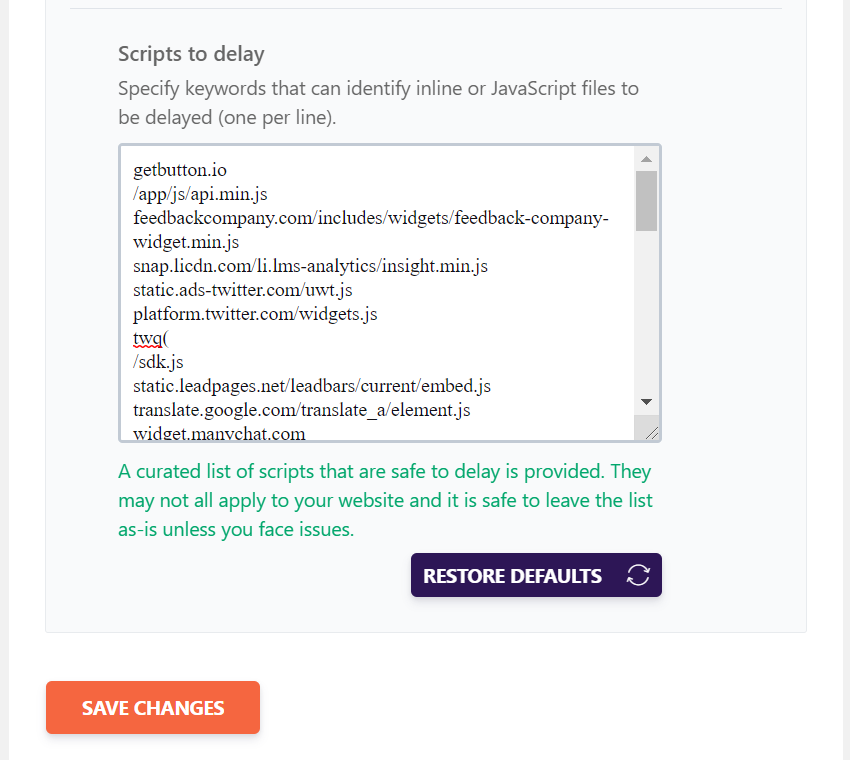
Our team mate @camilamadronero reported in Slack that she accidentally clicked the "Restore Defaults" button few times. Other team mates agreed. Our customers might also face this issue and they might loose all the scripts that they added manually.

Describe the solution you'd like
We could make the button less prominent. I have two suggestions.
One, make the button into an inline link.

Move the button to the right and make it smaller (5px padding instead of 8px. 5px is the padding for View my account button in the dashboard).
 arunbasillal
All 4 comments
Thanks, Arun!
I'd vote for the inline link option, because:
- the smaller button option still feels too visible and therefore _clickable_
- restoring defaults doesn't seem to be a commonly needed option, so it's ok to "hide" it a little
Cons:
- customers could still accidentally click on it, confusing it with a doc link
 camilamadronero
on 25 Sep 2020
camilamadronero
on 25 Sep 2020
I agree with what @camilamadronero said!
 webtrainingwheels
on 25 Sep 2020
webtrainingwheels
on 25 Sep 2020
What about?
1- Having confirmation message when the button clicked to mitigate clicking by mistake.
2- Making the btn dimmed till scripts to delay were changed than defaults to mitigate confusion when clicked and doing nothing
 Mai-Saad
on 28 Jan 2021
Mai-Saad
on 28 Jan 2021
I'm closing this one as this problem will be fixed with the Delay JS new UI.
 GeekPress
on 5 Feb 2021
GeekPress
on 5 Feb 2021
Related issues
 vmanthos
·
5Comments
vmanthos
·
5Comments
 crystinutzaa
·
4Comments
vmanthos
·
3Comments
crystinutzaa
·
4Comments
vmanthos
·
3Comments
 engahmeds3ed
·
4Comments
vmanthos
·
5Comments
engahmeds3ed
·
4Comments
vmanthos
·
5Comments
Most helpful comment
Thanks, Arun!
I'd vote for the inline link option, because:
Cons: