Wp-rocket: Rollback to more than one version backward leads to upgrade to latest version
Before submitting an issue please check that you’ve completed the following steps:
- Made sure you’re on the latest version Yes
- Used the search feature to ensure that the bug hasn’t been reported before Yes
Describe the bug
When trying to rollback for more than one time this leads to upgrade instead of multiple rollbacks.
To Reproduce
Steps to reproduce the behavior:
- I have 3.7.0.1 installled.
- I rollback to 3.6.4 and this happened successfully
- from that I try to rollback to 3.5.5.1.
- Instead it updates to 3.7.0.1
Expected behavior
we have two scenarios here:-
- not to rollback more than one time and here we need to adjust the rollback button text to express that it will update or show error message for example.
- Open the number of rollbacks and adjust the functionality of the button when user rollback more than one time.
Screenshots
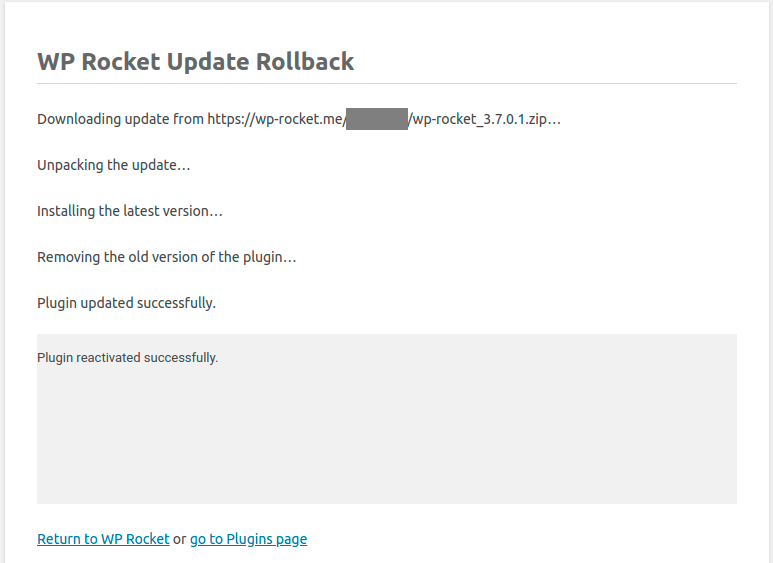
First rollback from 3.7.0.1 to 3.6.4


Second rollback from 3.6.4 to 3.5.5.1

Additional context
We need product input here
Backlog Grooming (for WP Media dev team use only)
- [ ] Reproduce the problem
- [ ] Identify the root cause
- [ ] Scope a solution
- [ ] Estimate the effort
 engahmeds3ed
All 4 comments
Open the number of rollbacks and adjust the functionality of the button when user rollback more than one time.
I always thought that the rollback would keep on rolling back. So this is what I think should happen.
- Let's say a user rolls back to 3.6.4. This WP Rocket should look and behave exactly like when the user installed 3.6.4 the first time.
- The last stable is hardcoded within WP Rocket. A user on 3.6.4 would expect to rollback to the stable one before that and so on.
- If the user wants to get the latest version, then they can always update.
- But if the user (for whatever reason) wants to go back, doing multiple rollbacks is the only way.
Inviting @GeekPress here.
 arunbasillal
on 9 Sep 2020
arunbasillal
on 9 Sep 2020
This isn't the expected behavior. If we want to rollback twice for any reasons, we should be able to do it.
 GeekPress
on 9 Sep 2020
GeekPress
on 9 Sep 2020
Reproduce the problem
Yes reproduced locally and on one of our customer sites.
When rollback to 3.6.4 I can see on the rollback button at WPR admin (tools) that we can rollback to 3.5.5.1 and when clicking on it, it updates to 3.7.0.1
Identify the root cause
https://github.com/wp-media/wp-rocket/blob/5434080ccd89b36f3312846e4288a50c9d6b7c3e/inc/classes/subscriber/Plugin/class-updater-subscriber.php#L247-L249
this line is checking Wordpress plugin latest version and if the latest version is newer than the current version it will add the newer always
I got a question on my mind: why it's rolling back from 3.7.0.1 to 3.6.4 and the answer simply: current version on plugin code is 3.7.0.1 and latest version is 3.7.0.1 so it won't go into this condition.
Scope a solution
https://github.com/wp-media/wp-rocket/blob/5434080ccd89b36f3312846e4288a50c9d6b7c3e/inc/classes/subscriber/Plugin/class-updater-subscriber.php#L247-L249
this code is called when updating and when rollback so inside rollback function
https://github.com/wp-media/wp-rocket/blob/2b2fe800bfd9ba748159dafe0eb5ec00b63212d7/inc/admin/admin.php#L204
we will define a new constant and check on the first code to stop checking on the last version number.
also add a check on the last version to stop on is: 2.3.7
Estimate the effort
@arunbasillal Please confirm that the last version to stop on is: 2.3.7 as we started using WP_ROCKET_LASTVERSION constant.
engahmeds3ed
on 10 Sep 2020
@engahmeds3ed
@arunbasillal Please confirm that the last version to stop on is: 2.3.7 as we started using WP_ROCKET_LASTVERSION constant.
I went back quite a lot and this commit confirms that 2.3.7 is indeed the last version - https://github.com/wp-media/wp-rocket/commit/f5e1b8c9fb4ed74c64dc9eac92f6d79091204477
Thank you 👍
arunbasillal
on 10 Sep 2020
Related issues
 vmanthos
·
5Comments
vmanthos
·
5Comments
 piotrbak
·
4Comments
piotrbak
·
4Comments
 Tabrisrp
·
5Comments
Tabrisrp
·
5Comments
 Screenfeed
·
5Comments
vmanthos
·
5Comments
Screenfeed
·
5Comments
vmanthos
·
5Comments
Most helpful comment
This isn't the expected behavior. If we want to rollback twice for any reasons, we should be able to do it.