Wp-rocket: Enable assets optimizations on uncached pages
What are we proposing to do?
With this enhancement our users will be able to use WP Rocket’s features on uncached pages.
Currently these features ARE available on uncached pages:
- Rules applied via the htaccess file (e.g. GZIP rules, browser caching rules etc)
- Optimization of the WooCommerce get_refreshed_fragments request
- Conversion of dynamic CSS/JS files to static files
- Disable Emoji
- Disable WordPress embeds
- Heartbeat settings
- Preload for fonts
We could safely add the following features as well:
- Optimize Google Fonts
- Optimize CSS Delivery
- Remove jQuery Migrate
- Defer JS
- LazyLoad
- Prefetch DNS
- Preload for fonts (coming in 3.6 and already added by design)
- CDN
- Google Tracking Add-on
- Facebook Pixel Add-on
Users will be able to turn some of these off on a post by post basis.
Why are we doing this?
Currently if a page is excluded from WP Rocket cache, most optimizations are not applied to the excluded page. Uncached pages can still benefit from WP Rocket with the other features we have.
Benchmark Tests
Test site: http://mega.wp-rocket.me/
The main purpose of the test is to see if any of our options are massively slowing down the load time. The homepage barely has assets or images that could greatly benefit from our optimizations.
Control test: WP Rocket disabled
Fully loaded time average: 2.44s (#1, #2, #3, #4, #5)
For the rest of the tests, WP Rocket page caching is disabled using our helper plugin.
Test with WP Rocket enabled but all options are disabled.
Fully loaded time average: 2.46s (#1, #2, #3, #4, #5)
Test with Optimize Google Fonts, Optimize CSS delivery, Remove jQuery Migrate and Defer JS (safe mode) enabled.
Fully loaded time average: 2.52s (#1, #2, #3, #4, #5)
Along with the options in the previous test, LazyLoad(images and iframe), Disable Emoji and Disable Emeds was enabled.
Fully loaded time average: 2.22s (#1, #2, #3, #4, #5)
Along with the options in the previous test, enabled minification for CSS and minification for JS
Fully loaded time average: 2.34s (#1, #2, #3, #4, #5)
Along with the options in the previous test, combination of CSS and combination of JS was enabled
Fully loaded time average: 2.36s (#1, #2, #3, #4, #5)
To reconfirm this, I used a test page with a lot more assets and images: http://smashingcoding.com/2020/06/01/lighthouse/
Control test: WP Rocket disabled
Fully loaded time average: 6.12s (#1, #2, #3, #4, #5)
For the rest of the tests, WP Rocket page caching is disabled using our helper plugin.
Test with WP Rocket enabled but all options are disabled.
Fully loaded time average: 5.86s (#1, #2, #3, #4, #5)
Test with Optimize Google Fonts, Optimize CSS delivery, Remove jQuery Migrate and Defer JS (safe mode) enabled.
Fully loaded time average: 5.44s (#1, #2, #3, #4, #5)
Along with the options in the previous test, LazyLoad(images and iframe), Disable Emoji and Disable Embeds was enabled.
Fully loaded time average: 4.26s (#1, #2, #3, #4, #5)
I did another 13 tests to confirm and the average fully loaded time was (13 tests): 3.94s
Combined average (13+5 = 18 tests): 4.02s
Along with the options in the previous test, enabled minification for CSS and minification for JS
Fully loaded time average: 4.35s (#1, #2, #3, #4, #5, #6, #7, #8, #9, #10, #11, #12, #13, #14, #15)
Along with the options in the previous test, combination of CSS and combination of JS was enabled
Fully loaded time average: 4.52s (#1, #2, #3, #4, #5, #6, #7, #8, #9, #10, #11, #12, #13, #14, #15)
Notes:
- The page has a YouTube video embed and an image gallery. The performance improvement when LazyLoad is enabled is clearly visible.
- Minification and combination of CSS and JS seems to cause a performance loss.
- Maybe in the future if we optimize our minification and combination process, we can provide this feature as well on uncached pages.
Based on the data above, it’s best not to enable CSS minification and combination on uncached pages. Here are the features that won’t be available on uncached pages.
- Minify HTML - Soon to be depreciated from WP Rocket
- Minify CSS
- Combine CSS
- Minify JS
- Combine JS
User expectations and experience. How will we do this feature?
We can easily take advantage of our existing WP Rocket meta box (with some changes) to do this feature.
This is how WP Rocket meta box looks like right now:
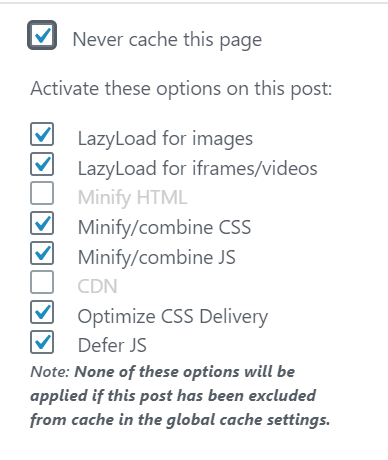
Right now:
- If “Never cache this page” is checked, the state of the other options (like LazyLoad for images etc.) doesn’t matter.
- The user can still enable or disable other options even if “Never cache this page” is enabled.
- Most existing users are likely to have other options enabled even on pages that are excluded from cache by enabling, “Never cache this page”.
- The only time an option is greyed out (like Minify HTML and CDN in the above screenshot) is when these options are not enabled in WP Rocket.
This creates a potential problem if the new features are applied to uncached pages automatically when a customer updates to the new WP Rocket version.
To accommodate our existing users and mitigate this problem, we can have a two step approach.
- Introduce a hidden database option and set it to 0 for existing customers. Then give existing customers an option to opt-in. We could handle it just like we did for “CPCSS for Mobile” and have the opt-in in the “Tools” tab. The value of this database option will be 1 for new installs.
- Adjust the behaviour of the meta box. Details below.
Recommended changes to the WP Rocket meta box in the post editor.
- For existing customers, until they opt-in to the new feature, when “Never cache this page” is enabled, grey out all the other options in the meta box.
- Change the footer note to: “Note: To use these features on this page, please do a one time opt-in via the Tools section of WP Rocket. More info”.
- For new installs (and once existing customers have opted-in), when “Never cache this page” is enabled, grey out and uncheck “Minify HTML”, “Minify/combine CSS” and “Minify/combine JS”. These options are not available on uncached pages.
- Any option not enabled in the global settings (eg if CDN is not enabled) to be greyed out as well as we do right now.
- Add an (i) call out (example: https://jmp.sh/h3bAv06) help text to these options (“Minify HTML”, “Minify/combine CSS” and “Minify/combine JS”)
- On hovering the callout (i), show help text: “This option can be used on cached pages only”.
- Remove the note from the metabox once the user opts-in to this enhancement via Tools tab.
A note on auto-exclusions
WP Rocket auto exclusions like WooCommerce cart, account and checkout pages for example are not reflected in the WP Rocket UI and are added directly to the config file. In the meta box for these pages, “Never cache this page” is never checked, nor are these pages listed in “Never Cache URL(s)” in the advanced tab.
- For these auto exclusions, we could permanently grey out the “Never Cache this page” option and mark it as checked.
- Then treat the page as an excluded page and provide other options in the metabox as detailed above.
Handling opt-in for existing users
Similar to how we handled this in “CPCSS for Mobile”, we could provide an opt-in “tool” in the Tools tab of WP Rocket.
The goal of this tool is to:
- Inform the user about the feature
- Warn the user of the pages that will be affected
- Link to a doc with more details
- Provide a one-time button to opt-in to the feature
Technical Specs
- Right now a page with a query string (example “?nocache” that we use for debug) has some optimizations applied. Listed here. Pages excluded via query string should have no optimizations where possible. This will help keep things simple for support and users.
- Such pages shouldn’t have any of the new optimizations that we add on uncached pages through this enhancement as well.
Spec for the tool in the “Tools” tab:
- Title: “Optimize Uncached Pages”
- Icon: Use the same icon from the “Cache” tab - https://jmp.sh/4zgrDDw (since it’s related to cached and uncached pages)
Description: Uncached pages on your website are excluded from all WP Rocket features. Click the button to enable certain WP Rocket features on uncached pages.
This is a one-time action and this button will be removed afterwards. More info
The following pages will be affected:
- example.com/link-1/
- example.com/link-2/
Button color: Blue
- Button text: Enable Optimizations on Uncached Pages
Button need not have any icon

Risks
We are handling any potential risk by making this feature opt-in for existing customers.
For new customers and for customers who opt-in to this feature, most of the features that could potentially break a website can be individually disabled via the meta box.
Features that are not available in the meta box namely, “Optimize Google Fonts”, “Remove jQuery Migrate”, “Prefetch DNS”, “Preload for fonts”, “Google Tracking Add-on”, “Facebook Pixel Add-on”, are typically sitewide and are unlikely to cause an issue on a specific page. If this becomes an issue, we can offer helper plugins to disable this, or add this to the meta box if a huge number of customers face issues.
Acceptance Criteria
- An existing customer on update shouldn’t see any different on any uncached pages
- For existing customers, the options in the meta box should be greyed out if “Never cache this page” is enabled.
- The “tool” in the Tools tab should list the pages that are affected, including the pages that are auto-excluded.
- Once the feature is enabled via the button in the “Tools” tab of WP Rocket, uncached pages should see WP Rocket features applied to it.
- When a customer enables “Never cache this page”, “Minify HTML”, “Minify/Combine CSS” and “Minify/combine JS” must be greyed out. There will be a callout (i) to provide quick info on why it is greyed out.
- Other features should be available on uncached pages and should be disabled if the option in the metabox is updated.
Documentation and Translations
- Update this doc: https://docs.wp-rocket.me/article/1285-bypass-wp-rockets-caching-and-optimizations
- Translation of the Tools section and updated metabox in post editor.
- Update an existing doc, or create a new doc on how to exclude a page from all WP Rocket optimizations. List which optimizations can be excluded via WP Rocket metabox and provide helper plugins (where available) to disable others. Also explain why minification and combination of HTML, CSS and JS is not available on uncached pages (see benchmark tests).
- Create helper plugins where needed to disable features that cannot be excluded via the metabox in the post editor. For example, preload for fonts cannot be excluded. But this can wait until we get a request from a user. There is no real reason for a user to exclude these things from an uncached page.
 GeekPress
All 18 comments
GeekPress
on 4 Jun 2020
Is uncached = logged-in with no user cache too? Or is it only pages excluded from cache in our configuration?
 Tabrisrp
on 4 Jun 2020
Tabrisrp
on 4 Jun 2020
@Tabrisrp I would stick with pages specifically excluded from cache. Otherwise users will not have an option to disable these settings.
 arunbasillal
on 4 Jun 2020
arunbasillal
on 4 Jun 2020
Let's first do it for uncached pages and not for logged-in users.
GeekPress
on 4 Jun 2020
- How to handle pages excluded using the
(.*)regex? - How to handle URLs than don't have the metabox available?
Tabrisrp
on 8 Jun 2020
@Tabrisrp Are the questions for Arun / me or the dev team?
GeekPress
on 9 Jun 2020
@webtrainingwheels Why do you think about doing it only for uncached pages? Should we also do it for logged-in users? What are the user feedback on support about that?
GeekPress
on 9 Jun 2020
It seems like a product question. I forgot the consider these.
How to handle pages excluded using the (.*) regex?
- Will it be possible to default to the settings of the base specified? OR is that too complicated?
- Example: if
example.com/post/(.*)is excluded and lets sayexample.com/post/has a metabox, then use those settings. - If there is an issue on these uncached pages, its likely to show up on all the pages that match it.
How to handle URLs than don't have the metabox available?
- How can we identify if a page has a metabox or not?
- We could consider these as edge cases and do what we are currently doing. i.e. do not apply any optimizations that have the meta box.
- The other optimizations that do not make it to the metabox (“Optimize Google Fonts”, “Remove jQuery Migrate”, “Prefetch DNS”, “Preload for fonts”, “Google Tracking Add-on”, “Facebook Pixel Add-on”) can be applied to these pages as well.
@GeekPress @webtrainingwheels what do you think?
arunbasillal
on 9 Jun 2020
Will it be possible to default to the settings of the base specified? OR is that too complicated?
I believe it's possible, we'll have to discuss this with the dev team. It does increase complexity of course, but if we are aware of that before starting, we can manage it.
How can we identify if a page has a metabox or not?
Well it's any type of content that is not a post of any type. Mainly terms. They are used a lot but don't have a way to be configured individually.
Tabrisrp
on 9 Jun 2020
Thanks, Jo! I love this idea! I've proposed this in some nonces related issues where the only option was to exclude the pages from the cache.
And I would vote for enabling the optimizations for uncached pages for logged-in users only when the User Cache is enabled.
Because I guess that no cache and no optimizations sounds like the _default_ meaning of having the User Cache feature disabled.
 camilamadronero
on 17 Jun 2020
camilamadronero
on 17 Jun 2020
@GeekPress For me personally, nothing should be applied for logged-in users, unless they have enabled User Cache.
I think the lack of minify/combine here will disappoint customers. I agree we don't want to add those features if they make the pages slower. In the future it would be great to optimize those features to make it possible.
 webtrainingwheels
on 17 Jun 2020
webtrainingwheels
on 17 Jun 2020
@camilamadronero @webtrainingwheels Thanks for the reminder, I totally forget the « User Cache » option 😱
You're right, let's keep the current behavior for logged-in users!
@wp-media/wprocketplugin @hellofromtonya I suppose you have all infos for splitting this epic card.
GeekPress
on 18 Jun 2020
The title of the epic is misleading in my opinion, the way the story is layed out, this optimizations are only applied to:
- Pages excluded from cache by the
cache_reject_urioption. Exclusion via user agent or query strings would still have no optimization - And only pages that have a metabox available for configuration. Any archives pages like terms, dates, authors, post types archives would still have no optimization
I think it's something to consider when we communicate this to our users, because even for us in the dev team, it's confusing
Tabrisrp
on 22 Jun 2020
@Tabrisrp Thanks for the heads up. Do you have any suggestions?
I thought of this:
- "Enable assets optimizations on pages excluded from cache using metabox". But it can be confusing as what about pages excluded via the Advanced Settings. Right now WP Rocket automatically syncs it with metabox automatically.
I guess we can include it as part of the description of the feature.
arunbasillal
on 23 Jun 2020
This feature has been removed from 3.7.
As it seems to require more discussion to get something done right, we will take the time to debate about it.
GeekPress
on 24 Jun 2020
@GeekPress Can you please confirm the topics that needs discussion related to this? What decisions needs to be made?
arunbasillal
on 29 Jun 2020
camilamadronero
on 15 Jan 2021
a similar request from the customer: https://secure.helpscout.net/conversation/1432788151/241369?folderId=3864740
 NataliaDrause
on 25 Feb 2021
NataliaDrause
on 25 Feb 2021
Related issues
webtrainingwheels
·
5Comments
arunbasillal
·
4Comments
webtrainingwheels
·
5Comments
NataliaDrause
·
4Comments
 Screenfeed
·
5Comments
Screenfeed
·
5Comments
Most helpful comment
@GeekPress For me personally, nothing should be applied for logged-in users, unless they have enabled User Cache.
I think the lack of minify/combine here will disappoint customers. I agree we don't want to add those features if they make the pages slower. In the future it would be great to optimize those features to make it possible.