Reproduce the issue ✅
Identified this issue on localhost.
Identify the root cause ✅
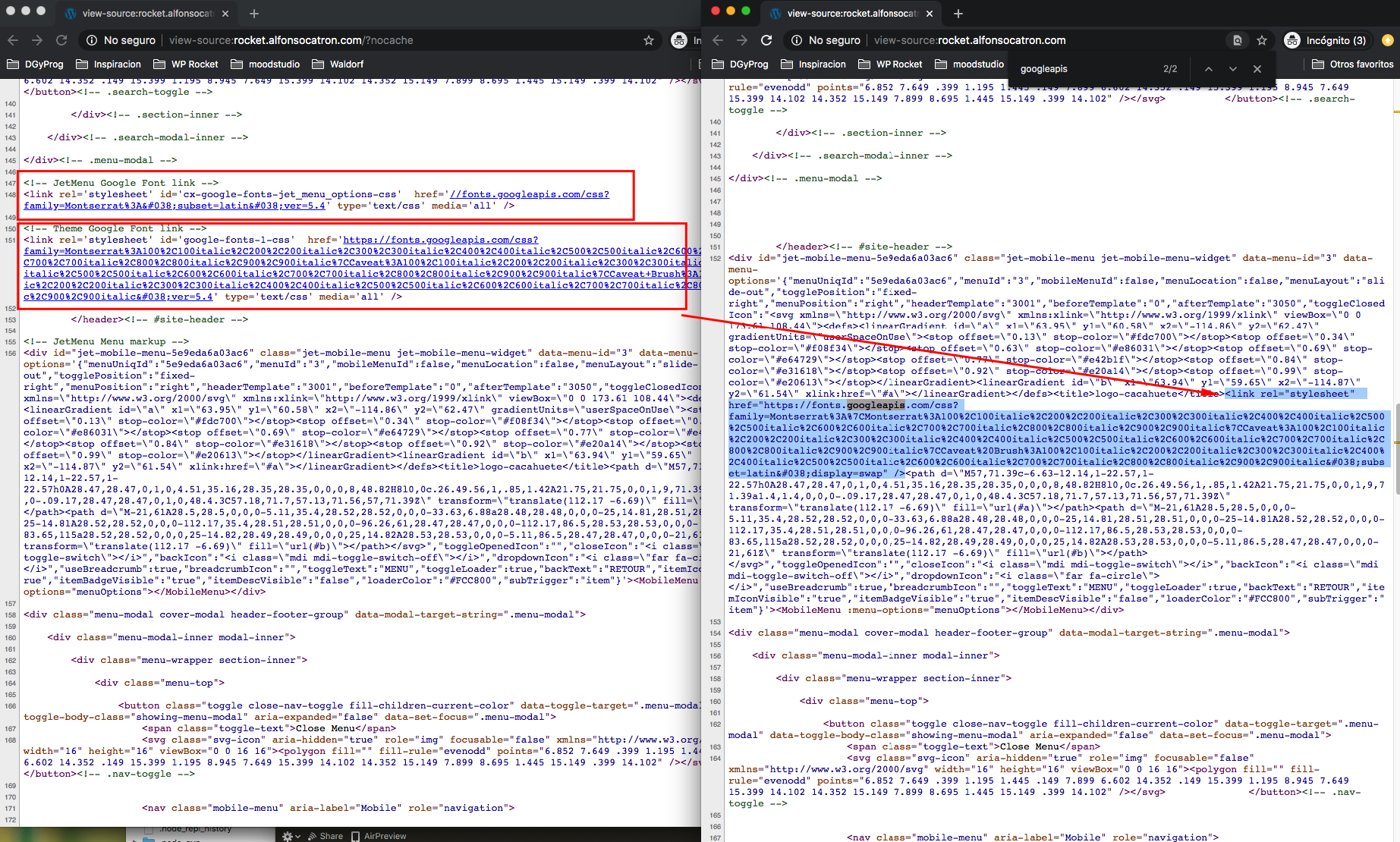
The root cause is that JetMenu contains SVG which contains <title></title> and Google Fonts is appended after </title> in here:
https://github.com/wp-media/wp-rocket/blob/57003cff362df710d36acb49085115ea4d09e0eb/inc/Engine/Optimization/GoogleFonts/Combine.php#L79
Scope a solution ✅
The solution will be to exclude the replace when
tag is inside a <svg> tag.</p>
<p><strong>Effort</strong> ✅<br />
Effort <code>[S]</code></p>
<p><strong>@hellofromtonya</strong> , <strong>@Tabrisrp</strong> any other ideas on how to exclude it in here?</p>
</div>
<div class="card-footer">
<div class="row">
<div class="col">
<img src="https://avatars.githubusercontent.com/u/45258937?v=4&s=40" style="width:20px; height:20px;" class="mr-2 rounded float-left" alt="crystinutzaa picture">
<strong>crystinutzaa</strong>
<span class="text-muted ml-1">on 27 Apr 2020</span>
</div>
<div class="col text-right">
</div>
</div>
</div>
</div>
<div class="card card-custom mb-4">
<div class="card-body pt-3 pb-3 markdown">
<p>There is also the possibility to use <code>preg_replace</code> instead of <code>str_replace</code> and use the <code>limit</code> attribute to perform the insertion only once.</p>
<p>Since we want to target the <code></title></code> tag in the <code><head></code>, it's very unlikely that another closing tag would be before the one for the page.</p>
</div>
<div class="card-footer">
<div class="row">
<div class="col">
<img src="https://avatars.githubusercontent.com/u/3465180?v=4&s=40" style="width:20px; height:20px;" class="mr-2 rounded float-left" alt="Tabrisrp picture">
<strong>Tabrisrp</strong>
<span class="text-muted ml-1">on 27 Apr 2020</span>
</div>
<div class="col text-right">
</div>
</div>
</div>
</div>
<div class="card card-custom mb-4">
<div class="card-body pt-3 pb-3 markdown">
<p>As <strong>@Tabrisrp</strong> said, we need to target within the <code><head></code> element only. How can we do that?</p>
<ol>
<li>Use <code>DomDocument</code> to get the <code><head></code> and then insert after the <code><title></code> element.</li>
<li>Build regex that targets <code></title></code> within the <code><head></head></code>.</li>
</ol>
<p>Either approach should work.</p>
</div>
<div class="card-footer">
<div class="row">
<div class="col">
<img src="https://avatars.githubusercontent.com/u/7284611?v=4&s=40" style="width:20px; height:20px;" class="mr-2 rounded float-left" alt="hellofromtonya picture">
<strong>hellofromtonya</strong>
<span class="text-muted ml-1">on 27 Apr 2020</span>
</div>
<div class="col text-right">
</div>
</div>
</div>
</div>
<div class="card card-custom mb-4">
<div class="card-body pt-3 pb-3 markdown">
<p>Because in here there are multiple ways of doing this I was checking on how it should be done.<br />
I would go on targeting with regex <code></title></code> withing <code><head></head></code>.</p>
<p>Does this sound good?</p>
</div>
<div class="card-footer">
<div class="row">
<div class="col">
<img src="https://avatars.githubusercontent.com/u/45258937?v=4&s=40" style="width:20px; height:20px;" class="mr-2 rounded float-left" alt="crystinutzaa picture">
<strong>crystinutzaa</strong>
<span class="text-muted ml-1">on 27 Apr 2020</span>
</div>
<div class="col text-right">
👍<span class="ml-2 mr-3">1</span>
</div>
</div>
</div>
</div>
<div class="card card-custom mb-4">
<div class="card-body pt-3 pb-3 markdown">
<p>thatt's the best approach I think yes</p>
</div>
<div class="card-footer">
<div class="row">
<div class="col">
<img src="https://avatars.githubusercontent.com/u/3465180?v=4&s=40" style="width:20px; height:20px;" class="mr-2 rounded float-left" alt="Tabrisrp picture">
<strong>Tabrisrp</strong>
<span class="text-muted ml-1">on 27 Apr 2020</span>
</div>
<div class="col text-right">
👍<span class="ml-2 mr-3">1</span>
</div>
</div>
</div>
</div>
<div class="card card-custom mb-4">
<div class="card-body pt-3 pb-3 markdown">
<p>For now, we'll stick with regex. I'm starting a R&D project to investigate using <code>DomDocument</code> with regex fallback for malformed HTML. But until we have that design built and tested, let's stick with regex.</p>
</div>
<div class="card-footer">
<div class="row">
<div class="col">
<img src="https://avatars.githubusercontent.com/u/7284611?v=4&s=40" style="width:20px; height:20px;" class="mr-2 rounded float-left" alt="hellofromtonya picture">
<strong>hellofromtonya</strong>
<span class="text-muted ml-1">on 27 Apr 2020</span>
</div>
<div class="col text-right">
</div>
</div>
</div>
</div>
</div>
<div class="col-12">
<div class="card card-custom mb-4">
<div class="card-body pt-3 pb-3 markdown text-center helpful">
<div class="title">Was this page helpful?</div>
<div class="mt-1" onMouseLeave="rating(603943303, 0);">
<i class="fas fa-star inactive" id="star-1" onMouseOver="rating(603943303, 1);" onclick="rate(603943303, 1);"></i>
<i class="fas fa-star inactive" id="star-2" onMouseOver="rating(603943303, 2);" onclick="rate(603943303, 2);"></i>
<i class="fas fa-star inactive" id="star-3" onMouseOver="rating(603943303, 3);" onclick="rate(603943303, 3);"></i>
<i class="fas fa-star inactive" id="star-4" onMouseOver="rating(603943303, 4);" onclick="rate(603943303, 4);"></i>
<i class="fas fa-star inactive" id="star-5" onMouseOver="rating(603943303, 5);" onclick="rate(603943303, 5);"></i>
</div>
<div class="description text-small"><span id="rating-val">0</span> / 5 - <span id="rating-count">0</span> ratings</div>
</div>
</div>
<div class="mb-4">
<ins class="adsbygoogle"
style="display:block"
data-ad-client="ca-pub-3835332123789605"
data-ad-slot="3452512275"
data-ad-format="auto"
data-full-width-responsive="true"></ins>
<script>
(adsbygoogle = window.adsbygoogle || []).push({});
</script>
</div>
</div>
</div>
</div>
<div class="col-12 col-lg-4">
<div id="ph-above-related"></div>
<div class="card card-custom issue-box">
<div class="card-body pt-3 pb-5">
<h2 class="mb-4">Related issues</h2>
<div>
<strong>
<a href="/wp-rocket/696982817/rollback-to-more-than-one-version-backward-leads-to-upgrade">Rollback to more than one version backward leads to upgrade to latest version</a>
</strong>
</div>
<div class="text-muted text-small mt-2">
<img src="https://avatars.githubusercontent.com/u/15707971?v=4&s=40" style="width:20px; height:20px;" class="mr-2 rounded float-left" alt="engahmeds3ed picture">
<strong class="pr-1" dir="ltr">engahmeds3ed</strong>
·
<span class="px-1" dir="ltr">4</span><span>Comments</span>
</div>
<hr />
<div>
<strong>
<a href="/wp-rocket/471253624/proposal-add-a-preload-complete-notice">Proposal: add a "preload complete" notice</a>
</strong>
</div>
<div class="text-muted text-small mt-2">
<img src="https://avatars.githubusercontent.com/u/1043076?v=4&s=40" style="width:20px; height:20px;" class="mr-2 rounded float-left" alt="webtrainingwheels picture">
<strong class="pr-1" dir="ltr">webtrainingwheels</strong>
·
<span class="px-1" dir="ltr">5</span><span>Comments</span>
</div>
<hr />
<div>
<strong>
<a href="/wp-rocket/379210234/the-facebook-pixel-add-on-breaks-the-facebook-like-share">The Facebook Pixel add-on breaks the Facebook Like/Share plugin</a>
</strong>
</div>
<div class="text-muted text-small mt-2">
<img src="https://avatars.githubusercontent.com/u/193660?v=4&s=40" style="width:20px; height:20px;" class="mr-2 rounded float-left" alt="vmanthos picture">
<strong class="pr-1" dir="ltr">vmanthos</strong>
·
<span class="px-1" dir="ltr">5</span><span>Comments</span>
</div>
<hr />
<div>
<strong>
<a href="/wp-rocket/381372414/enable-cdn-url-per-wpml-domain">Enable CDN URL per WPML Domain</a>
</strong>
</div>
<div class="text-muted text-small mt-2">
<img src="https://avatars.githubusercontent.com/u/1043076?v=4&s=40" style="width:20px; height:20px;" class="mr-2 rounded float-left" alt="webtrainingwheels picture">
<strong class="pr-1" dir="ltr">webtrainingwheels</strong>
·
<span class="px-1" dir="ltr">5</span><span>Comments</span>
</div>
<hr />
<div>
<strong>
<a href="/wp-rocket/472768335/change-exclude-inline-js-arrays-to-a-json-xml-file">Change "Exclude inline JS" arrays to a JSON / XML file</a>
</strong>
</div>
<div class="text-muted text-small mt-2">
<img src="https://avatars.githubusercontent.com/u/45258937?v=4&s=40" style="width:20px; height:20px;" class="mr-2 rounded float-left" alt="crystinutzaa picture">
<strong class="pr-1" dir="ltr">crystinutzaa</strong>
·
<span class="px-1" dir="ltr">4</span><span>Comments</span>
</div>
</div>
</div>
<div class="sticky-top pt-4">
<ins class="adsbygoogle"
style="display:block"
data-ad-client="ca-pub-3835332123789605"
data-ad-slot="3919948963"
data-ad-format="auto"
data-full-width-responsive="true"></ins>
<script>
(adsbygoogle = window.adsbygoogle || []).push({});
</script>
<div id="ph-below-related-2" class="mt-4">
<ins class="adsbygoogle"
style="display:block"
data-ad-client="ca-pub-3835332123789605"
data-ad-slot="3919948963"
data-ad-format="auto"
data-full-width-responsive="true"></ins>
<script>
(adsbygoogle = window.adsbygoogle || []).push({});
</script>
</div>
</div>
</div>
<div class="col-12 col-lg-4">
</div>
</div>
<div class="skyscraper-container">
<ins class="adsbygoogle"
style="display:block"
data-ad-client="ca-pub-3835332123789605"
data-ad-slot="7879185320"
data-ad-format="vertical"
data-full-width-responsive="true"></ins>
<script>
(adsbygoogle = window.adsbygoogle || []).push({});
</script>
</div>
</div>
<div class="mt-5 spacer"></div>
<footer class="mt-5 pb-2 py-4 text-center mt-auto">
<div class="container">
<a class="navbar-brand logo mr-5" href="/">
<img src="/assets/img/logo.svg" width="40" height="40" alt="bleepingcoder logo">
bleeping<strong>coder</strong>
</a>
<div class="mt-4">
bleepingcoder.com uses publicly licensed GitHub information to provide developers around the world with solutions to their problems. We are not affiliated with GitHub, Inc. or with any developers who use GitHub for their projects. We do not host any of the videos or images on our servers. All rights belong to their respective owners. </div>
<div>
Source for this page: <a href="https://www.github.com/wp-media/wp-rocket/issues/2561" rel="nofollow noreferrer" target="_blank">Source</a>
</div>
</div>
<hr class="mb-5 mt-5">
<div class="container">
<div class="row">
<div class="col-sm-4 col-lg mb-sm-0 mb-5">
<strong>Popular programming languages</strong>
<ul class="list-unstyled mb-0 mt-2">
<li class="mb-2">
<a href="/python" dir="ltr">Python</a>
</li>
<li class="mb-2">
<a href="/javascript" dir="ltr">JavaScript</a>
</li>
<li class="mb-2">
<a href="/typescript" dir="ltr">TypeScript</a>
</li>
<li class="mb-2">
<a href="/cpp" dir="ltr">C++</a>
</li>
<li class="mb-2">
<a href="/csharp" dir="ltr">C#</a>
</li>
</ul>
</div>
<div class="col-sm-4 col-lg mb-sm-0 mb-5">
<strong>Popular GitHub projects</strong>
<ul class="list-unstyled mb-0 mt-2">
<li class="mb-2">
<a href="/microsoft/vscode" dir="ltr">vscode</a>
</li>
<li class="mb-2">
<a href="/numpy/numpy" dir="ltr">numpy</a>
</li>
<li class="mb-2">
<a href="/ant-design/ant-design" dir="ltr">ant-design</a>
</li>
<li class="mb-2">
<a href="/mui-org/material-ui" dir="ltr">material-ui</a>
</li>
<li class="mb-2">
<a href="/vercel/next-js" dir="ltr">next.js</a>
</li>
</ul>
</div>
<div class="col-sm-4 col-lg mb-0">
<strong>More GitHub projects</strong>
<ul class="list-unstyled mb-0 mt-2">
<li class="mb-2">
<a href="/rust-lang/rust" dir="ltr">rust</a>
</li>
<li class="mb-2">
<a href="/moment/moment" dir="ltr">moment</a>
</li>
<li class="mb-2">
<a href="/yarnpkg/yarn" dir="ltr">yarn</a>
</li>
<li class="mb-2">
<a href="/mozilla/pdf-js" dir="ltr">pdf.js</a>
</li>
<li class="mb-2">
<a href="/JuliaLang/julia" dir="ltr">julia</a>
</li>
</ul>
</div>
</div>
</div>
<hr class="mb-5 mt-5">
<div class="container text-muted">
© 2026 bleepingcoder.com - <a href="/bleeps" rel="nofollow">Contact</a><br />
By using our site, you acknowledge that you have read and understand our <a href="/cookies" rel="nofollow">Cookie Policy</a> and <a href="/privacy" rel="nofollow">Privacy Policy</a>.
</div>
</footer>
<script src="https://code.jquery.com/jquery-3.5.1.slim.min.js" integrity="sha256-4+XzXVhsDmqanXGHaHvgh1gMQKX40OUvDEBTu8JcmNs=" crossorigin="anonymous"></script>
<script async src="https://cdn.jsdelivr.net/npm/popper.js@1.16.0/dist/umd/popper.min.js" integrity="sha384-Q6E9RHvbIyZFJoft+2mJbHaEWldlvI9IOYy5n3zV9zzTtmI3UksdQRVvoxMfooAo" crossorigin="anonymous"></script>
<script src="https://stackpath.bootstrapcdn.com/bootstrap/4.4.1/js/bootstrap.min.js" integrity="sha384-wfSDF2E50Y2D1uUdj0O3uMBJnjuUD4Ih7YwaYd1iqfktj0Uod8GCExl3Og8ifwB6" crossorigin="anonymous"></script>
<!--<script defer type="text/javascript" src="//s7.addthis.com/js/300/addthis_widget.js#pubid=ra-5fb2db66acbd74b2"></script>-->
<script type="text/javascript" src="/assets/js/main.js"></script>
<script src="https://cdn.jsdelivr.net/gh/google/code-prettify@master/loader/run_prettify.js"></script></body>
</html>
 alfonso100