What are we proposing to do?
Font files that are requested in a CSS file or later in the page load can be downloaded faster by preloading them. With this update, we will provide the necessary tools for our users to accomplish this.
Why are we doing this?
It is common practice to reference font files in CSS files. In this case, the browser has to download and parse the CSS files before it can download the fonts. Modern browsers can download multiple files in parallel.
With this feature, our users will be able to “tell” the browser about these hidden fonts. The feature also informs the browser that files are indeed fonts. Modern browsers handle fonts very well
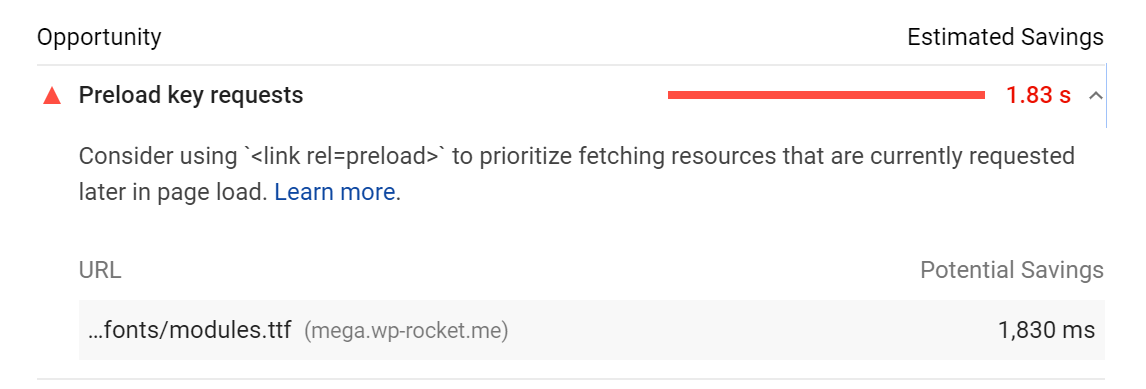
This feature will also satisfy the “Preload key requests” suggestion of PageSpeed.
Benchmark Tests
Jonathan did benchmarks for this feature on https://wp-rocket.me/ with positive results. Here is the waterfall
No Preload:

Full scale: https://jmp.sh/A336ebO
With Preload:

Full scale: https://jmp.sh/T8Gb6Ko
Note how the fonts take considerably lower time to load.
Another example is depicted here: https://developers.google.com/web/tools/lighthouse/audits/preload
User expectations and experience. How will we do this feature?
UI Proposal
Feature location: Preload tab
Section title: Preload Fonts
Section description: Improves performance by helping browsers discover fonts in CSS files. More info (Thanks Lucy https://github.com/wp-media/wp-rocket/issues/2543#issuecomment-615335738)
Text area title: Fonts to preload
Text area description: Specify urls of the font files to be preloaded (one per line).
Text area guideline (in green): The domain part of the URL will be stripped automatically.
Allowed font extensions: ttf, otf, woff, woff2, svg.

A related change is also recommended for cache preloading. Currently the section title simply says “Preload”. To avoid any confusion, let’s rename it to “Preload Cache”.

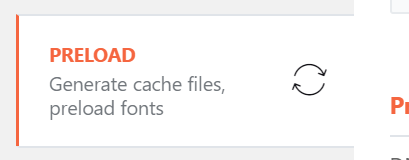
Also update the tab description from “Generate cache files” to: Generate cache files, preload fonts
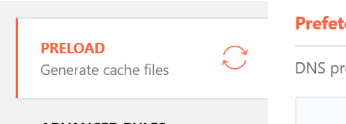
It will look so:
Technical Specs
The following is the expected output format in the of the website
<link rel="preload" as="font" href="https://domain.com/wp-content/themes/theme/assets/fonts/font-file.woff" crossorigin>
See example in the source code: https://wp-rocket.me/?nocache
(crossorigin is required, reference)
Preload for Google fonts:
- In every test conducted, PageSpeed never recommended to preload Google fonts.
- Even in tests where the Google font was manually specified in the same stylesheet with a local font, PageSpeed only recommended to preload the local font. (https://jmp.sh/Bp2oukP, https://jmp.sh/ORy9W34)
- In a real use case, Google fonts are added to the head, so they are discovered early and shouldn’t have an impact.
- However, if we get user feedback or we discover new information about the same, we can consider this in a future iteration.
- If we end up doing this ^ in the future, then the user would enter the complete font url (example: https://fonts.gstatic.com/s/manrope/v1/xn7_YHE41ni1AdIRqAuZuw1Bx9mbZk59FN_G-bnBeA.woff2) in the WP Rocket UI.
User Input
- During sanitization, strip off the domain part of the url (just as we do for the text areas in the File Optimization tab)
- During sanitization, check for allowed font formats(
ttf, otf, woff, woff2, svg) and remove any input that isn't this format. We can remove it silently because we already display allowed formats in the UI - Add a placeholder (just like we have for dns prefetch https://jmp.sh/eiR9qun) in the text area that shows an example (
/wp-content/themes/theme/assets/fonts/font-file.woff)
Risks
The entire feature is opt-in and only adds meta tags. So it’s extremely low risk. At the very most, the user might enter incorrect fonts and that might cause a minor performance penalty.
Sub-tasks
- [x] [UI](https://github.com/wp-media/wp-rocket/issues/2545)
- [x] [Option management](https://github.com/wp-media/wp-rocket/issues/2546)
- [x] [Front](https://github.com/wp-media/wp-rocket/issues/2547)
Acceptance Criteria
- Enter a font url in the UI
- Font is added as
rel="preload" as="font"link meta tag in the header - Enter the url to the font with domain.com (http://domain.com/wp-content/themes/theme/assests/font.woff). Check if the domain part is stripped off.
- Enter a font url with a non-allowed file extension (eg: .eot). The font url should be removed from the UI when saved. This should be added to the
<head>for preload. - Enable CDN
- Font urls are rewritten with CDN CNAME
What if?
- The font url entered is invalid? (404)
^ My recommendation is to do nothing for now. If this becomes a common thing, we can figure it out then.
Documentation and Translations
- A new doc describing the feature. Doc needs to educate the user on how to identify the font files (PageSpeed report could be a good place to find them).
- When Optimize CSS delivery is enabled, since the CSS file is preloaded, PageSpeed will not suggest to preload the font file. To discover fonts via PageSpeed, it’s recommended to disabled Optimize CSS delivery and then run the test.
 arunbasillal
All 24 comments
@webtrainingwheels Please take a look at the copy for the UI (under UI Proposal) and share your feedback. 🙏
arunbasillal
on 15 Apr 2020
Shouldn't we also specifiy the type attribute when adding the font link, to prevent the browser from trying to download a type it's not compatible with?
Should the links be added on all pages, or only on cache pages?
 Tabrisrp
on 16 Apr 2020
Tabrisrp
on 16 Apr 2020
@Tabrisrp I didn't know the type could be to prevent to load the font if the browser doesn't support it. Yes, we will add it 🙏
I guess we can do the optimization for cached and uncached pages.
@Tabrisrp @arunbasillal What do you think?
 GeekPress
on 16 Apr 2020
GeekPress
on 16 Apr 2020
Shouldn't we also specifiy the
typeattribute when adding the font link, to prevent the browser from trying to download a type it's not compatible with?
Good point, I should have included the clarification in the feature doc.
Based on data from canIuse.com, the most common font formats, woff, woff2 and ttf has 95% plus browser coverage.
And the browsers that doesn't support these also doesn't support preload. So at this time, I see no reason to add the type.
(However, if we decide to include it, I suppose this can be auto detected from the filename extension)
What do you think @GeekPress ?
Should the links be added on all pages, or only on cache pages?
My vote is to stick to only cached pages. This how we do it for other features like DNS-Prefetch. Let's keep that pattern to keep things simple.
arunbasillal
on 16 Apr 2020
@arunbasillal @webtrainingwheels I'm wondering if we have to add a mention in the UI about the valid extension allowed for this option?
GeekPress
on 16 Apr 2020
What do you think @GeekPress ?
@arunbasillal My response will depend to the extension we will allow :D
GeekPress
on 16 Apr 2020
If Lucy agrees, we will be educating our customers to use PageSpeed to find the fonts. So we do not have to be worried about wrong input at this point I believe.
If wrong input becomes a trend, we can add sanitization at that point. My recommendation is to keep things simple for now.
arunbasillal
on 16 Apr 2020
@arunbasillal Hum, a small sentence below the textarea to let our customer know which files are allowed won't make the option more difficult to use. It could save some tickets ;)
GeekPress
on 16 Apr 2020
From experience, we should always be worried about wrong input ;)
If the option is specifically for fonts, I think we must validate that the customer has only entered a font.
The pagespeed recommendation, while most commonly referring to fonts, could potentially flag a different file and I can see a user copy/pasting that into this field.
 webtrainingwheels
on 17 Apr 2020
webtrainingwheels
on 17 Apr 2020
That's a good point Lucy 🙏 Since we specifically add the as="font" parameter, it makes sense to limit it to just fonts.
How about we sanitize the input and check for font extensions? We could check for all these extensions (ttf, otf, woff, woff2, svg, eot reference).
When a non-font file is detected, ideally we should display a notice to the customer saying that their input was removed because it wasn't a font file.
@GeekPress This is something we can easily check. Also will leave the UI cleaner and less complicated/intimidating for not-so-technical users. What are your thoughts?
arunbasillal
on 17 Apr 2020
When a non-font file is detected, ideally we should display a notice to the customer saying that their input was removed because it wasn't a font file.
By adding a sentence below the field with the allowed extension, we won't need to make a notice.
We are already doing this for some features like Exclude CSS files:
The domain part of the URL will be stripped automatically.
Use (.*).css wildcards to exclude all CSS files located at a specific path.
If we strip the domain, we will need also to inform the user. For this option, it could be:
The domain part of the URL will be stripped automatically.
Allowed fonts extension: ttf, otf, woff, woff2, svg, eot
GeekPress
on 17 Apr 2020
@arunbasillal For the font format I suggest to not include eot => https://caniuse.com/#search=eot
This format doesn't seem to be supported anymore.
GeekPress
on 17 Apr 2020
By adding a sentence below the field with the allowed extension, we won't need to make a notice.
@GeekPress Do you mean we add the line "Allowed fonts extension: ttf, otf, woff, woff2, svg, eot"
And validate user input as well (and remove other file formats automatically)?
^ This sounds ideal to me that we do both.
For the font format I suggest to not include eot => https://caniuse.com/#search=eot
This format doesn't seem to be supported anymore.
Sure 👍
arunbasillal
on 17 Apr 2020
@arunbasillal Could we make the text a tad more compact this way?
Improves performance by helping browsers discover fonts in CSS files. More info
webtrainingwheels
on 17 Apr 2020
@webtrainingwheels Thanks, I have updated the original comment with the suggestion :)
arunbasillal
on 17 Apr 2020
@GeekPress Do you mean we add the line "Allowed fonts extension: ttf, otf, woff, woff2, svg, eot"
And validate user input as well (and remove other file formats automatically)?
@arunbasillal Yep!
GeekPress
on 19 Apr 2020
Based on @GeekPress's comment (https://github.com/wp-media/wp-rocket/issues/2543#issuecomment-616155846), I have updated the feature doc.
@Tabrisrp + @Screenfeed Please note. Sorry if you have to rework on things that were already worked on. 🙏
Changes:
- The note under the text area - https://jmp.sh/zsh9r5r
- During sanitization, check for allowed font formats( ttf, otf, woff, woff2, svg ) and remove any input that isn't this format. We can remove it silently because we already display allowed formats in the UI
arunbasillal
on 22 Apr 2020
@arunbasillal It was already added. I simply had to remove the eot extension as I didn’t notice that it doesn’t need to be included.
 Screenfeed
on 22 Apr 2020
Screenfeed
on 22 Apr 2020
@arunbasillal Sorry I didn't notice your response about cached vs uncached.
My vote is to stick to only cached pages. This how we do it for other features like DNS-Prefetch. Let's keep that pattern to keep things simple.
We are doing it for DNS-Prefetch, but is it a good thing to do that? I don't think so.
Why? This kind of options won't generate any issues on uncached version compare to cached version. We have no risks to apply them into the uncached version.
And preload fonts has an important impact on loading time. It will really worth to get this optimization on uncached pages.
We also have a feature request to maybe apply all optimizations on uncached pages:
https://portal.productboard.com/wp-media/1-wp-rocket-portal/c/13-enable-optimizations-on-uncached-pages
If one day we decide to implement this, it will be one less feature to migrate and test.
GeekPress
on 22 Apr 2020
In the mean time we would have one thing that applies all the time, and all the other things that apply only on cached pages.
That’s confusing imho, it feels more logic to me to stick with the current behavior until the feature request lands in a release.
Screenfeed
on 22 Apr 2020
@GeekPress The reason I voted against it is for uniformity (similar thought to what @Screenfeed said). Right now we do not add any optimizations to the uncached page and as soon as a page is excluded from caching, the other optimizations only make a minor impact.
Adding it to uncached page isn't going to win any customer heart imo. But uniformity will help our support team and customers understand our plugin better.
arunbasillal
on 23 Apr 2020
Adding it to uncached page isn't going to win any customer heart imo.
Here the last feedbacks on « Enable assets optimizations on uncached pages » feature requests.

The « Enable assets optimizations on uncached pages » is in our Top 5 of most rated features by our customers.
This improvement will be a good start and welcoming by our customers.
If we don't want to apply this option for a « uniformity » reason, it's in fact a reason to start applying some optimizations on uncached pages. It's going to « force » us to work now on this improvement.
We also have to take in consideration how our users are actually implementing this feature. It could be done by using several plugins.
For example, on our website we put the preload tags by using « Insert Headers and Footers ». The preload tags are included on cached and uncached version.
If someone is using Assets Cleanup, the preload tags are included in cached and uncached version.
If our users want to switch from their previous solution to WP Rocket to preload fonts, they won't be able to get the same behavior than they have now. And then, we could expect to have complaints.
I guess, it will be easy on our side to explain why we decided this option can be applied on cached and uncached version compare to others.
Please go ahead by applying this option on uncached version.
GeekPress
on 23 Apr 2020
No CSS property value option font-display in @font-face "&display=swap" ?
 KENY92
on 11 Jun 2020
KENY92
on 11 Jun 2020
@KENY92 Preload for fonts isn't related to the display swap CSS declaration. Here our complete doc about our preload fonts feature:
https://docs.wp-rocket.me/article/1317-preload-fonts
GeekPress
on 12 Jun 2020
Related issues
arunbasillal
·
4Comments
 maximejobin
·
4Comments
maximejobin
·
4Comments
 vmanthos
·
5Comments
arunbasillal
·
4Comments
vmanthos
·
3Comments
vmanthos
·
5Comments
arunbasillal
·
4Comments
vmanthos
·
3Comments
Most helpful comment
That's a good point Lucy 🙏 Since we specifically add the
as="font"parameter, it makes sense to limit it to just fonts.How about we sanitize the input and check for font extensions? We could check for all these extensions (
ttf, otf, woff, woff2, svg, eotreference).When a non-font file is detected, ideally we should display a notice to the customer saying that their input was removed because it wasn't a font file.
@GeekPress This is something we can easily check. Also will leave the UI cleaner and less complicated/intimidating for not-so-technical users. What are your thoughts?