Wp-graphql: 404 error at /graphql endpoint (wp installation directory different from site url)
In the WordPress general settings I have the following settings:
WordPress Address (url): mysite.com/cms
Site Address (url): mysite.com
Trying to access the graphql api at mysite.com/cms/graphql returns a 404 error and redirects to the 404 error WordPress page. Could the different in installation locaiton and site url causing this?
I'm currently using the Twenty Sixteen theme and there are two other active plugins; FakerPress and WordPress Importer.
 acollins1991
All 17 comments
@acollins1991 did you flush permalinks after activation? Also make sure you're permalink structure is something other than the default
 jasonbahl
on 31 Aug 2017
jasonbahl
on 31 Aug 2017
@jasonbahl I did originally have it set to mysite.com/%postname%/, but have changed mysite.com/post/%postname%/ with no luck. What's the simplest way to check that the endpoint is working? I've tried using postman to send JSON requests to it but would be good to see if it's just my requests that are broken rather than the endpoint. Thanks for your help!
acollins1991
on 31 Aug 2017
@acollins if you visit in your browser you should see a JSON response instead of your 404 page. Also try using GraphiQL and point it at the endpoint and it should read your Schema (make sure it's using POST requests instead of GET though)
I'll check things out with a sub-directory install like you have and see what's up though
jasonbahl
on 31 Aug 2017
@jasonbahl I have tried to use the GraphiQL Chrome Extension but only results in the following error:
SyntaxError: Unexpected token < in JSON at position 0
This is probably because it's receiving the 404 page rather than the expected data.
Thanks again. Hopefully we can resolve this.
acollins1991
on 31 Aug 2017
Try the GraphiQL desktop app as well, as the Chrome extension seems iffy for me too. I don't think it gets updated properly or something. . .but it sounds like there's a legit issue when the site URL is set with a directory instead of just the root.
jasonbahl
on 31 Aug 2017
@acollins1991 do all other pages on your site work fine with the permalink structure and site URL setup you have?
jasonbahl
on 31 Aug 2017
@jasonbahl Couldn't get GraphiQL working unfortunately, but other posts seem ok.
acollins1991
on 1 Sep 2017
@acollins1991 have you tried mysite.com/graphql in addition to mysite.com/cms/graphql?
jasonbahl
on 1 Sep 2017
@jasonbahl Just tried mysite.com/cms/graphql and still went to the 404 page.
acollins1991
on 4 Sep 2017
@acollins1991 can you also check mysite.com/graphql?
If that doesn't work I'll need more info on your setup. How are you setup with your WordPress Address and Site Address (url) to be different? Whatever you have setup there _might_ have some affect on things. . .but hard to say without knowing details on how you're setup.
jasonbahl
on 6 Sep 2017
@jasonbahl The only difference is that the WordPress installation sits in the /cms/ directory of the root domain so:
Site Address: https://root.com/
WordPress Address: https://root.com/cms/
acollins1991
on 7 Sep 2017
@acollins1991 without more info, I can't be of much assistance.
I just setup a local WordPress in a sub-directory, activated the plugin, flushed the permalinks and things are working. Attached GIF showing my site at graphqltest.dev/cms where graphqltest.dev/cms/graphql shows a 404, then I activate WPGraphQL and flush the permalinks, then visit graphqltest.dev/cms/graphql and see the JSON response, then put the URL in GraphiQL and get the schema back to explore the docs.
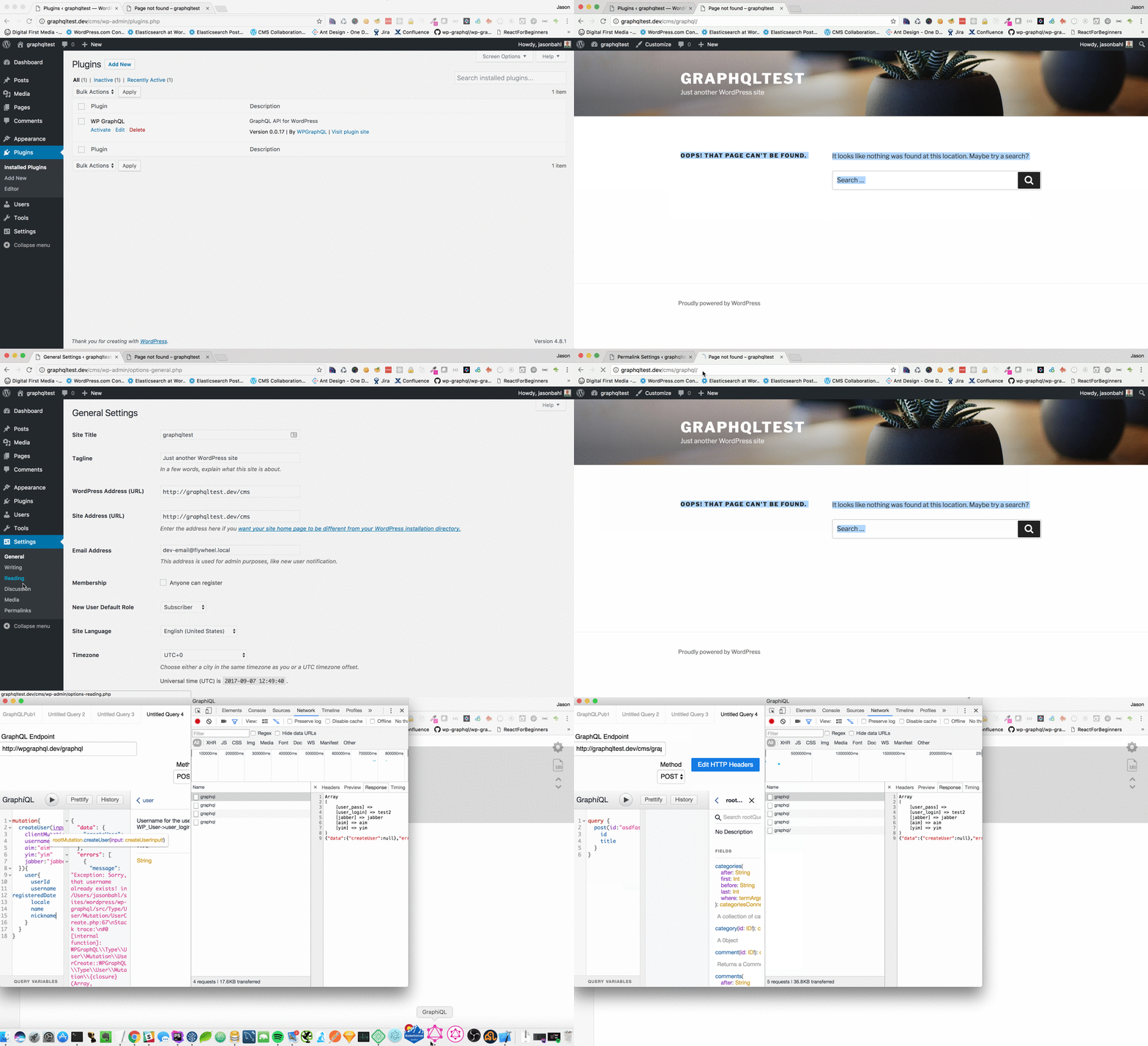
It seems that things are working fine with a WordPress install in a sub-directory, such as site.com/cms. I'd be happy to try and help more, but I would need more info about your setup.
I'm closing this issue as there's not enough info about your setup for me to help with. If you want to provide more info that is helpful, I'll consider re-opening and helping further.
jasonbahl
on 7 Sep 2017
I had the same error. Flushing the permalinks did the trick, I've never heard of it before.
Is this something that always needs to be done on clean installs?
 krokofant
on 13 Sep 2017
krokofant
on 13 Sep 2017
I just ran into this after cloning a Local by Flywheel site. Flushing permalinks does fix it.
 joshuaiz
on 29 Nov 2019
joshuaiz
on 29 Nov 2019
Try this:
Setting -> General ->
- WordPress Address (URL)
- Site Address (URL)
Normally we set this two fields like:
WordPress Address (URL) : http://example.com/main
Site Address (URL) : http://example.com
And after I changed Site Address
WordPress Address (URL) : http://example.com/main
Site Address (URL) : http://example.com/main
http://example.com/main/graphql
works for me.
after /graphql was working
you can change your Site Address (URL) back
Site Address (URL) : http://example.com
 gravityeric
on 9 Jan 2020
gravityeric
on 9 Jan 2020
thanks !
 jonrrivera
on 22 Mar 2020
jonrrivera
on 22 Mar 2020
Hi, I am having a similar issue here. Nothing to fancy in my setup running from MAMP on a mac. /Applications/MAMP/htdocs/wordpress/ is where the site lives.
Accessing the basic install of WP in the browser via http://localhost:8888/wordpress
I have flushed the permalinks tried them in every available option [plain, day and name, month and name, numeric, post name, custom, structure].
WordPress Address (URL): http://localhost:8888/wordpress
Site Address (URL): http://localhost:8888/wordpress
When I browse to the graphql endpoint http://localhost:8888/wordpress/graphql the site returns a HTML document with status code 200, which renders the hello world post, not a graphql JSON object as I was expecting as seen (https://www.youtube.com/watch?v=9KGuI0UmpMw).
The other plugins seem to operate fine i.e. I can query using graphiql, adv custom fields seems to work fine.
Advanced Custom Fields: Version 5.8.9 | By Elliot Condon
WP GraphiQL: Version 1.0.1 | By WPGraphQL, Digital First Media, Jason Bahl
WP GraphQL: Version 0.8.4 | By WPGraphQL
WPGraphQL for Advanced Custom Fields: Version 0.3.2 | By WPGraphQL, Jason Bahl
Wordpress Version : wordpress-5.4.1
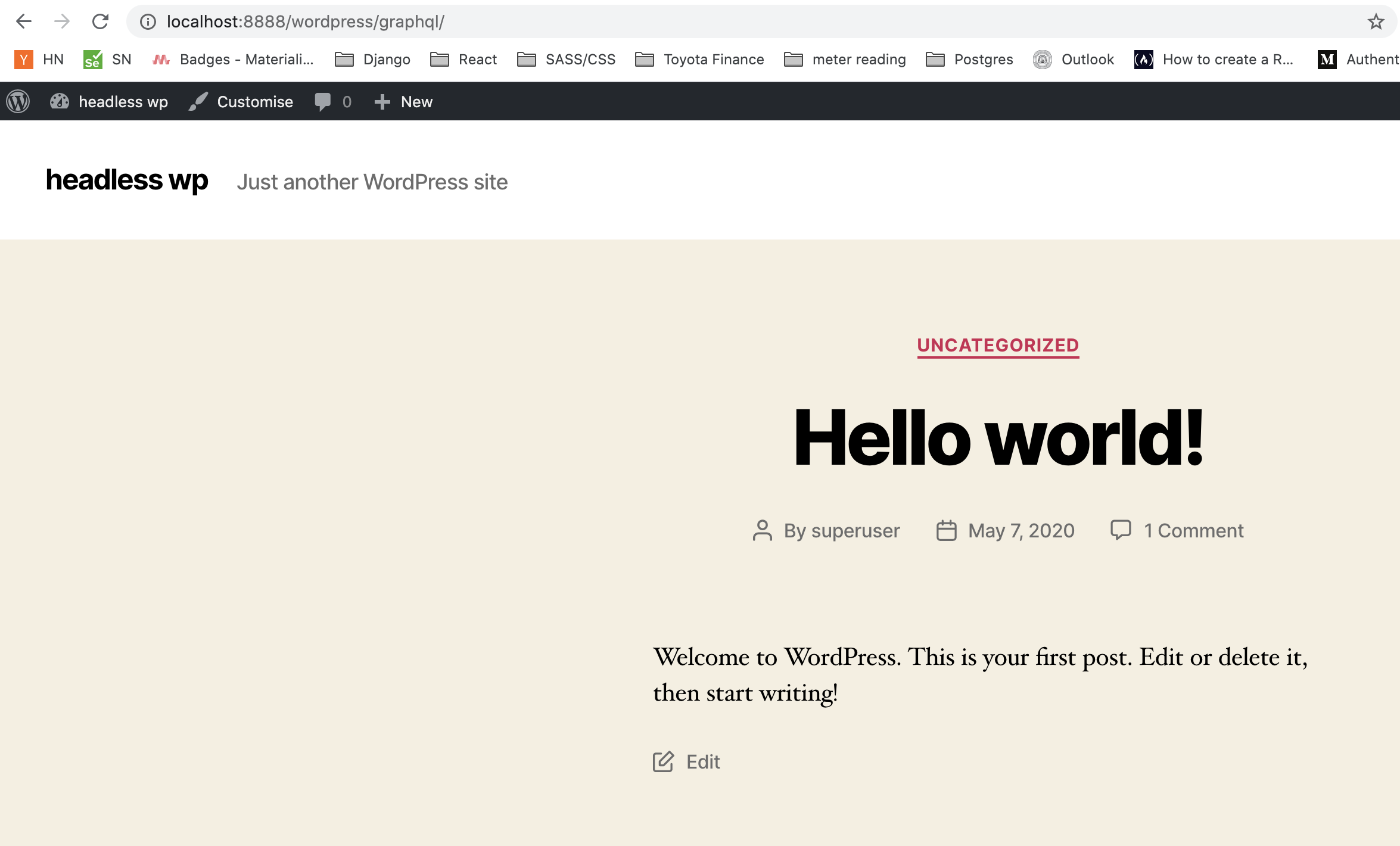
Thanks
UPDATE:::: my bad I was in the develop branch and not master
 odalton
on 8 May 2020
odalton
on 8 May 2020
Related issues
 cr101
·
3Comments
cr101
·
3Comments
 nikosolihin
·
5Comments
nikosolihin
·
5Comments
 TylerBarnes
·
4Comments
TylerBarnes
·
4Comments
TylerBarnes
·
4Comments
TylerBarnes
·
4Comments
TylerBarnes
·
4Comments
TylerBarnes
·
4Comments
Most helpful comment
Try this:
Setting -> General ->
Normally we set this two fields like:
And after I changed Site Address
http://example.com/main/graphqlworks for me.
after
/graphqlwas workingyou can change your Site Address (URL) back
Site Address (URL) : http://example.com