Wp-calypso: Jetpack: Premium themes cannot be enabled on sites with Jetpack Complete
Steps to reproduce
Ensure a site is connected with the Jetpack Complete plan.
- Starting at URL: wordpress.com/themes/
- Find a premium theme
- Attempt to activate it on your Jetpack Complete site.
What I expected
The premium theme should activate.
What happened instead
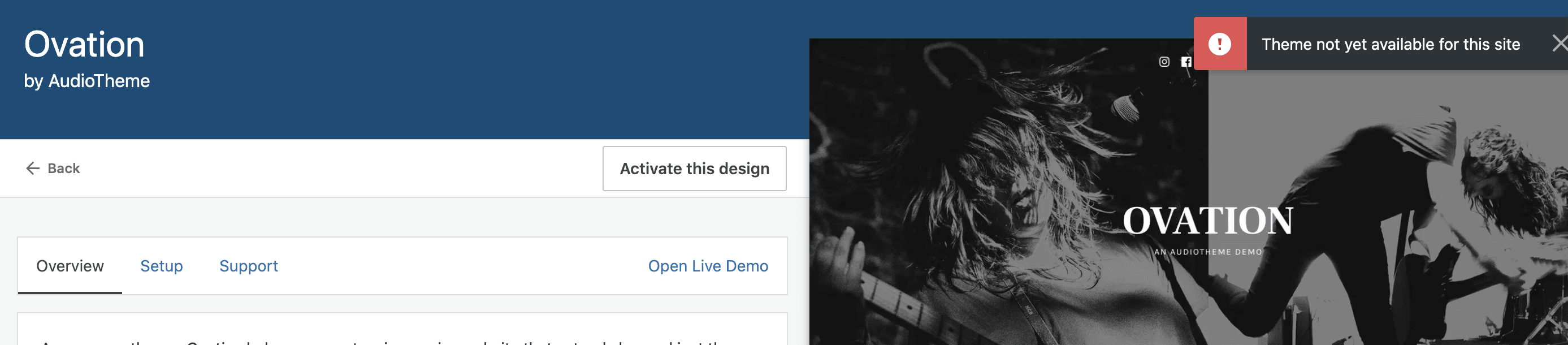
Error banner ""Theme not yet available for this site."
Browser / OS version
Chrome/MacOS
Screenshot / Video
Context / Source
Team 51 project, tested with multiple premium themes. Also tested in desktop app, where the flow fails differently, but also seems to be related to Jetpack plan changes.
Edited to add: This issue was found on a fresh install of WordPress, freshly connected to Jetpack for the first time.
 tiffanybridge
All 3 comments
I just deployed D49976-code, which should address this issue. If @tiffanybridge or @cathymcbride can confirm we can close the issue!
 cbauerman
on 22 Sep 2020
cbauerman
on 22 Sep 2020
🎉1
Confirming this works on the affected site.
tiffanybridge
on 22 Sep 2020
🎉1
And I'm not able to repro with a new site either. Closing as fixed!
 cathymcbride
on 22 Sep 2020
cathymcbride
on 22 Sep 2020
🚀1
🎉1
Was this page helpful?
0 / 5 - 0 ratings
Related issues
 gedex
·
3Comments
gedex
·
3Comments
 spen
·
3Comments
spen
·
3Comments
 jeherve
·
3Comments
spen
·
3Comments
jeherve
·
3Comments
spen
·
3Comments
 jjchrisdiehl
·
3Comments
jjchrisdiehl
·
3Comments
Most helpful comment
And I'm not able to repro with a new site either. Closing as fixed!