Wp-calypso: Reader: Sharing feature is not working on some Atomic sites
There have been some reports from users that they unable to share posts from Reader. Upon clicking the 'Share' button, the link redirected to empty editor.
Unfortunately, not all AT sites have this issues. However, the common thread among the issues is the editor is redirecting to wp-admin instead of block-editor
Steps to reproduce
- Starting at URL on Reader: https://wordpress.com/read
- Select a post from the Reader list (not your site), then click the share icon to open sharing options for that post
- Select a site on your account from the list. Try to choose an AT site (a WordPress.com website with customized plugins/themes installed)
- The screen will redirect to editor so user can enter additional texts on the post.
What I expected
For the editor to open the reblogged/shared posts.
What happened instead
Post will load blank instead of showing the content of the post being reblogged.
Additional findings
I have ensured that:
- Classic Editor plugin is inactive
- Preferred editor is set to Gutenberg on User RC
- Deactivate or reactivate Gutenberg plugin is not affecting anything
- With the problematic site (the editor opened blank/empty page), I found the URL always displays as
https://DOMAINNAME.COM/wp-admin/post-new.php?block-editor=1&frame-nonce=... - While the correct/expected URL should be
https://wordpress.com/block-editor/post/DOMAINNAME.COM... - At some point, I tried to clear editor preference from User RC. At first, it looks working (displaying
block-editor...instead ofwp-admin...) but it displays an error "DOMAINNAME.COM refused to connect" then rerouted to this:https://DOMAINNAME.COM/wp-admin/post-new.php?calypsoify=1&block-editor=1&frame-nonce... - I also find that for some reason, the pages and posts on the user’s Calypso is always pointing to /wp-admin link path
Context / Source
user-report
The issue is user-report and can be found here: p9F6qB-5TQ-p2
Feel free to ping me if you need more information about this. Thank you.
 retnonindya
All 15 comments
This has something to do with failing Gutenframe checks, and then being instead redirected to WP Admin (the redirect fails to carry the post content with it). The checks for which Gutenframe will fail (PCYsg-lwV-p2) are:
- The site’s Jetpack plugin must be v7.3 or later. This does not apply to simple sites or Atomic sites, all of which meet this requirement.
- The site to be iframed must have an SSL certificate (https). This does not apply to simple sites or Atomic sites, all of which meet this requirement.
- The user must be opted in to the block editor.
- The site must not have the Classic Editor plugin active.
- The site must not have any problematic plugins active.
@retnonindya Since the first two are invalid, and you've checked 3 and 4, it is likely a https://github.com/Automattic/wp-calypso/pull/32915/files#diff-c5eeae718548baa022e9a4c821efc8b8R228 (which you can verify using the MC tools (PCYsg-lOu-p2).
This should still be expected to work, though. It looks like there are title, text, and url query params for the shared post that go missing. Doing a quick test of manually adding them didn't work though, so there's still another piece missing beyond that.
 kwight
on 16 Sep 2020
kwight
on 16 Sep 2020
Hi @kwight! Thanks for checking into this.
I checked your links (massive thank you!) and I noticed the user has WPBakery plugin active and it's on "Denied" list, so I deactivated the plugin and tried again. Still, no luck.
We even got the same report here: p9F6qB-5TQ-p2#comment-33171 -- and on that site, all plugins on the site is on "Accepted" list. When I deactivated Classic Editor plugin, the issue persists.
I'm sorry I can't find further findings on this :( Do you have any insights on this, or maybe you know other folks that I can ping about this? Thank you in advance.
retnonindya
on 17 Sep 2020
all plugins on the site is on "Accepted" list. When I deactivated Classic Editor plugin, the issue persists.
Hm, then I have no explanation 🙃
Do you have any insights on this, or maybe you know other folks that I can ping about this?
Not at the moment, no – we'll need to try to fit it in for deeper digging.
kwight
on 17 Sep 2020
I had a user saying that they couldn't Reblog a Post to their Atomic site: #24241116-hc
When they click the Reblog button on another WordPress.com site, their Simple Sites appear in the list but not their Atomic site.
I'm not sure if this is expected behavior, but this bug report seemed to be for the same thing.
 eoinsav
on 19 Sep 2020
eoinsav
on 19 Sep 2020
Another report in 24259683-hc.
They have the Classic Editor plugin active. When I deactivate it and use the block editor the share works just fine.
ETA:
I just read a bit more thoroughly and noticed these:
The user must be opted in to the block editor.
The site must not have the Classic Editor plugin active.
So is it expected behavior that the share function just fails silently and loads a blank classic editor screen when the Classic Editor plugin is active? That seems... Less than optimal.
 katiebethbrown
on 20 Sep 2020
katiebethbrown
on 20 Sep 2020
So is it expected behavior that the share function just fails silently and loads a blank classic editor screen when the Classic Editor plugin is active? That seems... Less than optimal.
Expected at this point, yes – and very not optimal. Basically, our Gutenframe fallback is unaware of features like Sharing, so the support would need to be added (to carry through the shared content for populating the new post).
kwight
on 21 Sep 2020
When they click the Reblog button on another WordPress.com site, their Simple Sites appear in the list but not their Atomic site.
@eoinsav You're right, confirmed that myself; I have a feeling it may have been intentional (as in, support hasn't been added yet similar to this issue). Can you create a separate issue though please, since reblogging is not possible from the Reader (which this issue is focussed on)? Thanks!
kwight
on 21 Sep 2020
Another report here #3304942-zen On my end, when testing, if the Classic Editor is not enabled this is working normally on an Atomic site.
 joweber123
on 23 Sep 2020
joweber123
on 23 Sep 2020
if the Classic Editor is not enabled this is working normally on an Atomic site
If the the Atomic site has no other factors that force a redirect to WP Admin, then yes, Gutenframe will apply (wordpress.com/block-editor/), and Sharing will work as expected.
kwight
on 23 Sep 2020
Another report here: #24966793-hc
Follow up ticket: #3418103-zen
User reported that it's happening on both of their atomic sites: https://moneyclipblog.com/ and https://hintenanstellen.de/
I deactivated the classic editor plugin on both sites and set the block editor as the preferred editor on their user RC, however it's still not working and the share button (from the Reader) keeps loading a blank page on both sites. I also briefly deactivated all other plugins on the sites but that did not help either
 sourourn
on 18 Oct 2020
sourourn
on 18 Oct 2020
User has come back repeatedly asking for a solution on this one: #25028665-hc.
It's important to them, and they're not happy.
 scosgro
on 21 Oct 2020
scosgro
on 21 Oct 2020
moneyclipblog.com is a particular case.
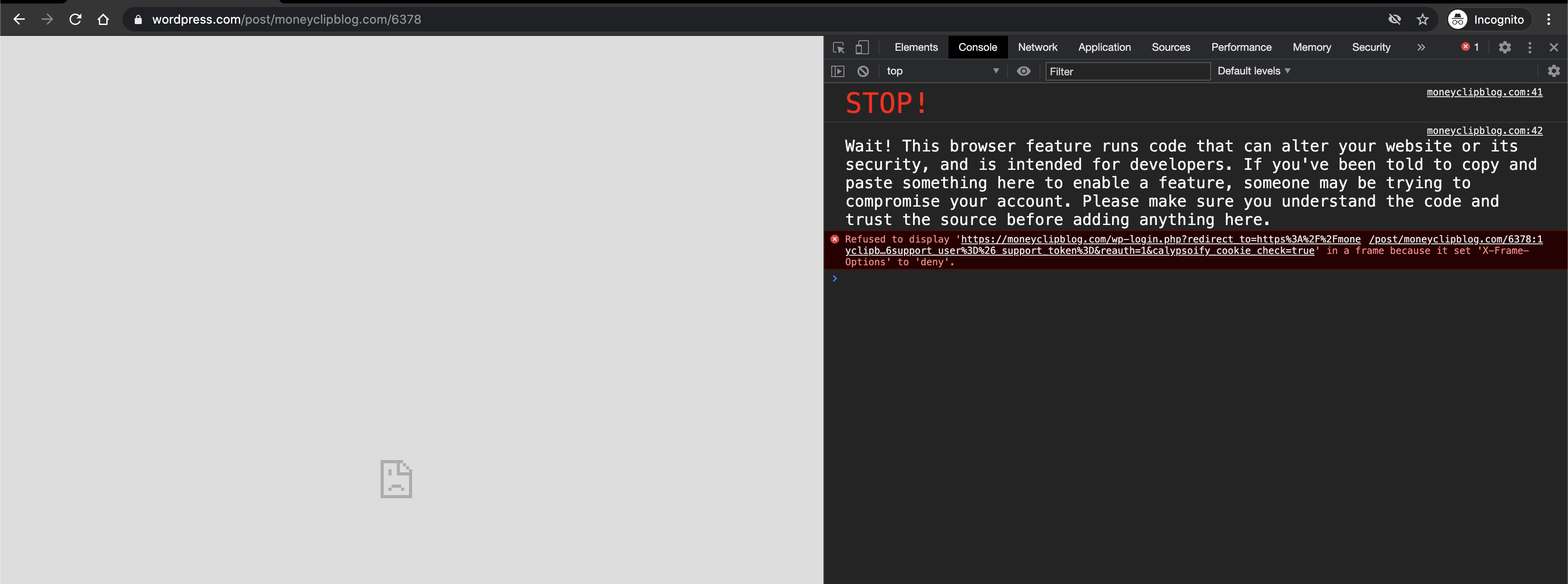
For some reason it gets :this: error and the iFrame redirect to wp-admin, losing the ability to populate the title and description of the post to share.
 retrofox
on 27 Oct 2020
retrofox
on 27 Oct 2020
User came back asking for an update #25713789-hc
 fashuvo
on 18 Nov 2020
fashuvo
on 18 Nov 2020
This is unlikely to be prioritized any time soon: pbAPfg-15y-p2
kwight
on 18 Nov 2020
User asking for update #25759305-hc
 nagpai
on 20 Nov 2020
nagpai
on 20 Nov 2020
Related issues
 aduth
·
3Comments
aduth
·
3Comments
 vparkhere
·
3Comments
vparkhere
·
3Comments
 ghost
·
3Comments
ghost
·
3Comments
 kellychoffman
·
3Comments
kellychoffman
·
3Comments
 ehg
·
3Comments
ehg
·
3Comments
Most helpful comment
If the the Atomic site has no other factors that force a redirect to WP Admin, then yes, Gutenframe will apply (
wordpress.com/block-editor/), and Sharing will work as expected.