Wp-calypso: Form block: cannot remove added string on a date block
Steps to reproduce
- Starting at URL: https://wordpress.com/start/ (create a new site - it can be a free plan one) and do not launch the site yet.
- Create a new Contact page.
- Add a date block to the form block and check how it looks on the frontend. The field should be empty by default.
- Go back and add the letter 'S' to the date field and save the changes. Now, you should see the letter right after the day after you picked the date.
- Go back to the editor and remove that string and save the changes.
- Now we're stuck on that site for the date field with that bug regardless of the page we add a form with a date block in.
I launched the site and tried other things such as adding an ID or a value to it - nothing works.
What I expected
To be able to fix my initial mistake on step 4.
What happened instead
I was stuck with a date such as 5s Feb 2020
Browser / OS version
Chrome 79, macOS Catalina
Context / Source
user-report
Test site: https://fmr202020aaaaaccc.wordpress.com/contact/
I cannot replicate this on a self-hosted site.
 Robertght
All 8 comments
cc @Automattic/explorers for triage.
 simison
on 6 Mar 2020
simison
on 6 Mar 2020
I am unable to replicate this. Do you see the same thing on other sites?
 scruffian
on 9 Mar 2020
scruffian
on 9 Mar 2020
I'm not able to replicate this either. I notice that the date format is different on the linked test site, to the default on my sites, so I wonder if this is related to locale's or some other user-level setting - especially as it's affecting things sitewide.
 pablinos
on 9 Mar 2020
pablinos
on 9 Mar 2020
Managed to figure out what causes it, but not sure about how to fix it.
Basically the test site uses a custom date format: jS F Y
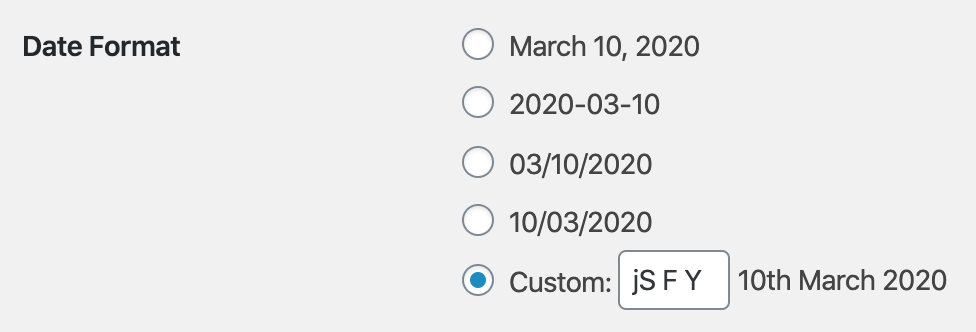
According to the WP docs (which is based upon the PHP date formats), the S token is the English numeric suffix (e.g. th in the screen above).
The Contact Form block uses the jQueryUI Datepicker, which uses different date tokens. S is not among them, and so it's rendered as a literal S character.
I've tried removing the S from the date format j F Y, and indeed it stops being displayed in the date picker.
But... none of those tokens are listed in the date picker tokens, not just S!
j should be d, F should be MM, and Y should be yy.
Instead, I end up with "10 Mar 2020", which is j M Y in PHP (M, not F!), and d M yy in jQuery.
And now I'm trying to find out where (if?) we convert between PHP and jQuery formats. 😓
 Copons
on 10 Mar 2020
Copons
on 10 Mar 2020
On a deeper look, the jQuery UI Datepicker is a Core WP dependency, and is localized in Core WP:
Unfortunately, the conversion does not replace all PHP tokens into jQuery ones. As you can guess, S is not among those.
I'm pretty sure this is a Core issue, and I think it should be reported to Core. 🤔
Also, curiously, F is converted to M instead of MM (I might be overlooking something here though 🤔).
Copons
on 11 Mar 2020
Excuse the random suggestion, but @akirk is somewhat of a date/time guru and probably can chime in here with an expert opinion.
 lancewillett
on 12 Mar 2020
lancewillett
on 12 Mar 2020
I think there is nothing to add here. @Copons did a perfect analysis.
Also, curiously, F is converted to M instead of MM (I might be overlooking something here though 🤔).
The code you linked above converts it to MM (5th line in the first array is F, 5th line in the second one is MM).
S is simply not supported in the jQuery UI Datepicker, so the best way to go ahead is to remove it and patch core to do so, along with all the other chars that are not supported either, since jQuery UI will print them verbatim as we saw above.
 akirk
on 17 Mar 2020
akirk
on 17 Mar 2020
Thanks @akirk!
The code you linked above converts it to MM (5th line in the first array is F, 5th line in the second one is MM).
Yup, the code is clear, but in my test, PHP F (month name long, "March") is converted into jQuery M (month name short, "Mar") instead of MM (month name long). 😅
Anyway, I've never opened a patch on Core, so it will take me some time to figure it out. 🙂
Copons
on 17 Mar 2020
Related issues
 hoverduck
·
3Comments
hoverduck
·
3Comments
 vparkhere
·
3Comments
vparkhere
·
3Comments
 jeherve
·
3Comments
jeherve
·
3Comments
 spen
·
3Comments
spen
·
3Comments
 ghost
·
3Comments
ghost
·
3Comments