Wp-calypso: User mentions: cursor focus lost after typing '@'
This is a regression.
Steps to reproduce
- Internal users only: browse to a P2 post in Reader (full post, e.g. /read/feeds/:feed_id/posts/:post_id)
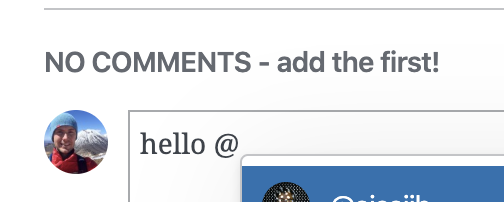
- Press '@' and start typing for user matches
- Try and continue typing for a specific match
What I expected
After typing '@', I continue seeing matches as I add more text. I am then able to choose one by pressing 'Enter'.
What happened instead
After the '@' I cannot continue typing. I have to manually place the cursor back after the '@' to find user matches.
Browser / OS version
Chrome/Mac
Screenshot / Video
 bluefuton
All 5 comments
I came here to report this same issue. I also wanted to note that not only does it lose focus, but shortcuts can be accidentally applied as a result.
For example, if you are tagging someone like that starts with an L it will subtly like the post, which may not be your intention.
 kriskarkoski
on 23 Mar 2020
kriskarkoski
on 23 Mar 2020
You can reproduce this issue in Devdocs:
http://calypso.localhost:3000/devdocs/blocks/user-mentions
I suspect that a change in how focus is handled in the underlying Popover component may be the culprit.
bluefuton
on 21 May 2020
Hi there! I took a look and found a possible solution for this but I'm not sure if it affects the popover functionality elsewhere. But by not calling the focusPopover function in /client/components/popover/index.jsx, it seems to work normally as expected. If it's alright I can raise a PR and work through it further if needed :)
setPositionAndFocus() {
        this.setPosition();
        // this.focusPopover(); // Not sure why this is needed
    }

    focusPopover() {
        // Defer the focus a bit to make sure that the popover already has the final position.
        // Initially, after first render, the popover is positioned outside the screen, at
        // { top: -9999, left: -9999 } where it already has dimensions. These dimensions are measured
        // and used to calculate the final position.
        // Focusing the element while it's off the screen would cause unwanted scrolling.
        this.scheduledFocus = defer( () => {
            if ( this.popoverNodeRef.current ) {
                debug( 'focusing the popover' );
                this.popoverNodeRef.current.focus();
            }
            this.scheduledFocus = null;
        } );
    }
 glenpadua
on 16 Aug 2020
glenpadua
on 16 Aug 2020
Thank you for investigating @glenpadua! We'd welcome a PR :)
bluefuton
on 17 Aug 2020
@bluefuton I have raised a PR. Let me know if it works :)
glenpadua
on 18 Aug 2020
Related issues
 samouri
·
3Comments
samouri
·
3Comments
 roccotripaldi
·
3Comments
roccotripaldi
·
3Comments
 lamosty
·
3Comments
lamosty
·
3Comments
 rickybanister
·
3Comments
rickybanister
·
3Comments
 spen
·
3Comments
spen
·
3Comments