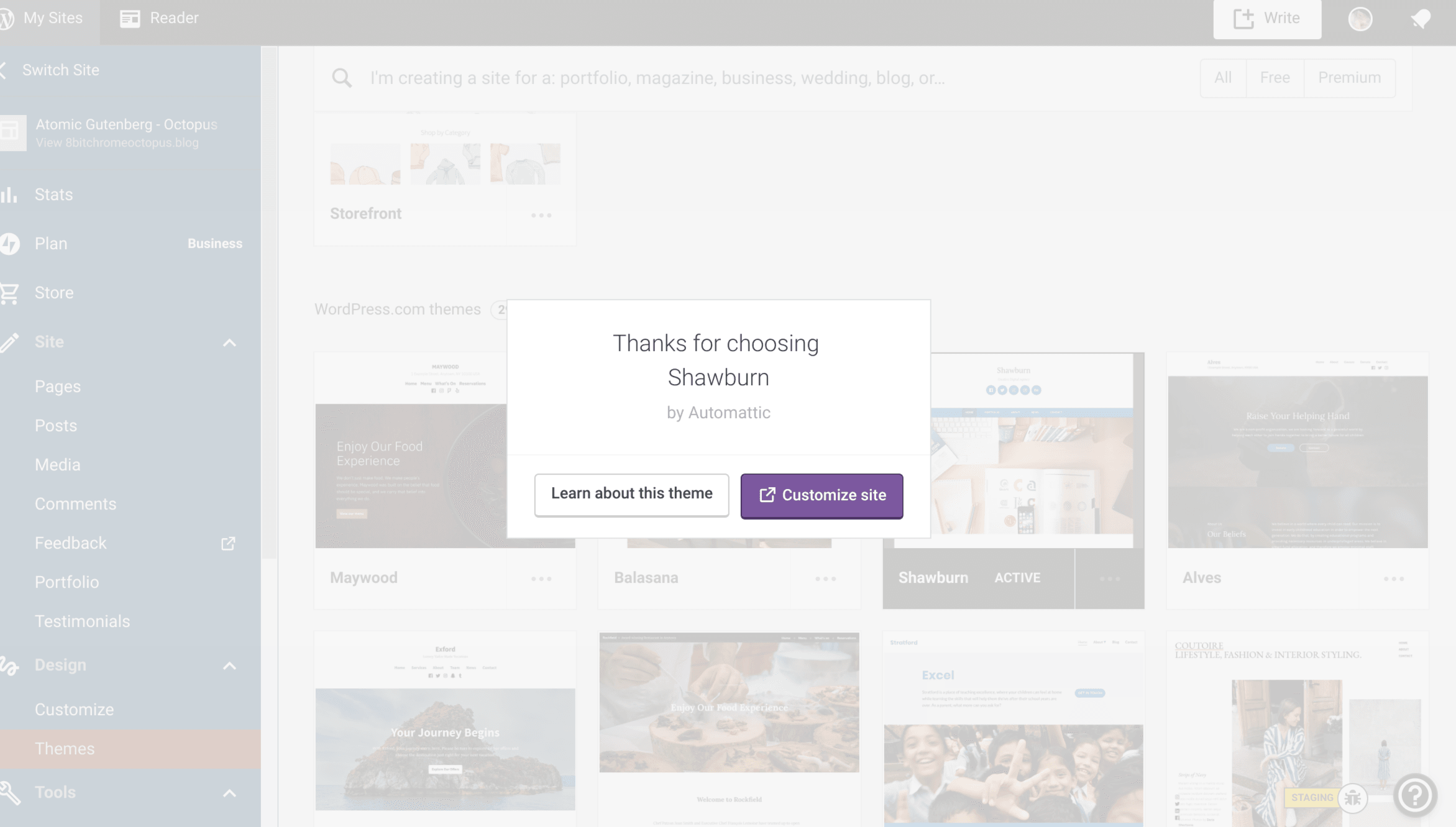
Wp-calypso: Theme Gallery: "Thanks for choosing" dialogue can't be closed by clicking outside the box.
Steps to reproduce
- Starting at URL: https://wordpress.com/themes/
- Activate a theme.
- On the "Thanks for choosing" popup, try clicking outside the dialogue area to close the popup.
- Popup refuses to close unless you click "Learn about this theme" or "Customize site".
What I expected
To be able to easily close the popup dialogue, especially if testing multiple themes back-to-back.
What happened instead
You either have to click "Learn about this theme" which redirects your current page to the theme info, even if you don't want your page redirected.
Or open the customizer in a new window, even if you don't want it to or need to customize anything.
Browser / OS version
Chrome OS Version 76.0.3809.102 (Official Build) (64-bit)
Screenshot / Video
Context / Source
This is extremely frustrating especially if you're trying to change themes in one tab, and then refresh/review the new theme style on the site in another.
You either get tabs you don't want opening, or you have to click back every time you change a theme.
Both create unnecessary work and being locked into a popup is generally frustrating, like when a popup ad won't let you dismiss it.
 cecoates
All 8 comments
I agree, I have run into this a few times and it is frustrating.
 arunsathiya
on 30 Aug 2019
arunsathiya
on 30 Aug 2019
+1 on this. Came here to open an issue if it didn't exist.
 tijosh
on 20 Sep 2019
tijosh
on 20 Sep 2019
+1 on this. This is very inconvenient as you need to go either of those pages to get out.
 iamtakashi
on 2 Oct 2019
iamtakashi
on 2 Oct 2019
+1 This is annoying af. I'm pretty sure it was not always like this, clicking outside or hitting ESC used to close it. This should always be the case for a popup dialogue!
 kristarella
on 3 Oct 2019
kristarella
on 3 Oct 2019
+1 This is really irritating when frequently changing themes for testing purpose.
 formosattic
on 8 Oct 2019
formosattic
on 8 Oct 2019
I just made a fix for this here: https://github.com/Automattic/wp-calypso/pull/36584! It looks like there was "just" a small typo: it tried to call _close instead of close.
 noahtallen
on 8 Oct 2019
noahtallen
on 8 Oct 2019
If anyone wants to test and give a 👍 feel free!
noahtallen
on 8 Oct 2019
@noahtallen Thank you for fixing this issue! 🎉
iamtakashi
on 8 Oct 2019
Related issues
 kellychoffman
·
3Comments
kellychoffman
·
3Comments
 roccotripaldi
·
3Comments
roccotripaldi
·
3Comments
 jjchrisdiehl
·
3Comments
jjchrisdiehl
·
3Comments
 ehg
·
3Comments
ehg
·
3Comments
 gedex
·
3Comments
gedex
·
3Comments
Most helpful comment
I just made a fix for this here: https://github.com/Automattic/wp-calypso/pull/36584! It looks like there was "just" a small typo: it tried to call
_closeinstead ofclose.