Wp-calypso: Login: cannot view Masterbar on the front-end when "Prevent cross-site tracking" is on in Safari
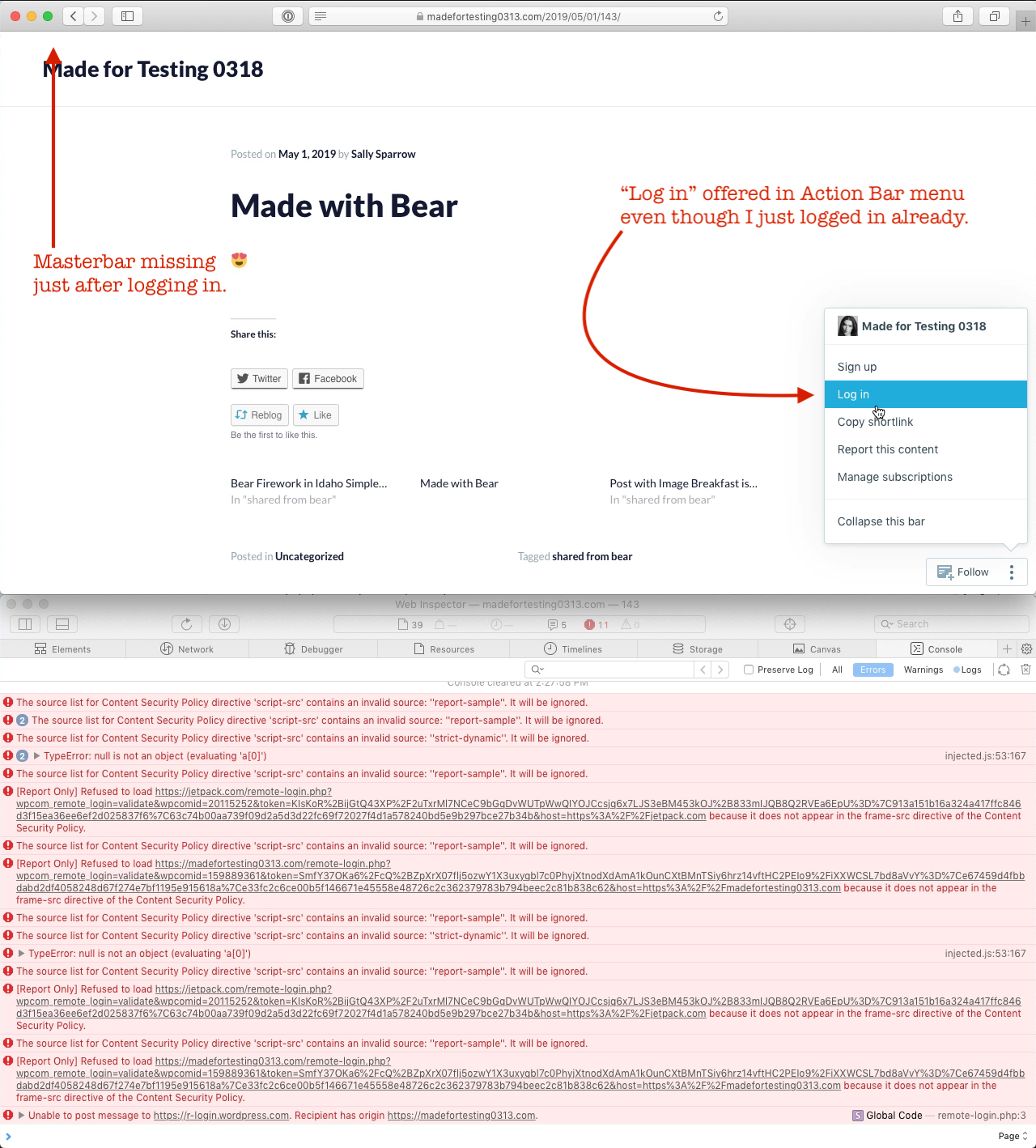
If you try logging in from the front-end to a WordPress.com site with a custom domain using Safari with the "Prevent cross-site tracking" setting on, it is confusing because it seems like the login did not work when it actually did and the Masterbar and other admin functions are missing on the front-end.
To prepare:
- Setup a WordPress.com site with a custom domain.
- Open Safari.
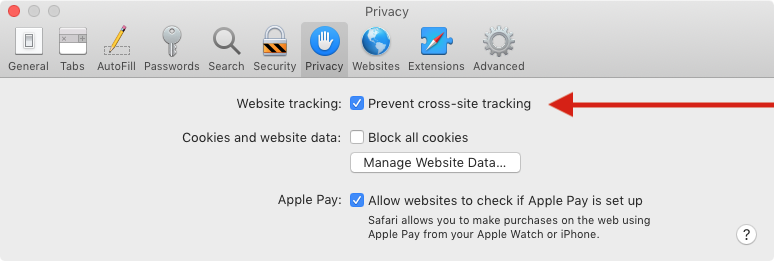
- Go to Settings > Privacy.
- Check the option for "Prevent cross-site tracking".
- Close and re-open Safari.
- Clear cache and cookies.
To test:
- Go to your site home page.
- Click ••• at bottom right and select "Log in".
- Follow the prompts to log in.
- Check to see that the Masterbar is visible and that you can interact with the admin pages such as by creating a new post.
Result: if "Prevent cross-site tracking" is checked then remote login works but the Masterbar and admin functions in the Action Bar do not work on the front-end of a site with a custom domain. (44s)
Note: *.wordpress.com and free *.blog domains such as wibblywobblytimeywimey.travel.blog appear to work normally. (33s)
Safari > Privacy > Website tracking > Prevent cross-site tracking screenshot:
Tested with Safari 12.1 on macOS 10.14.4 on ``.
Sample of console errors seen during login:
[Error] The source list for Content Security Policy directive 'script-src' contains an invalid source: ''report-sample''. It will be ignored.
[Error] [Report Only] Refused to load https://jetpack.com/remote-login.php?wpcom_remote_login=validate&wpcomid=20115252&token=JrlujCqY%2FZZ7zWFDadgz3eFRoH1CdJ%2BDDO0oy1vR22Mr%2F7gltrSq%2FacjvFWJbGcQCvGPI3zCvAw%3D%7C1119cfb41d328f16dbdb080a9af56fa71a79f4a025149960%7Ca7ecc2ac4639e9888ea57cedd1de74ba4c45f9b731&host=https%3A%2F%2Fjetpack.com because it does not appear in the frame-src directive of the Content Security Policy.
Related: WebKit article on Intelligent Tracking Prevention 2.2.
Workaround: log in at https://wordpress.com/log-in and manage the site there.
(internal reference: p1557936663211700-slack-mobile-support cc @diegoreymendez)
 designsimply
All 15 comments
Related -
Intro: https://webkit.org/blog/8124/introducing-storage-access-api/
Update, introducing the prompt for user consent: https://webkit.org/blog/8311/intelligent-tracking-prevention-2-0/
Ref: https://twitter.com/johnwilander/status/1111770503440560128?s=21 from @johnwilander to me a while back when I mentioned similar.
 dougaitken
on 17 May 2019
dougaitken
on 17 May 2019
I just worked with a user in live chat who ran into this issue (13717721-hc), and they were bummed to have to change the the Prevent Cross-Tracking setting. They were looking to Safari for greater privacy. Wanted to report it here to log at least one instance of it affecting customers :).
 andreabadgley19
on 14 Nov 2019
andreabadgley19
on 14 Nov 2019
Correct, they way to do this kind of integration is to use the Storage Access API, not to tell users/customers to disable all privacy protections in their browser. The Storage Access API is implemented and shipped in WebKit/Safari and Gecko/Firefox, and is being implemented in Chromium/Edge.
 johnwilander
on 14 Nov 2019
johnwilander
on 14 Nov 2019
Another case in #267035-hc. When they upgraded to a paid plan, both the reblog button and master bar disappeared in Safari. We disabled cross site tracking and restarted Safari to solve it.
 donalirl
on 15 Nov 2019
donalirl
on 15 Nov 2019
Asking users to turn off all privacy protections is bad. You wouldn’t do that for security protections, right?
johnwilander
on 15 Nov 2019
That's a very fair point, @johnwilander. The user was eager to get the Reblog button back and didn't think twice about disabling cross site tracking. I've emailed them to explain more about this privacy protection so that they can make an informed decision. I've also told them we're looking into solving this on the development side. Thanks for calling this out.
donalirl
on 15 Nov 2019
Pinging @josephscott as an FYI on this one for John's comment above, as it is related to pb6Nl-daR-p2 and the discussion in Slack on 6th/7th November.
dougaitken
on 16 Nov 2019
I've run through the specific flow mentioned here and it worked fine. @designsimply can you do the walk through and try it again?
It is possible that ITP has gotten into a state where it is flagging the mapped domain as a third party tracker, in which case we'll have to come up with something to address that condition.
In the case where this is a new domain, simply going directly to wordpress.com/log-in should log them into the mapped domain as well.
 josephscott
on 18 Nov 2019
josephscott
on 18 Nov 2019
Another case in #2580124-zen. I suggested they disable cross-site tracking
 thabotswana
on 27 Dec 2019
thabotswana
on 27 Dec 2019
I don't expect that to be a sustainable option, with Safari already listing an experiment to block all 3rd party cookies.
josephscott
on 27 Dec 2019
Another case in #2600836-zen. Suggested disabling cross-site tracking.
 krutidugade
on 3 Jan 2020
krutidugade
on 3 Jan 2020
2617927-zen
 thebud15
on 10 Jan 2020
thebud15
on 10 Jan 2020
2657089-zen I suggested disabling cross-site tracking, but this did not work. I was able to reproduce it locally and this workaround it did not work on my end either.
Updating to add that the person noticed that Safari on their iPad is working normally. It still won't work on the computer, though. - clp
 mrfoxtalbot
on 24 Jan 2020
mrfoxtalbot
on 24 Jan 2020
Follow-up from a previous report states that after MacOS update 10.15.3. Safari began showing the Masterbar again.
2671693-zen
 ktyfuller604
on 29 Jan 2020
ktyfuller604
on 29 Jan 2020
Another report here 2690483-zen
 joweber123
on 25 Feb 2020
joweber123
on 25 Feb 2020
Related issues
 spen
·
3Comments
spen
·
3Comments
 vparkhere
·
3Comments
vparkhere
·
3Comments
 roccotripaldi
·
3Comments
roccotripaldi
·
3Comments
 jeherve
·
3Comments
spen
·
3Comments
jeherve
·
3Comments
spen
·
3Comments