Wp-calypso: Related Posts Block: Rendered as Grid even if set to List Mode
Reported at p1HpG7-64l-p2 #comment-29600:
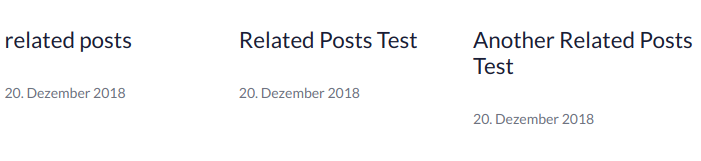
No matter what settings I set, I could not get List View to work. Always showed my posts in Grid View after publishing. Same results in Preview.
Steps to reproduce
- In the block editor, start a new post, and insert a Related Posts block.
- In the block toolbar, set it to list mode.
- Publish the post and view it.
What I expected
The block to be rendered in list mode.
What happened instead
The block was rendered in grid mode.
Screenshot / Video
Context / Source
I've verified that the correct class is applied on the frontend (.jp-relatedposts-list). I think the stylesheet's selectors aren't working since they require an element with ID #jp-relatedposts wrapped around Related Posts. (ID based styling probably isn't a good idea here -- or anywhere really -- anyway.)
 ockham
All 3 comments
Seems like we don't handle lists on WP.com the same way we do for Jetpack. Will work on a fix.
 tyxla
on 28 Dec 2018
tyxla
on 28 Dec 2018
Fixed by:
- D22685-code
- https://github.com/Automattic/jetpack/pull/11048
tyxla
on 28 Dec 2018
Both of the above have been merged, and on production things are now looking well. Closing.
tyxla
on 28 Dec 2018
Related issues
 jeherve
·
3Comments
jeherve
·
3Comments
 roccotripaldi
·
3Comments
roccotripaldi
·
3Comments
 BrookeDot
·
3Comments
BrookeDot
·
3Comments
 jjchrisdiehl
·
3Comments
jjchrisdiehl
·
3Comments
 gedex
·
3Comments
gedex
·
3Comments
Most helpful comment
Fixed by: