Wp-calypso: Checklist Add site icon modal hides error on file upload
Steps to reproduce
- Starting at URL: https://wordpress.com/checklist/{:site.url:}
- Click "Do It!" to change the site icon.
- Click on Change
- Drag a file that is not a supported image type, such as a .zip file
What I expected
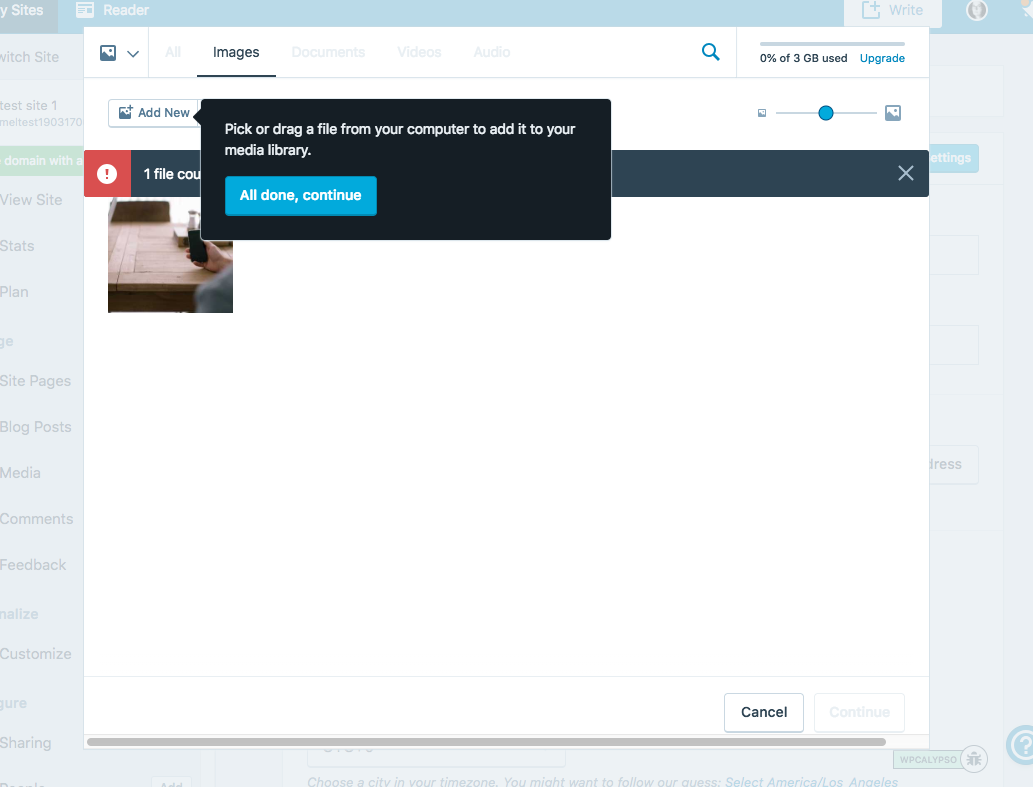
On step 5, I expect that the error is shown on top of any other modals, popups, or other items so I can see what the error says. Although the error can be dismissed, I can't see what kind of error I encountered.
What happened instead
An error is displayed, but it is behind the guided tour popup
Browser / OS version
Chrome 67.0.3396.99
Mac OS 10.13.6
Screenshot / Video
Context / Source
Attempting to learn the checklist flow to later automate. Found by #manual-testing
 mel-OR
All 4 comments
Thanks for logging this bug, Melissa.
 lancewillett
on 26 Jul 2018
lancewillett
on 26 Jul 2018
Thanks for sharing. That's a tricky one. Pinging @taggon again for any thoughts of how we could fix this?
 fditrapani
on 26 Jul 2018
fditrapani
on 26 Jul 2018
Does it make sense to temporarily hide all guided tour tips when we detect an error notification (regardless of where we are in WordPress.com) or should we target this one specifically, that is, when the media library wants to display an error?
I'm not yet sure off the top of my head how, but we could retrigger the tip once the user has dismissed the error notification. Might have to store something in state to track it all.
 ramonjd
on 15 Oct 2018
ramonjd
on 15 Oct 2018
Ideally, it would be great to solve this at a system level but I worry how big a task that is. Maybe dealing with it in this one-off case is the better approach?
I'm not yet sure off the top of my head how, but we could retrigger the tip once the user has dismissed the error notification. Might have to store something in state to track it all.
Sounds like a good approach.
fditrapani
on 15 Oct 2018
Related issues
 vparkhere
·
3Comments
vparkhere
·
3Comments
 hoverduck
·
3Comments
hoverduck
·
3Comments
 jjchrisdiehl
·
3Comments
jjchrisdiehl
·
3Comments
 rickybanister
·
3Comments
rickybanister
·
3Comments
 kellychoffman
·
3Comments
kellychoffman
·
3Comments