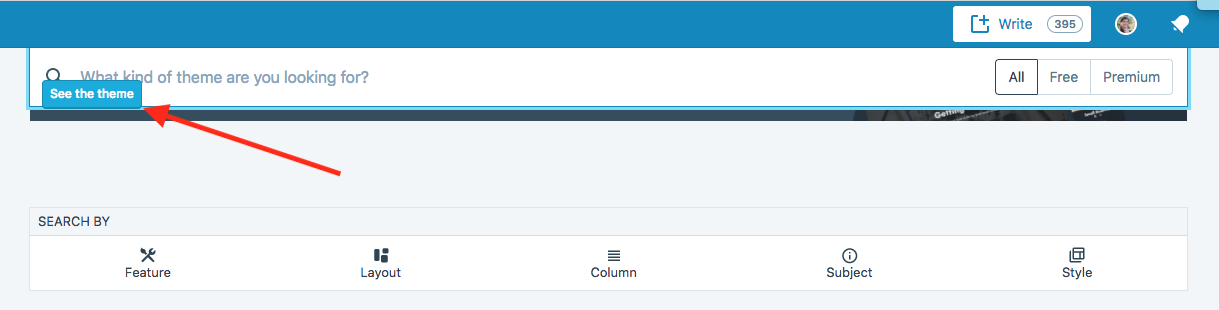
Wp-calypso: Themes overview: Theme banner button in front of search input field when scrolling
Steps to reproduce
- Starting at URL: https://wordpress.com/themes/{your-site-id}
- Scroll down
- Look at the theme banner button
What I expected
The button behind the search input field
What happened instead
The button is in front of the search input field
Browser / OS version
Chrome latest version on Mac OS latest versions
Screenshot / Video

 syndia
All 8 comments
It's possible there's a problem with a specific banner, because when I view https://wordpress.com/themes/xxxxxx.wordpress.com it renders OK for me. Could you please give us a bigger screenshot or tell us which banner (if any) is displayed above the search input?

 andfinally
on 5 Mar 2018
andfinally
on 5 Mar 2018
I see the plans banner is not showing in my browser. Maybe that will be the problem.
Before scrolling

After scrolling

syndia
on 5 Mar 2018
I can reproduce the issue at a specific point while I'm scrolling down the page — it seems to be a positioning + z-index issue.
The search field seems to jump up to stick to the top of the screen while the bottom half of the banner (including the button) is still on-screen, and the banner's button has a higher z-index than the search field.
Before:

Scrolling down a tiny bit more, the search field jumps up:
 rachelmcr
on 5 Mar 2018
rachelmcr
on 5 Mar 2018
Thanks @rachelmcr, I was just about to say the same thing! You're dead right, it seems to be a z-index issue when the banner is scrolled up behind the sticky search bar.

andfinally
on 5 Mar 2018
Thanks @syndia and @rachelmcr, I've created PR https://github.com/Automattic/wp-calypso/pull/22979 to address this.
andfinally
on 5 Mar 2018
Hi @syndia, the fix for this issue has now been deployed - it's looking OK for me. Can you please confirm it's good for you (you may have to flush your browser cache) and close this issue if it is?
andfinally
on 5 Mar 2018
Yes, it's working as expected ;)
syndia
on 5 Mar 2018
Thanks! I'll close this one.
andfinally
on 5 Mar 2018
Related issues
 spen
·
3Comments
spen
·
3Comments
 aduth
·
3Comments
aduth
·
3Comments
 ghost
·
3Comments
ghost
·
3Comments
 roccotripaldi
·
3Comments
roccotripaldi
·
3Comments
 ehg
·
3Comments
ehg
·
3Comments