Wp-calypso: My Plan: Incorrect CTA link for GA
Steps to reproduce
- Starting at URL: https://wordpress.com/plans/my-plan/{site-url}
- Make sure site has a Professional plan
- Click the "Connect Google Analytics" button
What I expected
To be taken to the Google Analytics settings card
What happened instead
I was taken to the SEO settings card
 richardmuscat
All 7 comments
Ideally we'd be able to target/highlight specific settings with this sort of link as well.
 beaulebens
on 23 Feb 2018
beaulebens
on 23 Feb 2018
It would be great if we could highlight just the card we're referring like Beau said. This would be useful in many scenarios.
Here's a quick mock of how that could look like, taken from this issue: https://github.com/Automattic/wp-calypso/issues/21610
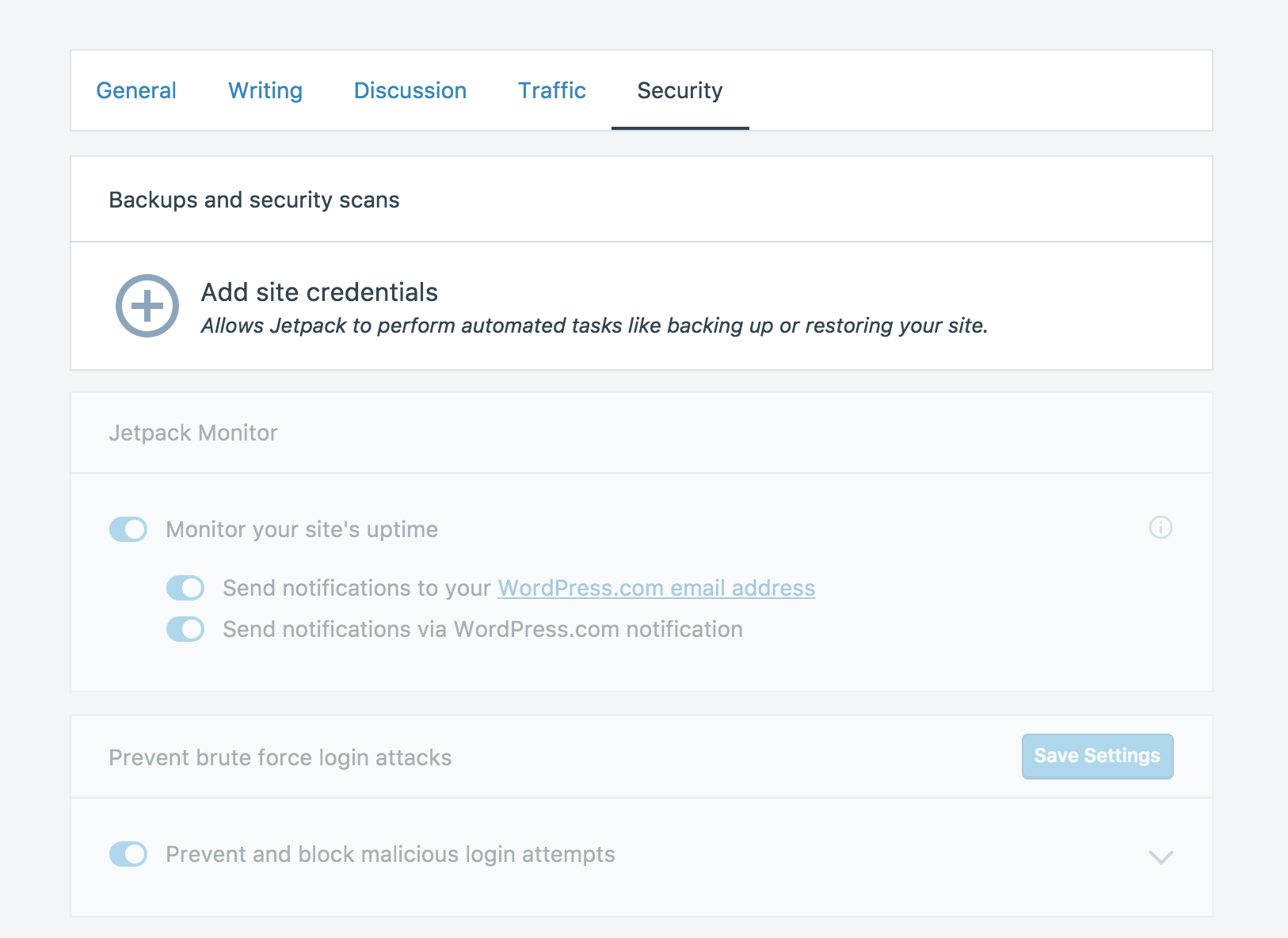
This effect could go away after X seconds upon tab focus, so the entire interface is still accessible.
 keoshi
on 1 Mar 2018
keoshi
on 1 Mar 2018
Same issue here: https://github.com/Automattic/jetpack/issues/8727
And here: https://github.com/Automattic/wp-calypso/issues/22692
 gravityrail
on 1 Mar 2018
gravityrail
on 1 Mar 2018
Removing from Hack Week in favour of longer term direct-link solution as per conversation with @rickybanister
gravityrail
on 2 Mar 2018
@keoshi thanks for the mockup—I actually did something similar recently while thinking about the checklist project—a checklist item would direct a user to a settings page and we could highlight a single item.
In discussing with @johnHackworth, however, we felt it would be more clear if we could create routes like /settings/traffic/google-analytics that show only one setting per page. That page would have a header-cake to go back to the whole traffic tab.
This has been removed from hack week so we can work on implementing this along with the checklist feature and 'do it right'.
cc @joanrho also
 rickybanister
on 2 Mar 2018
rickybanister
on 2 Mar 2018
I confirmed this is still an issue using the original steps to reproduce. Part of what makes this especially confusing is that I am scrolled partway down the Traffic settings page, but not far enough to get to the GA settings.
The proposed solution would definitely make this clearer.
 rachelmcr
on 29 Aug 2018
rachelmcr
on 29 Aug 2018
This issue has been marked as stale and will be closed in seven days. This happened because:
- It has been inactive in the past 9 months.
- It isn't a project or a milestone, and hasn’t been labeled `[Pri] Blocker`, `[Pri] High`, `[Status] Keep Open`, or `OSS Citizen`.
You can keep the issue open by adding a comment. If you do, please provide additional context and explain why you’d like it to remain open. You can also close the issue yourself — if you do, please add a brief explanation.
![stale[bot] picture](https://avatars3.githubusercontent.com/in/1724?v=4&s=40) stale[bot]
on 27 Feb 2020
stale[bot]
on 27 Feb 2020
Related issues
 spen
·
3Comments
spen
·
3Comments
 jeherve
·
3Comments
rickybanister
·
3Comments
jeherve
·
3Comments
rickybanister
·
3Comments
 ghost
·
3Comments
ghost
·
3Comments
 apeatling
·
3Comments
apeatling
·
3Comments
Most helpful comment
@keoshi thanks for the mockup—I actually did something similar recently while thinking about the checklist project—a checklist item would direct a user to a settings page and we could highlight a single item.
In discussing with @johnHackworth, however, we felt it would be more clear if we could create routes like /settings/traffic/google-analytics that show only one setting per page. That page would have a header-cake to go back to the whole traffic tab.
This has been removed from hack week so we can work on implementing this along with the checklist feature and 'do it right'.
cc @joanrho also