Wp-calypso: Editor: Backdating an empty post or page does not work correctly
Steps to reproduce
- Starting at URL: https://wordpress.com/post/YOURURL
- Click the Status dropdown on the right
- Click the "Publish Immediately" dropdown
- Try to pick a date or change the publication time
What I expected
I expected to be able to choose a date or time in the future
What happened instead
Nothing. You can't change the date or time of publication
Browser / OS version
Firefox 57.0/ macOS Sierra 10.12.6
Andrew Spittle also reproduced in Chrome (said it worked for him sometimes but not others).
Screenshot / Video
Context / Source
user-report
826676-zd-woothemes
 catrymer
All 10 comments
It looks like to reproduce this you have to try and set the date first before adding any content.
 westi
on 5 Dec 2017
westi
on 5 Dec 2017
Just reproduced this error on my end as well, on Chrome 64.0.3282.119.
 eduardozulian
on 31 Jan 2018
eduardozulian
on 31 Jan 2018
1747098-hc is reporting this as an issue even with content already added, across Ffx, Edge and Chrome. snag.gy screenshot from user in transcript.
Reproduced on own site on Win10/Chrome without content, could not reproduce with content on page, even just a title or single image.
 goblinartificer
on 7 Feb 2018
goblinartificer
on 7 Feb 2018
@Automattic/tanooki will look into this.
 mattsherman
on 22 Feb 2018
mattsherman
on 22 Feb 2018
[user] is reporting this as an issue even with content already added
This is likely because the user added content and then changed the date before the first draft save completed, which is the point when the editor receives a post ID. Currently, the calendar won't show a date until we get that post ID.
https://github.com/Automattic/wp-calypso/pull/23094 should fix that situation. If there is more follow-up needed afterwards, please feel free to reopen this issue.
 nylen
on 7 Mar 2018
nylen
on 7 Mar 2018
I'm reopening this because it's still a bit broken for backdated posts and pages.
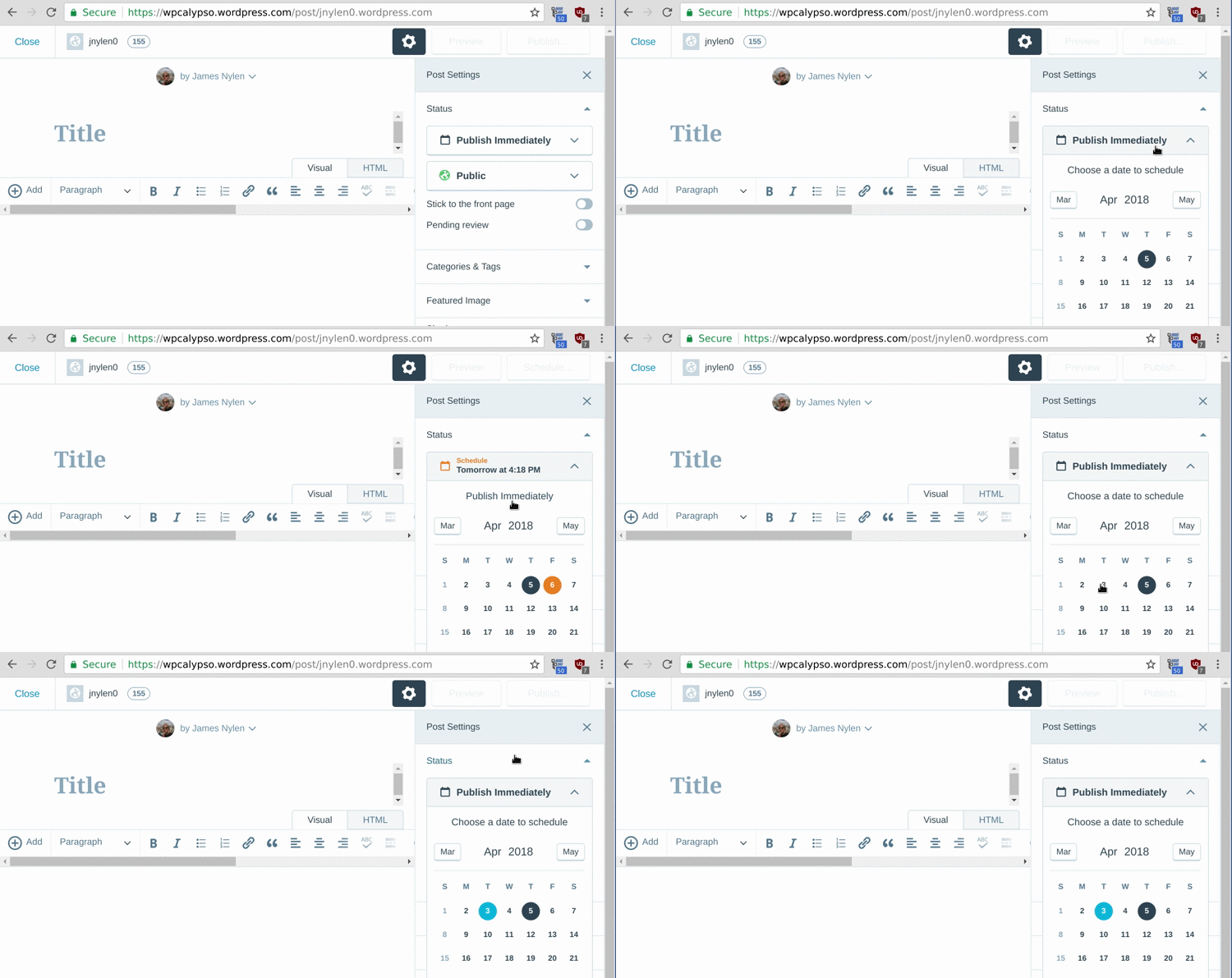
@Automattic/tanooki let's take another look :(
nylen
on 5 Apr 2018
Verified that this does not function properly for backdated posts/pages.
mattsherman
on 10 May 2018
@Automattic/tanooki is looking into this in the next few days
mattsherman
on 11 May 2018
A few details that I noticed from a brief investigation...
post.modifiedis set topost.dateinstead of current timestamp whenpost.dateis set and then draft is autosaved the first timeisBackDatedreturns false whenpost.dateis set in past butpost.modifiedis not set at all
mattsherman
on 25 May 2018
@jsnajdr You might want to look into this one while in the area looking at other editor/scheduling issues.
mattsherman
on 25 May 2018
Related issues
 rickybanister
·
3Comments
rickybanister
·
3Comments
rickybanister
·
3Comments
rickybanister
·
3Comments
 jeherve
·
3Comments
jeherve
·
3Comments
 roccotripaldi
·
3Comments
roccotripaldi
·
3Comments
 lamosty
·
3Comments
lamosty
·
3Comments