Wp-calypso: Checkout: Lack of next steps on Thank You page after Premium theme purchase
There's no content underneath the "What Now" heading on the Thank You page after purchasing a standalone Premium theme.
Steps to reproduce
- Starting at URL: https://wordpress.com/start
- Follow the screen prompts and choose a Premium theme at /start/themes.
- Choose a free site address at /start/domains and the free plan at /start/plans.
- Follow the remaining steps to set up a new site and make payment for the Premium theme.
What I expected
To be led to a Thank You page that contains some useful links to next steps. This expectation is based on how the Thank You page appears after purchasing a domain or a paid plan.
What happened instead
The Thank You page had a "What Now" heading but there was no content underneath it.
Browser / OS version
Chrome 57.0.2987.133 / MacOS Sierra 10.12.3
Screenshot / Video

Context / Source
dogfooding, #manual-testing
 SiobhyB
All 6 comments
I took a look at this one, but I'm having a hard time reproducing. I can't seem to find a Premium theme available on wordpress.com/start/themes during signup. I believe these are the themes that should be displaying, and it looks like they're all free.
Siobhan, do you happen to remember which theme you purchased to trigger this?
 jeremeylduvall
on 23 May 2017
jeremeylduvall
on 23 May 2017
@jeremeylduvall: Sorry, my steps to replicate were actually wrong. The correct steps are:
- Google "WordPress.com themes" while logged out of WordPress.com and click on the first link to arrive at: https://wordpress.com/themes
- Select the three dots next to a Premium theme and then "Pick this design".
- Follow the screen prompts to set up a new site. Choose a free site address at /start/domains and the free plan at /start/plans.
- Follow the remaining steps to set up a new site and make payment for the Premium theme.
It can also be replicated by purchasing a Premium theme on an existing free or Personal site. You'll need to actually make payment for the theme to replicate, using credits doesn't seem to produce the same effect.
SiobhyB
on 26 May 2017
Awesome - thank you! I think I was missing this:
using credits doesn't seem to produce the same effect.
I'll take a peek next week!
jeremeylduvall
on 26 May 2017
I'm having trouble reproducing this one either from the /themes flow or purchasing a theme on an existing site. Note that I'm not using credits, but am using a test card. @SiobhyB or @jeremeylduvall are you still seeing this issue?
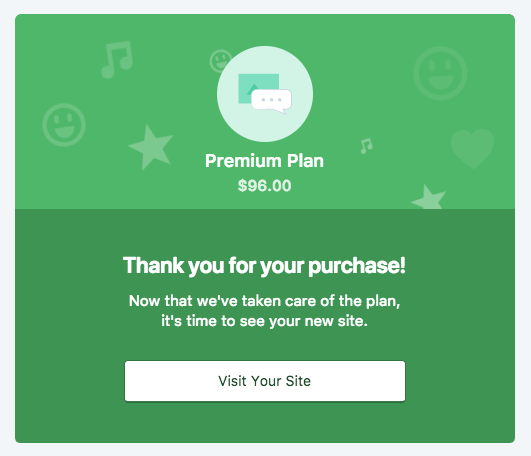
Here's what I see on the new user flow, starting from /themes logged out.
 gwwar
on 16 Feb 2018
gwwar
on 16 Feb 2018
Going to close this one out since I suspect we completely redid the thank you page. Feel free to reopen if this is not the case.
gwwar
on 16 Feb 2018
@gwwar: Sorry for the delay getting back to you! I can confirm that I'm no longer able to replicate. Thanks for looking.
SiobhyB
on 23 Feb 2018
Related issues
 roccotripaldi
·
3Comments
roccotripaldi
·
3Comments
 rickybanister
·
3Comments
rickybanister
·
3Comments
 ehg
·
3Comments
ehg
·
3Comments
 aduth
·
3Comments
aduth
·
3Comments
 apeatling
·
3Comments
apeatling
·
3Comments
Most helpful comment
Awesome - thank you! I think I was missing this:
I'll take a peek next week!