Tips for using habits
When Alfred was used, a particularly convenient function was found.
switch to default input method when opening operation.My thoughts on the Chinese people
- For some Chinese users, the Chinese input method is the default.
- For wox, the usual operation is to start with English (for example, using keywords for search)
- if each time, the Chinese input method is used to open the wox.
- switch to Chinese or English input each time, or enter it and return to use it in English.
- operation is rather inconvenient.
- so we hope to add default input function
> Used translate
关于使用习惯的小建议
当时使用 Alfred 的时候,发现一个特别方便的功能
打开操作时默认切换为指定输入法我的思考
- 对于部分中国用户来说,中文输入法是默认的
- 对于 wox 这款软件来说,一般的操作都是以英文开头(例如使用关键词进行搜索)
- 如果每一次都是使用中文输入法打开 wox
- 那每一次都要切换中英文输入,或者输入后砸回车使用其英文
- 操作相当不便捷。
- 故希望可以添加默认输入法功能
 sunshinenny
All 4 comments
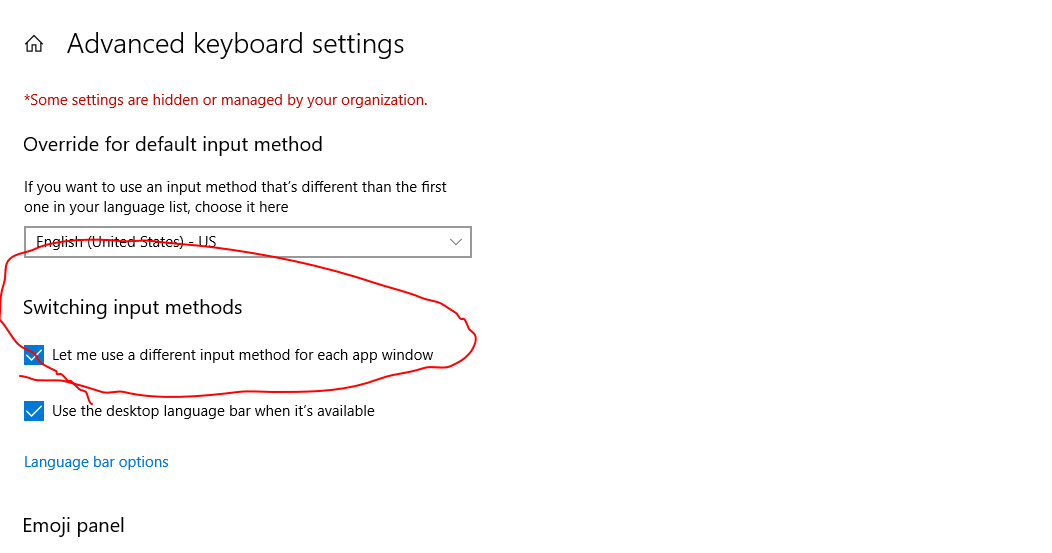
思考的是对的,但Windows有键盘选项,允许每个独立的app使用不同的输入法,你只需要一次在Wox输入界面改成英文输入法之后,下一次会自动切换成英文
 iamwwc
on 13 Oct 2018
iamwwc
on 13 Oct 2018
👍2
❤1
🎉1
😄1
Thanks
我自己没发现这个选项 打扰了……
sunshinenny
on 13 Oct 2018
感谢建议,@iamwwc 提供的方法应该可以解决你的问题了(我也是这么做的)。issue我就先关了,有新的想法再打开。
 jhdxr
on 19 Dec 2018
jhdxr
on 19 Dec 2018
Windows 设置“允许我为每个每个应用窗口使用不同的输入法”之后,每个窗口的输入法都独立了。但我希望只有 Wox 使用英文输入法,其他所有窗口都保持输入法切换状态(这是来自 Alfred 的使用习惯)。所以,还是希望 Wox 可以加上类似的功能。
 balthild
on 20 Nov 2020
balthild
on 20 Nov 2020
Was this page helpful?
0 / 5 - 0 ratings
Related issues
 rumingruyue
·
3Comments
rumingruyue
·
3Comments
 mardulas
·
3Comments
mardulas
·
3Comments
 corevo
·
8Comments
corevo
·
8Comments
 andytham
·
4Comments
andytham
·
4Comments
 huaf22
·
5Comments
huaf22
·
5Comments
Most helpful comment
思考的是对的,但
Windows有键盘选项,允许每个独立的app使用不同的输入法,你只需要一次在Wox输入界面改成英文输入法之后,下一次会自动切换成英文