Although it is not stated in the settings win key + r which usually serves for Run invokes Wox.
How can I disable it ?
Can I make it enabled but disable win+r run dialog (without external program i.e. Autohotkey) ?
 elig0n
👍5
All 4 comments
It’s quite hidden in the settings.
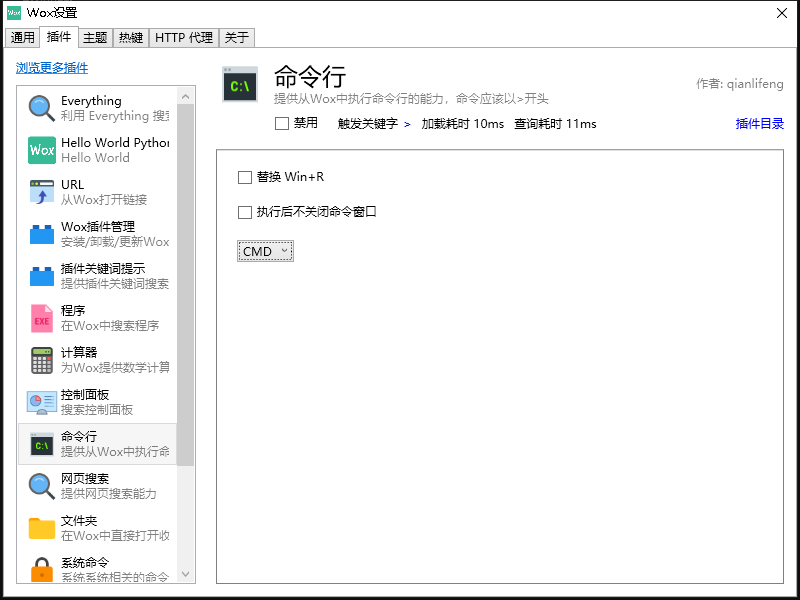
Open Wox’ Settings > Go to Plugin > Shell > Uncheck Replace Win+R
This should absolutely not be a default setting.
 kleinfreund
on 17 Apr 2018
kleinfreund
on 17 Apr 2018
👍20
Yes quite hidden in the settings. It would be nice to have it somewhere else :)
 nowox
on 21 Jul 2018
nowox
on 21 Jul 2018
👍2
 xcl-net
on 26 Dec 2019
xcl-net
on 26 Dec 2019
close due to question seems resolved.
 bao-qian
on 15 May 2020
bao-qian
on 15 May 2020
Was this page helpful?
0 / 5 - 0 ratings
Related issues
 corevo
·
8Comments
corevo
·
8Comments
 rumingruyue
·
3Comments
rumingruyue
·
3Comments
 kayshen0817
·
5Comments
bao-qian
·
7Comments
kayshen0817
·
5Comments
bao-qian
·
7Comments
 Bourne-M
·
3Comments
Bourne-M
·
3Comments
Most helpful comment
It’s quite hidden in the settings.
Open Wox’ Settings > Go to Plugin > Shell > Uncheck Replace Win+R
This should absolutely not be a default setting.