- Wox 版本 / commit number:1.3.357&1.3.424
- 如何重现 bug:搜索程序都是这样
- Windows 版本:Windows10 Enterprise ver.
- Exception:
- 整个 log 文件 (
%APPDATA%\Wox\Logs\version\date.txt):程序目录中没有上述路径 - 截图 (可选):

 davidan106
All 11 comments
我也遇到了同样的问题,重装了几次也不行。
windows版本:win7 service pack 1
 teddy-hoo
on 25 Apr 2017
teddy-hoo
on 25 Apr 2017
试试单独安装Everything程序试试?只是建议一下
 WooodHead
on 28 Apr 2017
WooodHead
on 28 Apr 2017
👍3
win10 64bit 遇到此问题,单独安装 everything 并设置开机启动,问题解决,附 everything 地址:
http://www.voidtools.com/
下载相关程序安装即可。
 AjiMIde
on 28 Apr 2017
AjiMIde
on 28 Apr 2017
👍6
wox需要运行everything才能用哦,需要安装everything 并在使用wox的时候同时开启everything
 jinpeng15800
on 11 May 2017
jinpeng15800
on 11 May 2017
👍4
我也是这样的,经过测试,需要运行et才行,要不然把et安装成服务
 Ramon403
on 25 May 2017
Ramon403
on 25 May 2017
"Everything" is an optional plugin. Remove it if you don't need.
I just use "Program Plugin" only.
 tomexou
on 31 May 2017
tomexou
on 31 May 2017
单独安装以后可以使用,不过我的wox没法搜索文件,不知道为啥
 ghost
on 31 Jul 2017
ghost
on 31 Jul 2017
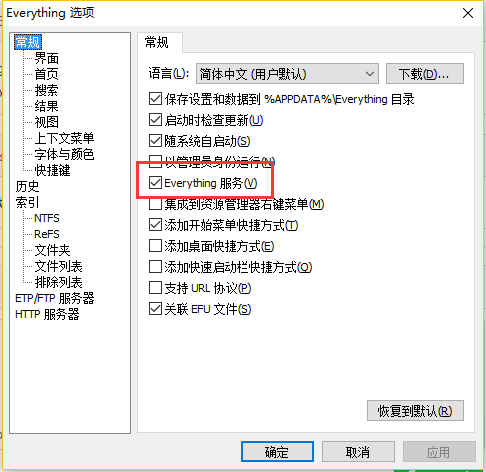
下载了最新版的 everything 和 Wox 。
- 安装everything时将“以管理员权限运行”修改成“everything服务”,然后继续安装即可。
- everything安装后,进入设置里面勾选“everything服务”。
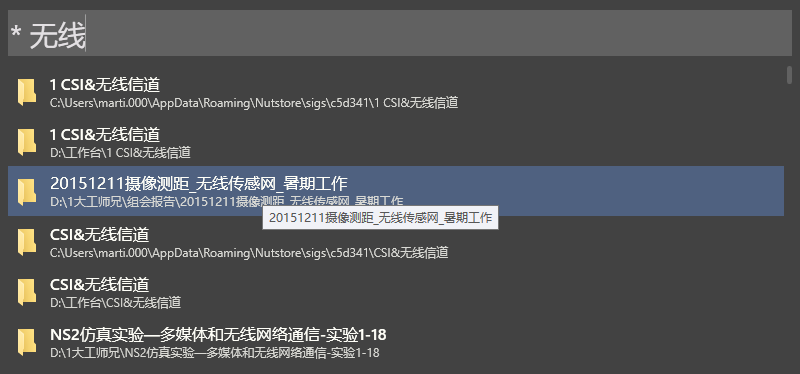
最终效果:
 mymartin
on 28 Aug 2017
mymartin
on 28 Aug 2017
👍2
👀1
从1.3 切换到最新1.4版本之后就可以了
 westfly
on 8 Dec 2017
westfly
on 8 Dec 2017
If your system is 32bit, you need 32bit version of everything. Same with 64bit system.
 CrazyPassion
on 9 Feb 2018
CrazyPassion
on 9 Feb 2018
Please try new release https://github.com/Wox-launcher/Wox/releases
new build has full installer, which bundled everything
 bao-qian
on 15 May 2020
bao-qian
on 15 May 2020
Was this page helpful?
0 / 5 - 0 ratings
Related issues
 mardulas
·
3Comments
mardulas
·
3Comments
 xjl456852
·
7Comments
xjl456852
·
7Comments
 appel
·
5Comments
appel
·
5Comments
 elig0n
·
4Comments
elig0n
·
4Comments
 caoyue
·
3Comments
caoyue
·
3Comments
Most helpful comment
win10 64bit 遇到此问题,单独安装 everything 并设置开机启动,问题解决,附 everything 地址:
http://www.voidtools.com/
下载相关程序安装即可。