Workbox: Non-CORS requests from DevTools can pollute the cache
Library Affected:
workbox v5.1.3 npm
Browser & Platform:
Google Chrome v85
Issue or Feature Request Description:
CORS requests from known CDNs like "fonts.googleapis.com" o "cdn.jsdelivr.net" often fail, but are cached correctly as cors.
On Chrome the errors can be triggered by toggling the development panel and reloading the page. But can happen for other unknown reasons too. On Firefox the issue still occurs, in different conditions, and can even affect the page's look (when "normalize.css" goes missing for example)
It happens on different machines under different networks.
I've made a minimal reproducible example, you can try it on pages. Open the console and see.
Recap of what said here:
observation 1: when reloading the page, only three requests are logged: for the stylesheet, the main js file, and the favicon. No html file. Is this expected? I thought the http cache affected workbox's
fetches, not the entire event capturing.observation 2: after the developer tools have been opened (Ctrl+shift+i):
- the first page reload will trigger all the requests again, and the cors error will always occur.
- the second page reload will trigger all the requests again, no error messages will be print.
- the subsequent page reloads will show the same three requests mentioned above
after the developer tools have been closed:
- the first page reload will trigger all the requests again, no error messages will be print.
- the subsequent page reloads will show the same three requests mentioned above
Looks like opening the dev tools alters some caching mechanism. It temporarily breaks cors requests too. Not sure why the error persisted between reloads in my previous tests, might have been because I was toggling the dev panel.
I've ran the app in Firefox, to see if I could gather something more. It says:
Cross-Origin Request Blocked: The Same Origin Policy disallows reading the remote resource at https://cdn.jsdelivr.net/npm/normalize.css@8/normalize.min.css. (Reason: CORS request did not succeed).

GET https://cdn.jsdelivr.net/npm/normalize.css@8/normalize.min.css

Failed to load ‘https://cdn.jsdelivr.net/npm/normalize.css@8/normalize.min.css’. A ServiceWorker passed an opaque Response to FetchEvent.respondWith() while handling a ‘cors’ FetchEvent. Opaque Response objects are only valid when the RequestMode is ‘no-cors’. sw.js:1853:26

GET https://fonts.googleapis.com/css2?family=Open+Sans&display=block

Cross-Origin Request Blocked: The Same Origin Policy disallows reading the remote resource at https://fonts.googleapis.com/css2?family=Open+Sans&display=block. (Reason: CORS request did not succeed).

Failed to load ‘https://fonts.googleapis.com/css2?family=Open+Sans&display=block’. A ServiceWorker passed an opaque Response to FetchEvent.respondWith() while handling a ‘cors’ FetchEvent. Opaque Response objects are only valid when the RequestMode is ‘no-cors’.
A Learn More link sends here, where it talks about general network/http errors, but I don't think that's the case. Neither are adblockers, because chrome with external debugger starts blank, and my "Firefox Developer Edition" installation is blank.
 Lucide
All 13 comments
Hello @Lucide! Apologies, but I did not follow along with the full original issue, so thank you for breaking things out into a standalone issue.
I'm not able to reproduce any of the failures that you describe when visiting https://lucide.github.io/cors-workbox/
Here's what I see in the Network panel after reloading one, and then reloading again a few minutes later. (There's an extra entry for sw.js due to a Chrome extension I have installed.)

I can't reproduce this in Firefox 80, either.
Are you able to reproduce in a Chrome Incognito window? I wonder if your browser's HTTP cache is serving a non-CORS response that was previously cached for some reason.
Can you take a similar screenshot of what you see, along with any logged messages in the console??
(You can make sure that all the traffic is captured by ticking the "Preserve log" checkbox.)
 jeffposnick
on 17 Sep 2020
jeffposnick
on 17 Sep 2020
The issue can be reproduced this way on a fresh incognito window, on Chrome (I think i remember Firefox disables sw in incognito mode):
- Open link in new incognito window
- Open dev tools, reload, no errors
- Close and reopen dev tools, reload. The cors error occurs.
I'm lucky I found this way to reproduce it quickly and reliably. But it's not required, it's sufficient to leave the page/reload/work for a bit, and sooner or later it happens.
On Firefox it's not reproducible so predictably.
Lucide
on 17 Sep 2020
(The URL in question is https://lucide.github.io/cors-workbox/)
- Open link in new incognito window
- Open dev tools, reload, no errors
- Close and reopen dev tools, reload. The cors error occurs.
Ah, okay. Thanks for those reproduction steps. I'm able to trigger it now in an Incognito window.
If I had to guess... there's a memory cache that sits in front of the service worker, and perhaps it's not properly storing the responses as CORS—and perhaps toggling DevTools triggers... something related to that? It's not a very good theory, but it's enough for me to follow-up on now with the relevant folks who work Chrome.

jeffposnick
on 17 Sep 2020
I wonder why this issue seems to be biting just me. This library seems quite popular and a just basic boilerplate is all that's needed to trigger it.
It's difficult to miss when developing.
The fact that it's cross browser makes me think it's not just a browser bug.
Lucide
on 17 Sep 2020
@wanderview was good enough to jump in with some debugging help, and figured out what's going on.
The DevTools interface basically behaves like another client of the service worker, and in order to populate its user interface with details about the various resources being loaded, makes its own requests for each URL. When those requests are for cross-origin URLs, they're made without CORS. Those non-CORS requests made by DevTools do trigger the service worker's fetch handler, and the revalidation step in the Workbox strategy you're using ends up using a non-CORS (opaque) response to populate the cache.
That explains why opening DevTools triggers this behavior. The fact that you explicitly require a CORS response (due to the crossorigin="anonymous" attribute on your DOM elements) explains why you experience a complete failure to load the subresources.
So... that's a summary of what's going on.
You can explicitly work around it in your specific use case by adding an instance of the CacheableResponsePlugin that requires a 200 response status to your strategy:
import {CacheableResponsePlugin} from 'workbox-cacheable-response';
import {StaleWhileRevalidate} from 'workbox-strategies';

new StaleWhileRevalidate({
  cacheName: 'cdn',
  plugins: [
    new CacheableResponsePlugin({statuses: [200]}),
  ],
});
The documentation for workbox-cacheable-response includes an explanation of its usage and why some strategies default to caching opaque responses.
Beyond resolving your specific issue, there are a couple of longer-term ways of following-up:
Do nothing. Given that this happens due to interaction with DevTools, it's not likely to affect production users, but it can obviously cause frustration for developers if they frequently open DevTools and have subresources which require CORS responses and use a stale-while-revalidate or network-first strategy.
Change
workbox-routingso that it explicitly detects requests that originate from DevTools (I'm assuming there's a programmatic way of doing that via some header...) and ensure that Workbox doesn't respond to thosefetchevents.Change the
StaleWhileRevalidateandNetworkFirststrategies to detect what the currently cached responses'stypeis, and if it's not'opaque', refuse to overwrite it with an'opaque'response.Change the
StaleWhileRevalidateandNetworkFirststrategies to detect what the currently cached responses'stypeis, and if it's not'opaque', refuse to overwrite it with an'opaque'response. Instead, perform an additionalfetch()with an explicit'cors'mode and revalidate the cache with that response instead.
My personal preference is probably 2., but Ben points out that if Workbox refused to respond to DevTool's requests, the DevTools interface may end up showing a different response that what the web page sees. You could imagine, for instance, a Workbox route that created a synthetic response by stitching together multiple partial sources. That synthetic response would not be visible to DevTools. So I'm not really sure what to do about that.
Option 3. might be the best compromise, but it does add in some extra overhead, and in the back of my head, I wonder whether there are any legitimate use cases that it would end up breaking.
For the meantime, it's option 1. by default.
jeffposnick
on 17 Sep 2020
Very interesting! But why only the first "batch" of requests fail, and the subsequent do not, with the dev panel still open?
From this, I assume that every time I saw the errors without having interacted with the panel was because I had remote debugging enabled. That or something else, because I'm sure I've seen it happening nevertheless.
Lucide
on 17 Sep 2020
But why only the first "batch" of requests fail, and the subsequent do not, with the dev panel still open?
Because loading the page triggers another stale-while-revalidate pass with cors enabled. This then overwrites the opaque responses in cache storage.
Beyond resolving your specific issue, there are a couple of longer-term ways of following-up:
Option 4. Like option 3, but if you detect you will overwrite a cors response with an opaque response then do another revalidation with cors enabled.
 wanderview
on 17 Sep 2020
wanderview
on 17 Sep 2020
(I've added option 4.)
jeffposnick
on 17 Sep 2020
thank you!
Because loading the page triggers another stale-while-revalidate pass with cors enabled. This then overwrites the opaque responses in cache storage.
ok. Does it repeat all requests since the page was loaded, or only the ones declared in html/css files?
I'm unable to match the cache contents with the supposed behaviour tho.
- if I open the page in a new incognito window (and reload a bunch of times), when I inspect the cache I find this:
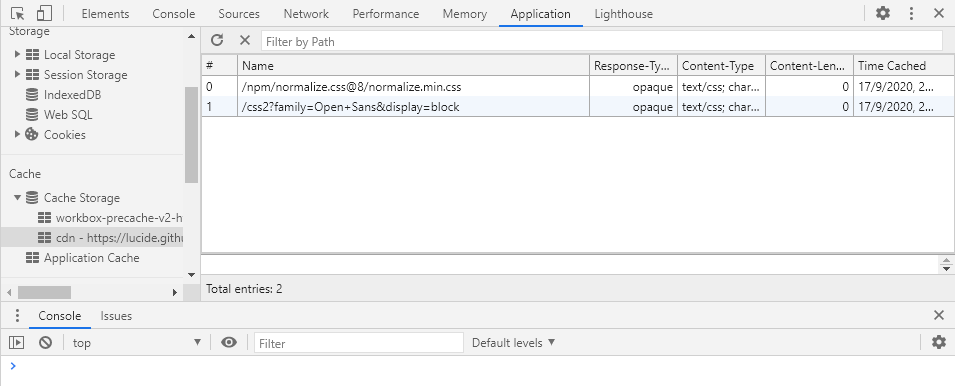
How come? I was expectingcorsentries, the dev panel had never been opened at the time of the requests.. Were they added as soon as I opened the panel to look at them? If so, they must have replaced some previouscorsentries. Why no errors? - if I reload again:
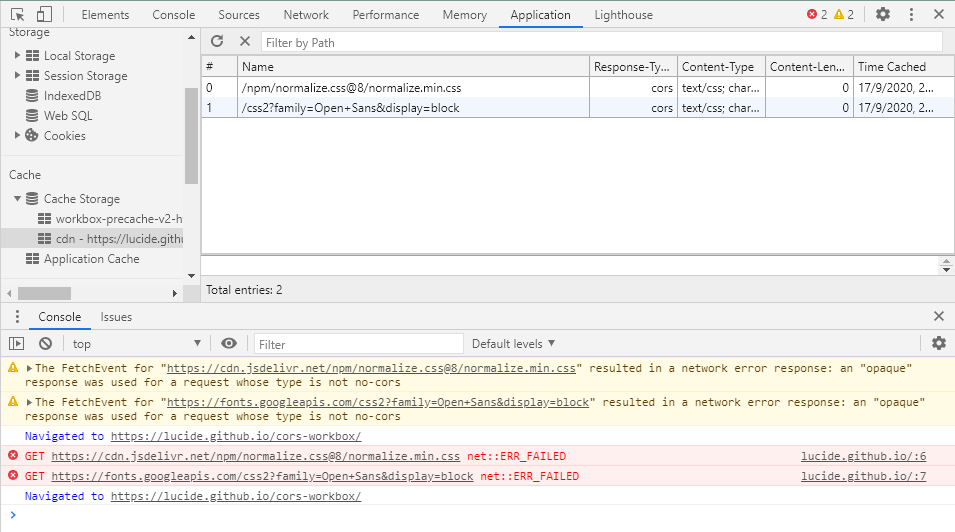
now the cache gets updated with proper non-opaque responses ..but I get errors about opaque responses being used. I did an additional reload at the end, ignore it, it didn't update the entries.
Edit
I just opened the updated app one last time (with the scroll wheel? does it matter?) and styles were missing.

Then i opened the dev tools to give a look and the errors were there. This is one example where the dev tools haven't been touched. It has already happened before (I think on Firefox too), but it's quite rare. This is perhaps the fourth time ever.
Lucide
on 17 Sep 2020
How come? I was expecting cors entries, the dev panel had never been opened at the time of the requests..
Were they added as soon as I opened the panel to look at them? If so, they must have replaced some previous cors entries. Why no errors?
Yes, exactly. Opening DevTools is what triggers the non-CORS requests, so they were added a very, very short time before you opened the panel to look at them, and they replaced what was previously CORS entries.
The nature of using a StaleWhileRevalidate strategy means that whatever's currently in the cache will be used immediately, and then a fetch() will be done a very short time after to overwrite whatever cached entry was just previously used.
If you want a way of checking out the status of cached responses _without_ opening DevTools, add a button or something to your test page that runs the following function and displays the string that's returned:
async function getInfoAboutCache(cacheName) {
  const cache = await caches.open(cacheName);
  const info = [];
  const keys = await cache.keys();
  for (const key of keys) {
    const response = await cache.match(key);
    info.push(`${key.url} has a type of ${response.type}`);
  }
  return info.join('\n');
}
(You can access the same Cache Storage API entries from the window context, i.e. your web page.)
jeffposnick
on 17 Sep 2020
I wonder why overwriting "cors" with "opaque" doesn't trigger errors but the opposite does.
Lucide
on 17 Sep 2020
This is now being tracked for possible remediation on the Chrome DevTools side of things at https://bugs.chromium.org/p/chromium/issues/detail?id=1147985
jeffposnick
on 11 Nov 2020
It seems like there's some movement on the underlying issue at https://bugs.chromium.org/p/chromium/issues/detail?id=1092637, so I'm going to defer to the DevTools team to find a permanent resolution, as opposed to trying to address this in Workbox.
jeffposnick
on 3 Dec 2020
Related issues
 thangman22
·
4Comments
thangman22
·
4Comments
 angelinaqj
·
4Comments
angelinaqj
·
4Comments
 niveditaece
·
3Comments
niveditaece
·
3Comments
 xe21500
·
4Comments
xe21500
·
4Comments
 Sturgelose
·
3Comments
Sturgelose
·
3Comments
Most helpful comment
@wanderview was good enough to jump in with some debugging help, and figured out what's going on.
The DevTools interface basically behaves like another client of the service worker, and in order to populate its user interface with details about the various resources being loaded, makes its own requests for each URL. When those requests are for cross-origin URLs, they're made without CORS. Those non-CORS requests made by DevTools do trigger the service worker's
fetchhandler, and the revalidation step in the Workbox strategy you're using ends up using a non-CORS (opaque) response to populate the cache.That explains why opening DevTools triggers this behavior. The fact that you explicitly require a CORS response (due to the
crossorigin="anonymous"attribute on your DOM elements) explains why you experience a complete failure to load the subresources.So... that's a summary of what's going on.
You can explicitly work around it in your specific use case by adding an instance of the
CacheableResponsePluginthat requires a200response status to your strategy:The documentation for
workbox-cacheable-responseincludes an explanation of its usage and why some strategies default to caching opaque responses.Beyond resolving your specific issue, there are a couple of longer-term ways of following-up:
Do nothing. Given that this happens due to interaction with DevTools, it's not likely to affect production users, but it can obviously cause frustration for developers if they frequently open DevTools and have subresources which require CORS responses and use a stale-while-revalidate or network-first strategy.
Change
workbox-routingso that it explicitly detects requests that originate from DevTools (I'm assuming there's a programmatic way of doing that via some header...) and ensure that Workbox doesn't respond to thosefetchevents.Change the
StaleWhileRevalidateandNetworkFirststrategies to detect what the currently cached responses'stypeis, and if it's not'opaque', refuse to overwrite it with an'opaque'response.Change the
StaleWhileRevalidateandNetworkFirststrategies to detect what the currently cached responses'stypeis, and if it's not'opaque', refuse to overwrite it with an'opaque'response. Instead, perform an additionalfetch()with an explicit'cors'mode and revalidate the cache with that response instead.My personal preference is probably 2., but Ben points out that if Workbox refused to respond to DevTool's requests, the DevTools interface may end up showing a different response that what the web page sees. You could imagine, for instance, a Workbox route that created a synthetic response by stitching together multiple partial sources. That synthetic response would not be visible to DevTools. So I'm not really sure what to do about that.
Option 3. might be the best compromise, but it does add in some extra overhead, and in the back of my head, I wonder whether there are any legitimate use cases that it would end up breaking.
For the meantime, it's option 1. by default.