Workbox: Question about runtime caching to cache cross-domain resources?
I have a question:
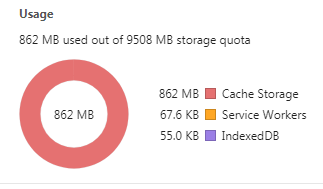
Why When I used runtimeCaching to cache cross-domain images, the Cache Storage displayed in the Chrome browser's developer tools grew rapidly, but these images are usually only a few dozen KB?
(If I don't cache these images, no problem...)
For example:
 angelinaqj
All 4 comments
@jeffposnick probably knows more about this, see his great stack overflow answer about the limitations of opaque responses:
In order to avoid leakage of cross-domain information, there's significant padding added to the size of an opaque response used for calculating storage quota limits (i.e. whether a QuotaExceeded exception is thrown) and reported by the navigator.storage API.
The details of this padding vary from browser to browser, but for Google Chrome, this means that the minimum size that any single cached opaque response contributes to the overall storage usage is approximately 7 megabytes. You should keep this in mind when determining how many opaque responses you want to cache, since you could easily exceeded storage quota limitations much sooner than you'd otherwise expect based on the actual size of the opaque resources.
 DavidScales
on 19 Jan 2018
DavidScales
on 19 Jan 2018
Yup, that's indeed the case.
The underlying reason behind that padded quota storage usage is described at https://bugs.chromium.org/p/chromium/issues/detail?id=796060#c17
If you have control over the server used to host the images, enabling it for CORS would work around the issue.
 jeffposnick
on 19 Jan 2018
jeffposnick
on 19 Jan 2018
Thanks @DavidScales @jeffposnick .
But the Response Headers of the image is:
Access-Control-Allow-Methods:GET
Access-Control-Allow-Origin:*
and
Status Code:200
So I think the images are allowed across domains, aren't they?
angelinaqj
on 22 Jan 2018
If your image requests originate from an img element in the DOM, then you need to explicitly opt-in to CORS mode the crossorigin attribute of img. If you don't opt-in, the original request won't contain CORS request headers, leading to an opaque, rather than CORS, response.
<img src="https://example.com/image.png" crossorigin="anonymous">
There's more detail at https://developer.mozilla.org/en-US/docs/Web/HTML/Element/img#attr-crossorigin
jeffposnick
on 22 Jan 2018
Related issues
 kaycebasques
·
4Comments
kaycebasques
·
4Comments
 stephanvierkant
·
4Comments
stephanvierkant
·
4Comments
 davidka
·
3Comments
davidka
·
3Comments
 caleb531
·
3Comments
caleb531
·
3Comments
 Fillah
·
3Comments
Fillah
·
3Comments
Most helpful comment
Yup, that's indeed the case.
The underlying reason behind that padded quota storage usage is described at https://bugs.chromium.org/p/chromium/issues/detail?id=796060#c17
If you have control over the server used to host the images, enabling it for CORS would work around the issue.