Workbox: Unexpected token < after redeploy
Library Affected:
workbox-sw v3.6.3
Browser & Platform:
Google Chrome for Android
Issue or Feature Request Description:
I bundle my website/PWA, where I use a couple of Web Components, using the workbox-webpack-plugin.
Everything works smooth and well till I redeploy the project (hosted on Firebase).
On my phone, if I clean my cache and get access the website/pwa, all good, worker works correctly.
Later on, once I release a new version, where I did several changes, and deploy it to the hosting and if I try to access the website/pwa with my phone, then I'll face the following error:
Uncaught SyntaxError: Unexpected token <
Any help would be appreciated.
Source
The project is open source: https://github.com/deckgo/deckdeckgo-website
URL
The website/pwa: https://deckdeckgo.com
Screenshot of the error

 peterpeterparker
All 6 comments
On my phone, if I clean my cache and get access the website/pwa, all good, worker works correctly.
That's not normally what you'd want to do—manually clearing your Cache Storage would delete precached entries which are needed by your PWA to function. Workbox does attempt to recover from manual deletion by going against the network and seeing if the asset can be loaded from there, which is perhaps why you didn't see any errors right away. But once the URL ceases to exist on the network (e.g. following a redeployment), your web server might start responding to those requests with an HTTP 404 response containing HTML. That could lead to the behavior you're seeing.
So... my suggestion is that you don't manually clear your cache at all, and let Workbox handle updating things for you. If you do need to explicitly clear things out for some reason, then also make sure that you unregister your service worker as well.
If that's not the underlying issue, could you please provide more context as to how you reproduced the error?
 jeffposnick
on 14 Feb 2019
jeffposnick
on 14 Feb 2019
@jeffposnick thx for the feedback but I think I was not enough clear then in my original entry. The thing is, I don't clear and I don't to want to clear my my cache at all, I just did and specified that to make it clear that the error Unexpected token < doesn't exist if the pwa was never fetched
so here again the scenario:
"user" access the PWA
workbox cache the resources
-> All good
2.
timeframe jump here, like a couple of days or weeks where I develop new features
3.
I redeploy the PWA to Firebase Hosting
4.
same "user" as above access the PWA again (without clearing anything)
-> ERROR Unexpected token <
peterpeterparker
on 15 Feb 2019
Gotcha. I took a look at https://deckdeckgo.com/'s Network traffic, and I think I see what's going on.
Here's what it looks like on a return visit, after the service worker is in control:
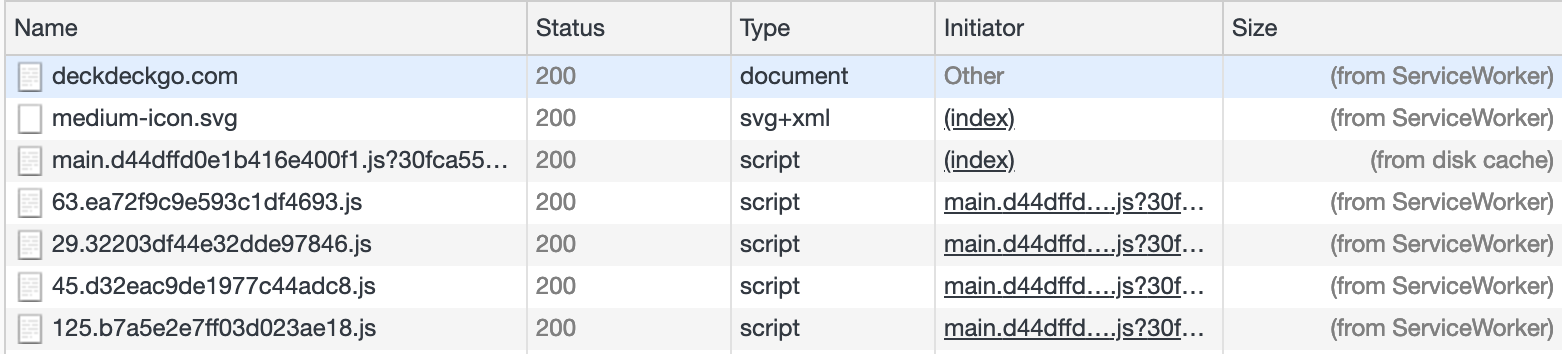
You can see that your main.[hash].js?[otherhash] URL is loaded (from disk cache) instead of (from ServiceWorker). That means that Workbox doesn't know how to find it in its precache, and it would explain the issues that you see after redeployment.
The reason it can't find it is because the entry that's precached is main.[hash].js, and the request is made for main.[hash].js?[otherhash]. That URL query parameter is causing the precache miss.
I'd recommend dropping that ?[otherhash] query parameter from your request. Your main.[hash].js file is already uniquely versioned, so I don't see what you gain from an additional cache-busting query parameter.
If you can't drop it for some reason, you can tell workbox-precaching to ignore query parameters when matching entries in its precache via the ignoreUrlParametersMatching config parameter.
jeffposnick
on 15 Feb 2019
@jeffposnick thx a lot for having a look at that and also for documenting clearly what are the solutions, that's really cool 👍 I'll try to remove the hash or use the configuration as you say.
P.S.: I kind of observe the same behavior in another project, but an Ionic Angular one where I use @angular/pwa to pack the worker...if I solve the above error like you suggest, I will try to see if it applies to it too
peterpeterparker
on 15 Feb 2019
Yeaaaah @jeffposnick, confirmed on two phones, ignoreUrlParametersMatching solved it, thx a looooooooott
peterpeterparker
on 15 Feb 2019
@jeffposnick , I have the same issue. After redeploy, it is still requesting older app.[hash].js file.
The solution to use ignoreUrlParametersMatching works only for generateSw mode, but I'm using injectManifest mode. I checked the config parameters supported, looks like this mode doesn't support this parameter. Any workaround for this?
 sourybunny
on 7 May 2019
sourybunny
on 7 May 2019
Related issues
jeffposnick
·
3Comments
 nevaan9
·
4Comments
nevaan9
·
4Comments
 angelinaqj
·
4Comments
jeffposnick
·
3Comments
angelinaqj
·
4Comments
jeffposnick
·
3Comments
 caleb531
·
3Comments
caleb531
·
3Comments
Most helpful comment
Yeaaaah @jeffposnick, confirmed on two phones,
ignoreUrlParametersMatchingsolved it, thx a looooooooott