Workbox: broadcastUpdate does not seem to access/interpret response headers correctly, causing the plugin to not work as expected
Library Affected:
workbox.broadcastUpdate.Plugin
Browser & Platform:
Google Chrome v66.0.3359.139 for MacOS 10.13.4
Issue or Feature Request Description:
I am using the staleWhileRevalidate strategy in conjunction with the broadcastUpdate plugin, and have noticed that nearly all response headers are missing when being used by broadcastUpdate to determine whether or not a change has been made which should kick off the message broadcast process. I've set the route to a single resource for demonstration purposes.
In the service worker:
workbox.routing.registerRoute(
    new RegExp('https://dev.pamdas.org/api/v1.0/featureset/70be361cad7e457baa7c0457d8017b04'),
    workbox.strategies.staleWhileRevalidate({
        cacheName: 'test-cache',
        method: 'GET',
        plugins: [
            new workbox.broadcastUpdate.Plugin('subject-group-updates', {
                headersToCheck: ['etag', 'date'],
            }),
        ],
    }),
);
On first app load, the "welcome to workbox" dialogue appears and all is well--Workbox sees that the resource is not cached and grabs it from the server.
However, on app reload there is the following message: "Unable to determine where the response has been updated because none of the headers that would be checked are present."

When inspecting the network request, you can see that the previous cached request and the new request have "etag" and "date" headers, which are the headers for which an update should be broadcast:
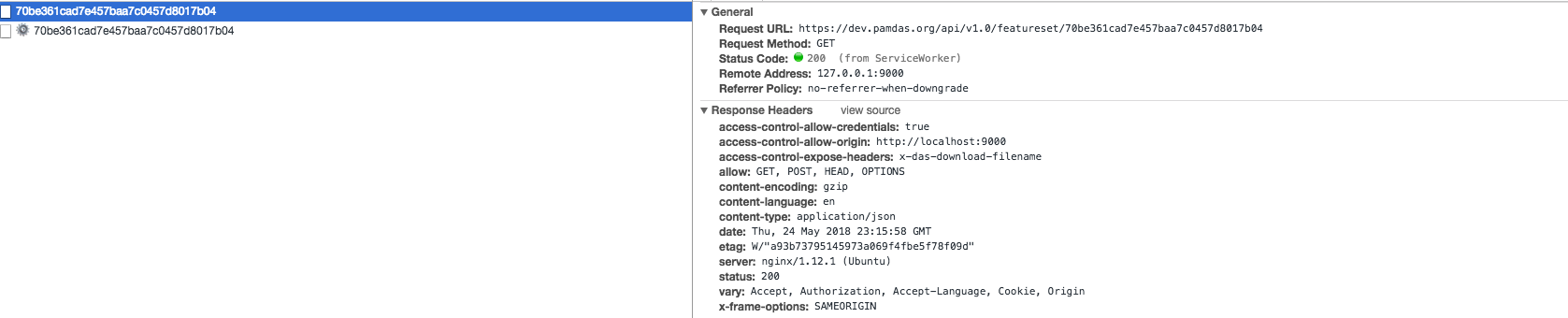
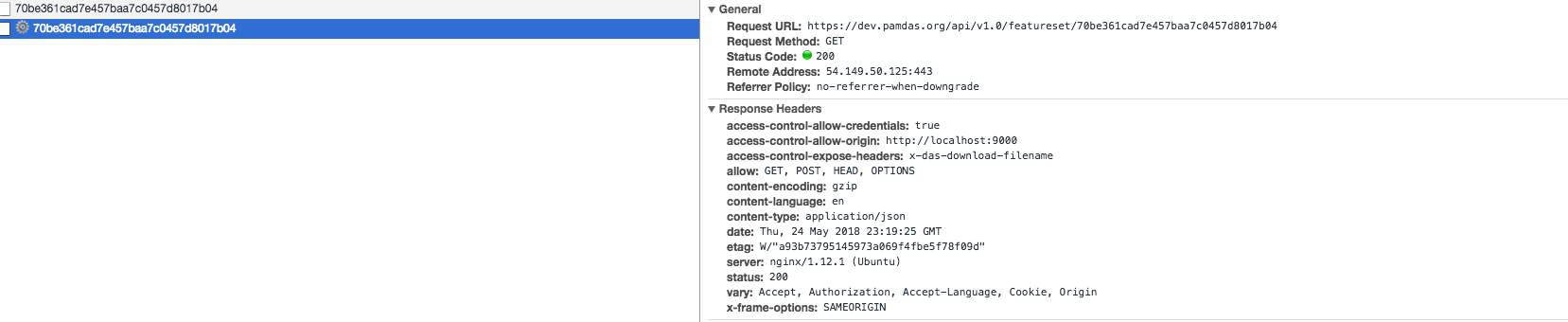
But when you crack into the broadcastUpdate source, you can see that the only existing headers on its cached and fresh values seem to be "content-type" and "content-language":



As such, despite the fact that both required headers necessary to broadcast a change ("date" and "etag") are present, no update is broadcast.
 JoshuaVulcan
All 2 comments
You're working with cross-origin resources, so the CORS protocol comes into play here.
By default, only the six simple response headers are exposed for CORS responses.
You can use the Access-Control-Expose-Headers response header to whitelist additional headers, and make them available by code that runs in your web app/service worker.
It looks like you're already setting Access-Control-Expose-Headers: x-das-download-filename, so it would just be a question of adding in the additional headers to that list when your server generates the response.
 jeffposnick
on 29 May 2018
jeffposnick
on 29 May 2018
Am facing the same issue while using the workbox web pack plugin.
new workboxPlugin.GenerateSW({
  swDest: 'myServiceWorker.js',
  clientsClaim: true,
  skipWaiting: true,
  cleanupOutdatedCaches: true,
  runtimeCaching: [{
    urlPattern: /(platform-components)$/,
    handler: 'StaleWhileRevalidate',
    options: {
      cacheName: 'platform-components',
      broadcastUpdate: {
        channelName: 'test',
        options: {
          headersToCheck: ['content-length', 'date'],
        },
      },
    },
  }],
})
Am getting a error
Unable to determine where the response has been updated
because none of the headers that would be checked are present.
but when am using with custom service worker am getting the headers.
am able to print all expected headers
event.respondWith(
  caches.open(CACHE_NAME).then(cache => cache.match(event.request).then((response) => {
    const fetchPromise = fetch(event.request).then((networkResponse) => {
      console.log(networkResponse.headers.forEach((value, key) => console.log('networkResponse', {
        value,
        key
      })));
      cache.put(event.request, networkResponse.clone());
      return networkResponse;
    });
    return response || fetchPromise;
  })),
);
Am using Chrome Version 72.0.3626.109 (Official Build) (64-bit)
 ashithrahul
on 7 Mar 2019
ashithrahul
on 7 Mar 2019
Related issues
 willemodendaal
·
3Comments
jeffposnick
·
3Comments
willemodendaal
·
3Comments
jeffposnick
·
3Comments
 angelinaqj
·
4Comments
angelinaqj
·
4Comments
 pratikraj-mob-incedo
·
4Comments
pratikraj-mob-incedo
·
4Comments
 nevaan9
·
4Comments
nevaan9
·
4Comments
Most helpful comment
You're working with cross-origin resources, so the CORS protocol comes into play here.
By default, only the six simple response headers are exposed for CORS responses.
You can use the
Access-Control-Expose-Headersresponse header to whitelist additional headers, and make them available by code that runs in your web app/service worker.It looks like you're already setting
Access-Control-Expose-Headers: x-das-download-filename, so it would just be a question of adding in the additional headers to that list when your server generates the response.