Wordpress-seo: BUG: When using AMPforWP + Yoast SEO 14 the tag 'link rel=canonical' appears more than once in the document.
Please give us a description of what happened.
If using AMPforWP and the new Yoast SEO 14 the AMP Validation fails. The tag 'link rel=canonical' appears more than once in the document.
Please describe what you expected to happen and why.
No validation errors should appear. When downgrading to Yoast SEO 13.5 there are no validation problems.
How can we reproduce this behavior?
- Use AMPforWP
- Upgrade to Yoast SEO 14
- Validate your AMP page
Technical info
- WordPress version: 5.4
Yoast SEO version: 14
Which browser is affected (or browsers):
- [x] IE11
- [x] Edge
- [x] Chrome
- [x] Firefox
[x] Safari
Relevant plugins in case of a bug:
AMPforWP, Yoast SEO 14
 seriou5
All 38 comments
Hi @seriou5 and thank you for the report. AMP for WP is using some deprecated methods and actions from our plugin. We've contacted them to resolve these issues.
 Djennez
on 28 Apr 2020
Djennez
on 28 Apr 2020
I have same problem at Bakht Website
You should be more coordinated with popular plugins like AMPforWP, this conflict can cause big seo downgrade.
thanks
 bakhtorg
on 28 Apr 2020
bakhtorg
on 28 Apr 2020
Please inform the customer of conversation # 606141 when this conversation has been closed.
 iamazik
on 28 Apr 2020
iamazik
on 28 Apr 2020
AMP For WP has been updated and shey should have updated their code in relation to our filters:
1.0.44 (29TH APRIL 2020)
Fixed: Multiple issues created after the latest update of Yoast (14.0 and above) #4412
So I'm going to close this issue.
Djennez
on 29 Apr 2020
Notices of this issue have been sent just this morning from multiple Google Search Console accounts. In each case, these client sites are using AMPforWP, WordPress version: 5.4, and Yoast SEO version: 14. Waiting for third-party code to update is costly for sites and may be one more reason to keep reliance on plugins at a minimum.
 jeannieh
on 30 Apr 2020
jeannieh
on 30 Apr 2020
@jeannieh Thank you for your pointing out the issue, can you please let us know the issue pesists after installation of the latest version of AMPforWP and Yoast?
Also, @Djennez thank you for tracking and adding the change log in the ticket, and after multiple tests it seems Yoast is now properly working fine with the update.
One thing I'm not able to get is, you mentioned "AMP for WP is using some deprecated methods and actions from our plugin".
If I'm not mistaken, these methods were introduced in the very latest update i.e version 14 and after release these issues raised up. But how an another plugin will be aware that these methods are coming? Wouldn't be a good idea to keep these method as fallback instead of directly depreciating it? and slowly deprecate it once other developers updated their code?
It's not about us, we updated our codebase within 48 hours of 14.0 update, but there are lot of themes and plugins provide the support for Yoast in their product, that would have made life easy for them.
Not complaining, just my suggestion ✌️
Great work and version 14+ looks promising.
Hope you guys are safe.
Thanks
 MohammedKaludi
on 4 May 2020
MohammedKaludi
on 4 May 2020
Yes, Mohammed Kaludi - the issues still persist. We're not relying on one theme or even a theme, sometimes. And prefer not to rely on many plugins. I am sure this is a challenge; hope a resolution comes soon for you.
jeannieh
on 5 May 2020
@jeannieh Thank you for your pointing out the issue, can you please let us know the issue pesists after installation of the latest version of AMPforWP and Yoast?
Also, @Djennez thank you for tracking and adding the change log in the ticket, and after multiple tests it seems Yoast is now properly working fine with the update.
One thing I'm not able to get is, you mentioned "AMP for WP is using some deprecated methods and actions from our plugin".
If I'm not mistaken, these methods were introduced in the very latest update i.e version 14 and after release these issues raised up. But how an another plugin will be aware that these methods are coming? Wouldn't be a good idea to keep these method as fallback instead of directly depreciating it? and slowly deprecate it once other developers updated their code?
It's not about us, we updated our codebase within 48 hours of 14.0 update, but there are lot of themes and plugins provide the support for Yoast in their product, that would have made life easy for them.
Not complaining, just my suggestion ✌️
Great work and version 14+ looks promising.
Hope you guys are safe.Thanks
Hi @MohammedKaludi,
I'm seeing this issue on all of my sites that are currently using your plugin as well. I just noticed it today but I suspect that this has been ongoing for at least the last week or so.
I'm using the most current version of your plugin and the most current version of Yoast.
This is having a big impact on AMP pages not being allowed to be indexed.
Please, this is very important that this is taken care of as soon as possible.
See error:
Not a valid AMP page
Invalid AMP pages will not have AMP-specific features in Google search results
Validation issues
The tag 'link rel=canonical' appears more than once in the document.
 Doc2b191
on 5 May 2020
Doc2b191
on 5 May 2020
@jeannieh and @Doc2b191
We have released an update 4 hours ago, with improvements. Are you sure you are using 1.0.47?
This is very strange because issue was tested in multiple scenarios with yoast free and premium and it seems to working.
But I have created a ticket for it and I assure you that will dig into it and fix and release an update ASAP.
For that I have created a ticket https://github.com/ahmedkaludi/accelerated-mobile-pages/issues/4434
Please do let me know that you have installed 1.0.47 and issue still persists.
MohammedKaludi
on 5 May 2020
@jeannieh and @Doc2b191
We have released an update 4 hours ago, with improvements. Are you sure you are using 1.0.47?
This is very strange because issue was tested in multiple scenarios with yoast free and premium and it seems to working.
But I have created a ticket for it and I assure you that will dig into it and fix and release an update ASAP.
For that I have created a ticket ahmedkaludi/accelerated-mobile-pages#4434
Please do let me know that you have installed 1.0.47 and issue still persists.
Hi @MohammedKaludi,
Thank you for the quick reply. I am using 1.0.47 and Yoast Version 14.0.4. I've subscribed to the ticket you shared. I love your plugin as it offers more than other AMP plugins but, with almost 90% of my traffic coming in on my AMP pages, I really need it to be functioning properly.
Thank you!
Doc2b191
on 5 May 2020
I'm facing a similar error from the last week. I'm using Yoast 14 and AMP for WP. Problems are still there. can anyone help me how to fix this issue? Goole has identified my 580 AMP pages down. That is badly affecting my website https://www.charismaticplanet.com entire traffic has gone down due to the canonical issue.
 CP3822
on 5 May 2020
CP3822
on 5 May 2020
Hey @CP3822
I just tested homepage and most recent post in amp validator and amp pages seems to be valid. Issue seems to be fixed in the latest version.
Single, Post page
https://search.google.com/test/amp?utm_source=gws&utm_medium=onebox&utm_campaign=suit&id=Rpvj8dUT8W1ToJTPmZXVlA
Please notify Google to recrawl the site by hitting validate fix in Google search console, and Google will require wallet and the validation errors will be resolved from search console.
Please do let me know your results if this fixed your issue
MohammedKaludi
on 5 May 2020
They are NOT fixed in the latest version for us. In fact, we have new and
more errors from clients’ Google Search Console this AM.
JH
On Tuesday, May 5, 2020, Mohammed Kaludi notifications@github.com wrote:
Hey @CP3822 https://github.com/CP3822
I just tested homepage and most recent post in amp validator and amp pages
seems to be valid. Issue seems to be fixed in the latest version.Homepage:
https://search.google.com/test/amp?utm_source=gws&utm_
medium=onebox&utm_campaign=suit&id=2VaMiiwxDi8gm3GqNj1n2wSingle, Post page
https://search.google.com/test/amp?utm_source=gws&utm_
medium=onebox&utm_campaign=suit&id=Rpvj8dUT8W1ToJTPmZXVlAPlease notify Google to recrawl the site by hitting validate fix in Google
search console, and Google will require wallet and the validation errors
will be resolved from search console.Please do let me know your results if this fixed your issue
—
You are receiving this because you were mentioned.
Reply to this email directly, view it on GitHub
https://github.com/Yoast/wordpress-seo/issues/14927#issuecomment-624118681,
or unsubscribe
https://github.com/notifications/unsubscribe-auth/AADZCYGH36CQXSNIBMLESFDRQAU6ZANCNFSM4MSTUTRA
.
--
Jeannie Hill
Hill Web Creations
Digital Marketing, Google Analytics, PPC & SEO Consultant | When you're
serious about marketing, you employ winning strategies.
Office 651.460.2496 <(651)%20460-2496> |Cell 651.206.2410
<(651)%20206-2410>
[email protected] | Hill Web Creations on LinkedIn
http://www.linkedin.com/profile/view?id=22161273&authType=name&authToken=NBrD&invAcpt=218672614_I176303754_215&trk=eml-comm_invm-b-profile-newinvite&fromEmail=&ut=2B3u0P9-t-NRQ1
| Hill Web Creations http://www.hillwebcreations.com/
jeannieh
on 5 May 2020
Hi I am also facing the 360 amp bugs on my GC. Even after updating the Plugin the issue Remains Here with so many errors.
site:- https://blog.oureducation.in
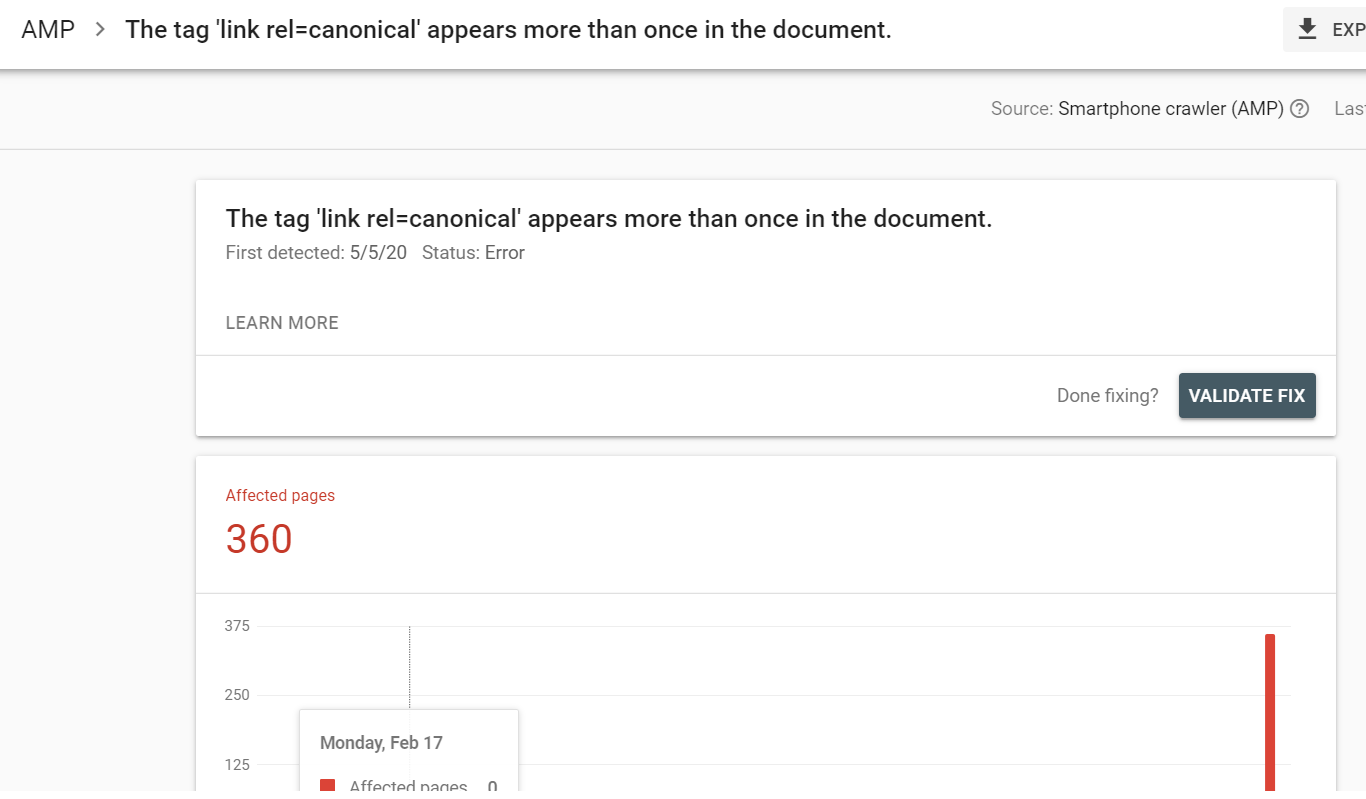
 430470
on 5 May 2020
430470
on 5 May 2020
@jeannieh We have checked your website and found that you are using 1.0.46 version of our AMPforWP plugin, Will you please update it to 1.0.47 because there are so many people confirmed us that their errors are fixed.
https://wordpress.org/support/topic/problem-with-link-relcanonical/
https://wordpress.org/support/topic/duplicate-tag-canonical/
https://wordpress.org/support/topic/canonical-9/
So please update the plugin and we are sure that your issue will also get fixed
 Zabi09
on 6 May 2020
Zabi09
on 6 May 2020
@430470 I have checked some of your AMP pages and it is showing valid at the moment and also found that you are using the latest version of our plugin,
https://blog.oureducation.in/which-one-is-good-among-rc-reddy-and-braintree-for-upsc-coaching-in-hyderabad/amp/
https://blog.oureducation.in/need-of-ias-coaching-in-allahabad/amp/
And if you are having error on any specific page then please send us that exact URL and we will check and let you know
Zabi09
on 6 May 2020
Thank you for your email. Please see the attached screenshot, as
the canonical error is not valid yet. Let's hope to resolve in the next
crawl cycle. what could be the issue?
On Wed, May 6, 2020 at 11:48 AM Syed Zabiuddin notifications@github.com
wrote:
@430470 https://github.com/430470 I have checked some of your AMP pages
and it is showing valid at the moment and also found that you are using the
latest version of our plugin,https://blog.oureducation.in/which-one-is-good-among-rc-reddy-and-braintree-for-upsc-coaching-in-hyderabad/amp/
https://blog.oureducation.in/need-of-ias-coaching-in-allahabad/amp/And if you are having error on any specific page then please send us that
exact URL and we will check and let you know—
You are receiving this because you were mentioned.
Reply to this email directly, view it on GitHub
https://github.com/Yoast/wordpress-seo/issues/14927#issuecomment-624473088,
or unsubscribe
https://github.com/notifications/unsubscribe-auth/APOYU6ZJAHP5BFBFPLMPDQLRQEB5NANCNFSM4MSTUTRA
.
CP3822
on 6 May 2020
Thank you for your email. Please see the attached screenshot, as the canonical error is not valid yet. Let's hope to resolve in the next crawl cycle. what could be the issue? www.charismaticplanet.com
Yes, in the next crawl you should see the better results.
Also you can hit validate fix in search console to start th crawl manually.
MohammedKaludi
on 6 May 2020
@jeannieh and @Doc2b191
We have released an update 4 hours ago, with improvements. Are you sure you are using 1.0.47?
This is very strange because issue was tested in multiple scenarios with yoast free and premium and it seems to working.
But I have created a ticket for it and I assure you that will dig into it and fix and release an update ASAP.
For that I have created a ticket ahmedkaludi/accelerated-mobile-pages#4434
Please do let me know that you have installed 1.0.47 and issue still persists.
Hi @MohammedKaludi,
As of this morning, it looks like the errors in search console are going down. For now, it seems like the issue has been resolved.
Thank you!
Doc2b191
on 6 May 2020
I'm still getting this problem on GSC
AMP Version 1.0.52
Yoast Version 14.2
WP version 5.4.1
deactivated yoast and gsc is not showing error
 arielvered
on 4 Jun 2020
arielvered
on 4 Jun 2020
I just got this problem.
https://search.google.com/test/amp?id=AATbN1MjQnlDwernzNE3Dg
I salute your response Mr. Ahmed.
www.sirajin.com
 ADE-KHOERUDIN
on 14 Jun 2020
ADE-KHOERUDIN
on 14 Jun 2020
I just got this problem.
https://search.google.com/test/amp?id=AATbN1MjQnlDwernzNE3DgI salute your response Mr. Ahmed.
www.sirajin.com
Yoast Version 14.3
AMP Version 1.0.52
ADE-KHOERUDIN
on 14 Jun 2020
I just got this problem.
https://search.google.com/test/amp?id=AATbN1MjQnlDwernzNE3Dg
I salute your response Mr. Ahmed.
www.sirajin.comYoast Version 14.3
AMP Version 1.0.52
Hey,
We are looking into the issue.
And I'll get back to you
MohammedKaludi
on 14 Jun 2020
I am using 1.0.53.1 I am having same issue. Yoast SEO and AMP for WP plugins. I have purged all caches, inlcuding my CDN. There is 1 canonical tag in the Yoast section, and another in the AMP for WP section.
 gatehealing
on 21 Jun 2020
gatehealing
on 21 Jun 2020
@gatehealing @ADE-KHOERUDIN @arielvered @CP3822
We have fixed it and just pushed the update, this was happening with some specific scenario and in this update, it should resolve the issue.
MohammedKaludi
on 22 Jun 2020
I'm also facing this issue too; when I disable Yoast, the issue disappears on GSC. @MohammedKaludi, where can I get this update?
 jacosky
on 23 Jun 2020
jacosky
on 23 Jun 2020
@jacosky are you using the latest 1.0.53.2 version of ampforwp?
MohammedKaludi
on 23 Jun 2020
No, I use Yoast and Better AMP. All the same never mind, I've gotten a solution. Thanks for your time.
jacosky
on 23 Jun 2020
No, I use Yoast and Better AMP. All the same never mind, I've gotten a solution. Thanks for your time.
Great, do let us know if you need anything else.
Have a great day
MohammedKaludi
on 23 Jun 2020
I have the problem on my site too ltechd.in and the error is for only 5 pages
ERror on Search console is : The tag 'link rel=canonical' appears more than once in the document.
I use AMP plugin by Mohammed Kaludi and Rank math . Disabling plugins didn't help ...please help .. it is the latest version
 anil416
on 18 Jul 2020
anil416
on 18 Jul 2020
It may be fixed. GSC will take a few days (or more) to crawl the pages again.
Where you see the error in GSC, there should be a button in top right that says Validate Fix. Clicking that tells google to recrawl.
You can check yourself by viewing your page’s source code and searching for the tag. Message me directly if you need help with any of that. I can get on phone with you and walk through it.
Best,
Jon
Jonathan F. Anderson, LPC-s
Licensed Professional Counselor
State of Texas Board Approved Supervisor
https://gatehealing.com
512 771-7621
3355 Bee Caves Rd, #505
Austin, Tx 78746
—Notice—
The information transmitted is intended only for the person or entity to which it is addressed and may contain confidential and/or privileged material, the disclosure of which is governed by applicable law. Any review, retransmission, dissemination or other use of, or taking of any action in reliance upon, this information by persons or entities other than the intended recipient is prohibited. If you received this email in error, please contact the sender and destroy the materials contained in this message.
On Jul 18, 2020, at 10:15 AM, anil416 notifications@github.com wrote:
I have the problem on my site too ltechd.in and the error is for only 5 pages
ERror on Search console is : The tag 'link rel=canonical' appears more than once in the document.
I use AMP plugin by Mohammed Kaludi and Rank math . Disabling plugins didn't help ...please help .. it is the latest version—
You are receiving this because you were mentioned.
Reply to this email directly, view it on GitHub, or unsubscribe.
gatehealing
on 18 Jul 2020
It may be fixed. GSC will take a few days (or more) to crawl the pages again. Where you see the error in GSC, there should be a button in top right that says Validate Fix. Clicking that tells google to recrawl. You can check yourself by viewing your page’s source code and searching for the tag. Message me directly if you need help with any of that. I can get on phone with you and walk through it. Best, Jon Jonathan F. Anderson, LPC-s Licensed Professional Counselor State of Texas Board Approved Supervisor https://gatehealing.com [email protected] 512 771-7621 3355 Bee Caves Rd, #505 Austin, Tx 78746 —Notice— The information transmitted is intended only for the person or entity to which it is addressed and may contain confidential and/or privileged material, the disclosure of which is governed by applicable law. Any review, retransmission, dissemination or other use of, or taking of any action in reliance upon, this information by persons or entities other than the intended recipient is prohibited. If you received this email in error, please contact the sender and destroy the materials contained in this message.
…
On Jul 18, 2020, at 10:15 AM, anil416 @.*> wrote: I have the problem on my site too ltechd.in and the error is for only 5 pages ERror on Search console is : The tag 'link rel=canonical' appears more than once in the document. I use AMP plugin by Mohammed Kaludi and Rank math . Disabling plugins didn't help ...please help .. it is the latest version — You are receiving this because you were mentioned. Reply to this email directly, view it on GitHub, or unsubscribe.
Sorry I can't call you directly as I am not from US and moreover GSC still says there is an error :[ why I dont understand can you help me .
anil416
on 18 Jul 2020
Hey @anil416,
I'll look into it and we'll let you know.
MohammedKaludi
on 18 Jul 2020
Thanks thats cool , I would love to learn how to make my website better with our AMP plugin
anil416
on 18 Jul 2020
Please contact me at my mail id [removed personal info] day by day other AMP errors are appearing.
anil416
on 21 Jul 2020
Please use the Yoast SEO repositories for their designated content and move any other discussion to their appropriate channels.
Djennez
on 21 Jul 2020
@MohammedKaludi
We have updated to the latest version 1.0.61.2 since 10 days ago.
The issue still shows on GSC. It also still shows in the view source page as shown in the below screenshot. Please help
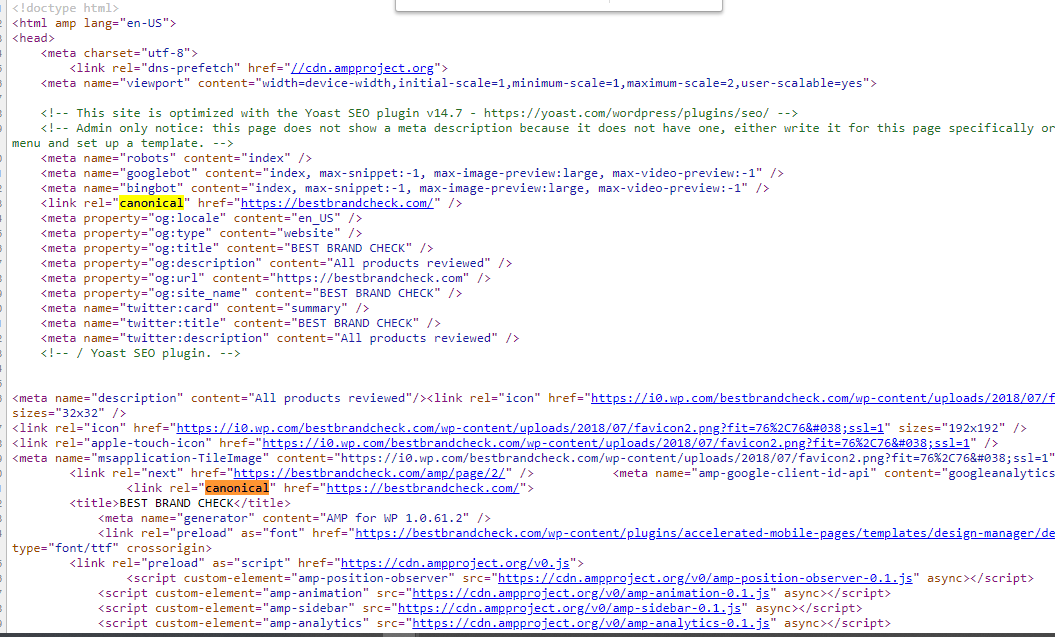
 vigwe
on 12 Aug 2020
vigwe
on 12 Aug 2020
As the hijacking of this thread is really counter productive for any of the parties involved, I'm locking this thread for further conversations. Please create a new issue on the repository of the intended plugin, following their guidelines for issue creation.
Djennez
on 12 Aug 2020
Related issues
 schurig
·
5Comments
schurig
·
5Comments
 theRealRizeo
·
5Comments
theRealRizeo
·
5Comments
 szepeviktor
·
6Comments
szepeviktor
·
6Comments
 JoshuaPotter
·
4Comments
JoshuaPotter
·
4Comments
 cristopherrosenberg
·
3Comments
cristopherrosenberg
·
3Comments