Wordpress-seo: Unwanted Warnings in Console when SCRIPT_DEBUG true
- [x] I've read and understood the contribution guidelines.
- [x] I've searched for any related issues and avoided creating a duplicate issue.
Please give us a description of what happened.
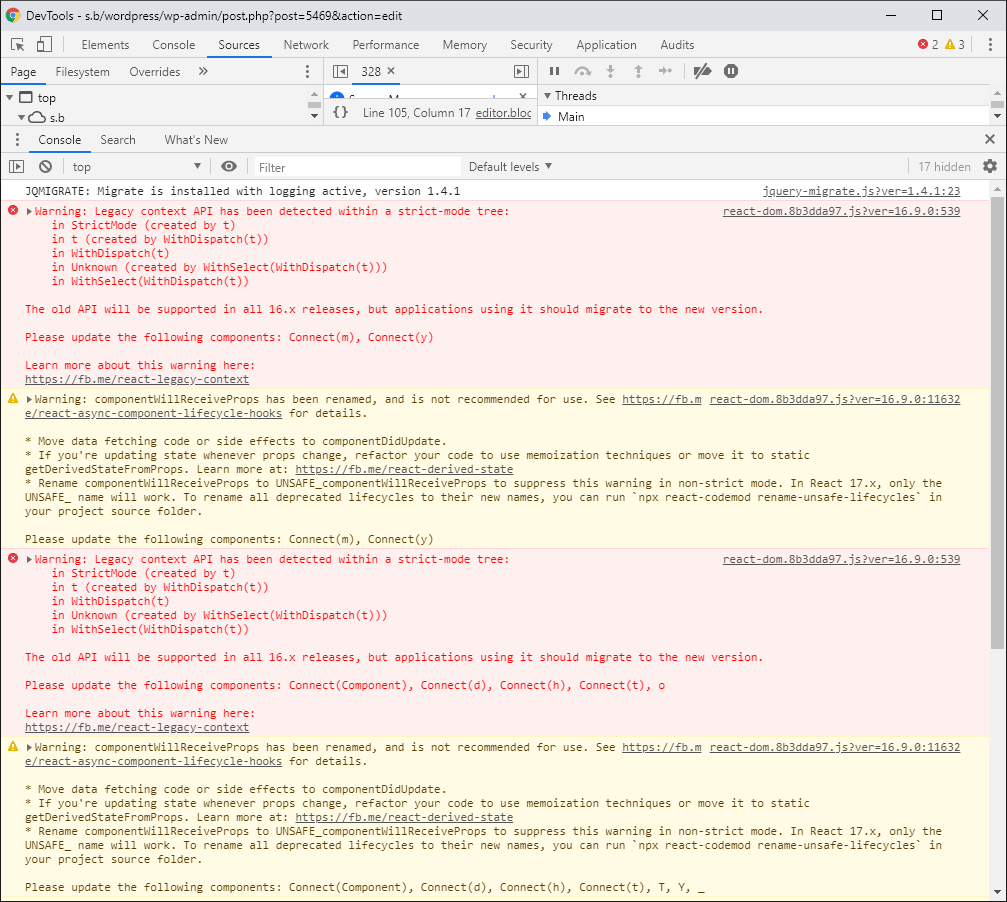
When WordPress SEO is activated and SCRIPT_DEBUG is true then a load of Warnings are displayed in the Chrome console.
Please describe what you expected to happen and why.
I'm developing my own blocks, so have SCRIPT_DEBUG set to true. When WordPress SEO is activated then I see a load of Warnings in the Chrome console. I'd rather not see these messages. My current workaround is to deactivate WordPress SEO. This is fine in a development environment.
How can we reproduce this behavior?
- in wp-config.php
define( 'SCRIPT_DEBUG', true ); - Activate WordPress SEO
- Add new post
- Inspect the console
Technical info
Warning: Legacy context API has been detected within a strict-mode tree:
    in StrictMode (created by Editor)
    in Editor (created by WithDispatch(Editor))
    in WithDispatch(Editor)
    in Unknown (created by WithSelect(WithDispatch(Editor)))
    in WithSelect(WithDispatch(Editor))

The old API will be supported in all 16.x releases, but applications using it should migrate to the new version.

Please update the following components: Connect(m), Connect(y)


Learn more about this warning here:
https://fb.me/react-legacy-context
react-dom.js?ver=16.9.0:11632 Warning: componentWillReceiveProps has been renamed, and is not recommended for use. See https://fb.me/react-async-component-lifecycle-hooks for details.

* Move data fetching code or side effects to componentDidUpdate.
* If you're updating state whenever props change, refactor your code to use memoization techniques or move it to static getDerivedStateFromProps. Learn more at: https://fb.me/react-derived-state
* Rename componentWillReceiveProps to UNSAFE_componentWillReceiveProps to suppress this warning in non-strict mode. In React 17.x, only the UNSAFE_ name will work. To rename all deprecated lifecycles to their new names, you can run `npx react-codemod rename-unsafe-lifecycles` in your project source folder.

Please update the following components: Connect(m), Connect(y)
Similar to #10494
* If relevant, which editor is affected (or editors):
- [ ] Classic Editor
- [ ] Gutenberg
- [ ] Classic Editor plugin
* Which browser is affected (or browsers):
- [x] Chrome
- [ ] Firefox
- [ ] Safari
- [ ] Other
Used versions
- WordPress version: 5.3.2
- Yoast SEO version: 12.8
- Gutenberg plugin version:
- Classic Editor plugin version:
- Relevant plugins in case of a bug:
only WordPress SEO activated.
- Tested with theme: Twenty Twenty
 bobbingwide
>All comments
@dariaknl, any update on this? I know these warnings are not a big deal but since deactivating Yoast SEO while developing is not an option for us, they are quite annoying. Thanks!
 tyrann0us
on 29 Jun 2020
tyrann0us
on 29 Jun 2020
Related issues
 adrianleira
·
6Comments
adrianleira
·
6Comments
 shanejones
·
5Comments
shanejones
·
5Comments
 Pcosta88
·
6Comments
Pcosta88
·
6Comments
 cristopherrosenberg
·
3Comments
cristopherrosenberg
·
3Comments
 PENTAGON4
·
6Comments
PENTAGON4
·
6Comments
Most helpful comment
@dariaknl, any update on this? I know these warnings are not a big deal but since deactivating Yoast SEO while developing is not an option for us, they are quite annoying. Thanks!