Wordpress-seo: Notice: Try to get property 'user_login' of non-object
- [x] I've read and understood the contribution guidelines.
- [x] I've searched for any related issues and avoided creating a duplicate issue.
Similar issues are #13307 and #13262
Please give us a description of what happened.
Visiting the root site of a WordPress MultiSite installation this Notice is displayed.
Notice: Trying to get property 'user_login' of non-object in
C:\apache\htdocs\wordpress\wp-content\plugins\wordpress-seo\frontend\schema\class-schema-utils.php on line 26
Please describe what you expected to happen and why.
Notice should not be displayed, even when WP_DEBUG is true.
The code should allow for the fact that the userid of the Person is not set, which leads to the user object being null.
How can we reproduce this behavior?
- In the root site of a Multi Site installation I've not gone through the installation wizard to indicate whether or not the Site represents an Organization or Person.
- The Knowledge Graph and Schema.org indicates that the site represents a Person
- But no user is set.
- And there's an Error message
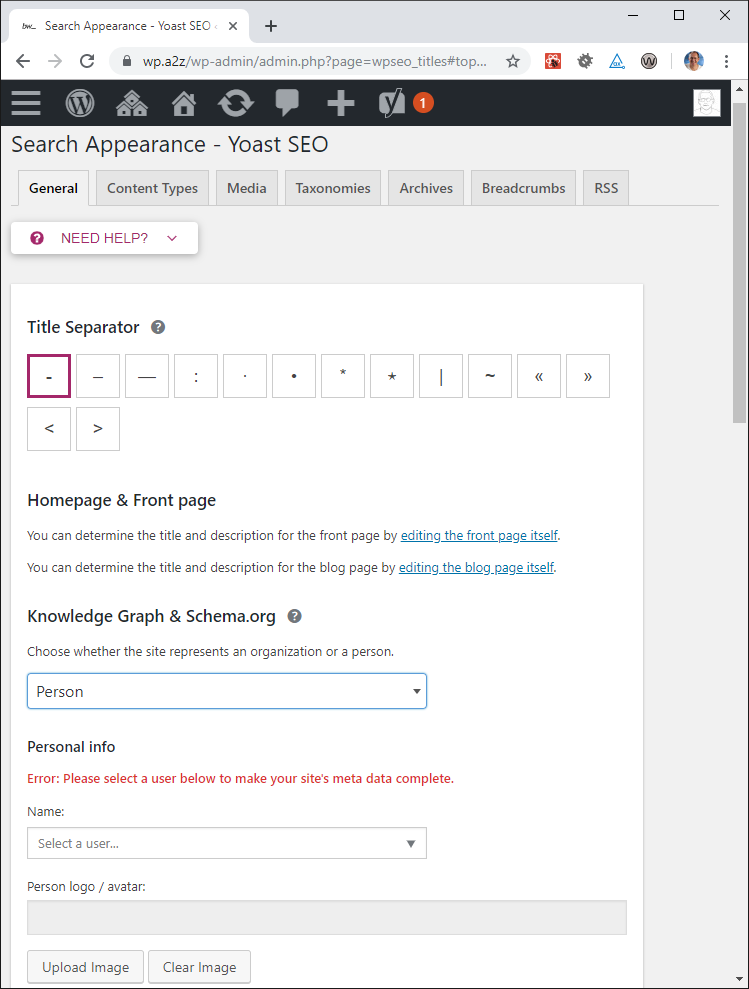
Workaround
Set the Site to represent either an Organization or a Person.
When you choose Person then you're forced to select a valid user.
The thing is... for the subdomains in this WordPress Reference site I don't really know what value to use! So I guess the default should be an unspecified Organization.
Technical info
errcontext is
 [user_id] =>
    [context] => WPSEO_Schema_Context Object
        (
            [canonical] => https://wp.a2z/
            [company_name] =>
            [company_logo_id] =>
            [id] => 15301
            [site_represents] => person
            [site_name] => WordPress a2z
            [site_url] => https://wp.a2z/
            [title] => Home - WordPress a2z
            [site_user_id] =>
            [description] =>
            [breadcrumbs_enabled] =>
            [site_represents_reference] =>
            [has_image] =>
        )

    [user] =>
Backtrace is
0. bw_lazy_backtrace C:\apache\htdocs\wordpress\wp-content\plugins\oik-bwtrace\libs\bwtrace.php:108 0
1. bw_backtrace C:\apache\htdocs\wordpress\wp-content\plugins\oik-bwtrace\includes\bwtrace-actions.php:285 0
2. bw_trace_error_handler(8,Trying to get property 'user_login' of non-object,C:\apache\htdocs\wordpress\wp-content\plugins\wordpress-seo\frontend\schema\class-schema-utils.php,25,array) C:\apache\htdocs\wordpress\wp-content\plugins\wordpress-seo\frontend\schema\class-schema-utils.php:25 5
3. get_user_schema_id(,object) C:\apache\htdocs\wordpress\wp-content\plugins\wordpress-seo\frontend\schema\class-schema-context.php:167 2
4. set_site_represents_reference C:\apache\htdocs\wordpress\wp-content\plugins\wordpress-seo\frontend\schema\class-schema-context.php:144 0
5. build_data C:\apache\htdocs\wordpress\wp-content\plugins\wordpress-seo\frontend\schema\class-schema-context.php:124 0
6. __construct C:\apache\htdocs\wordpress\wp-content\plugins\wordpress-seo\frontend\schema\class-schema.php:76 0
7. generate() C:\apache\htdocs\wp-a2z\wp-includes\class-wp-hook.php:286 1
8. apply_filters(,array) C:\apache\htdocs\wp-a2z\wp-includes\class-wp-hook.php:310 2
9. do_action(array) C:\apache\htdocs\wp-a2z\wp-includes\plugin.php:465 1
10. do_action(wpseo_json_ld) C:\apache\htdocs\wordpress\wp-content\plugins\wordpress-seo\frontend\schema\class-schema.php:63 1
11. json_ld() C:\apache\htdocs\wp-a2z\wp-includes\class-wp-hook.php:286 1
12. apply_filters(unsupported,array) C:\apache\htdocs\wp-a2z\wp-includes\class-wp-hook.php:310 2
13. do_action(array) C:\apache\htdocs\wp-a2z\wp-includes\plugin.php:465 1
14. do_action(wpseo_head) C:\apache\htdocs\wordpress\wp-content\plugins\wordpress-seo\frontend\class-frontend.php:666 1
15. head() C:\apache\htdocs\wp-a2z\wp-includes\class-wp-hook.php:286 1
16. apply_filters(unsupported,array) C:\apache\htdocs\wp-a2z\wp-includes\class-wp-hook.php:310 2
17. do_action(array) C:\apache\htdocs\wp-a2z\wp-includes\plugin.php:465 1
18. do_action(wp_head) C:\apache\htdocs\wp-a2z\wp-includes\general-template.php:2745 1
19. wp_head C:\apache\htdocs\wordpress\wp-content\themes\genesis\header.php:35 0
20. require_once(C:\apache\htdocs\wordpress\wp-content\themes\genesis\header.php) C:\apache\htdocs\wp-a2z\wp-includes\template.php:722 1
21. load_template(C:\apache\htdocs\wp-a2z/wp-content/themes/genesis/header.php,1) C:\apache\htdocs\wp-a2z\wp-includes\template.php:671 2
22. locate_template(array,1) C:\apache\htdocs\wp-a2z\wp-includes\general-template.php:41 2
23. get_header C:\apache\htdocs\wordpress\wp-content\themes\genesis\lib\framework.php:24 0
24. genesis C:\apache\htdocs\wordpress\wp-content\themes\genesis-a2z\front-page.php:20 0
25. include(C:\apache\htdocs\wordpress\wp-content\themes\genesis-a2z\front-page.php) C:\apache\htdocs\wp-a2z\wp-includes\template-loader.php:78 1
26. require_once(C:\apache\htdocs\wp-a2z\wp-includes\template-loader.php) C:\apache\htdocs\wp-a2z\wp-blog-header.php:19 1
27. require(C:\apache\htdocs\wp-a2z\wp-blog-header.php) C:\apache\htdocs\wp-a2z\index.php:17 1
* If relevant, which editor is affected (or editors):
Not relevant
- [ ] Classic Editor
- [ ] Gutenberg
- [ ] Classic Editor plugin
* Which browser is affected (or browsers):
Not relevant
- [ ] Chrome
- [ ] Firefox
- [ ] Safari
- [ ] Other
Used versions
- WordPress version: 5.2.2
- Yoast SEO version: 11.6 through 11.8
- Gutenberg plugin version:
- Classic Editor plugin version:
- Relevant plugins in case of a bug:
- Tested with theme: Not relevant but it's the Genesis-A2Z child theme of the Genesis framework. https://github.com/bobbingwide/genesis-a2z
 bobbingwide
All 7 comments
The notice triggers due to $user not being an object on:
https://github.com/Yoast/wordpress-seo/blob/ca625f97fe001c138d2fe94941c22adf64776305/frontend/schema/class-schema-utils.php#L26
This is due to site_represents not getting set to false in:
https://github.com/Yoast/wordpress-seo/blob/ca625f97fe001c138d2fe94941c22adf64776305/frontend/schema/class-schema-context.php#L202-L205
It looks like this conditional only triggers if a user ID is set, but that user is non-existent. But if no user ID is set in the first place, this conditional does not trigger and the site_represents is still a person. This causes the $user object not to be set where the notice comes from.
However, these notices only occur if:
- WP_DEBUG is turned on (which should not be in production environments)
- The site administrator is ignoring the warning in the SEO -> Search Appearance tab, stating that a user should be selected.
And even though notices aren't meant to happen, creating and selecting a valid user would 'fix' the issue.
@jono-alderson tagging you so this is on your radar if it wasn't before :)
 Djennez
on 12 Aug 2019
Djennez
on 12 Aug 2019
- The site administrator is ignoring the warning in the SEO -> Search Appearance tab, stating that a user should be selected.
I got the problem today in another local site ( not WPMS ).
The Notice appeared as soon as I visited the site.
I hadn't yet seen the Warning message.
So I wasn't really ignoring the message.
Note: wordpress-seo is a symlinked installation that was updated elsewhere.
bobbingwide
on 12 Aug 2019
I can confirm this issue, and that the steps described resolved it for that site once saved. Ideally the default for this is to either not attempt to show the schema if no user is selected, or to have a _"none"_ option as the default
 tomjn
on 29 Aug 2019
tomjn
on 29 Aug 2019
Here's another Notice, from Social - Yoast SEO.
Setting the site to represent an Organisation resolved the issue.
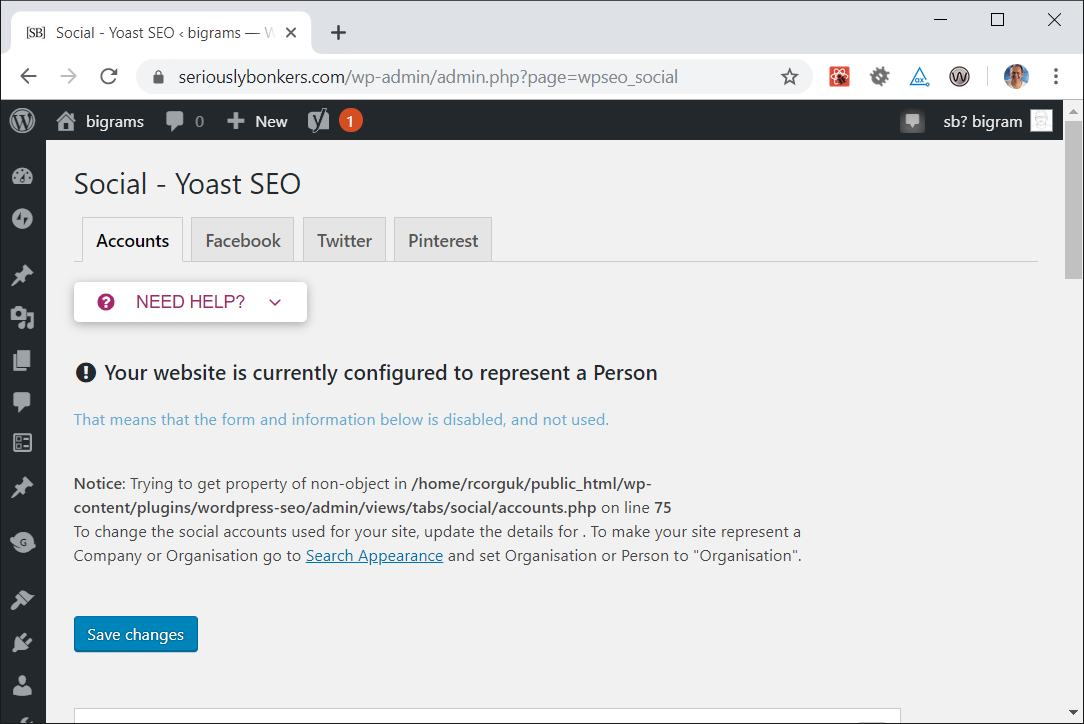
Setting the site to represent a Person makes this message rather irrelevant.
That means that the form and information below is disabled, and not used.
Also just got this today
 arkid
on 23 Sep 2019
arkid
on 23 Sep 2019
I've seen similar flavours of this issue, when a post tries to look up an author which does not exist.
 jono-alderson
on 14 Jan 2020
jono-alderson
on 14 Jan 2020
It's fixed in #14154.
 stodorovic
on 15 Jan 2020
stodorovic
on 15 Jan 2020
Related issues
 szepeviktor
·
6Comments
szepeviktor
·
6Comments
 tholu
·
3Comments
tholu
·
3Comments
 isaumya
·
4Comments
isaumya
·
4Comments
 stayallive
·
4Comments
stayallive
·
4Comments
 Pcosta88
·
6Comments
Pcosta88
·
6Comments
Most helpful comment
The notice triggers due to $user not being an object on:
https://github.com/Yoast/wordpress-seo/blob/ca625f97fe001c138d2fe94941c22adf64776305/frontend/schema/class-schema-utils.php#L26
This is due to
site_representsnot getting set tofalsein:https://github.com/Yoast/wordpress-seo/blob/ca625f97fe001c138d2fe94941c22adf64776305/frontend/schema/class-schema-context.php#L202-L205
It looks like this conditional only triggers if a user ID is set, but that user is non-existent. But if no user ID is set in the first place, this conditional does not trigger and the
site_representsis still a person. This causes the$userobject not to be set where the notice comes from.However, these notices only occur if:
And even though notices aren't meant to happen, creating and selecting a valid user would 'fix' the issue.
@jono-alderson tagging you so this is on your radar if it wasn't before :)