Wordpress-seo: Investigate the impact of wpseo_json_ld on each page load
- [x] I've read and understood the contribution guidelines.
- [x] I've searched for any related issues and avoided creating a duplicate issue.
Please give us a description of what happened.
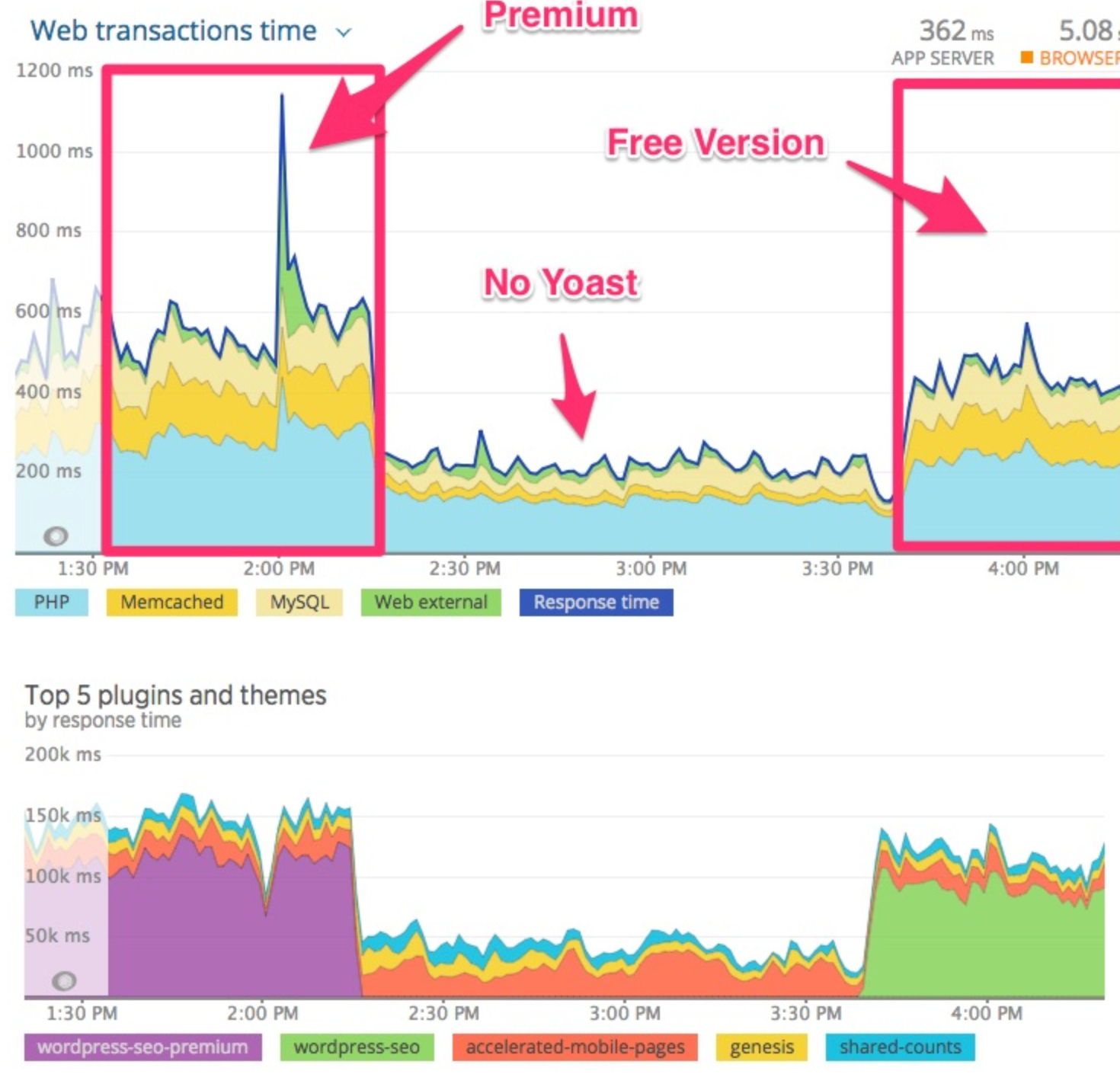
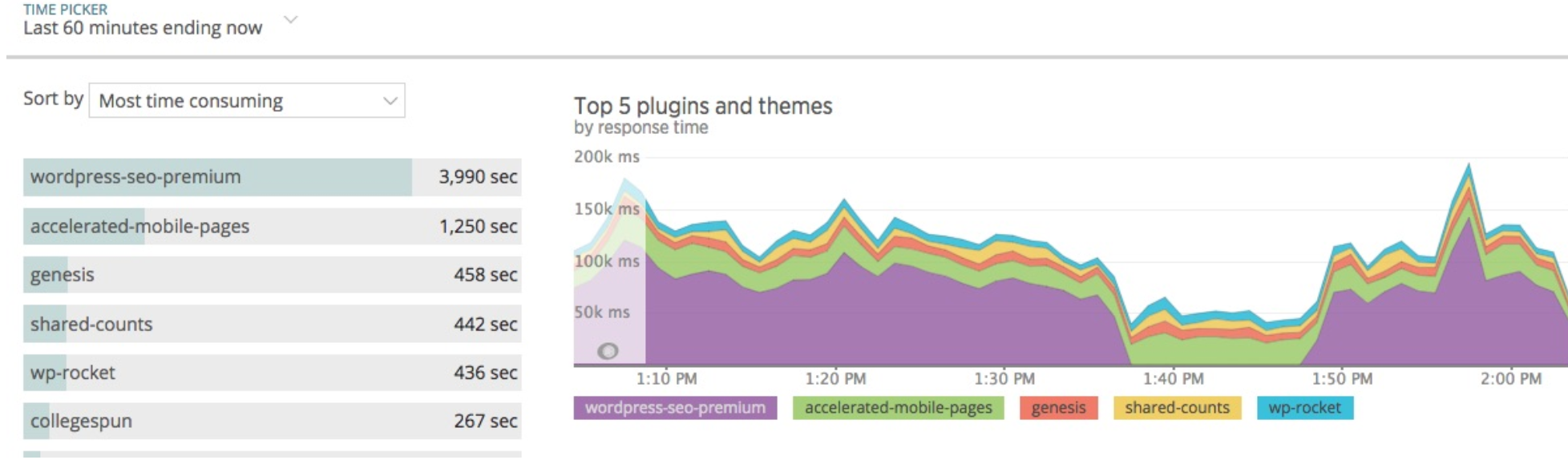
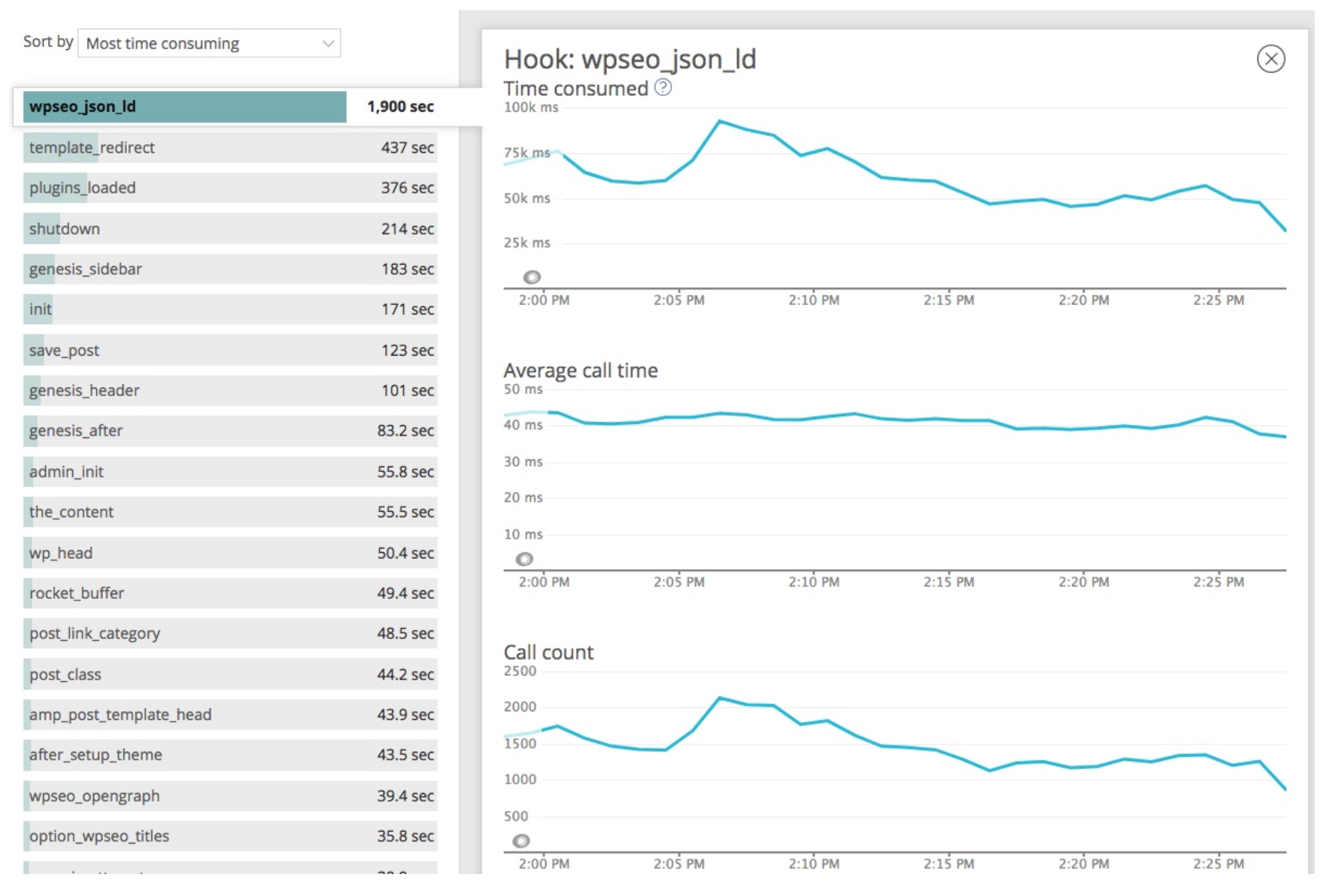
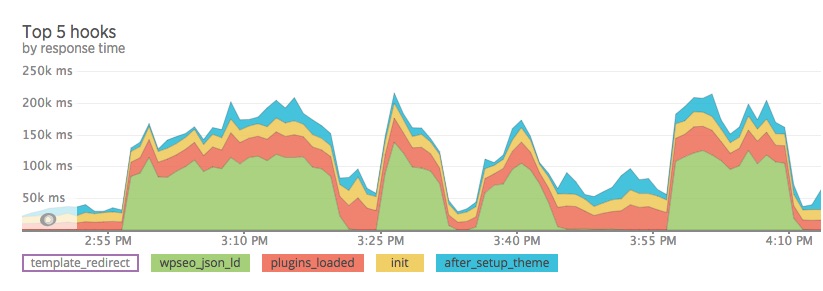
wpseo_json_ld, which is called by both Yoast Seo and Yoast SEO Premium, uses many recourses. (see screenshots)
This behaviour seems to be on every page for breadcrumbs if they are enabled.
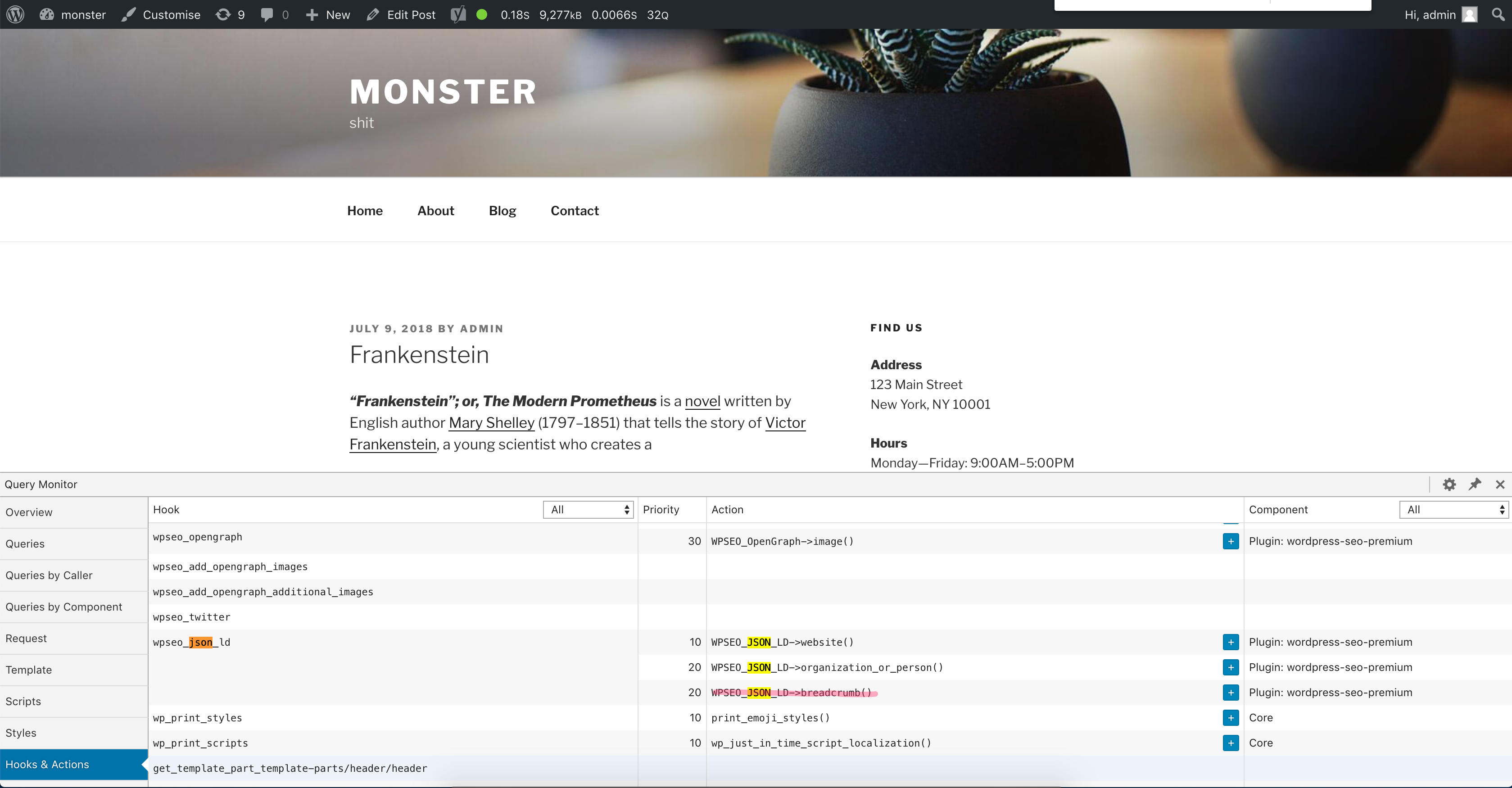
NOTE: Breadcrumbs are disabled but are still being called (screenshot below)
Technical info
- WordPress version: 4.9.8
- Yoast SEO version: user contacted us with v. 8.4 and still happens with 9.1
 ghost
ghost
All 29 comments
Please inform the customer of conversation #435553 when this conversation has been closed.
ghost
on 7 Nov 2018
We're beginning to scope a major upgrade to the way in which we manage and output json-ld. This will likely involve a bunch of back end optimisation, which should help out here.
In the meantime, we should see if there are any quick wins to be made with, eg, not calling functions breadcrumbs functions if breadcrumbs are disabled.
 jono-alderson
on 7 Nov 2018
jono-alderson
on 7 Nov 2018
FYI, here's the WIP spec.
https://docs.google.com/document/u/1/d/14ITkylzQDQVOqM_pu8ZgzeKJD8VOJkPokrWo02FfElo/mobilebasic#
jono-alderson
on 7 Nov 2018
I'm the customer that supplied the charts and info. We're running New Relic APM and Browser to capture the data/reports. What else can I provide/assist with?
 dws122
on 8 Nov 2018
dws122
on 8 Nov 2018
Thanks for the screenshots!
We'll look into things on our side and see what we can find. In the meantime, we're working towards completing the spec for the new JSON-LD approach; and when we implement that, we'll optimise any existing components we (re)use.
jono-alderson
on 10 Nov 2018
Sounds good. We can test a beta release too when ready. Hope to see you guys at WCUS in Nashville again this year.
dws122
on 11 Nov 2018
First of all: we do add a lot of functionality in these plugins.
Secondly: we do recommend to configure full page caching of your site if you want the best performance.
_To be clear, the WPSEO_JSON_LD::breadcrumbs method is being called but internally this is checking if breadcrumbs are enabled or not. So that is expected behaviour._
We do want to enable JSON+LD breadcrumbs for every page, even if "Breadcrumbs" have been disabled in the settings, as the one in the settings is a visual representation only.
@dws122 I'm missing a bit of context and information to make better judgements on what the charts say.
- It's not clear wether these load times are from the frontend or frontend/backend or backend of the site.
- What do the seconds mean? Is that per request or time consumed in the time-frame selected?
- What are your average server page creation times?
 moorscode
on 12 Nov 2018
moorscode
on 12 Nov 2018
Happy to provide more context. And we do appreciate the functionality you provide.
We run Apache with php-fpm, and then employ static file caching with Engintron, a reverse proxy nginx server. We also use Cloudflare for CDN, aggressively cache images (webp) and other static assets. We also run memcached for WordPress Object Caching and distributed database servers for performance, along with PHP OpCache. This particular website has substantial traffic, averaging 2,000 active users at any time, with times of load around 6,000 active users (as measured by Google Analytics). We've peak at over 60,000 active users on the site at one time.
We control and manage all aspects of hosting and WordPress theme development for our customers.
We do have breadcrumbs enabled for this site.
the times/charts I provided were server side, using New Relic APM to track and monitor PHP processing and events.
Average server side processing time is measured and the average server processing time is 320ms.
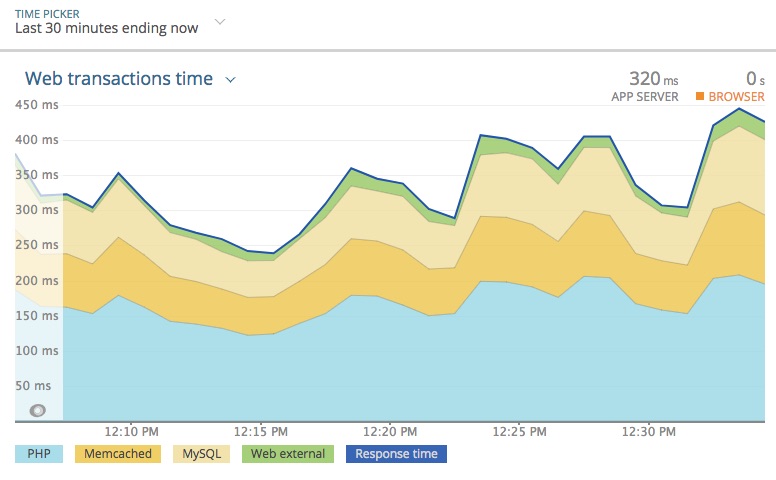
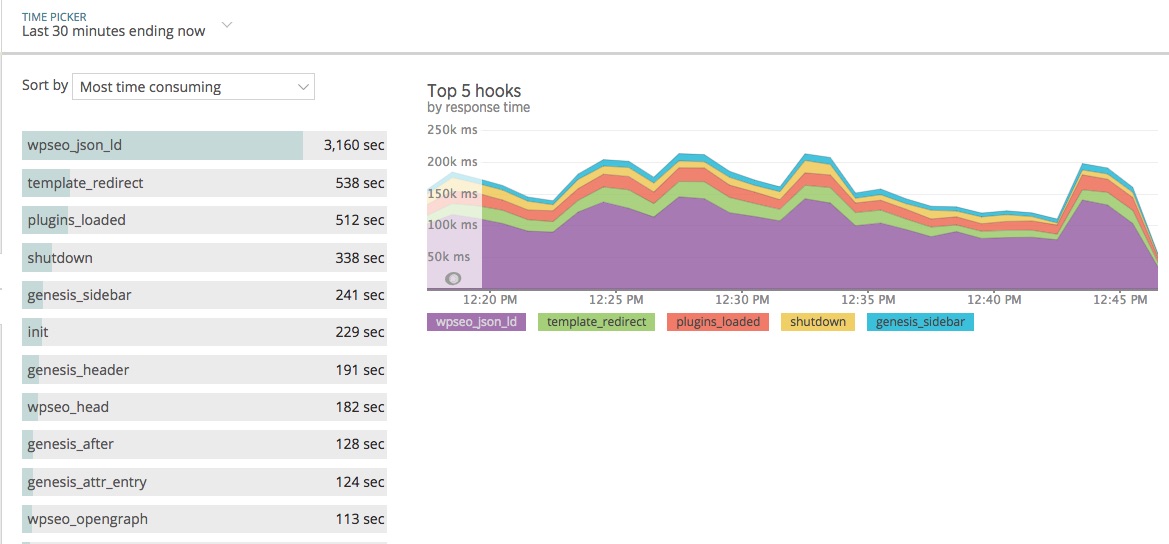
I've been trying to understand why the wpseo_json_ld function from Yoast seems to take 5-6 times the processing time of any other WordPress hook on the site.
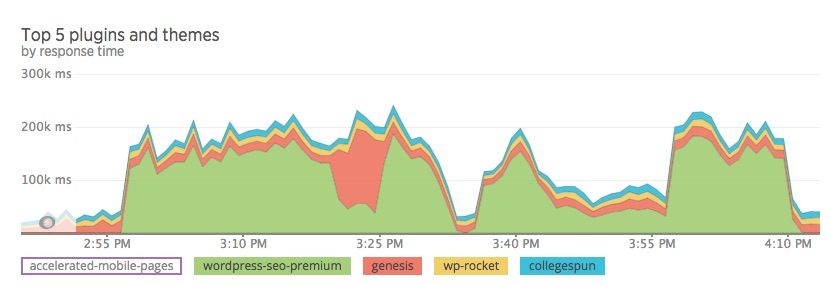
I am also able to measure plugin time -- so in this instance Yoast is using more than 65% of all processing time (server side) for the site.
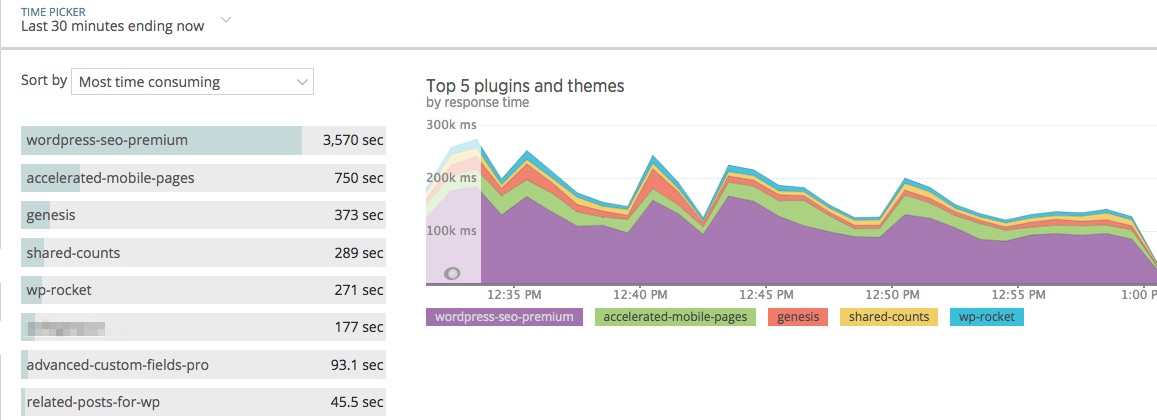
The measurement in seconds represents the total seconds of processing consumed during the time period reporting (which was 30 minutes).
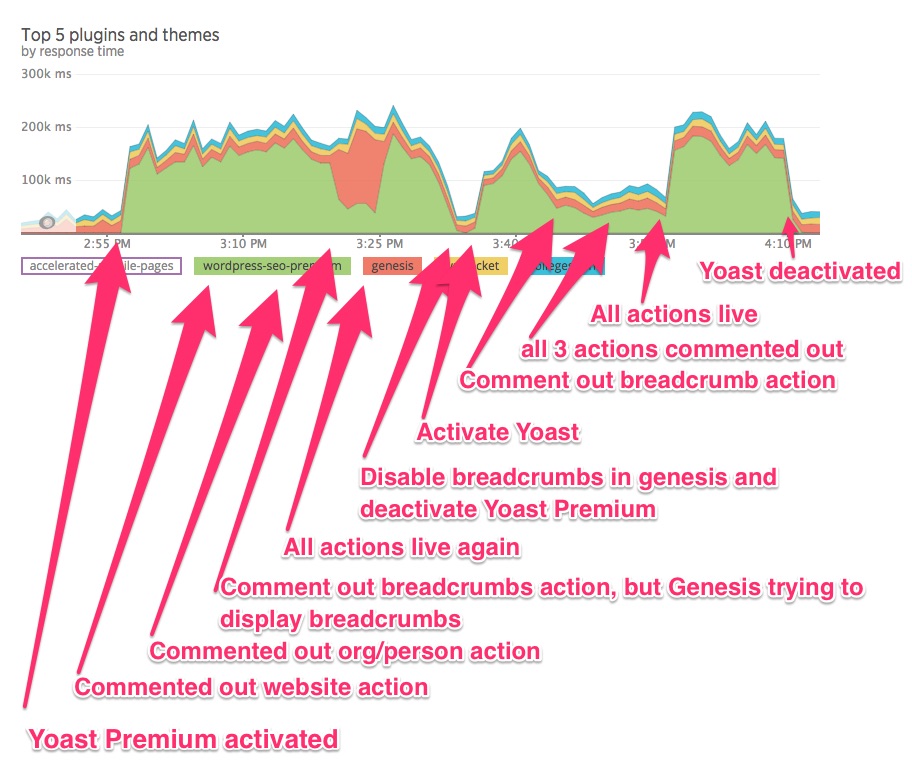
The first to charts attached (above) show the processing required by Yoast SEO Premium and the free version. The dip in the middle of the chart is processing without Yoast enabled.
Furthermore, we do see these same results on a half dozen other high-volume sites we manage.
I'm happy to provide any other debugging information you need. We can even arrange a time to video/screen share so you can inspect New Relic APM with me real time.
dws122
on 12 Nov 2018
Oh, wow, this is really fascinating, thanks! I'd love to know more about your site and setup.
So, as @moorscode says, there's no way of getting around the fact that our plugin introduces some overhead, because it does a ton of stuff (much of which you'll likely never see / worry about, as it's behind the scenes config/template SEO stuff). We go to great lengths to make sure that these processes are performant, but sometimes, there's no getting around "doing tons of stuff" having a performance hit.
That said, I'm personally excited that the new schema stuff were working on should hopefully have an impact. We can't promise that it'll be soon, but it'll definitely be a big deal.
I'd be happy to jump on a call in the meantime and see if we can reclaim some precious milliseconds!
jono-alderson
on 13 Nov 2018
you can reach me / DM me in the Making WordPress Slack group to setup a time convenient for us both, as I'm also @dws122 there. I happened to notice @moorscode chatting there today in the #hosting-community channel I'm active in. I'll also reach out to you on Slack.
dws122
on 13 Nov 2018
Hey all -- updated charts based upon commenting out the following three hooks.
Conclusion: breadcrumbs
add_action( 'wpseo_json_ld', array( $this, 'website' ), 10 );
add_action( 'wpseo_json_ld', array( $this, 'organization_or_person' ), 20 );
add_action( 'wpseo_json_ld', array( $this, 'breadcrumb' ), 20 );
dws122
on 21 Dec 2018
Has this been resolved? Seems like a major performance issue?
 koconder
on 24 Dec 2018
koconder
on 24 Dec 2018
Hey, @koconder, we're still investigating - please bear with us!
At this stage, we're still trying to get to the bottom of working out exactly what/where the bottlenecks might be. Because this doesn't appear to impact everybody / every site, and, seems to manifest differently on different websites, it's proving challenging to pin down the problem.
But, we're making progress! The charts above are super-helpful, and we'll keep exploring.
If we manage to pin down the issue, then we'll have a better idea of what a potential fix might look like, and a feel for how feasible it'll be to get that shipped (and when).
We'll keep updating this ticket as we make progress.
jono-alderson
on 28 Dec 2018
Thanks for the screenshots and additional data!
I was hoping that you could provide some additional information about the structure of the pages on which this is being used.
Do those have parent pages, taxonomies and tags?
How many levels deep do the breadcrumbs display?
This is where most of the logic happens and specific queries that might not be cached yet are happening.
moorscode
on 31 Dec 2018
I apologize for the delay in responding.
99% of the content is posts, not pages, and are in multiple categories. Tags are not used.
Breadcrumbs display one category deep.
dws122
on 23 Jan 2019
Is there anything I can do to assist with this?
dws122
on 21 Feb 2019
We're in the process of making some big changes to how we build and output schema, so, hopefully some housekeeping on breadcrumbs in the process should sharpen things up. Let's nudge @moorscode for some thoughts, though! :)
jono-alderson
on 21 Feb 2019
@moorscode @jono-alderson nudge nudge :)
Need me to beta test anything?
dws122
on 11 Mar 2019
@dws122 any chance you could test this branch:
https://github.com/Yoast/wordpress-seo/tree/jdv/breadcrumbs-cache-test
It adds object caching for breadcrumbs based on the canonical, so I assume that, _if_ you run an object cache, this should speed things up.
If you need a built zip I can do that for you but it's a bit more work ;)
 jdevalk
on 19 Mar 2019
jdevalk
on 19 Mar 2019
Hi @jdevalk -- thanks for this. I'll test it out this week and reply.
dws122
on 1 Apr 2019
I downloaded the zip for that branch and installed it.
The plugin activates; then immediately exists. I have debugging turned on
define( 'WP_DEBUG', true );
define( 'WP_DEBUG_LOG', true );
There is an error in debug.log related to Genesis
PHP Notice: Trying to get property 'term_id' of non-object in /domain.com/public_html/wp-content/themes/genesis/lib/classes/class-genesis-seo-document-title-parts.php on line 195
If I have Yoast SEO: News active and start the beta plugin, I get a server 500 error
PHP message: PHP Fatal error: Class 'WPSEO_Metabox' not found in /domain.com/public_html/wp-content/plugins/wpseo-news/classes/class-meta-box.php on line 11" while reading response header from upstream
Hope this helps. Test unsuccessful. There was about 1,100 active users on the site at the time of testing according to Google Analytics.
dws122
on 3 Apr 2019
You can see the time period when the plugin wasn't active
And here are the top 5 hooks during the same time period of 1 hour
https://cl.ly/76d11e0ce602
dws122
on 3 Apr 2019
any new thoughts? or testing I can do?
dws122
on 26 Apr 2019
Updated charts using Yoast 11.1.1
https://cl.ly/80c0457cdec1
https://cl.ly/3e9f2c5d184d
https://cl.ly/ae334c96b3a8
And lastly, you can see where I disabled the plugin
https://cl.ly/5d705c21f058
dws122
on 13 May 2019
We've determined that the issue related to Yoast Breadcrumbs on high-traffic sites. On quite a few sites we've had to turn off Yoast Breadcrumbs -- until this gets fixed.
dws122
on 24 Jul 2019
We'd like to invite you to test the Yoast SEO 14.0 RC, I think you'll find these performance issues are fixed there. Details: https://developer.yoast.com/blog/upcoming-release-yoast-seo-14-0-indexables/
jdevalk
on 22 Apr 2020
I am wondering if this issue can be closed with 14.x.
 Djennez
on 5 Jun 2020
Djennez
on 5 Jun 2020
Yes we have seen a significant improvement on 14.*
Thank you
On Fri, Jun 5, 2020 at 8:30 AM Djennez notifications@github.com wrote:
I am wondering if this issue can be closed with 14.x.
—
You are receiving this because you are subscribed to this thread.
Reply to this email directly, view it on GitHub
https://github.com/Yoast/wordpress-seo/issues/11523#issuecomment-639480906,
or unsubscribe
https://github.com/notifications/unsubscribe-auth/AADC4FHKNKOL3RFIXQSMKF3RVDXOFANCNFSM4GCIB3TA
.
--
Trey Tomjanovich
Strategy + Technology Lead
[email protected]
 treytt
on 5 Jun 2020
treytt
on 5 Jun 2020
Closing this as I believe this has been (mostly) resolved with the 14.x release. If not, please do feel free to provide additional feedback and we'll look into reopening this.
Djennez
on 3 Jul 2020
Related issues
 schurig
·
5Comments
schurig
·
5Comments
 andizer
·
3Comments
andizer
·
3Comments
 JoshuaPotter
·
4Comments
JoshuaPotter
·
4Comments
 cristopherrosenberg
·
3Comments
moorscode
·
6Comments
cristopherrosenberg
·
3Comments
moorscode
·
6Comments