Wordpress-seo: Warning: count(): Parameter must be an array or an object that implements Countable in .../wp-includes/post-template.php on line 284
- [x] I've read and understood the contribution guidelines.
- [x] I've searched for any related issues and avoided creating a duplicate issue.
Please give us a description of what happened.
In posts page (index.php) when I doesn't have any posts I see error:
Warning: count(): Parameter must be an array or an object that implements Countable in D:\xampp\htdocs\wp-includes\post-template.php on line 284

When I disable Yoast SEO plugin, then this message wont come.
And when I made a post, then this error also goes away.
Technical info
- WordPress version: 4.9.6 (multisite)
- Yoast SEO version: 7.7.2
- PHP version: 7.2.4
- Relevant plugins in case of a bug: Just Yoast SEO. Nothing else.
- Tested with theme: my custom theme, Underscores (https://underscores.me/), UnderStrap (https://understrap.com/) and many others - that's a common issue, not related with themes or plugins.
 ghost
ghost
All 22 comments
Thanks for reporting, but I'm unable to reproduce this on a multisite without any posts and with a default WordPress theme and without any other plugins active. What happens when you use a default WordPress theme like Twenty Seventeen?
You can also disable debugging to hide warnings like these.
 benvaassen
on 4 Jul 2018
benvaassen
on 4 Jul 2018
Tried with Twenty Seventeen:

But okay, I disabled warnings.
ghost
on 4 Jul 2018
I've searched around a bit more and it seems to be an issue in WordPress core which is scheduled to get fixed in WordPress 4.9.8: https://core.trac.wordpress.org/ticket/42814.
Therefore, I'm closing this ticket :-)
benvaassen
on 5 Jul 2018
@benvaassen This error is not caused by core, it appears to be caused by plugins and themes calling get_the_content() outside of the Loop, where $pages = null. This will cause php 7.2 to throw an error if attempting to count non-countable types.
The core issue you cited is still open and no patch has been committed to date. In fact, a recent comment on that thread suggests that the issue should be resolved by plugin/theme authors.
While this may get resolved in core, the plugin appears to be the cause of the error. It would be prudent, therefore, to keep this issue open here so it gets resolved at the source.
 gregmount
on 17 Jul 2018
gregmount
on 17 Jul 2018
Can either one of you provide me with steps to reproduce? I agree that it should remain open as long as the core ticket hasn't been resolved, but so far I haven't been able to reproduce it.
benvaassen
on 24 Jul 2018
I was able to reproduce the issue as follows:
- Configure WordPress Settings > Reading to use a static page for posts.
- Ensure there are no published blog posts.
- Navigate to the assigned posts page (e.g. example.com/blog/).
Since there are no posts to display, the WP SEO plugin sees $page = null, which invokes the PHP 7.2 error, as shown in the attached screen cap.
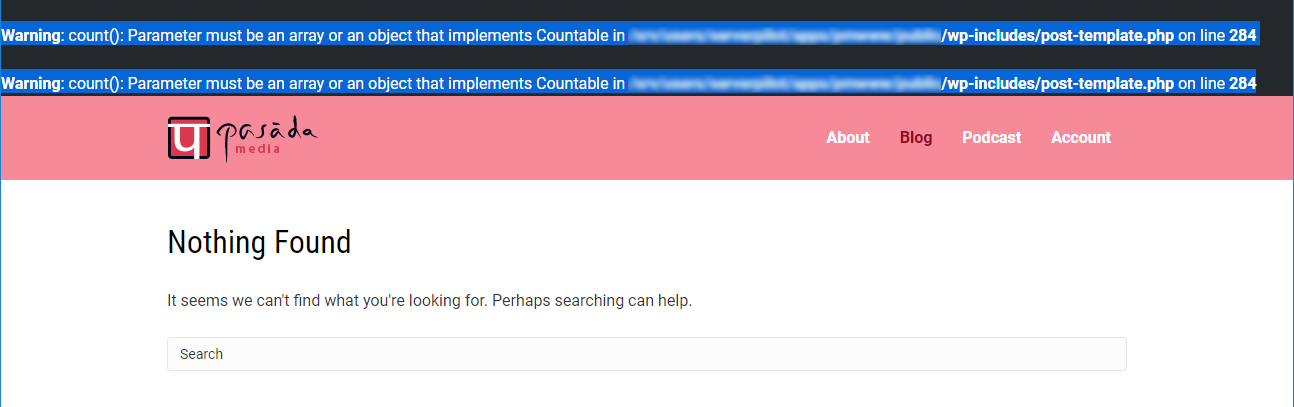
Hope that helps.
gregmount
on 25 Jul 2018
I can reproduce it now, thanks. I'll reopen it.
benvaassen
on 26 Jul 2018
Its been almost 4 months since the issue is opened. Is there any progress?
 punitcodes
on 30 Oct 2018
punitcodes
on 30 Oct 2018
@benvaassen, @gregmount or @punit2502 could any of you test the pull above perhaps? :)
 jdevalk
on 30 Oct 2018
jdevalk
on 30 Oct 2018
This issue is a core WordPress problem and will be fixed by the mentioned PR.
To resolve the problem yourself, please enter an SEO description on your Posts page. This will avoid us having to call get_the_excerpt on which wp_trim_excerpt is hooked. This calls the get_the_content function if the copy provided is empty.
 moorscode
on 31 Oct 2018
moorscode
on 31 Oct 2018
This worked for me (running 4.9.8): in wp-includes/post-template.php make this change...
https://core.trac.wordpress.org/attachment/ticket/42814/42814.patch
 mwatson615
on 26 Nov 2018
mwatson615
on 26 Nov 2018
thanks @mwatson615 that helped me.
 zjh65204
on 13 Dec 2018
zjh65204
on 13 Dec 2018
In my case this was happening when yoast seo was installed but not activated.
ghost
on 26 Dec 2018
@rafalfaro-bvmedia
In my case this was happening when yoast seo was installed but not activated.
Thank you for this discovery 😄 it solved the issue for me as well
 omarnas
on 3 Mar 2019
omarnas
on 3 Mar 2019
WP 5.1.1 , Yoast 10.0.1 - Still have these warnings
 AlexeySvidentsov
on 26 Mar 2019
AlexeySvidentsov
on 26 Mar 2019
WP 5.1.1 , sill have these warnings
 notrealdev
on 1 Apr 2019
notrealdev
on 1 Apr 2019
According to the conversation on the WordPress core Trac ticket, this should be fixed in WordPress 5.2
moorscode
on 1 Apr 2019
Using Wordpress Version 5.3.2
And still have the issue.
But no Yoast installed or active (yet).
 Flaschenzug
on 30 Dec 2019
Flaschenzug
on 30 Dec 2019
2020 Yoast 14.0.1
Still have the issue 😄
 iamroi
on 29 Apr 2020
iamroi
on 29 Apr 2020
Still same issue! WTF?
 djixas
on 20 May 2020
djixas
on 20 May 2020
Still same issue guys.
 melcarthus
on 20 May 2020
melcarthus
on 20 May 2020
I resolved my issue.
I was using ACF PRO (latest) when this error occured. I used a post_object select field to get the selected posts I wanted to show. Thats why you see the_post($post_object) It dit not occur on the_title() etc only on the_content
Works
<?php echo $post_object->post_content; ?>
Does not work
<?php echo the_content($post_object->ID); ?>
My full code (with ACF!) is this.
<?php
$post_objects = $layout_data['select_testimonial'];
if ($post_objects): ?>
<?php foreach ($post_objects as $post_object): ?>
  <?php // vars
    $post_quote_name = get_field('quote_name', $post_object->ID);
  ?>
  <div class="slide">
    <div class="blocks__inner bg--white">
      <div class="blocks__inner--left">
        <?php if ( has_post_thumbnail( $post_object->ID ) ) : ?>
          <?php the_post_thumbnail($post_object->ID ); ?>
          <?php endif; ?>
      </div>
      <div class="blocks__inner--right">
        <div class="testimonial--content text--center">
        <?php echo $post_object->post_content; ?>
          <span><?php echo $post_quote_name; ?></span>
        </div>
      </div>
    </div>
  </div>
<?php endforeach; ?>
<?php endif; ?>
Related issues
 haroldangenent
·
4Comments
haroldangenent
·
4Comments
 theRealRizeo
·
5Comments
theRealRizeo
·
5Comments
 Pcosta88
·
6Comments
Pcosta88
·
6Comments
 szepeviktor
·
6Comments
szepeviktor
·
6Comments
 tholu
·
3Comments
tholu
·
3Comments
Most helpful comment
@benvaassen This error is not caused by core, it appears to be caused by plugins and themes calling
get_the_content()outside of the Loop, where$pages = null. This will cause php 7.2 to throw an error if attempting to count non-countable types.The core issue you cited is still open and no patch has been committed to date. In fact, a recent comment on that thread suggests that the issue should be resolved by plugin/theme authors.
While this may get resolved in core, the plugin appears to be the cause of the error. It would be prudent, therefore, to keep this issue open here so it gets resolved at the source.