Wordpress-seo: "Loading help center." when Classic Editor plugin is active
- [x] I've read and understood the contribution guidelines.
- [x] I've searched for any related issues and avoided creating a duplicate issue.
Please give us a description of what happened.
Noticed "Loading help center." and did a search to see if other also experienced this. Most cases seemed to be related to plugin conflict, so deactivated all and turned them back on one by one. Classic Editor plugin was the one where the issue manifests itself.
Please describe what you expected to happen and why.
see above
How can we reproduce this behavior?
- install and activate Gutenberg
- install and activate Classic Editor
- go to any of the Yoast SEO Settings pages
Technical info
- WordPress version: 4.9.7-alpha-43316
- Yoast SEO version: 7.6.1
- Relevant plugins in case of a bug: Classic Editor
- Tested with theme: Twenty Seventeen
 gran1887
All 21 comments
Thank you for reporting this issue. We've milestoned this issue for WordPress 5.0.
 CarolineGeven
on 12 Jun 2018
CarolineGeven
on 12 Jun 2018
It seems with every new version of Yoast this issue is getting worse, now it is no longer possible to add any SEO metadata when the Classic Editor plugin has been installed and activated. Please see the screenshot here:
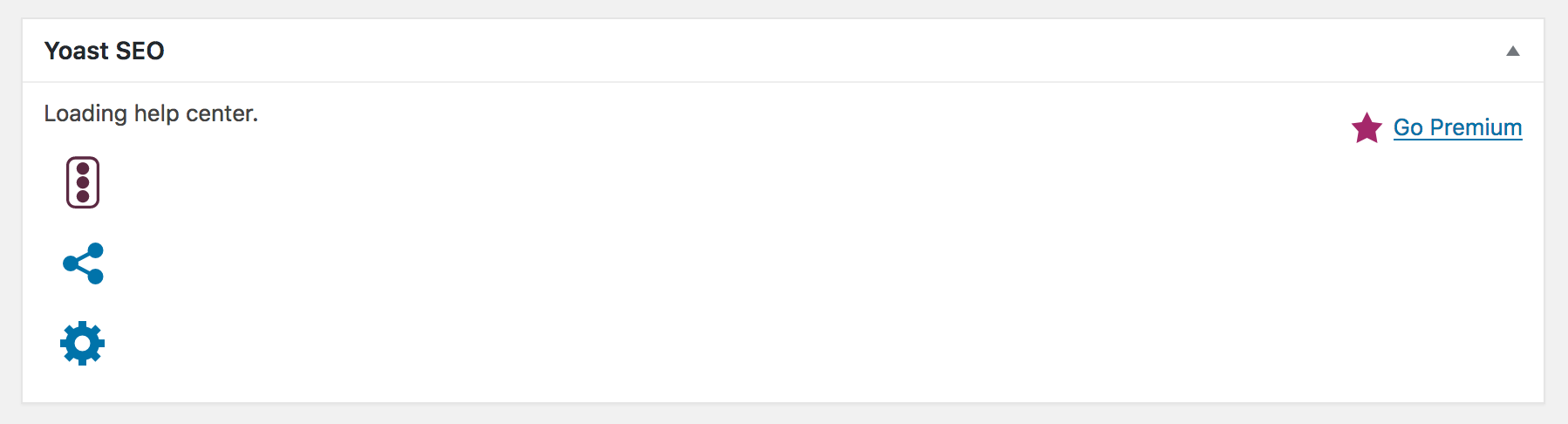
With the Classic Editor plugin becoming more popular, I'm not sure if you want to wait til WP 5.0 lands to tackle this issue?
gran1887
on 15 Jul 2018
We're not waiting until WP 5.0 lands, @gran1887. We're actively developing for Gutenberg and WordPress 5.0. The milestone means that we will pick it up at least before WP 5.0 launches.
CarolineGeven
on 30 Jul 2018
For developer: please investigate what is going on and discuss the suggested solution.
 moorscode
on 7 Aug 2018
moorscode
on 7 Aug 2018
I got ban hammered for leaving this feedback on .org..... so here since We not allowed to LINK to external sites... https://www.jeremiahstillings.net/the-gutenberg-revision-system-whammy/
 jstillings1
on 7 Aug 2018
jstillings1
on 7 Aug 2018
Please inform the customer of conversation # 413630 when this conversation has been closed.
 rmarcano
on 8 Aug 2018
rmarcano
on 8 Aug 2018
For reference, this results in the following error in the console:
Uncaught ReferenceError: yoastWebpackJsonp is not defined

rmarcano
on 8 Aug 2018
Please inform the customer of conversation # 412667 when this conversation has been closed.
 priscillamc
on 8 Aug 2018
priscillamc
on 8 Aug 2018
Please inform the customer of conversation # 413468 when this conversation has been closed.
priscillamc
on 9 Aug 2018
Please inform the customer of conversation # 414132 when this conversation has been closed.
 mayada-ibrahim
on 9 Aug 2018
mayada-ibrahim
on 9 Aug 2018
Have this error too.
 asm0dey
on 9 Aug 2018
rmarcano
on 10 Aug 2018
asm0dey
on 9 Aug 2018
rmarcano
on 10 Aug 2018
Please inform the customer of conversation # 414486 when this conversation has been closed.
 iamazik
on 12 Aug 2018
iamazik
on 12 Aug 2018
I commented in another report (#10616), reposting my comment here instead.
I can confirm this. Tested on two different installations (single and multisite), same appearance/screenshot (as shown in this post: https://github.com/Yoast/wordpress-seo/issues/9991#issuecomment-405079281 )
- Yoast SEO: Version 7.9.1
- Browser: Firefox 62.0b16 (32-bit)
- OS: Windows 7 32-bit
- Wordpress: v4.9.8
- Gutenberg: Version 3.5.0
- Classic Editor: Version 0.4
Console:
[Show/hide message details.] ReferenceError: yoastWebpackJsonp is not defined[Learn More] analysis-791.min.js:1:1
<anonymous>
https://domain.tld/wp-content/plugins/wordpress-seo/js/dist/analysis-791.min.js:1:1
[Show/hide message details.] ReferenceError: yoastWebpackJsonp is not defined[Learn More] wp-seo-replacevar-plugin-791.min.js:1:1
<anonymous>
https://domain.tld/wp-content/plugins/wordpress-seo/js/dist/wp-seo-replacevar-plugin-791.min.js:1:1
Use of Mutation Events is deprecated. Use MutationObserver instead. load-scripts.php:3:9644
[Show/hide message details.] Error: Syntax error, unrecognized expression: {
 "error": {
  "errors": [
   {
    "domain": "usageLimits",
    "reason": "keyInvalid",
    "message": "Bad Request"
   }
  ],
  "code": 400,
  "message": "Bad Request"
 }
} load-scripts.php:2:12733
t</fa.error
https://domain.tld/wp-admin/load-scripts.php:2:12733
t</fa.tokenize
https://domain.tld/wp-admin/load-scripts.php:2:18783
t</fa.select
https://domain.tld/wp-admin/load-scripts.php:2:21594
fa
https://domain.tld/wp-admin/load-scripts.php:2:7320
a.find
https://domain.tld/wp-admin/load-scripts.php:9:3684
find
https://domain.tld/wp-admin/load-scripts.php:2:24107
a.fn.find
https://domain.tld/wp-admin/load-scripts.php:9:8929
n.fn.init
https://domain.tld/wp-admin/load-scripts.php:2:24670
a.fn.init
https://domain.tld/wp-admin/load-scripts.php:9:3135
n
https://domain.tld/wp-admin/load-scripts.php:2:406
init/<
https://domain.tld/wp-content/plugins/wordfence/js/admin.ajaxWatcher.1533058343.js:17:24
dispatch
https://domain.tld/wp-admin/load-scripts.php:3:12392
add/r.handle
https://domain.tld/wp-admin/load-scripts.php:3:9156
trigger
https://domain.tld/wp-admin/load-scripts.php:3:11571
a.event.trigger
https://domain.tld/wp-admin/load-scripts.php:9:8273
y
https://domain.tld/wp-admin/load-scripts.php:4:22796
c
https://domain.tld/wp-admin/load-scripts.php:4:26925
 techmagus
on 12 Aug 2018
techmagus
on 12 Aug 2018
Thanks for the resolution. It worked! I deactivated Gutenberg and now everything is fine!
 sonibhat
on 12 Aug 2018
sonibhat
on 12 Aug 2018
Please inform the customer of conversation # 414872 when this conversation has been closed.
 michaelbriantina
on 13 Aug 2018
michaelbriantina
on 13 Aug 2018
Please inform the customer of conversation # 414884 when this conversation has been closed.
michaelbriantina
on 13 Aug 2018
Also having this issue on WordPress 4.9.5 and 5.0.. running Yoast SEO 9.2.1.
Update: Upgrading to release/9.3 (beta) seems to have resolved the issue.
 Braunson
on 8 Dec 2018
Braunson
on 8 Dec 2018
NO it is not resolved in 9.3
 zeusabn
on 18 Dec 2018
zeusabn
on 18 Dec 2018
@zeusabn 9.3 (beta) fixed the issue for _me_.
Braunson
on 18 Dec 2018
I have this website → [https://proservicesdubai.com] and the theme use "WPBakery Page Builder" Plugin. This plugin is having an issue with YoastSEO Plugin.
When I disable this plugin, I am able to see the snippet.
 crea8iveart
on 2 May 2019
crea8iveart
on 2 May 2019
Related issues
 JoshuaPotter
·
4Comments
JoshuaPotter
·
4Comments
 Pcosta88
·
6Comments
Pcosta88
·
6Comments
 ind88
·
6Comments
ind88
·
6Comments
 szepeviktor
·
6Comments
szepeviktor
·
6Comments
 PENTAGON4
·
6Comments
PENTAGON4
·
6Comments
Most helpful comment
It seems with every new version of Yoast this issue is getting worse, now it is no longer possible to add any SEO metadata when the Classic Editor plugin has been installed and activated. Please see the screenshot here:
With the Classic Editor plugin becoming more popular, I'm not sure if you want to wait til WP 5.0 lands to tackle this issue?