- [√] I've read and understood the contribution guidelines.
- [√] I've searched for any related issues and avoided creating a duplicate issue.
Please give us a description of what happened.
I am using my own function in my theme 404 page which sends mail to me everytime a page not found occurs. I receive this not found error from the admin dashboard when trying to create a new post
wp-content/plugins/wordpress-seo/js/dist/chunks/193.js
Please describe what you expected to happen and why.
Though this is not a serious bug its really annoying to receive mail every time when trying to create a new post.
How can we reproduce this behavior?
1.
2.
3.
Technical info
- WordPress version: 4.9.4
- Yoast SEO version: 6.3
- Relevant plugins in case of a bug: CloudFlare, WP Super Cache
- Tested with the theme: Varsity & Twenty Seventeen
 mrfanatic
All 21 comments
Clean local install of WordPress with Yoast SEO plugin only.
After the opening post “Hello, world”, I get messages in browser console:
GET wp-content/plugins/wordpress-seo/js/dist/chunks/193.js net::ERR_ABORTED
Error loading locale data for locale: en
Error: Loading chunk 193 failed. VM704 wp-seo-help-center-630.min.js:6
Technical info
WordPress 4.9.4
Yoast SEO 6.3
Standard theme 2016
 alexgff
on 14 Feb 2018
alexgff
on 14 Feb 2018
We are aware of this issue. It will be fixed in the next version of Yoast SEO.
Thank you for your understanding.
Leaving this issue open so people will be aware it is fixed in a future release.
 Xyfi
on 14 Feb 2018
Xyfi
on 14 Feb 2018
For me, the JS error is preventing any sort of post submission (hitting "_Are you sure you want to do this?"_ wall on update, draft, etc., of Post, Page, any other form where the error is present in wp-admin)
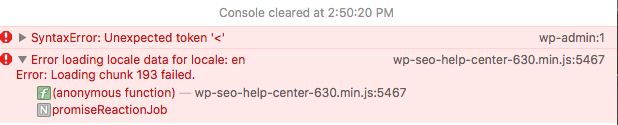
- Disable Yoast SEO fixes all problems. Enable brings back.
- Theme irrelevant.
- Disabled all other plugins, no conflict.
- Disabling Javascript in browser prevents wall.
Please rush the release as its preventing post submissions.
 davidsword
on 15 Feb 2018
davidsword
on 15 Feb 2018
@davidsword I'm sorry to hear that.
Can you please provide some additional information regarding the error:
- Can you provide any errors you receive in the
networktab of your browsers' debugger? - Any other stacktraces/errors you can provide?
Please visit this link, for additional information on how to give us a better understanding of the issue so we can resolve it.
I hope to hear from you soon.
Xyfi
on 15 Feb 2018
/wp-content/plugins/wordpress-seo/js/dist/chunks/193.js
Failed to load resource: the server responded with a status of 404 ()
Loading chunk 193 failed.
Initiated by /wp-content/plugins/wordpress-seo/js/dist/commons-630.min.js
 YoungCP
on 15 Feb 2018
YoungCP
on 15 Feb 2018
Trying to get some relevant symbols for you...
YoungCP
on 15 Feb 2018
The valid chunks that get translated by the chunk loader;
s.src = t.p + "chunks/" + ({
239: "wp-seo-post-scraper",
240: "wp-seo-term-scraper",
241: "configuration-wizard",
242: "wp-seo-help-center",
243: "wp-seo-dashboard-widget",
244: "wp-seo-metabox"
}[e] || e) + ".js";
Somehow 'e' gets here as value 193...
YoungCP
on 15 Feb 2018
Ok, so it's localization of the chunk, walking the stack shows...
Where t -> "./en", o[t] -> : [385, 193]...
This is invoked from a call to yoastWebpackJsonp by wp-seo-help-center-630.min.js
YoungCP
on 15 Feb 2018
Failure occurs when mounting the React component 'yoast-help-center-container'...
https://github.com/Yoast/wordpress-seo/blob/master/admin/class-help-center.php
Nope, minified React component 595 is trying to have wpseoHelpCenterData loaded into it... well maybe it's the container... maybe a metabox?
YoungCP
on 15 Feb 2018
Yeah, 193 is some component specified in the localization that just doesn't exist in the deployed plugin.
YoungCP
on 15 Feb 2018
@YoungCP Are you getting the same error as @davidsword? I'm not sure about the first console error, SyntaxError: Unexpected token: '<', whether that's actually caused by the failure to load the chunks.
Xyfi
on 16 Feb 2018
Yeah, but no syntax error, just chunk 193.
YoungCP
on 16 Feb 2018
Definitely appears to be breaking a large percentage of admin actions. Rolling back to the previous release...
YoungCP
on 16 Feb 2018
Yes it is breaking all of my sites as the page template will switch to "default" because it will not receive the last bit of the HTTP POST. This is causing my client's websites to become defunct. I am rolling everyone back to yoast version 6.1
 fitb-greg
on 16 Feb 2018
fitb-greg
on 16 Feb 2018
Broke here as well.
What's the easiest method to rollback to 6.1?
 nrileykc
on 16 Feb 2018
nrileykc
on 16 Feb 2018
Grab an older version here: https://github.com/Yoast/wordpress-seo/releases
For premium you need to contact them directly at: [email protected]
fitb-greg
on 16 Feb 2018
Got it, thanks!
nrileykc
on 16 Feb 2018
I got the versions from here (just file name difference);
6.1: https://downloads.wordpress.org/plugin/wordpress-seo.6.1.zip
6.2: https://downloads.wordpress.org/plugin/wordpress-seo.6.2.zip
(Optionally deactivate the plugin first, reactivate after, depends on your scenario;)
Rename (or delete) the plugin directory, and extract the preferred version of the plugin in it's place.
I haven't confirmed that the database is the same... probably safe to assume it is.
YoungCP
on 16 Feb 2018
Hi,
I'm posting my trouble also to be be aware of updates here:
There is a problem in wordpress admin panel when opening a post to edit, a 404 error on the file below is causing really slowness problems.
File: /wp-content/plugins/wordpress-seo/js/dist/chunks/158.js
It seems it is called from the file commons-630.min.js?ver=6.3:1
I see that neither the directory /chunks/ exists and neither the file.
 davideliquid
on 17 Feb 2018
davideliquid
on 17 Feb 2018
@alexgff @YoungCP @fitb-greg @davidsword @nrileykc @mrfanatic
Due to the underestimated severity of this issue, a patch release for Yoast SEO and Yoast SEO Premium can be expected in de coming hours.
Xyfi
on 19 Feb 2018
This has been released in 6.3.1, now available.
 moorscode
on 19 Feb 2018
moorscode
on 19 Feb 2018
Related issues
 ind88
·
6Comments
ind88
·
6Comments
 szepeviktor
·
6Comments
szepeviktor
·
6Comments
 shanejones
·
5Comments
shanejones
·
5Comments
 andizer
·
3Comments
andizer
·
3Comments
 cristopherrosenberg
·
3Comments
cristopherrosenberg
·
3Comments