Wordpress-seo: Noindex all posts in category
Currently there is an option to set noindex for the category-page itself, but it isn't possible to set noindex for all posts in that category.
Adding this to the category-settings seems like a useful option.
 tacoverdo
All 37 comments
Hey @tacoverdo. Has there been any updates to this? Would be a fantastic option.
 michaeltieso
on 14 Mar 2014
michaeltieso
on 14 Mar 2014
Just marked it as a requirement for 1.6 :)
 jdevalk
on 19 Mar 2014
jdevalk
on 19 Mar 2014
@jdevalk Awesome! Thanks!
michaeltieso
on 19 Mar 2014
@jdevalk
I badly need this option as well! There is nowhere a plugin or easy method to do this as i have about 4000 syndicated posts in the category.
Could you please show me the mysql query to noindex all posts in a certain category?
And please when you implement this option make it so that any new posts added to the category get the noindex tag as well. And if there is a development version where this is already added please let me know. Thanks!
 stereohype
on 8 Jul 2014
stereohype
on 8 Jul 2014
@tacoverdo @michaeltieso @stereohype @jdevalk
Just had a quick look at this. Adding the option as a taxonomy meta setting is not much of a problem. It would have the choice between auto-detect, always index and never index.
It gets more complicated when you look at how the behaviour should be for individual posts - both in the admin as well as on the front-end.
Consider an admin page for a new post:
You can set index/no-index for the post in the metabox advanced setting and the default will be the setting as it is for the post type and will be marked as such.
Now you add your title, content, add a couple of categories and tags and manually set a post to index.
What should happen if you select two categories/tags with conflicting index-settings ? Which one should lead ? The auto-detect being overruled is one thing, but what about one category being set to always index and the second one to never index ?
And what about child-categories ? Should they defer to the setting of the parent category ? What to do when the parent-category is set to never-index and the child to always-index ?
And to stick to the original admin page example: you just manually selected index for the post and a per-post setting always overrules a post-type or taxonomy setting. And as the category wasn't selected before, you had no way of knowing that the default for that category would be no-index. So now you unknowingly created an inconsistency and the page will be set to index even though the category is no-index.
All in all, great idea, but not so easy to implement.
And @stereohype AFAIK there is no current development on-going for this option.
 jrfnl
on 8 Jul 2014
jrfnl
on 8 Jul 2014
Yeah it's hell. I was thinking about it too.
jdevalk
on 8 Jul 2014
I'm glad you are looking into this. Anyway, I found a simple solution for my problem.
Just add this to your header:
<?php if (is_single() && in_category(array(457))) {
echo '<meta name="robots" content="noindex, follow">';
} ?>
Replace nr 457 with your category id.
stereohype
on 10 Jul 2014
Please inform the customer of conversation # 146991 when this conversation has been closed.
 iamazik
on 11 Sep 2016
iamazik
on 11 Sep 2016
This is something you want in very specific situations, so the above code snippet should be used if you want to have this.
 atimmer
on 16 Dec 2016
atimmer
on 16 Dec 2016
@atimmer I'm fine with it not being added (issue is several years old) but let's not call this "very specific". It's not that specific or unique of a situation. Just an enhancement that's not currently planned.
michaeltieso
on 16 Dec 2016
 Pcosta88
on 23 Aug 2017
Pcosta88
on 23 Aug 2017
I know this is old, but recently had to come up with a similar solution for this, but opted to use the following function under the theme's functions.php page:
function add_noindex( $content ) {
if( is_single() && in_category(array(value))) {
return '<meta name="robots" content="noindex, nofollow">'.$content;
} else return $content;
}
add_filter("the_content","add_noindex");
And just replace value with either the category ID or the name of the category (in quotes).
Separate multiple categories with a comma
 ouija
on 7 Mar 2018
ouija
on 7 Mar 2018
I know this is old, but recently had to come up with a similar solution for this, but opted to use the following function under the theme's functions.php page:
function add_noindex( $content ) { if( is_single() && in_category(array(value))) { return '<meta name="robots" content="noindex, nofollow">'.$content; } else return $content; } add_filter("the_content","add_noindex");And just replace value with either the category ID or the name of the category (in quotes).
Separate multiple categories with a comma
Hi Ouija,
thanks for this tip
would it look like { if( is_single() && in_category(array("1,2,3,4,5")))
or
would it look like { if( is_single() && in_category(array("1","2","3","4","5")))
I presume this can be done in reverse and use "index, follow" if needed or does a better method using functions.php exist ?
 SarahHaruel
on 25 Jan 2019
SarahHaruel
on 25 Jan 2019
No need for quotes if passing interger IDs, so this would suffice: in_category(array(1,2,3,4,5)
Use quotes if passing category names (strings), around each name.
And yes, the index, follow method should work to do the opposite. 👍
ouija
on 25 Jan 2019
Hi Ouija,
thanks so much for hitting this post back.
I have got the category ids now an if i put
- Custom code index all categories
function add_index( $content ) { if( is_single() && in_category(array(1,2,3,4,5))) { return ''.$content; } else return $content; } add_filter("the_content","add_index");
into my functions.php I should be good to ( will be replacing the category ids with my ones )
SarahHaruel
on 25 Jan 2019
Yup. (but ensure you use the entire function from my earlier post - - your reply is missing the insertion of the meta tag) 😉
ouija
on 25 Jan 2019
Oh crikey - blonde moment !! - is it possible you can post the entire code with an example category ids of 1,2,3,4,5.
I am probably going to mess up my site otherwise ;(
Sorry for the blonde moment
SarahHaruel
on 25 Jan 2019
Also can something similar be done to make all category be index all via functions.php ?
SarahHaruel
on 25 Jan 2019
can anyone advise how to apply "index, follow" to all my active categories via functions.php as yoast is applying 'noindex" to them ?!?
SarahHaruel
on 25 Jan 2019
Here's how the function should look with an array of category IDs being passed:
function add_noindex( $content ) {
if( is_single() && in_category(array(1,2,3,4,5))) {
return '<meta name="robots" content="noindex, nofollow">'.$content;
} else return $content;
}
add_filter("the_content","add_noindex");
Also ensure that you have the Search Engine Visibility option for Wordpress unchecked (found under _Settings -> Reading_):
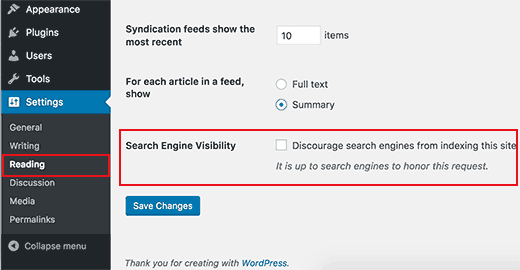
And that YoastSEO is also allowing categories to be shown in search results (found under _SEO -> Search Appearance -> Taxonomies -> Categories -> Show Categories in search results? -> Yes)_

Similarly, ensure YoastSEO is configured to show the post types that you'd prefer. YoastSEO shouldn't be adding a noindex unless you've configured it to do so.
ouija
on 25 Jan 2019
The way I went around solving it is
add_filter( 'wpseo_robots', 'wpseo_robots' );
/**
* Filter: 'wpseo_robots' - Allows filtering of the meta robots output of Yoast SEO.
*
* @param string $robotsstr The meta robots directives to be echoed.
* @return string
*/
function wpseo_robots( $robotsstr ) {
if ( is_single() && in_category( 23 ) ) {
return 'noindex,follow';
}
return $robotsstr;
}
 grappler
on 27 Mar 2019
grappler
on 27 Mar 2019
The way I went around solving it is
add_filter( 'wpseo_robots', 'wpseo_robots' ); /** * Filter: 'wpseo_robots' - Allows filtering of the meta robots output of Yoast SEO. * * @param string $robotsstr The meta robots directives to be echoed. * @return string */ function wpseo_robots( $robotsstr ) { if ( is_single() && in_category( 23 ) ) { return 'noindex,follow'; } return $robotsstr; }
How to do this for many categories?
 Musin88
on 27 Mar 2019
Musin88
on 27 Mar 2019
How to do this for many categories?
@Musin88 You need to pass an array of category ids to in_category() to exclude multiple categories.
add_filter( 'wpseo_robots', 'wpseo_robots' );
/**
 * Filter: 'wpseo_robots' - Allows filtering of the meta robots output of Yoast SEO.
 *
 * @param string $robotsstr The meta robots directives to be echoed.
 * @return string
 */
function wpseo_robots( $robotsstr ) {
    if ( is_single() && in_category( array( 23, 25 ) ) ) {
        return 'noindex,follow';
    }
    return $robotsstr;
}
@grappler is it possible to give noindex, follow to all posts from a category minus posts published recently (2 weeks)?
To be more exactly:
- last 2 weeks posts to have index and follow
- after 2 weeks to have noindex and follow
If is possible will the posts change automaticaly in noindex follow?
Thanks for the code!
 imatei1985
on 5 Dec 2019
imatei1985
on 5 Dec 2019
@imatei1985 It should be possible.
In the if conditional you would get the post published date [get_the_date()] add two weeks to the value and then compare the post with the current time[time()]. If the current time is greater then the published date plus two weeks then the post can be no-indexed.
You need to convert the date from get_the_date() to time in seconds by using strtotime(). The weeks in seconds can be added with 2 * WEEK_IN_SECONDS.
https://developer.wordpress.org/reference/functions/get_the_date/
https://www.php.net/manual/en/function.time.php
https://www.php.net/manual/en/function.strtotime.php
This should get you on the right path.
grappler
on 6 Dec 2019
@grappler I'm using your code (from April 19th), thanks for that! However, even though the posts in the respective categories are now noindexed, they still appear in the sitemap. Is there any way to also remove them from the sitemap?
 debjaygc
on 12 Dec 2019
debjaygc
on 12 Dec 2019
It's big issue because it isn't synchronized with sitemaps. I has already commented in other topics.
You should use the filter _wpseo_exclude_from_sitemap_by_post_ids_. To obtain IDs of posts in an category, you could use WP_Query or get_posts. If I find spare time then I'll try to write PHP snippets.
 stodorovic
on 12 Dec 2019
stodorovic
on 12 Dec 2019
That's a possible workaround but wouldn't it be easier to exclude the posts from the sitemap by category?
debjaygc
on 12 Dec 2019
I mean each action should be synchronized between meta robots tag and sitemaps. Even it's synchronized, google could have cached version of sitemaps. So, it's more complex then just put previous filters in _functions.php_.
You could use something like this as argument for WP_Query:
        'post_status' => 'publish',
        'post_type' => 'post',
        'no_found_rows' => true,
        'category__in' => array( 20 ),
        'posts_per_page' => -1,
        'fields' => 'ids',
@debjaygc I didn't test everything, but please be patient and I'll try to create exact PHP code which retrieves list of post IDs which could be passed to the filter.
stodorovic
on 12 Dec 2019
@stodorovic I appreciate the effort :) Just let me know via this thread whenever you have time.
debjaygc
on 13 Dec 2019
I've created simple/efficient PHP snippet which uses the filter _wpseo_exclude_from_sitemap_by_post_ids_:
add_filter( 'wpseo_exclude_from_sitemap_by_post_ids', function( $excluded_posts_ids ) {
    $args = array(
        'fields'         => 'ids',
        'post_type'      => 'post',
        'category__in'   => array( 11, 12 ),
        'posts_per_page' => -1,
    );

    return array_merge( $excluded_posts_ids, get_posts( $args ) );
} );
@debjaygc I didn't test it on real website, but I think that you will test it in real conditions.😄 I've used PHP Unit test to verify code. It should work.
If I find spare time soon then I'll try to integrate everything in small PHP class (noindex, sitemap, removal canonical,...).
stodorovic
on 14 Dec 2019
@stodorovic
Thanks for this :) I've combined your code with the existing snippet and it seems to work just fine.
Would it be possible to do the same using tags?
debjaygc
on 20 Dec 2019
I think that's possible to replace _category__in_ with _tag__in_ (I didn't test). Anyway, I'll try to integrate everything (robots tag, ...) into small PHP class which will use tax_query. On this way, it'll possible to use any taxonomy (product category, product attributes, ... ). I hope that I'll have spare time in January for something like this.
stodorovic
on 20 Dec 2019
In case it's helpful to anyone, below is @stodorovic example modified to exclude restricted category entries from Events Calendar Pro content type
add_filter( 'wpseo_exclude_from_sitemap_by_post_ids', function( $excluded_posts_ids ) {
    $exclude_cats = array('my-category-1', 'my-category-2','my-category-3');
      $args = array(
          'fields'         => 'ids',
          'post_type'      => 'tribe_events',
          'tax_query' => array(
                  array(
                      'taxonomy' => 'tribe_events_cat',
                      'field'    => 'slug',
                      'terms'     => $exclude_cats,
                      'operator'  => 'IN'
                  ),
              ),
          'posts_per_page' => -1,
      );
      return array_merge( $excluded_posts_ids, get_posts( $args ) );
  } );
Tested and it worked great for me.
 JulesWebb
on 29 Feb 2020
JulesWebb
on 29 Feb 2020
I've created simple/efficient PHP snippet which uses the filter _wpseo_exclude_from_sitemap_by_post_ids_:
add_filter( 'wpseo_exclude_from_sitemap_by_post_ids', function( $excluded_posts_ids ) {
  $args = array(
      'fields'         => 'ids',
      'post_type'      => 'post',
      'category__in'   => array( 11, 12 ),
      'posts_per_page' => -1,
  );

  return array_merge( $excluded_posts_ids, get_posts( $args ) );
} );
@debjaygc I didn't test it on real website, but I think that you will test it in real conditions.😄 I've used PHP Unit test to verify code. It should work.
If I find spare time soon then I'll try to integrate everything in small PHP class (noindex, sitemap, removal canonical,...).
Hello, thank you for the solution. Will this work for TAGs so excluding posts based on having a specific tag so if it is tagged it wont index and wont show up in sitemap.
 tripledm
on 7 Jul 2020
tripledm
on 7 Jul 2020
I've merged couple snippets into single PHP class:
<?php

namespace MY_SEO;

class No_Index_All_Posts_In_Tax {

        private $exclude_term_slugs = [ 'slug1', 'slug2' ];

        private $taxonomy = 'category';

        private $post_type = 'post';

        public function __construct() {

                \add_filter( 'wpseo_posts_where', [ $this, 'filter_sql_where_clause' ], 9, 2 );
                \add_filter( 'wpseo_typecount_where', [ $this, 'filter_sql_where_clause' ], 9, 2 );

                \add_filter( 'wpseo_robots', [ $this, 'filter_robots' ] );
        }

        public function filter_sql_where_clause( $where, $post_type ) {
                global $wpdb;

                if ( $post_type !== $this->post_type ) {
                        return $where;
                }

                $term_taxonomy_ids = [];

                foreach ( $this->exclude_term_slugs as $slug ) {
                        $term = \get_term_by( 'slug', $slug, $this->taxonomy );

                        if ( $term && ! \is_wp_error( $term ) ) {
                                $term_taxonomy_ids[] = $term->term_taxonomy_id;
                        }
                }

                if ( empty( $term_taxonomy_ids ) ) {
                        return $where;
                }

                // Sub query which retrieves all post IDs in specified taxonomies.
                $tax_sql = $wpdb->prepare(
                        "SELECT object_id FROM $wpdb->term_relationships
                                WHERE term_taxonomy_id IN( " .
                                        \implode( ', ', \array_fill( 0, \count( $term_taxonomy_ids ), '%d' ) ) .
                                " )",
                        $term_taxonomy_ids
                );

                return $where . " AND {$wpdb->posts}.ID NOT IN ( {$tax_sql} ) ";
        }

        public function filter_robots( $robots ) {
                if ( ! \is_singular( $this->post_type ) ) {
                        return $robots;
                }

                foreach ( $this->exclude_term_slugs as $slug ) {
                        if ( \has_term( $slug, $this->taxonomy ) ) {
                                return 'noindex, follow';
                        }
                }

                return $robots;
        }
}

new No_Index_All_Posts_In_Tax();
This code should be saved as PHP file and included from functions.php (or somewhere else): require_once __DIR__ . '/my-seo.php';
I use the filters _wpseo_posts_where_ and _wpseo_typecount_where_ to exclude posts before "pagination". It prevents empty sub-sitemaps if there are massive exclusions from the file.
stodorovic
on 4 Nov 2020
How to make noindex for a category in the Rank Math plugin?
/**
 * Allows filtering of the robots meta data.
 *
 * @param array $robots The meta robots directives.
 */
add_filter( 'rank_math/frontend/robots', function( $robots ) {
    return $robots;
});
https://support.rankmath.com/ticket/set-noindex-for-posts-with-a-specific-tag-or-category/
 inudder
on 9 Nov 2020
inudder
on 9 Nov 2020
Related issues
 moorscode
·
6Comments
moorscode
·
6Comments
 schurig
·
5Comments
Pcosta88
·
6Comments
schurig
·
5Comments
Pcosta88
·
6Comments
 tholu
·
3Comments
tholu
·
3Comments
 cristopherrosenberg
·
3Comments
cristopherrosenberg
·
3Comments
Most helpful comment
@Musin88 You need to pass an array of category ids to
in_category()to exclude multiple categories.