Wordpress-seo: Shop Base Appears In Product Sitemap When Page ID is Excluded
What did you expect to happen?
Excluded post/page ID to not show up under any sitemap
What happened instead?
Shop base appears in product sitemap when the page ID is excluded
How can we reproduce this behavior?
- Activate Yoast SEO and WooCommerce.
- Set shop base under WooCommerce > Settings > Products (tab) > Display (link) > Shop page
- Exclude shop base page under SEO > XML Sitemaps > Exclude Posts (tab)
- View page sitemap - shop base is excluded. :+1:
- View product sitemap - shop base appears :-1:
Technical info
- WordPress version: 4.7.3
- Yoast SEO version: 4.6
- WooCommerce version: 3.0.3
 amboutwe
All 20 comments
Please inform the customer of conversation # 191015 when this conversation has been closed.
amboutwe
on 17 Apr 2017
Hi there,
Some additional details. This problem also occurs on WooCommerce 2.6.X. I've researched this a lot on the internet and basically in a nutshell Woo always generates the /shop page, even when you clearly specify in Woo that you do NOT want one, or you have one and then delete / clear it. Woo doesn't need the /shop page to operate, but it always seems to make it. Woo refuses to address this issue as they claim it's part of how their plugin works. However, there are thousands of Woo and Yoast users on the internet that want the /shop page GONE from their Yoast product sitemap as it can trigger Duplicate Content penalties from Google SEO, especially if you use other categories or catalogs to display the same products. So, the best fix for this would be if Yoast can do a quick check to see is the WP user has specified a shop page in Woo. If they have not and it's clear or unassigned, then Yoast should auto hide or remove the /shop link from the products sitemap. That way, the issue is solved and everyone is happy and for users that want it, they can have it. Or, there could be a simple option in Yoast or in the Yoast Woo Commerce SEO plugin to choose if you want to hide / remove the /shop link. I have the Yoast Woo SEO plugin as well. Just some thoughts. Please address this when you can.
 strayangelfilms
on 17 Apr 2017
strayangelfilms
on 17 Apr 2017
I just saw this. I was trying to fix similar issues and I can explain some details.
Page is listed in page-sitemap because it's page. Any rule which excludes this page will remove it from page-sitemap.
From other side, shop page is archive page for CPT product. Eg. get_post_type_archive_link( 'product' ) will return shop page URL and product-sitemap will show this URL on the begin. (It's archive page and usual rules don't work).
Simple solution is filter:
add_filter( 'wpseo_sitemap_post_type_archive_link', 'my_wpseo_cpt_archive_link', 10, 2);

function my_wpseo_cpt_archive_link( $link, $post_type ) {

        // Disable product/post archives in the sitemaps
        if ( $post_type === 'product' )
                return false;

        return $link;
}
This filter removes archive page from the begin of particular sitemap (post, product,...). It's connected on some way with #5450 and #5428. Also, there are many issues related to shop page. (description, title, settings don't work correctly)
 stodorovic
on 8 May 2017
stodorovic
on 8 May 2017
PRAISE CODE JESUS THIS WORKS! Thank you good sir!!!!!!!!!
For anyone that thinks it doesn't, log in to your WP site, change any page or product, save it, then go to Yoast and hit "update" for any setting to refresh it, and then check your Yoast product sitemap again and the dreaded /shop link will be gone!
So happy this is resolved!
strayangelfilms
on 9 May 2017
Help me understand: what's "wrong" with that page showing up in the sitemap?
 jdevalk
on 10 Jul 2017
jdevalk
on 10 Jul 2017
Shop page is regular page in Wordpress. So, you can open All Pages and edit it as page. You can also set _noindex_ or title or ... into SEO dashboard bellow WP editor. It removes it from page-sitemap.xml
From other side, woocommerce use this URL (example.com/shop) as product archive page (WP Dashboard -> SEO -> Titles & metas -> Custom Post Type Archives, so it's different location for SEO settings). So, sitemap product-sitemap.xml shows example.com/shop on the top even if page is set to _noindex_ (or excluded from page sitemap).
Examples:
get_post_type_archive_link( 'product' ) returns example.com/shop
get_permalink( wc_get_page_id( 'shop' ) ) returns example.com/shop
Basically, they are different kind of pages (and they use different settings), but it's same URL. There are also some confusion between titles/descriptions/... It's related to #5450 and few similar issues.
@jdevalk I hope that helps for now. I had an idea how it's possible to fix it (I'll try to make PR in next weeks), but for now, I'm using couple filters (see my previous comment) as temporary workaround, I could write more details if you need it.
stodorovic
on 10 Jul 2017
There are many instances where you don't want to use a shop page. Not everyone uses WooCommerce in a standard layout. We use it as a product catalog but we don't do any check out or sales through it. We use different ways that you can browse all our products, so having a forced "/shop" page created redundancies for SEO and potential penalties from Google. We only needed and wanted one way to display all of our products. stodorovic's code correctly removes it from Yoast as there is no other working way to accomplish this for people who do not want or need the /shop page on their sites.
strayangelfilms
on 10 Jul 2017
Please inform the customer of conversation # 211580 when this conversation has been closed.
 Pcosta88
on 1 Aug 2017
Pcosta88
on 1 Aug 2017
Note that this behavior results in the shop page...when it is deleted still appearing on the sitemap
1.Delete shop page
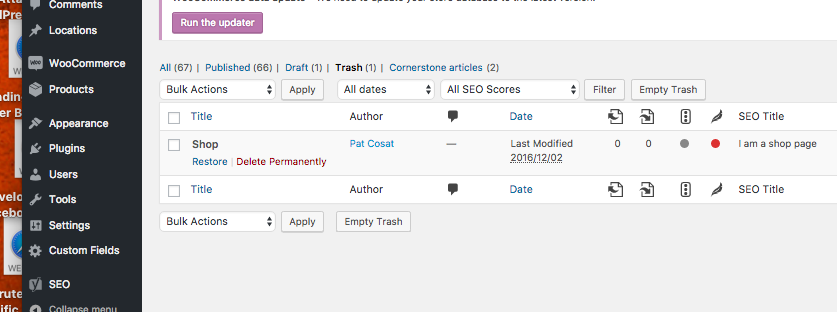
2.See that it still appears

Pcosta88
on 7 Aug 2017
USE CASE
From a user:
I do not use the shop feature. I have created pages which link to products and do not see why I should be forced to have this in my sitemap.
Pcosta88
on 7 Aug 2017
There is an issue related to post_type archives:
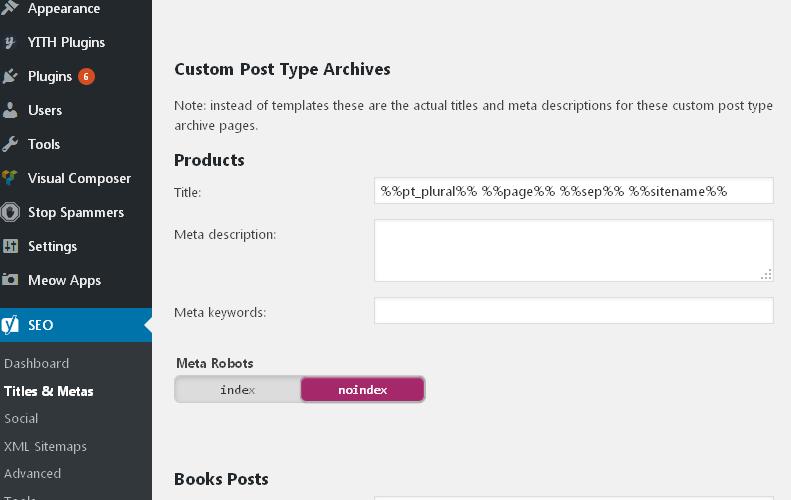
Archive page is still included inside sitemaps even meta robots tag is _noindex_. I'm working on #7668 which will fix it and it's possible workaround for shop page.
stodorovic
on 11 Aug 2017
I solved the issue this way:
Set the "Maximum number of entries per site map" value from 1000 to 1.
Save the changes.
Restore the "Maximum number of entries per site map" to 1000.
Save the changes.
This should delete the shop URL from sitemap.
 anthiago
on 19 Dec 2017
anthiago
on 19 Dec 2017
@PatrickYoast can you reproduce this?
jdevalk
on 20 Jan 2018
@jdevalk
I was able to reproduce the original behavior @amboutwe described by following the steps she provided. The shop base URL remained in the product-sitemap.xml
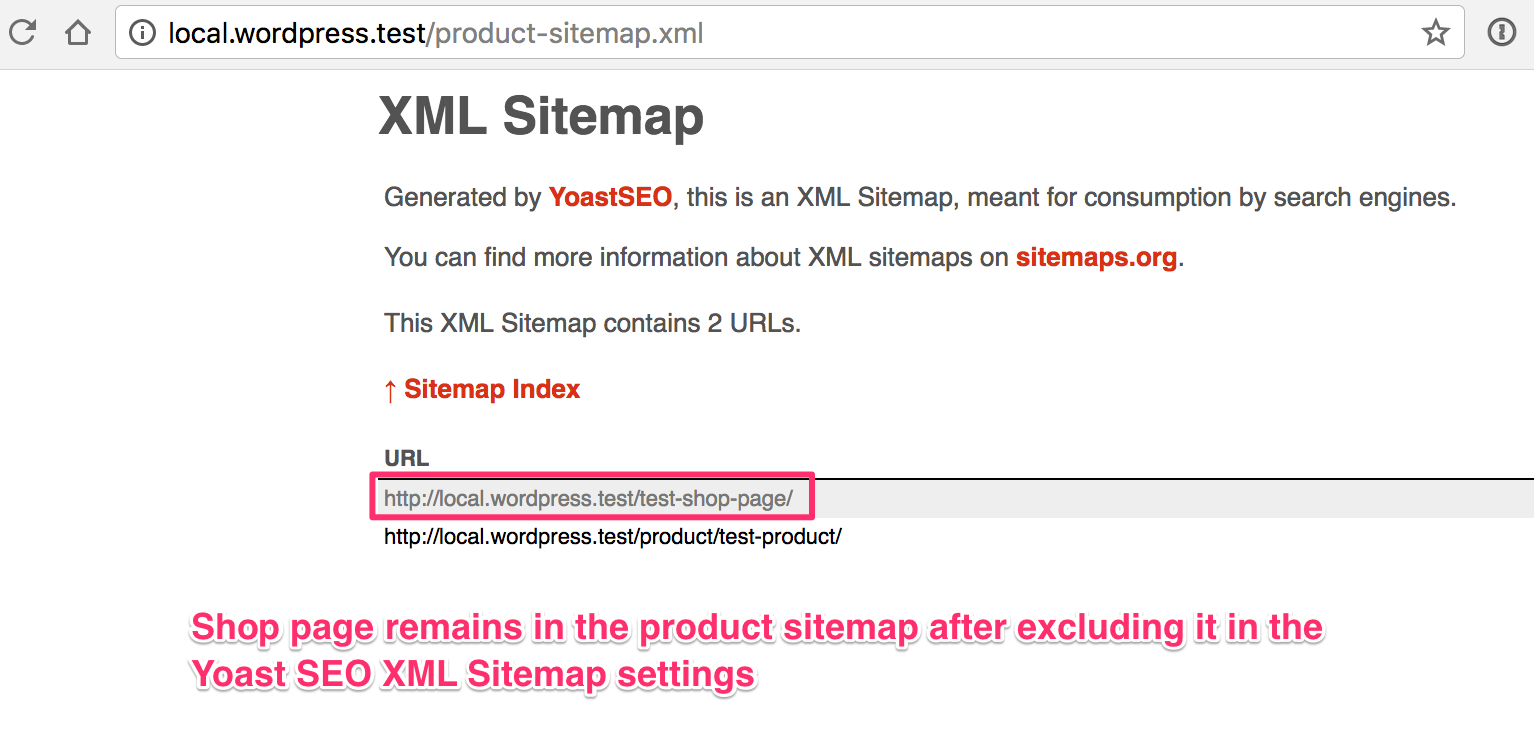
I was also able to reproduce @Pcosta88 ’s addition where deleting the shop page keeps it in the product-sitemap.xml. Only after refreshing the sitemap (setting the "Maximum number of entries per sitemap" value from 1000 to 1) the sitemap showed as test-shop-page__trashed.

 PatrickYoast
on 26 Jan 2018
PatrickYoast
on 26 Jan 2018
I can see archive pages for other custom post types (WooThemes testimonials, in one case) being shown at the top of the post type sitemap. Could this be related to how the type or taxonomy are registered?
There's been no update since this issue was marked as a bug on 27 January. Is a fix coming?
 galbaras
on 5 Mar 2018
galbaras
on 5 Mar 2018
 strarsis
on 7 Sep 2018
strarsis
on 7 Sep 2018
Please inform the customer of conversation # 431001 when this conversation has been closed.
Pcosta88
on 3 Oct 2018
@strarsis The issue which you've been meaning isn't similar as this issue. Possible fixes for woocommerce/woocommerce#21297 are:
- Install Yoast WooCommerce SEO plugin
- Set _Allow search engines to show this Page in search results?_ to "No" for these pages (Yoast SEO metabox).
- Use the filter
wpseo_exclude_from_sitemap_by_post_ids.
stodorovic
on 28 Oct 2018
I've created #11443 which fixes this issue. Regarding that 'SEO > XML Sitemaps > Exclude Posts' doesn't exist as option (WP Dashboard) in the latest version, this PR checks only "noindex" field for shop page if product sitemap is requested.
@strayangelfilms @Pcosta88 It would be great if you could test #11443 as it needs to solve this issue.
@Pcosta88 I don't think that's useful to check status of shop page, but I could add additional code into method _get_post_type_archive_link_. It's a very rare case (deleted shop page or posts page into settings). What you think?
stodorovic
on 29 Oct 2018
@Pcosta88 any news on this?
 karimaziz
on 6 Nov 2018
karimaziz
on 6 Nov 2018
Related issues
 garretthyder
·
5Comments
Pcosta88
·
6Comments
garretthyder
·
5Comments
Pcosta88
·
6Comments
 szepeviktor
·
6Comments
szepeviktor
·
6Comments
 Chouby
·
4Comments
Chouby
·
4Comments
 PENTAGON4
·
6Comments
PENTAGON4
·
6Comments
Most helpful comment
I just saw this. I was trying to fix similar issues and I can explain some details.
Page is listed in page-sitemap because it's page. Any rule which excludes this page will remove it from page-sitemap.
From other side, shop page is archive page for CPT product. Eg.
get_post_type_archive_link( 'product' )will return shop page URL and product-sitemap will show this URL on the begin. (It's archive page and usual rules don't work).Simple solution is filter:
This filter removes archive page from the begin of particular sitemap (post, product,...). It's connected on some way with #5450 and #5428. Also, there are many issues related to shop page. (description, title, settings don't work correctly)