Wordpress-seo: [Wizard] Content changes
Following our user test, here are some improvements to the content of the configuration wizard. These are mostly copy-related changes. Mockups can be found here, copy here.
~#### Welcome page~
- ~Remove the newsletter signup from the first page. It distracts from the focus of the user, and seems deceptively non-optional.~ - Solved via #6080
Environment page:
- Add an explanation about what _Environment_ means and what this setting affects.
Site Type page
- Add
Portfolio. - Add
Non-profit? - Change
Other personal siteinto justPersonal site. - Some phrasing for the business options should be changed. What's the difference between
webshopand smallbusiness?When does a business go fromsmalltoother? Can some of these be merged?
Company Or Person page
- Can this page be merged with the preceding one? It makes sense to present people with this choice at the same time they're picking their site type. As in: when you choose _small business_, the choice should default to _company_ etc.
- This setting needs more explanation. What if you're a non-profit? What if you blog with several people but are not a business? What is Google's Knowledge Graph and why should I want to appear in it?
Social Profiles page
- Needs a short explanation: where will these connections be used? Are they shown on my site?
- Change Twitter username to URL. All the other fields ask for a URL.
- Can this layout be improved by using flexbox? Seems unnecessary to make the page this long when the input fields are so short.
- Perhaps adding social icons will help make scanning these fields easier.
Post Type Visibility page
- Add more explanation about how these settings affect your search results, and that the default is probably the best. For instance, many people don't understand that exposing
Mediameans that search results could go straight to an image, skipping the article or page it appears on. - Perhaps a division between standard Wordpress post types and third-party post types could be useful.
Multiple Authors page
- Again, explain what this setting does, why is it relevant to know this?
Google Search Console page
- Explain what GSC even is and why you'd need it.
- Add a button for when you don't have a GSC account yet (
Create an accountor whatever). - Rename
AuthenticatetoConnect. - Add a line explaining the privacy implications of connecting (aka that we don't store data and don't have access to the whole account etc).
- Is this step absolutely necessary? Maybe this falls under advanced settings and should be removed from the wizard?
Title Settings page
- Add a quick note about how the length of the title selector can affect search results.
- If possible, add the snippet preview to show what your chosen settings would look like.
Final page will be a separate issue.
 hedgefield
All 13 comments
@hedgefield I've assigned the content team to this issue
 Annelieke
on 5 Apr 2017
Annelieke
on 5 Apr 2017
Here is the requested new copy:
Environment page:
- Please specify if your site is under construction or already active. Choose Under construction if you want to keep the site out of the index of search engines. Don’t forget to activate it once you’re ready to publish your site.
- Option A: My site is live and ready to be indexed
- Option B: My site is under construction and should not be indexed
Site Type page
- What type of site is
URL?
- Blog
- Webshop
- News site
- Business site
- Portfolio
- Other
Company Or Person page
- Does your site represent a person or a company? This information will be used in Google’s Knowledge Graph, the big block of information you see on the right side of the search results. (screenshot)
Social Profiles page
- Yoast SEO can tell search engines about your social media profiles. These will be used in Google’s Knowledge Graph. There are additional sharing options in the advanced settings. More info.
Post Type Visibility page
- Please specify which post types you want to search engines to index. If you do not know the differences between these, it’s best to choose the default settings. For instance, setting ‘Media’ to visible would index your images which could lead to visitors finding your images without ever coming to your site. If you have custom post types on your site, you need to activate these by hand.
Multiple Authors page
- Does, or will, your site have multiple authors? If you choose no, your author archives will be deactivated to prevent duplicate content issues.
Google Search Console page
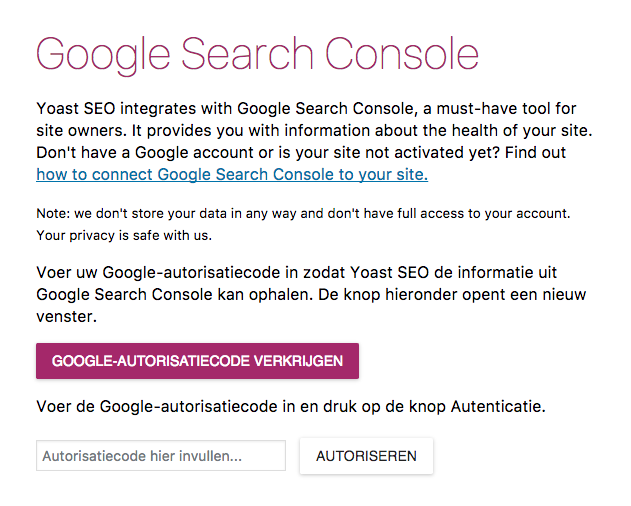
- Yoast SEO integrates with Google Search Console. Search Console is a must-have tool for site owners. You can use it to get a lot of data about the health of your site. This data can be accessed from within Yoast SEO if you grant it access. Don’t have an Search Console account or is your site not activated yet? Find out how to connect Search Console to your site.
Ps: we don’t store your data in any way and don’t have full access to your account. Your privacy is safe with us.
To allow Yoast SEO to fetch your Google Search Console information, please enter your Google Authorization Code. Clicking the button below will open a new window.
GET GOOGLE AUTHORIZATION CODE
Enter your Google Authorization Code and press the Authenticate button.
Title Settings page
- On this page, you can change the name of your site and choose which separator to use. The separator will display, for instance, between your post title and site name. Symbols are shown in the size they'll appear in the search results. Choose the one that fits your brand best or takes up the least space in the snippets.
 edwintoo
on 7 Apr 2017
edwintoo
on 7 Apr 2017
@edwintoo
Site Type page » Webshop
Shall I change this into 'Online shop' ?
As far as I understood, while working on our Shop SEO eBook, 'webshop' is only used in the Netherlands.
 Mijke
on 8 May 2017
Mijke
on 8 May 2017
@Mijke You're right. If possible, please change it.
edwintoo
on 8 May 2017
@Annelieke can you provide for the 'company or person page'?
_"Does your site represent a person or a company? This information will be used in Google’s Knowledge Graph, the big block of information you see on the right side of the search results. (screenshot)"_
Mijke
on 9 May 2017
@Mijke suggested edit: Google's Knowledge Graph should be Google's Knowledge Graph Card
edwintoo
on 9 May 2017
Just a thought: Would site type be more user friendly if we ask simple yes/no questions and then behind the scene determine the type. We can show/hide question to narrow down the site type. This could help users that aren't sure what to select or if they fall into more than one category (what if I blog and sell products?).
Example:
- Does this site publish content articles?
Does this site have more than one author? (hide unless yes to main question)
Does this site publish news content? (hide unless yes to main question) - Is this site an business or organization?
Does this site sell products or services? (hide unless yes to main question)
Does this site have one ore more physical locations? (hide unless yes to main question)
Is this site not for profit? (hide unless yes to main question)
Is this site non-profit? (hide unless yes to main question) - Does this site have a portfolio?
- Other toggle questions
We've determine your site type is XYZ. These are the settings that we'll modify or change.
 amboutwe
on 19 May 2017
amboutwe
on 19 May 2017
That's a darn good idea actually, let me put that on my todo list.
hedgefield
on 19 May 2017
Here are mockups for the copy changes above. With this we can move to implementation.
hedgefield
on 7 Jul 2017
Putting this issue back in the queue until Yoast/yoast-components#240 is resolved.
 herregroen
on 22 Aug 2017
herregroen
on 22 Aug 2017
Blocking issue has been resolved.
I'll be making a PR shortly which adds all the relevant descriptions.
The other aspects of this issue, putting the inputs into multiple columns and adding an image to the "Company or Person" page were not implemented at this time due to insufficient gains for the time that would need to be invested.
herregroen
on 11 Sep 2017
 Pcosta88
on 11 Sep 2017
Pcosta88
on 11 Sep 2017
@jcomack and I were having trouble reading the Search Console context.
This is what we ended up with (please ignore the Dutch):
 moorscode
on 19 Sep 2017
moorscode
on 19 Sep 2017
Related issues
 haroldangenent
·
4Comments
haroldangenent
·
4Comments
 szepeviktor
·
6Comments
szepeviktor
·
6Comments
 andizer
·
3Comments
andizer
·
3Comments
 isaumya
·
4Comments
isaumya
·
4Comments
 JoshuaPotter
·
4Comments
JoshuaPotter
·
4Comments