Wordpress-ios: Stats: Better Error Messaging for Jetpack Remote Install Failure
Expected behavior
When I try to install Jetpack on my site, I expect an informative error if it fails.
Actual behavior
Instead all reasons for failure give:
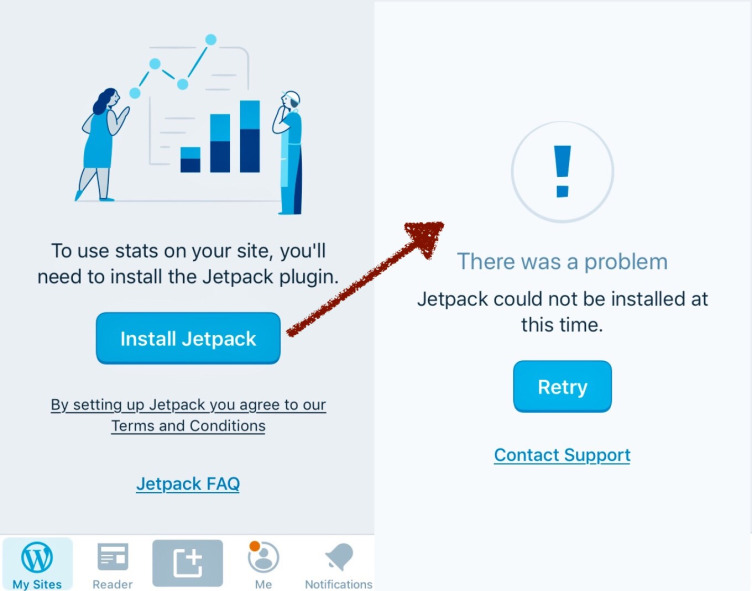
Known reasons for failure include blocked XML-RPC (such as a 403 at /xmlrpc.php) and Jetpack already existing in the database (the user gets "the jetpack plugin is already installed” when trying to install from wp-admin).
It would be very helpful to return errors that describe the problem we had with installing Jetpack.
 thehenrybyrd
All 9 comments
Raised in priority due to several user reports and a steady uptick in metrics for install_jetpack_remote_failed.
(internal reference: p4a5px-2pQ-p2)
 designsimply
on 17 Jul 2019
designsimply
on 17 Jul 2019
Not sure how to implement this one. Hoping to involve design to give some direction.
 nheagy
on 24 Jul 2019
nheagy
on 24 Jul 2019
Removing from the wordpress-mobile Groundskeeping project until after it has a design review. Once a designer has a chance to add an update here, would you please re-add this to the Groundskeeping To Do list at https://github.com/orgs/wordpress-mobile/projects/7 at that time? Thank you!
designsimply
on 27 Aug 2019
I opened a separate issue https://github.com/wordpress-mobile/WordPress-iOS/issues/12497 to track the case where Jetpack is already installed and connected, since it seems like that should be handled differently from installation errors.
 rachelmcr
on 9 Sep 2019
rachelmcr
on 9 Sep 2019
To test:
- Add a self-hosted site with no plugins to the WordPress for iOS app.
- Install the All In One WP Security & Firewall plugin.
- Go to WP Security > Firewall.
- Check the box for "Completely Block Access To XMLRPC" and save settings.
- Go to
/xmlrpc.phpfor the site and verify a 403 Forbidden error is returned. - On the web, activate Jetpack and connect it to a WordPress.com account.
- In the app, go to Stats and try to finish the Jetpack Setup there.
Result: Jetpack install flow fails with the generic error "Jetpack could not be installed at this time" and that error could be more helpful. (2min)
Tested with WPAndroid 13.5-rc-1 on Pixel 3 Android 10 on uptight-gorillas.jurassic.ninja with xmlrpc.php returning 403 Forbidden.
Would it be possible to detect the 403 and respond with something like the following in this case?
Jetpack could not be installed at this time. XML-RPC returned 403 Forbidden. Please check any security plugin settings to make sure XML-RPC is not blocked.
Also see https://github.com/wordpress-mobile/WordPress-iOS/issues/12793.
designsimply
on 31 Oct 2019
Here are a few more cases which would be nice to cover—and let me know if you would prefer these as separate GitHub issues (if we don't have a better error message to give for these cases, we could just at least mention what HTTP error does get returned and stop there).
xmlrpc.phpreturns 404 Not Found.xmlrpc.phpreturns 405 Disabled.- PHP version is too old to install Jetpack.
designsimply
on 31 Oct 2019
If I'm not very technical, "Jetpack could not be installed at this time. XML-RPC returned 403 Forbidden. Please check any security plugin settings to make sure XML-RPC is not blocked." is a bit scary.
Is there a way to redesign the screen a bit so that the headline is "We couldn't finish installing Jetpack." instead of "There was a problem." and then smaller text contains the detail "Why? Jetpack couldn't access your XML-RPC file, possibly because a plugin's security settings are blocking it. Check your settings and try again, or contact support."
 michelleweber
on 31 Oct 2019
michelleweber
on 31 Oct 2019
I've been checking this out, and I saw two problems:
1 - In the relevant area of the code, we get an error code 7.
This on WPApiError means just unknown. And this is the case since the backend returns a error key: "error": "SITE_IS_JETPACK", which is unknown by the general WPKit library.
But the key is known by the JetpackInstallError description.
2 - Looking at the raw HTTP Error code returned by the network request, it is a 400 (Bad Request), and not 403.
Thinking about the "error": "SITE_IS_JETPACK" error, and this being an install Jetpack request, I'd assume that the meaning of the 400 is:
"You can not install Jetpack on a site that already is jetpack."
The real problem (maybe):
So, my guess is that the real problem is on the previous step, on that silent error when logging in to Jetpack form the app (on the video at 1:20).
One last thing I noticed is, every time the user opens the Stats section, there's a call to XMLRPC getOptions, that returns things like jetpack_version and jetpack_client_id.
A wild guess is that, after the Jetpack Install and Login succeeded, the app search for these fields to see if Jetpack is indeed installed, and since this call DOES return a 403 error, the absence of this information is interpreted as Jetpack not installed.
If we can save the reason for the getOptions, when it's triggered, we could use it to know what indeed we don't have the information because of other reasons (like blocking access to XMLRPC in this case)
 etoledom
on 1 Nov 2019
etoledom
on 1 Nov 2019
Is there a way to redesign the screen a bit so that the headline is "We couldn't finish installing Jetpack." instead of "There was a problem." and then smaller text contains the detail "Why? Jetpack couldn't access your XML-RPC file, possibly because a plugin's security settings are blocking it. Check your settings and try again, or contact support."
I like @michelleweber 's suggestions, though the copy might be a bit too long for the design pattern. Ideas for shortening
We couldn't install Jetpack
Check plugin settings to see if any are blocking XML-RPC file access
[Retry]
 obi2020
on 1 Nov 2019
obi2020
on 1 Nov 2019
Related issues
designsimply
·
3Comments
 wptester9845
·
3Comments
wptester9845
·
3Comments
 frosty
·
3Comments
frosty
·
3Comments
 ScoutHarris
·
3Comments
ScoutHarris
·
3Comments
 jleandroperez
·
3Comments
jleandroperez
·
3Comments
Most helpful comment
If I'm not very technical, "Jetpack could not be installed at this time. XML-RPC returned 403 Forbidden. Please check any security plugin settings to make sure XML-RPC is not blocked." is a bit scary.
Is there a way to redesign the screen a bit so that the headline is "We couldn't finish installing Jetpack." instead of "There was a problem." and then smaller text contains the detail "Why? Jetpack couldn't access your XML-RPC file, possibly because a plugin's security settings are blocking it. Check your settings and try again, or contact support."