Wordpress-ios: Offline Support: Discard Losing all changes
Description
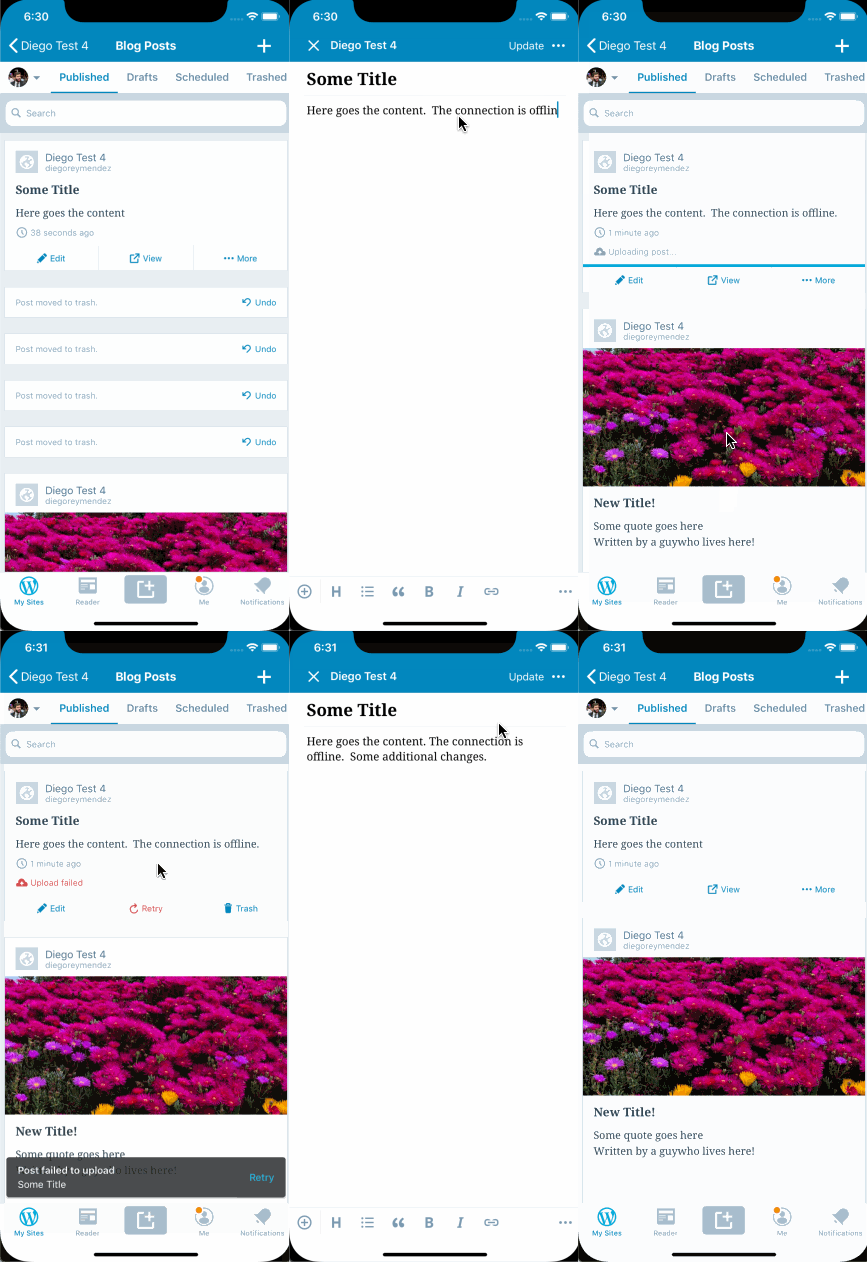
We need to improve how we deal with local changes, and make sure that saving those changes has a meaningful and consistent meaning.
Expected Behavior
If the device is offline, saving changes to a post means those changes shouldn't be lost when the user selects "Discard Changes" in a latter editing session.
Actual Behavior
Local saves while offline don't properly create a saving checkpoint. Tapping "Discard Changes" in a latter editing session is discarding all local changes.
Steps to reproduce
- Tap post in post list
- Edit post
- be offline
- Close editor
- Choose "Update Post" from action sheet
- Stay offline. The post will show "Uploading post" .
- Stay offline. Wait till post shows "Failed to upload"
- Go back to the post editor
- Edit post
- Close editor and discard changes.
Updates
Update 2019-Nov-29
There is another discussion about the “Discard Changes” option most recently in https://github.com/wordpress-mobile/WordPress-iOS/pull/12947#issuecomment-559808264. An older discussion is from here https://github.com/wordpress-mobile/WordPress-Android/issues/9810#issuecomment-507716708. The gist is we should remove the Discard Changes dialog altogether.
 diegoreymendez
All 15 comments
@diegoreymendez , at which part were you offline? Trying to reproduce and can't save while offline (which is a different issue). Is it a published post or a draft you were working on?
Can you please describe the steps?
We had a similar issue when online that Jan fixed by introducing isLocalRevision here: https://github.com/wordpress-mobile/WordPress-iOS/pull/10906
So I assume one of the checks there is not working when offline but can't tell for sure till I'm abvle to reproduce.
 yaelirub
on 7 May 2019
yaelirub
on 7 May 2019
@yaelirub - I managed to reproduce for published and draft posts by pressing X to close the editor while offline.
For drafts you get a "Save Draft" option.
For published posts you get an "Update Post" option.
Both cases allow you to save the changes.
PS: Also - it feels like there's some inconsistency in how those options work, vs how the Update option from the top right corner works. Can you open an issue for this inconsistency?
diegoreymendez
on 7 May 2019
@diegoreymendez
For drafts you get a "Save Draft" option.
I'm seeing "Update Draft" (are we looking at different versions)?
I'm still unable to reproduce.
Would you mind sending a screen capture for your actions?
Here's the steps I've been doing:
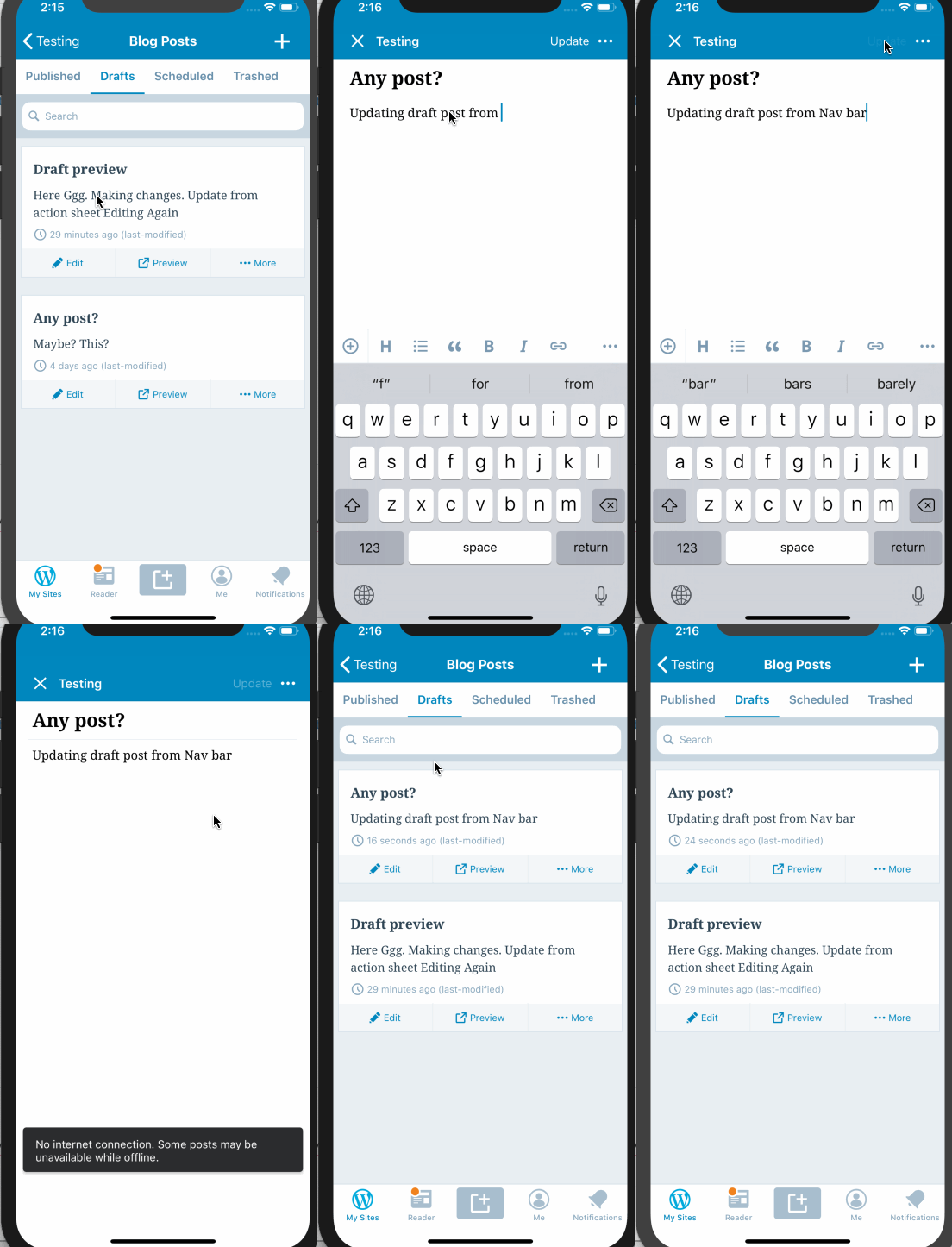
Drafts:
A. taping "Update" from the navigation bar
- Go to post list
- Open a draft in editor
- Edit
- Tap "Update" from the navigation bar
- Exit editor
- Go to the same draft
- Edit again
- Be offline
- Exit
- Tap "Discard" in action sheet
Result - only the latest (local changes) are discarded. (as expected)
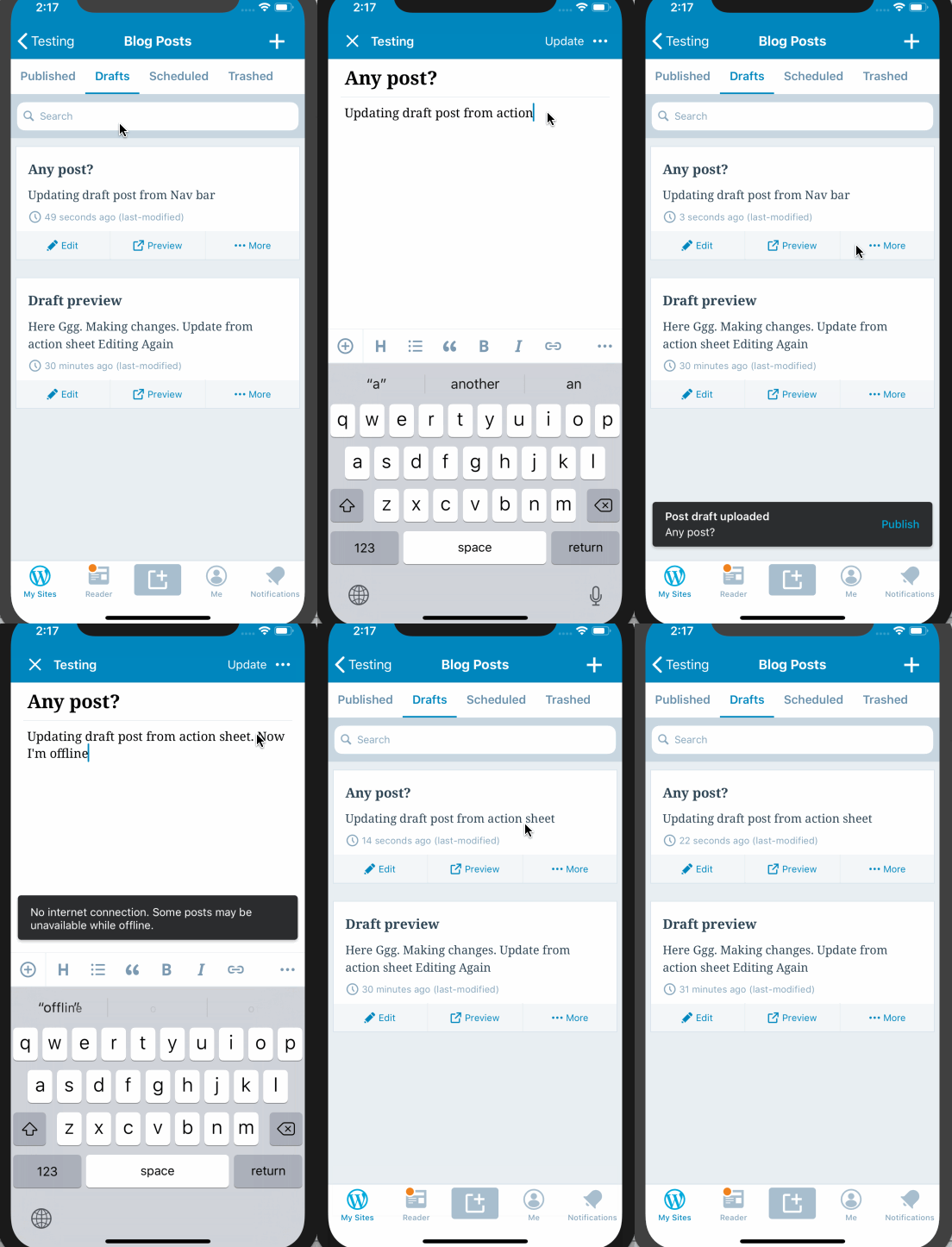
B. Taping "Update Draft" from the action sheet
- Go to post list
- Open a draft in editor
- Edit
- Tap X to close editor
- Tap "Update Draft" from the action sheet
- Go to the same draft
- Edit again
- Be offline
- Exit
- Tap "Discard" in action sheet
Result - only the latest (local changes) are discarded. (as expected)
Published
A. taping "Update" from the navigation bar
- Go to post list
- Open a draft in editor
- Edit
- Tap "Update" from the navigation bar
- Exit editor
- Go to the same draft
- Edit again
- Be offline
- Exit
- Tap "Discard" in action sheet
Result - only the latest (local changes) are discarded. (as expected)
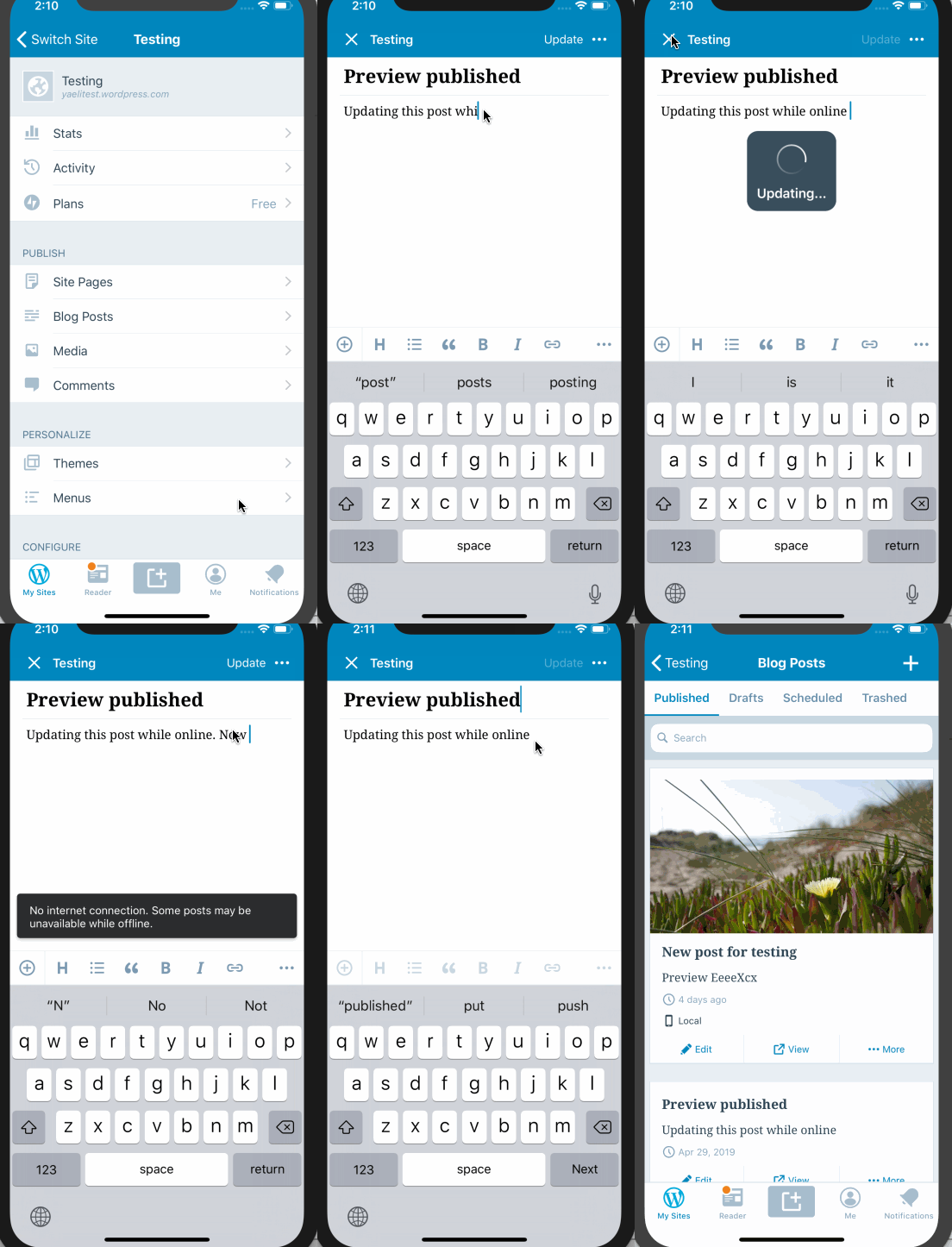
B. Taping update Post from the action sheet
- Go to post list
- Open a published post in editor
- Edit
- Tap X to close editor
- Tap "Update Post" from the action sheet
- Go to the same post
- Edit again
- Be offline
- Exit
- Tap "Discard" in action sheet
Result - only the latest (local changes) are discarded. (as expected)
yaelirub
on 7 May 2019
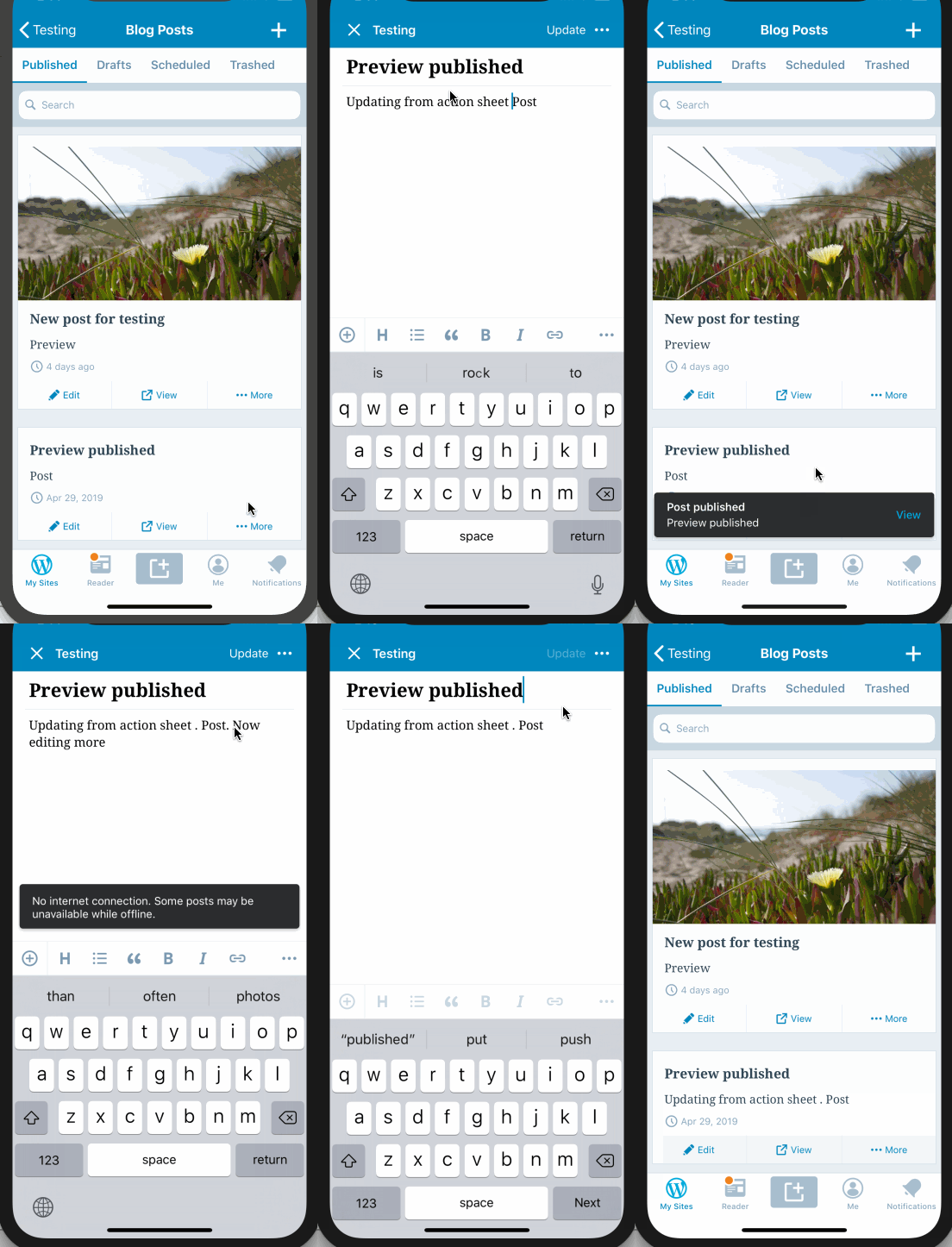
@yaelirub - I've added a description and a demonstration of the problem. Basically tapping "Update" or "Save" is really not doing much to persist the changes.
I believe the way to resolve this issue is to differentiate better between changes that were saved locally by the user, and changes that could be caused by the app crashing while a post was being edited.
This is most likely going to be resolved by better handling our local data.
diegoreymendez
on 7 May 2019
Reopening this since the changes were reverted in #11920.
 shiki
on 13 Jun 2019
shiki
on 13 Jun 2019
@yaelirub @diegoreymendez I was thinking more about this. The current behavior where the last revision is discarded, which loses the offline changes, is not ideal. There might be a few options here. For example, we can say that "Discard" should just discard the changes since the beginning of the editing session.
However, changing this right now would risk going against the future decision of the discussion in https://github.com/wordpress-mobile/WordPress-Android/issues/9561. I believe we should wait for that before proceeding with this.
shiki
on 13 Jun 2019
The implementation of #11653 will be used to solve this issue
@yaelirub Would you mind explaining more why #11653 would solve this issue?
shiki
on 13 Jun 2019
Would you mind explaining more why #11653 would solve this issue?
@shiki , not sure. #11653 will cause failed uploads to be uploaded automatically when connectivity is regained hence maybe prevent the issue since the revision will be updated on the remote post.
but maybe @diegoreymendez can answer that.
yaelirub
on 14 Jun 2019
Would you mind explaining more why #11653 would solve this issue?
but maybe @diegoreymendez can answer that.
I don't think the upload manager is related at all to this issue. From what I can see that edit is yours @yaelirub ?
diegoreymendez
on 14 Jun 2019
Then I'll remove that. I think I confused this with a different issue
yaelirub
on 14 Jun 2019
@osullivanchris I'd like to confirm this. In https://github.com/wordpress-mobile/WordPress-Android/issues/9561, we decided to remove the "Discard Local Changes" option. Does this mean that we will be removing that option on iOS too?
NB: Contrary to Android, this option is shown when the user leaves the editor.
shiki
on 2 Jul 2019
@shiki Yeah we decided to remove 'Discard Local Changes' from the overflow menu in Android here https://github.com/wordpress-mobile/WordPress-Android/issues/9561
You're right in iOS it appears differently. I have been working on this across both Android and iOS the last couple of days to find a consistent approach for the behaviour when the user leaves the editor. The concept is captured here on the Android side, but thanks for pinging me here as I knew we had a related iOS ticket somewhere
https://github.com/wordpress-mobile/WordPress-Android/issues/9810
I'm just waiting on some feedback on the proposal. If the team is happy on it, its a proposal for both platforms. Let me know if you have any thoughts
 osullivanchris
on 3 Jul 2019
osullivanchris
on 3 Jul 2019
@osullivanchris Thank you for pointing me to https://github.com/wordpress-mobile/WordPress-Android/issues/9810. We can continue the discussion there. I'll mark this as blocked by that issue for now.
shiki
on 3 Jul 2019
Moving this to v2 as this is part of Exiting the editor epic
yaelirub
on 15 Aug 2019
Updated the description to mention a discussion about removing the dialog altogether.
shiki
on 29 Nov 2019
Related issues
 marekhrabe
·
3Comments
marekhrabe
·
3Comments
 designsimply
·
3Comments
designsimply
·
3Comments
 hypest
·
3Comments
designsimply
·
3Comments
hypest
·
3Comments
designsimply
·
3Comments
 jkmassel
·
3Comments
jkmassel
·
3Comments