Wordpress-ios: Site Icon/Gravatar: Unable to use new photo (can't proceed from cropping screen)
Expected behavior
When I take a new photo to set as my profile picture (Gravatar) or site icon, I am taken to a screen to crop/edit it. From there I should be able to crop and use the photo.
Actual behavior
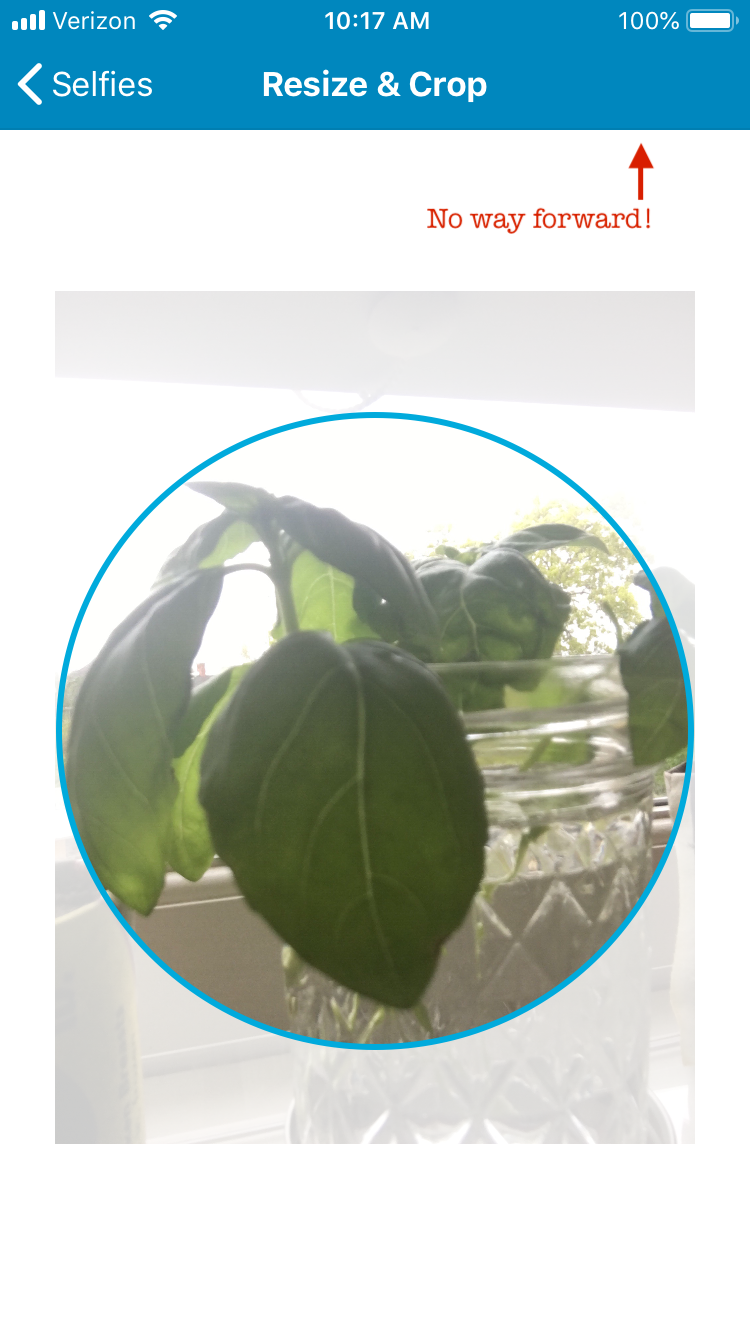
After taking a photo through the site icon or gravatar media picker, I'm taken to the cropping screen, but the "Use" button in the top right instantly disappears. I then can only go back and select another image.

Steps to reproduce the behavior
- Tap a blog's site icon, or the gravatar on the Me screen
- From the media picker, tap the camera cell to take a photo.
- Take a photo. When you're taken to the cropping screen, notice the Use button disappear in the top right.
It looks like this is happening due to the initial if statement at the top of updateSelectionAction in WPNavigationMediaPickerViewController, so the bug may need fixing there. But I opened the issue here as it primarily affects WPiOS.
Tested on [device], iOS [version], WPiOS [version]
iPad Mini 2, 11.3.1, 10.4.20180702
 bsessions85
All 13 comments
Note: Also happens when editing gravatar on signup
bsessions85
on 2 Jul 2018
I just ran into this while trying to change a Gravatar. If I selected an existing photo I almost always saw the button to use the selected photo once I got to the crop/resize screen, but every time I took a picture and tried to use it the screen was missing that button.
 rachelmcr
on 18 Jan 2019
rachelmcr
on 18 Jan 2019
I edited the issue to add details from @frosty 's report in https://github.com/wordpress-mobile/WordPress-iOS/issues/11297.
rachelmcr
on 27 Mar 2019
Thanks @rachelmcr. I've labelled this a broken window and added it to groundskeeping, as I feel it's fairly important now that we're promoting changing the site icon as part of Quick Start.
 frosty
on 28 Mar 2019
frosty
on 28 Mar 2019
Tested and confirmed using WP Internal 12.3.0.20190422 on iPhone 6S iOS 12.2.
- Go to Me > My Profile and tap "Update Profile Photo".
- Take a selfie with a camera option at the top.
- Tap "Use Photo".
- Adjust/crop the photo.
- Try to find a way forward.
Result: cannot accept the profile photo taken, there's no way forward!
 designsimply
on 29 Apr 2019
designsimply
on 29 Apr 2019
Moving up in priority because the flow for adding a profile photo using the camera is blocked (but not too high right now because it's still possible to take a photo with the camera separately and then select that one and use it in the profile photo select from camera option flow).
designsimply
on 29 Apr 2019
This looks fixed with WPMediaPicker version 1.3.4 within another fix and it will be available with the next WordPress-iOS release.
 pinarol
on 1 May 2019
pinarol
on 1 May 2019
Noting that this came up in WPiOS 14.8 beta testing at https://github.com/wordpress-mobile/WordPress-iOS/issues/14065 which I closed as a duplicate.
designsimply
on 12 May 2020
@pinarol following up, am I reading https://github.com/wordpress-mobile/WordPress-iOS/blame/5683f6676d4e5ef9378f4b2cf547272314b41f2a/Podfile#L179 correctly that WPMediaPicker was updated to 1.6.1 a few months ago in https://github.com/wordpress-mobile/WordPress-iOS/pull/13700 and that it should be available as of WPiOS 14.5? (I'm basing my assumption on the milestone showing for the 13700 issue in WordPress-iOS.
cc @hypest because this issue also got a mention on an internal post (internal reference: pbPjnJ-2a-p2#comment-53).
designsimply
on 20 May 2020
It should be available but there's a quite fragile logic there which I believe is responsible for seeing this bug again: https://github.com/wordpress-mobile/MediaPicker-iOS/blob/1882592249d3402ab826bf8f3f71efd401db84fd/Pod/Classes/WPNavigationMediaPickerViewController.m#L363
It is overriding the Use button with nil and causing its removal based on some conditions. @SergioEstevao you seem to have a lot of experience on this file, it'd be very helpful if you can take a look.
pinarol
on 20 May 2020
So in my first round of tests, it looks that the cropper is working correctly for the site icon picker, but not for the user gravatar. I will try to find what differences exists between those.
 SergioEstevao
on 20 May 2020
SergioEstevao
on 20 May 2020
It should be available but there's a quite fragile logic there which I believe is responsible for seeing this bug again: https://github.com/wordpress-mobile/MediaPicker-iOS/blob/1882592249d3402ab826bf8f3f71efd401db84fd/Pod/Classes/WPNavigationMediaPickerViewController.m#L363
@pinarol After some more tests I agree with you that the line you refer is the reason we see these bugs, I'm thinking on adding logic on that code to only nil the button if it's the same is added bellow. What do you think?
SergioEstevao
on 21 May 2020
@SergioEstevao Sounds good if that's the only bar button item that should be effected of that logic, I wasn't sure about that. In this case, UIBarButtonItem should have a tag property that we can use to identify it.
pinarol
on 21 May 2020
Related issues
designsimply
·
3Comments
 rclations
·
3Comments
designsimply
·
3Comments
rclations
·
3Comments
designsimply
·
3Comments
 ScoutHarris
·
3Comments
designsimply
·
3Comments
ScoutHarris
·
3Comments
designsimply
·
3Comments