Wordpress-android: Jetpack: show a notice to download the backup
Acceptance criterias
Downloading the file
- When a Backup is available (created either from the web or the app)
- The user can see a notice to download the file
- When the user taps download the file is downloaded
Dismissing the notice
- When a Backup is available (created either from the web or the app)
- The user can see a notice to download the file
- When the user taps dismiss the notice is dismissed and it doesn't appear again
Design
In iOS was used an already existent component to show this notice:
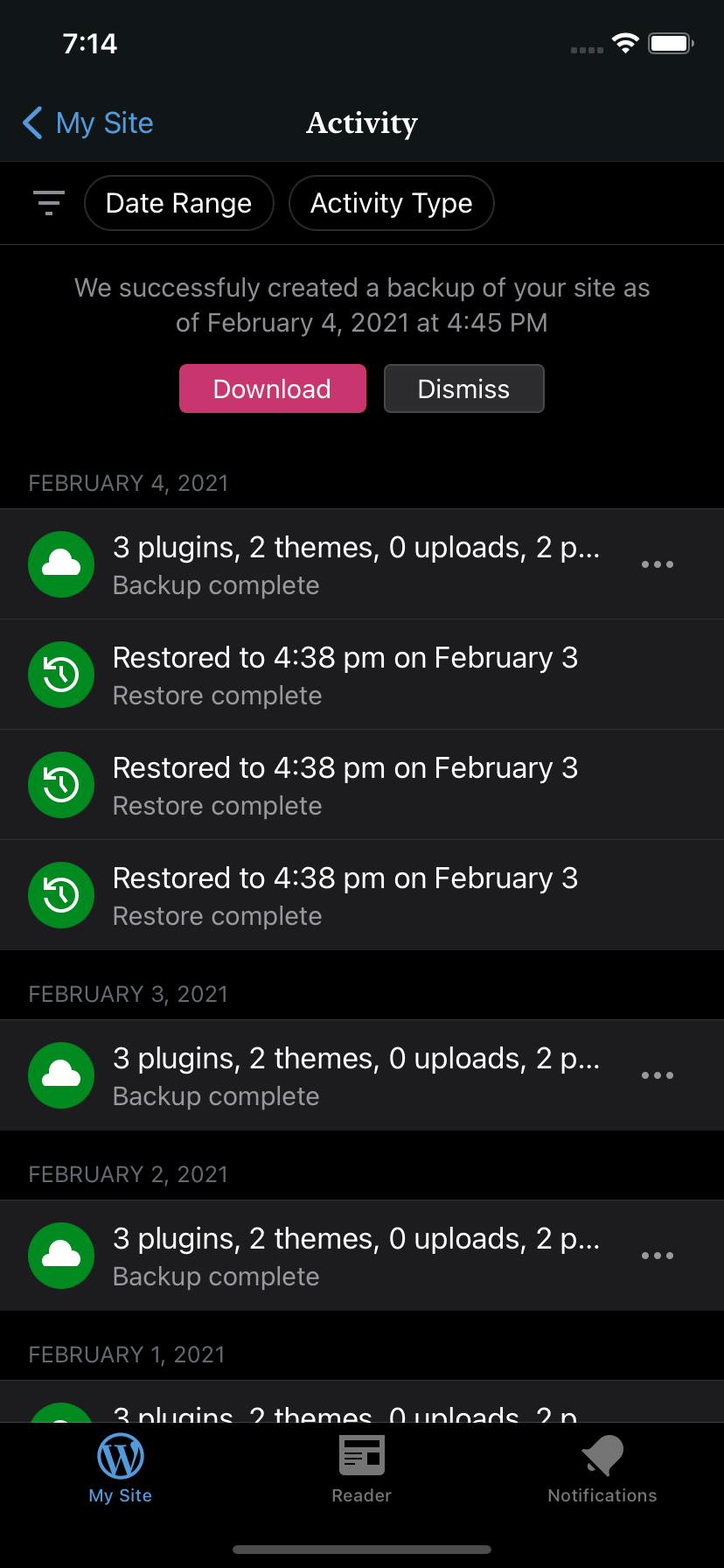
I would recommend the same in Android (if such component exists), but that's up to @osullivanchris.
Technical information
The list of files available to download can be obtained from GET: /wpcom/v2/sites/<siteID>/rewind/downloads?_envelope=1. Remember to check validUntil before displaying the notice.
If the user dismisses the notice, a POST request should be made to /v2/sites/<siteID>/rewind/downloads/<downloadID>?_envelope=1. This dismisses the notice in the app and in the web (so no need to persist in the client that information, next time you request the list of downloads it won't be there).
 leandroalonso
All 14 comments
👋 @leandroalonso !
Should we then do the same for the restore flow, to show a notice to View site or a Thanks, got it!? The same way it happens on the web?

 ParaskP7
on 10 Feb 2021
ParaskP7
on 10 Feb 2021
@ParaskP7 good question! When the site finishes restoring there's already a Notification after the operation is done, so I think we're good. Wdyt @osullivanchris?
The problem with the backup is that there's no way to download the file (in the app) after the backup is generated, so by doing this task we complete the flow.
leandroalonso
on 10 Feb 2021
@ParaskP7 good question! When the site finishes restoring there's already a Notification after the operation is done, so I think we're good. Wdyt @osullivanchris?
This is true! 👍
The problem with the backup is that there's no way to download the file (in the app) after the backup is generated, so by doing this task we complete the flow.
Yeap, indeed, for the backup we don't have a notification, which make this task necessary (comparing to the corresponding restore task I mentioned). I agree. 👍
ParaskP7
on 10 Feb 2021
@leandroalonso - does the endpoint return more than 1 file? And if so, how many banners are showing?
 zwarm
on 11 Feb 2021
zwarm
on 11 Feb 2021
I would recommend the same in Android (if such component exists), but that's up to @osullivanchris.
Yep I agree. Do we have this component on Android too, I forget?
@ParaskP7 good question! When the site finishes restoring there's already a Notification after the operation is done, so I think we're good. Wdyt @osullivanchris?
As you said we don't have this problem of an incomplete flow for 'restore'. The flow is complete, the site is restored. This is needed in some cases to complete the 'download backup' flow.
 osullivanchris
on 11 Feb 2021
osullivanchris
on 11 Feb 2021
@zwarm Even though the response is an array, from my explorations it only returns the last file. The web shows only one notice per time — that's how it was implemented in iOS.
leandroalonso
on 11 Feb 2021
Yep I agree. Do we have this component on Android too, I forget?
Maybe @malinajirka will know? Or, do you mean @osullivanchris whether Android, in general, has this component, like in its Material Components?
As you said we don't have this problem of an incomplete flow for 'restore'. The flow is complete, the site is restored. This is needed in some cases to complete the 'download backup' flow.
Cool, totally agree, thanks for jumping in @osullivanchris ! 👍
ParaskP7
on 12 Feb 2021
I'm not aware of existence of such component. Having said that the implementation should be quite straightforward - it'd be just good to update the designs so it looks ok on Android.
 malinajirka
on 12 Feb 2021
malinajirka
on 12 Feb 2021
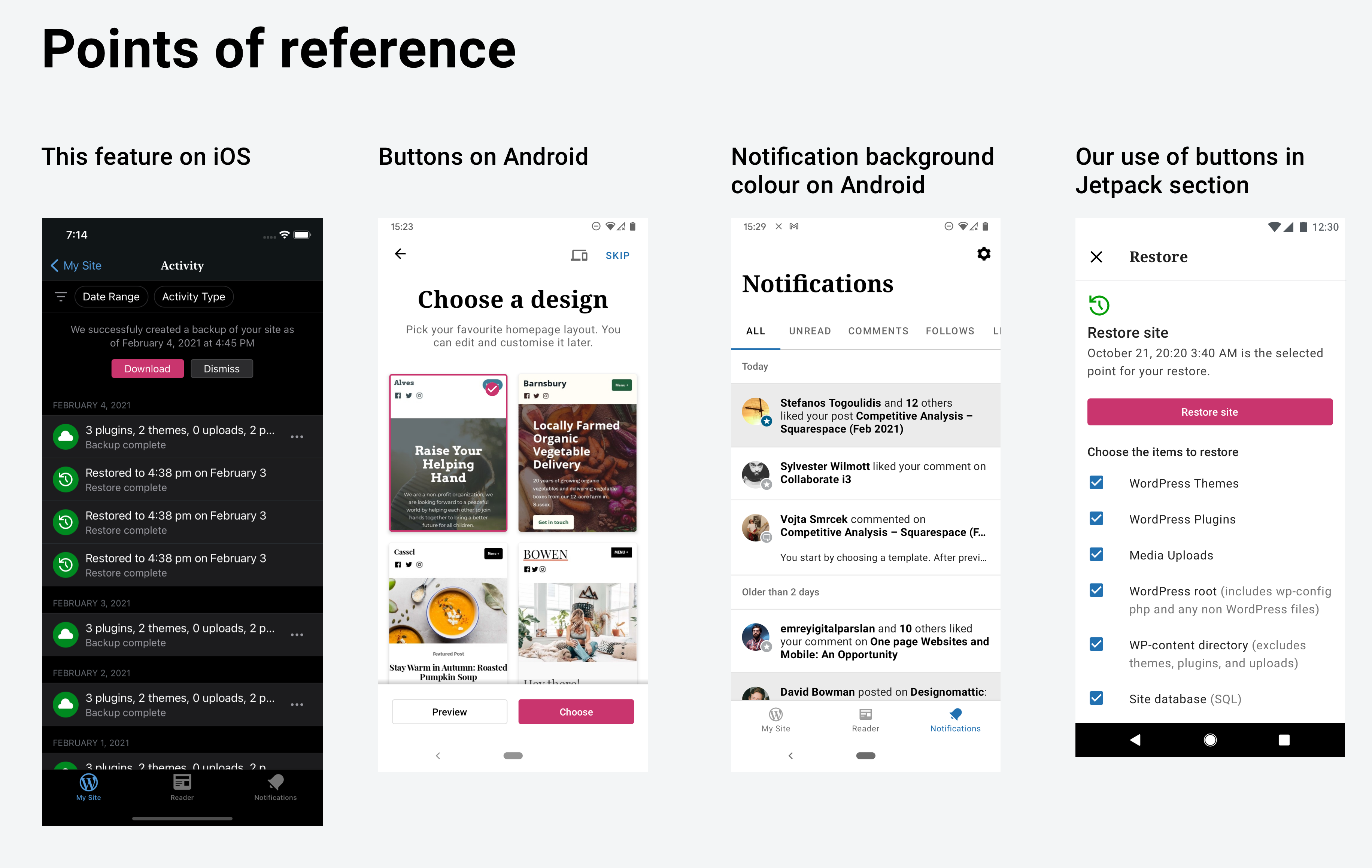
Hey sorry I didn't get to this last week. Had a quick look at it now. I didn't realise that we didn't have this existing component in notifications on Android like we do in notifications on iOS. Here are a few existing things I looked at for reference/inspiration
and here are a few directions I considered. They're a bit sloppy right now. Consider them wireframes as I did them in 20mins and I would need to tune them up a bit. But just wanted to share before I go into research sessions for the rest of today. WDYT? Any appealing here? Should we just go with the one same as iOS (mock 1) for now, and maybe come up with something better later?
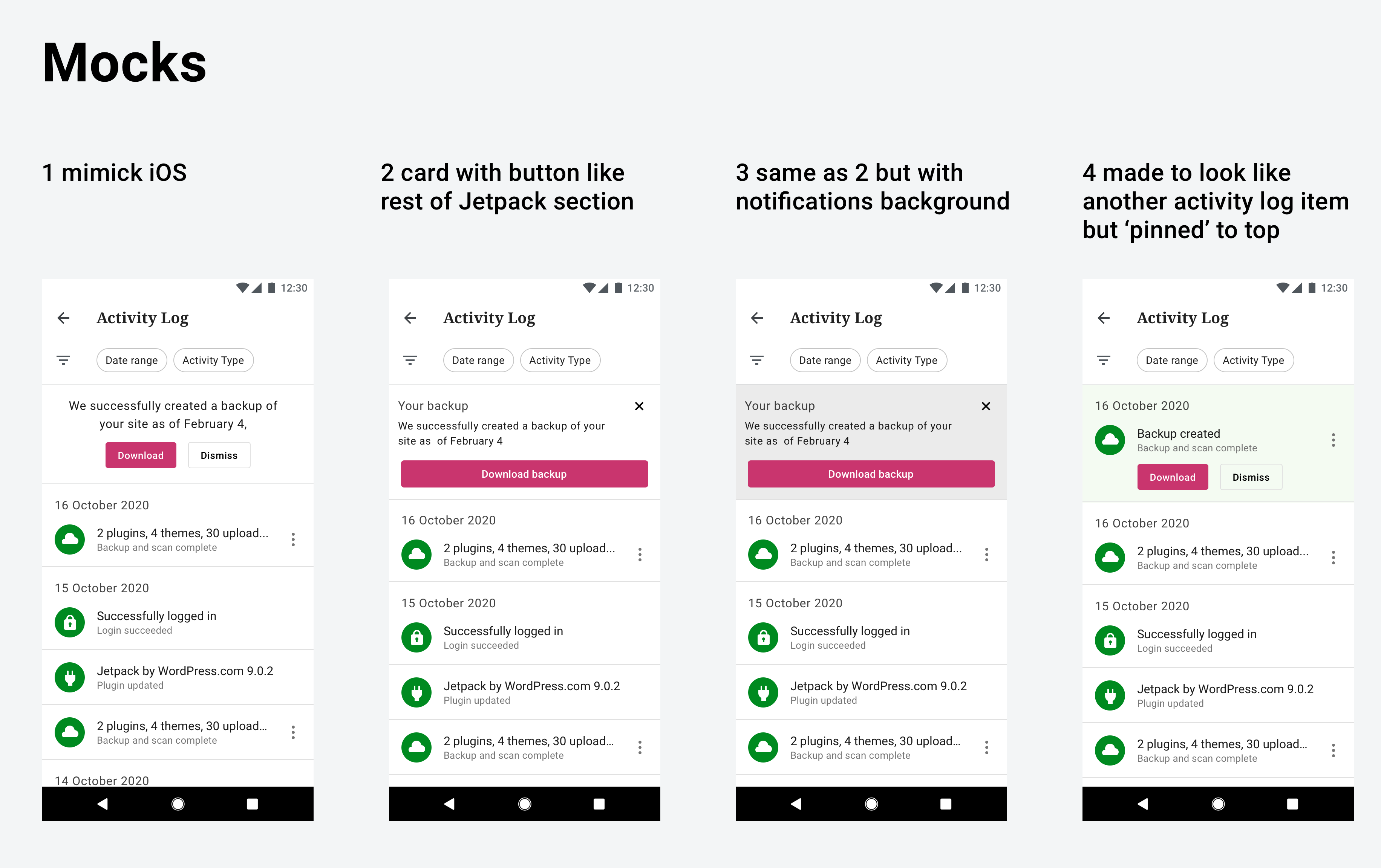
(In mock 1 I used the same button style as the layout picker, but just used buttons with default 16dp padding rather than full-width. But either could work.)
osullivanchris
on 15 Feb 2021
👋 @osullivanchris !
Many thanks for the wireframes, I would personally go with 1 mimick iOS. 🌟
It seems simple, consistent on both platforms and to the point. Maybe if we added some light background color on it, just like you did with the last one (light green), this can make it distinguish better, that's all I have.
ParaskP7
on 16 Feb 2021
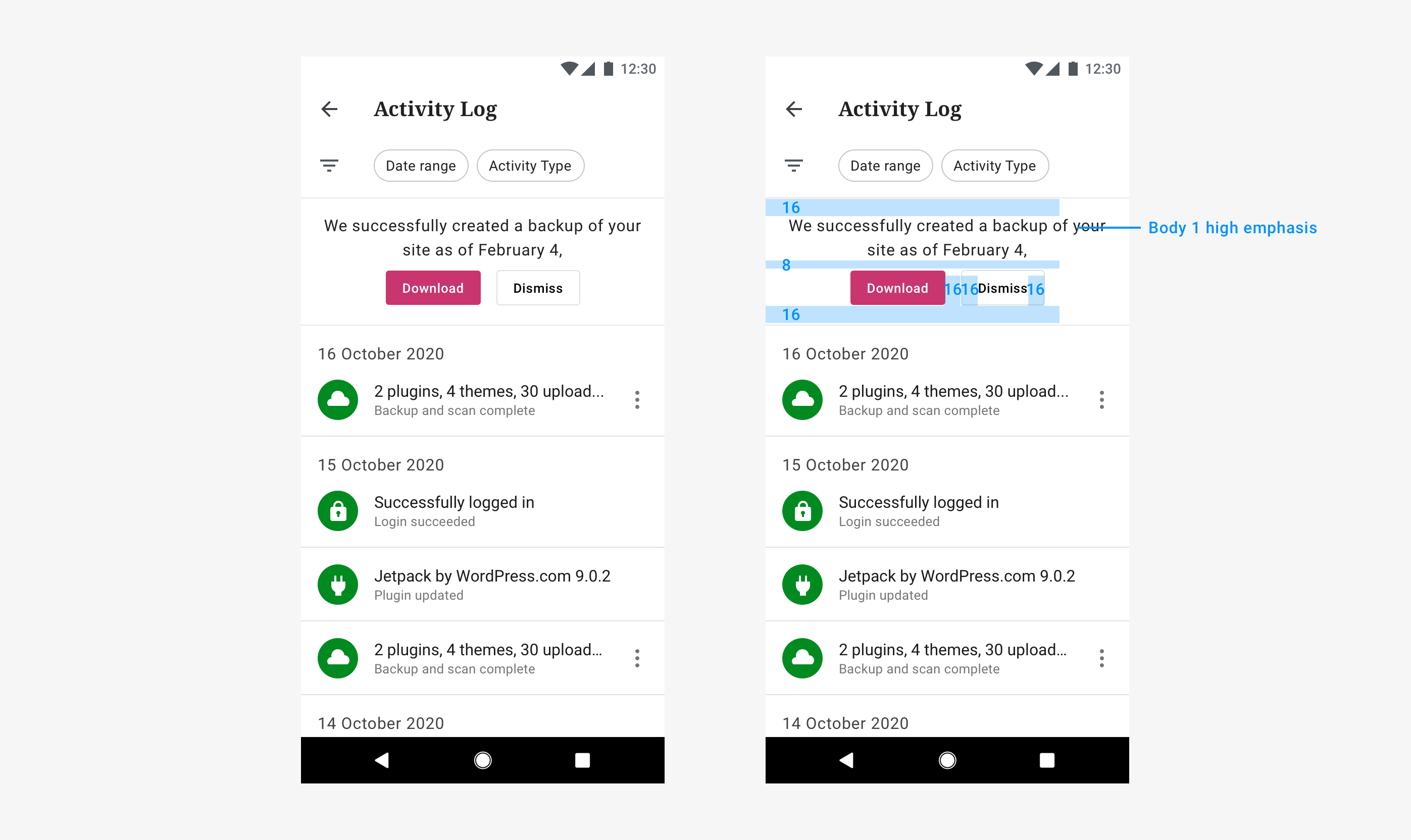
Hey @ParaskP7 sounds fair to me! We have the precedent of iOS at least. Trying to re-use existing styles as much as possible here. Here are specs for it. Just let me know if anything seems wrong to you, or if you want to tweak anything. Thanks!
osullivanchris
on 16 Feb 2021
👋 @osullivanchris, it looks good to me! 🌟
PS: @zwarm @malinajirka your thoughts?
ParaskP7
on 16 Feb 2021
@osullivanchris - I would also add this component to the Backup list view, as this is where we send folks when navigating from the notificationsDetail view.
FYI @ParaskP7
zwarm
on 16 Feb 2021
@osullivanchris - I would also add this component to the Backup list view, as this is where we send folks when navigating from the notificationsDetail view.
oh yeah, definitely @zwarm . We have it in both on iOS. Thanks for flagging that!
osullivanchris
on 16 Feb 2021
Related issues
malinajirka
·
3Comments
 designsimply
·
3Comments
designsimply
·
3Comments
 khaykov
·
3Comments
khaykov
·
3Comments
 develric
·
3Comments
develric
·
3Comments
 jtreanor
·
3Comments
jtreanor
·
3Comments
Most helpful comment
👋 @osullivanchris, it looks good to me! 🌟
PS: @zwarm @malinajirka your thoughts?